
Narrative
: How to use it, features, and the business problems it solves
Add bookmark
What is Narrative?
Narrative is a workspace launched by STELLA Inc. on November 6, 2026, where AI agents and people create slide decks together. It builds a template in your company's design from your website URL or your usual PowerPoint/PDF files, and the Claude Code or Codex you connect through the Mac app first decides the structure (storyboard) and then writes the deck in that design. Text and shapes can be edited directly on screen, with version history, team sharing and view tracking. Pricing: Free (up to 1 editor, unlimited decks and slides) and Pro at ¥980 per person per month (tax included; ¥9,800 per year), with PDF/PowerPoint export from Pro. Narrative does not charge for AI usage; a separate Claude Code or Codex subscription is required (as of November 2026).
Business problems it solves


About "Narrative"
What is Narrative?
Narrative is a workspace where AI agents and people create documents together, launched by STELLA Inc. on November 6, 2026. The first thing it makes is slide decks. It builds a template in your company's design from your website URL or your usual PowerPoint or PDF files, and the Claude Code or Codex you already subscribe to writes the deck in that design.
What sets it apart is that Narrative does not run its own AI model. The Mac app connects directly to the Claude Code or Codex you are already signed in to on your computer, and AI usage is paid through your own subscription (Narrative does not charge for AI usage). The AI only writes the "content and structure" — headings, body text and the words to emphasize — while layout, colors and fonts are applied by Narrative through a fixed process based on your company's design settings. The official guide says the same input always produces the same result.
How to use it
- Install the Mac app and sign in with a Google account Download the Mac app from the official site and sign in to Narrative. All you need is a Google account (company addresses on Google Workspace also work); there is no password.
- Choose your AI Pick Claude Code or Codex and, the first time, sign in to that AI. AI usage comes out of your own subscription; Narrative does not bill you for it.
- Set up your company's design Give it your company's website URL, or a PowerPoint or PDF you usually send outside the company, and the AI reads the colors, fonts and logo and builds a company template. From then on, every deck made in that organization uses this design, and a second member of the same organization does not need to provide the files again.
- Ask in the chat on the left Ask with the number of slides and the purpose, such as "Make a 5-slide proposal for ...". The AI decides the structure before it starts writing, and the slides appear one by one on the right.
- Edit on screen, then share or export Click any text to change it on the spot, or ask the AI to fix a specific page, such as "fix ... on slide 3". You can share with people outside the company via a link that needs no sign-in, and the Pro plan lets you export to PDF and PowerPoint.
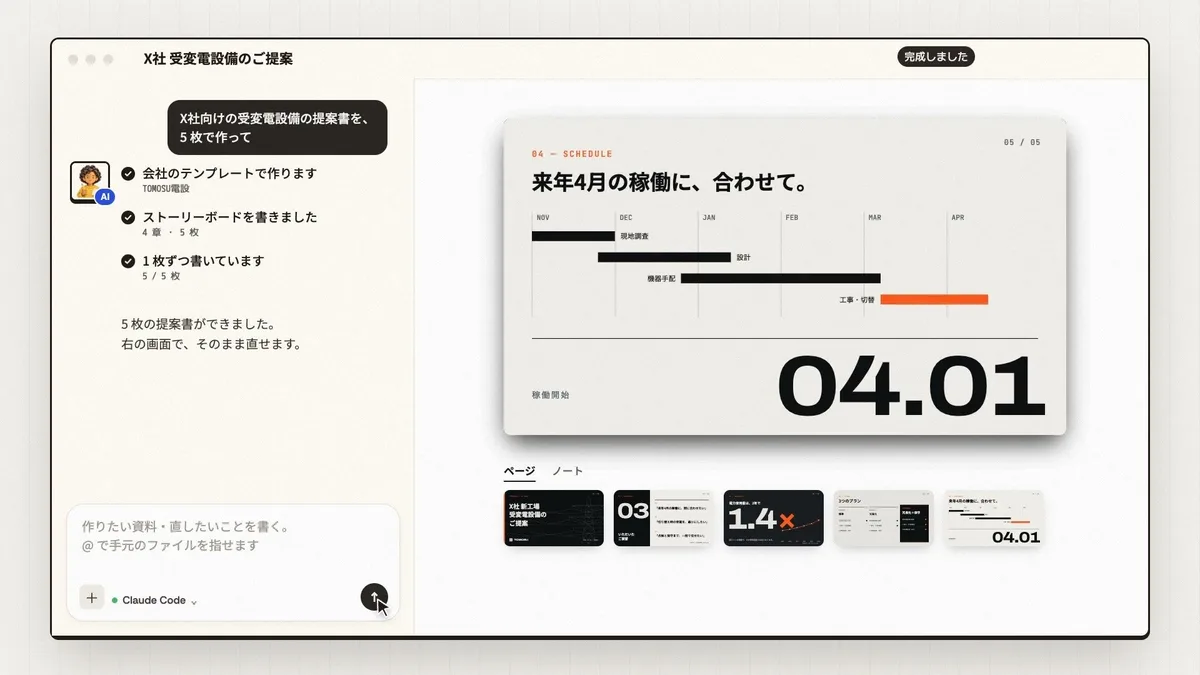
Source: Narrative official site, User guide (also for the images below)
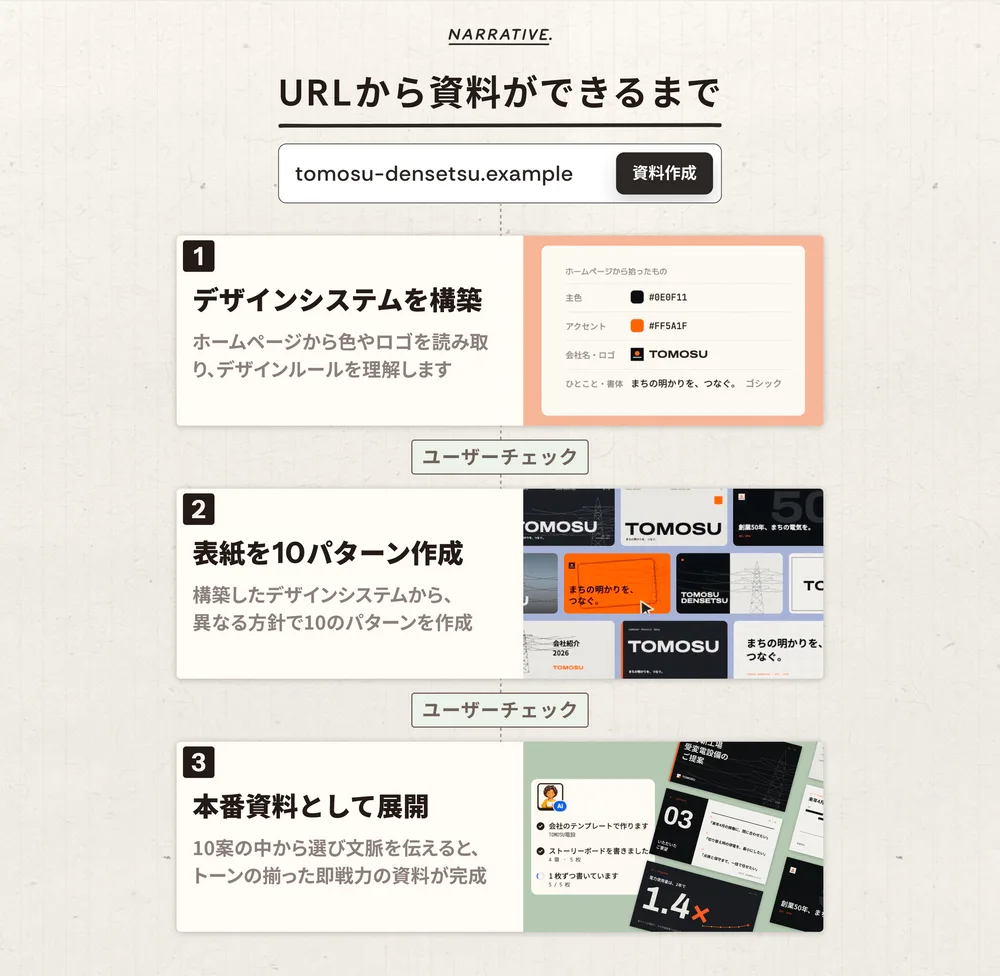
Enter a URL, and the AI writes in your company's design
When you ask an AI to make slides, the look often changes with every request, and the result rarely looks like something your company could send out. The official site describes this as "there is no design foundation."
In Narrative, you first create your company's tone and manner. Enter your website URL and it reads the colors, fonts, logo and wording, then lays out 10 cover ideas. Choose one and it becomes your company template; the AI then creates the remaining pages in the same design.
The AI can only specify content and structure; it cannot set positions, sizes or color values. Colors are specified with words such as "default," "soft," "accent" and "warn," and the actual look is decided by the company's design settings. That keeps every deck consistent, no matter how many are made or who makes them.
PowerPoint files can be passed as they are, because the theme's colors, fonts and logo are read with their names. You can also turn a deck you have made into a template.
The storyline comes before the slides
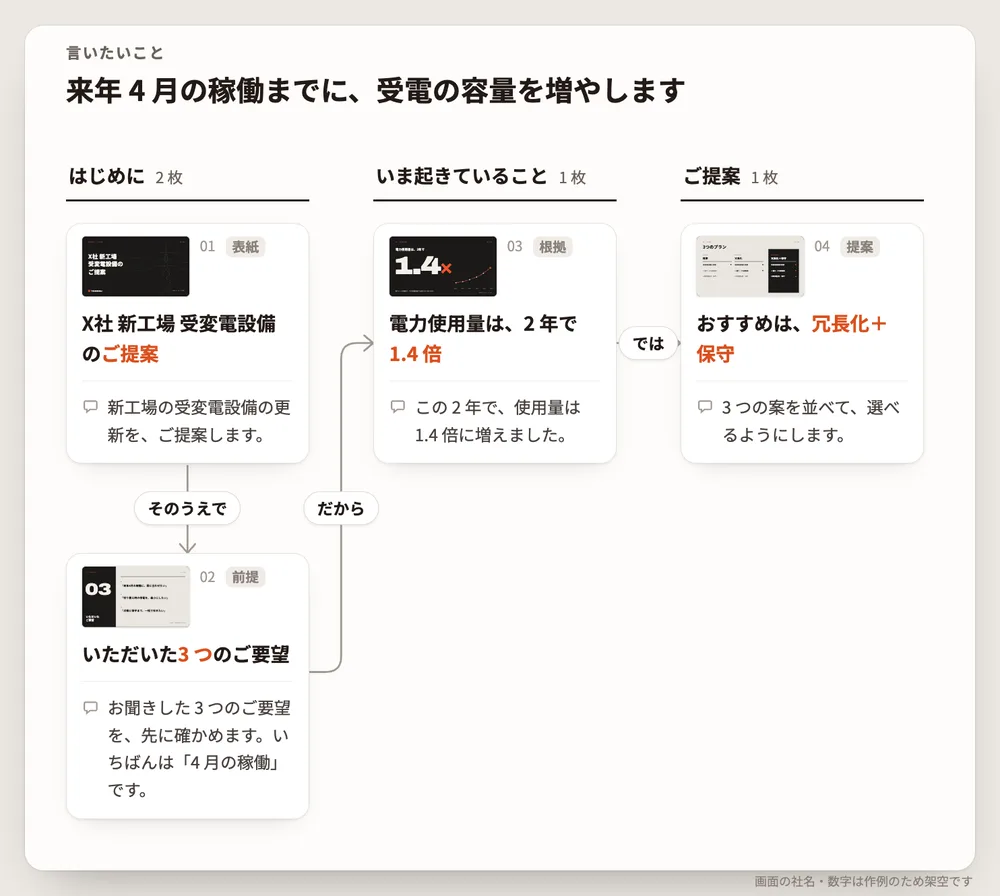
The AI agent does not jump straight into writing slides. It first decides the key messages and chapters, and on the storyboard screen you can review the pages in each chapter and the speaker notes for each page in one list.
The guide says you can simply ask the way you normally would, such as "Turn these meeting minutes into a 5-slide deck on next term's priorities" or "One slide comparing quotes from 3 vendors by price, delivery and terms." Stating the number of slides and the purpose makes the results more consistent.
Fix it yourself, without asking the AI again
Having to ask the AI again just to change a single character is another common hassle of AI-made slides. In Narrative, people can edit what the AI made directly on screen.
In the browser's editable view, click text to rewrite it on the spot, and drag shapes to move or resize them. They snap to a grid, so the layout does not break. Your edits are reflected automatically in the PDF and PowerPoint.
Both AI edits and human edits are kept as versions, and from "History" you can see who changed what and when, and go back to any version. When you ask the AI for a fix, it resends only that page instead of rebuilding the whole deck.
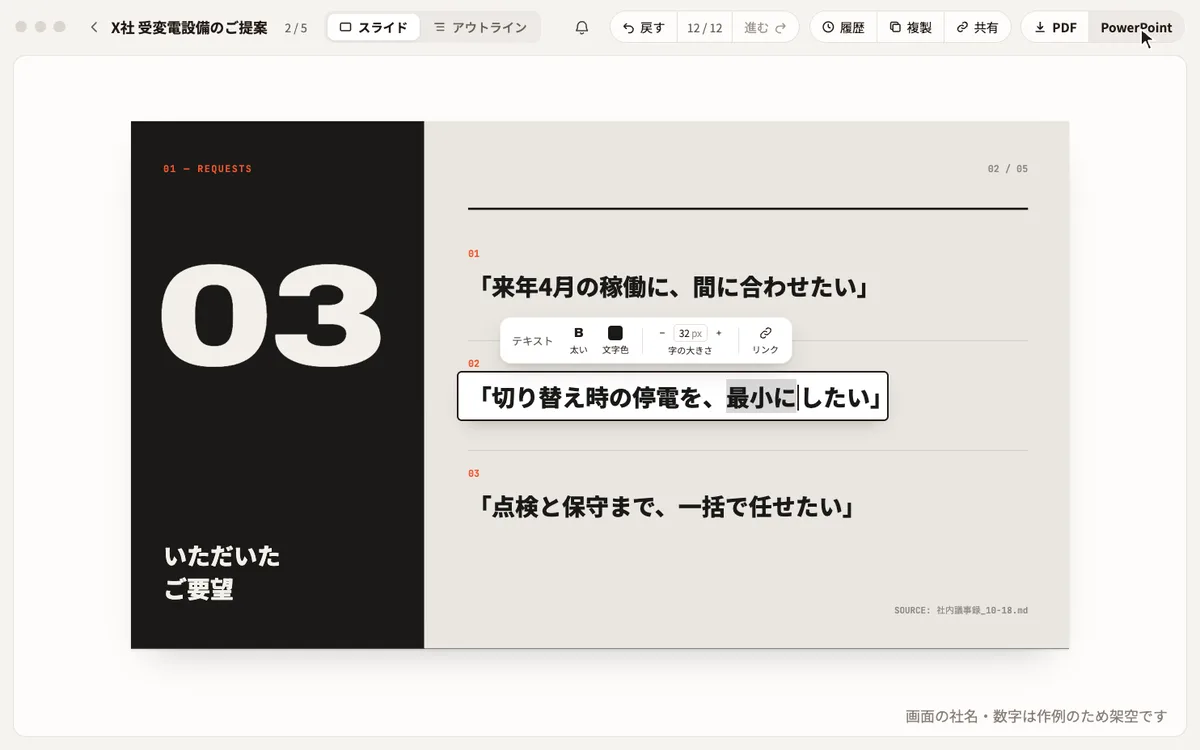
PowerPoint export keeps tables as tables, charts as charts and text as text, so the people you send it to can edit it as usual. However, photos, backgrounds and some complex elements become images. Edits made in your local PowerPoint are not synced back to the organization's versions in Narrative.
One person's deck becomes the starting point for the team's next one
Decks and templates are shared within the organization and can be organized into teams and folders. You can even ask the AI to "make it for the sales team."
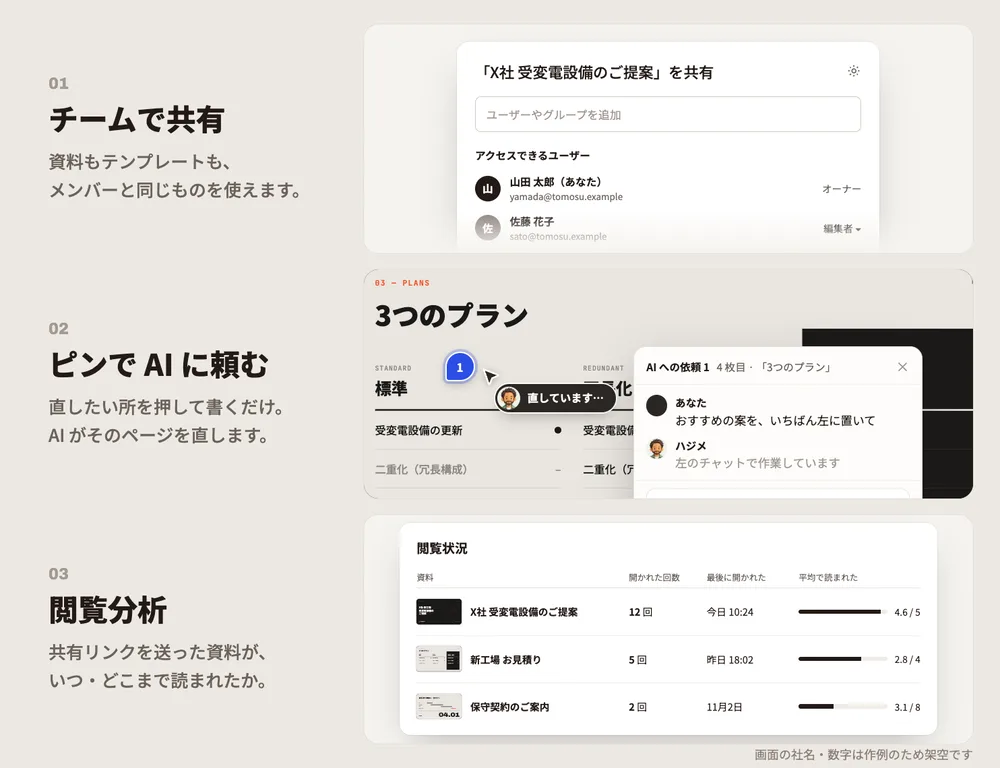
- Roles — Admins and Editors can create and edit; Viewers can only view
- Comment-based fix requests — Pin a spot you want changed and discuss it with the team; in the Mac app you can ask the AI to make the fix right there
- Sharing outside the company — Issue a share link per deck that can be viewed without signing in
- View tracking — See when, how many times and how far a shared deck was read
- Deck search — Search earlier decks by their content and use them as the basis for the next one
The FAQ on the pricing page explains that what gets shared is the finished output, not the conversations or prompts with the AI. Narrative receives only the content and structure of the deck and has no feature that stores whole conversations.
Features
01Create
The AI writes decks in your company's design.
- Company design settings — Read colors, fonts and logo from a website URL or PowerPoint/PDF files
- Templates — Build from cover ideas, or turn a finished deck into a template
- Storyboard — Review chapters, pages and speaker notes in one list
- Layouts and charts — Layouts for comparisons, processes, timelines, funnels and more, plus 25 chart types grouped by purpose
- Stock assets — Find and use photos, illustrations and logos of commonly used services
- Import — Extract text and tables from local PowerPoint/PDF files into an editable draft
02Edit
Edits by the AI and by hand go into the same history.
- Editable view — Click text to rewrite it and move shapes
- Page-level fixes — Ask the AI, "fix ... on slide 3"
- Version history — See who changed what and when, and restore any version
- Duplicate — Create a new deck from the current one's content
03Work as a team
Store decks in the organization and divide work by role.
- Teams and folders — A place for each department's or project's decks
- Roles — Admin, Editor and Viewer
- Comments — Pin a spot to discuss changes
- Share links and view tracking — Share without sign-in and see how decks are read
- Usage — See monthly slide and request counts and download details as CSV
04Connect
Use it from AIs and systems beyond the Mac app.
- MCP — Connect from Claude Code and Codex in the terminal, Cursor, Gemini (Antigravity), claude.ai and ChatGPT
- Connection keys — Issue keys for automation and CI
- HTTP API — Create and retrieve decks without going through an AI
The official guide says it will add things other than decks that you can create, marked "coming soon" (no dates are given; as of November 2026).
Pricing
Pricing depends only on the number of people who edit. The number of slides, the number of decks, view-only users and the number of connected AIs are not counted.
| Plan | Price | Main features |
|---|---|---|
| Free | ¥0 | Up to 1 editor. Unlimited people who view or comment. Unlimited decks and slides |
| Pro | ¥980 per person per month (tax included) / annual ¥9,800 per person | From the second editor, charged for all editors. PDF/PowerPoint export, video file uploads, remove the "Narrative で作成" (Made with Narrative) mark |
| Enterprise | By consultation (quoted excluding tax) | Seats and quote based on headcount, onboarding consultation, invoice payment and annual contracts |
- When you invite a second person as an editor, you are guided to the Pro plan, and payment covers all editors. You can invite any number of people as viewers or commenters while staying free
- The Free plan cannot export to PDF or PowerPoint; you share through the browser's editable view and sign-in-free share links
- Using the AI requires a separate Claude Code or Codex subscription (Narrative does not charge for AI usage)
- Extremely heavy creation in a short time may temporarily pause new creation (with no additional charge)
There are also hands-on services provided by people.
| Service | Price (excluding tax) | Description |
|---|---|---|
| Narrative Works (deck creation service) | From ¥3,500 per page | Designers create your company's decks |
| Narrative Consulting (adoption support) | Individually quoted by period and scope | Inventory of work, designing what to hand to AI, adoption and support until it sticks |
Pricing is based on the official pricing page and the Notation under the Specified Commercial Transactions Act as of November 2026.
How it differs from other AI slide tools
| Product | Provider | How AI is used | Best for | Entry price |
|---|---|---|---|---|
| Narrative | STELLA Inc. | Connect your own Claude Code or Codex | Building up proposals and reports in your company's design as a team | Free (1 editor) / Pro ¥980 per person per month (tax included) |
| GAMMA | Gamma Tech, Inc. | Built into the service | Quickly turning prompts into decks, web pages and more | Free / Plus ¥1,440 per month (annual, excluding tax) |
| イルシル | Irusiru Inc. | Built into the service | Making Japanese business documents from Japanese templates | Free / Personal ¥1,848 per month (tax included) |
| Beautiful.ai | Beautiful Slides | Built into the service | On-brand business presentations with auto-adjusting layouts | 14-day free trial / Pro $12 per month (annual) |
Details for the other products are as of the check dates on each product page.
The biggest difference is that you bring your own AI. GAMMA and イルシル have AI built into the service, and you choose a plan based on how much you generate. Narrative is a tool for people who already subscribe to Claude Code or Codex to create decks in their company's design within that subscription, and Narrative's price depends only on the number of editors. Conversely, if you do not have an AI subscription yet, that cost comes on top.
- To make decks quickly from prompts, see GAMMA
- To choose by the number of Japanese templates, see イルシル
- To compare with an English-language business presentation tool, see Beautiful.ai
- For the AIs you connect, see Claude Code and Codex
Frequently asked questions (FAQ)
Q. Can I use Narrative for free? If only one person edits, it is free forever, with no limit on the number of decks or slides. You pay when two or more people edit decks, or when you export to PDF or PowerPoint. However, you need a separate Claude Code or Codex subscription to run the AI.
Q. Does it work on Windows? As of November 2026, decks and templates are created in the Mac app, and a Windows version is in preparation. On Windows, you can view decks and edit them by hand in the browser.
Q. Can I use AIs other than Claude Code and Codex? Yes. Through the MCP standard, you can connect from Cursor, Antigravity, claude.ai, ChatGPT and others. For automation and CI, connect with a connection key issued in the admin console.
Q. Can I edit the exported PowerPoint? You can edit regular text, basic shapes and tables. Photos, backgrounds and some complex elements become images. Edits made locally are not synced back to the versions in Narrative.
Q. Where is my data stored? In Tokyo. Decks are delivered via URLs that only signed-in people such as organization members can open, and when showing a deck to people outside the company you can issue a sign-in-free share link for each deck. No AI is used in the finishing step.
The information on this page is based on what was published on the official site, user guide, pricing page, Specified Commercial Transactions Act notation and press release as of November 2026. Features and pricing may change, so please check the official site for the latest information.