

Kaiber AI
: How to use it, features, and the business problems it solves
Add bookmark
What is Kaiber AI?
An all-in-one AI creative workspace that gathers leading generative models — Veo, Kling, Sora, Nano Banana — in one place to generate, edit, and rearrange video and images. Structured as Canvas (multi-model generation), Beat Sync (batch beat-synced), and Editor. $5 / 5-day trial, paid from $10.
Business problems it solves


About "Kaiber AI"
What is Kaiber AI
Kaiber AI is an all-in-one AI creative workspace that gathers leading generative models — Veo, Kling, Sora, Nano Banana, and more — in one place to generate, edit, and rearrange video and images. Under the tagline "Turn imagination into motion," it has shifted from a single "still-image → animation" engine into a multi-model creation workspace. It's operated by Kaiber, Inc. (under Kyber Corp).
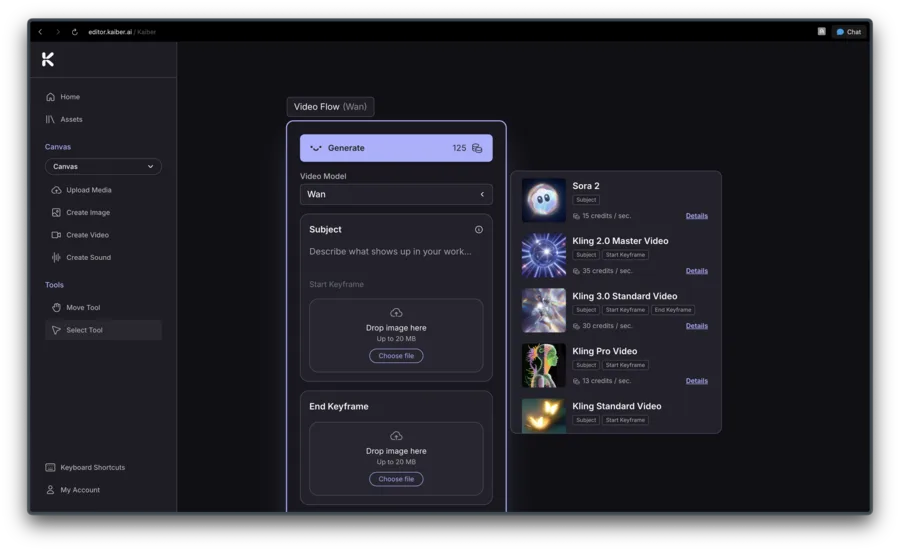
Kaiber's core is Canvas — creating video and images across leading models. Generate from text/image, restyle (video/image style transform), make variations, and compare side by side on an infinite canvas. Switch models mid-project and use each one without juggling multiple subscriptions.
Kaiber is a "model aggregator," not a proprietary model — its edge is using leading generative models in one place. It offers Veo, Kling (incl. 3.0), Sora, Nano Banana, Seedance, MiniMax, FLUX, Wan, and Grok Imagine. The old "storyboard" feature is gone, and "Kaiber Cuts" has been renamed "Beat Sync."
How to use
Pick a model and generate in Canvas, then finish in Beat Sync and Editor.
Add input
Enter text or images and specify what to make in Canvas.
Pick a model
Choose the right model — Veo, Kling, Sora — and generate.
Batch & restyle
Batch beat-synced videos with Beat Sync; remake with Restyle.
Edit & export
Finish on the Editor timeline and export in social aspect ratios.
The entry point is a $5 / 5-day trial (one per account). There's no free/watermark plan currently.
Key features
01Canvas (multi-model generation)
Generate video and images from text/image, with restyle (style transform), variations, and side-by-side comparison on an infinite canvas. Switch between leading models — Veo, Kling, Sora — within a project.
02Beat Sync (batch beat-synced)
From a song, video, image, or Pinterest board, batch-generate up to 10 beat-synced videos, with auto-clipping, auto lyric detection and text overlays, no-prompt image-to-video, and export in social aspect ratios (formerly "Kaiber Cuts").
03Editor (timeline editing)
Pull in everything made in Canvas and Beat Sync and finish it on a timeline editor — trim, layer, and adjust.
Pricing
You can start with a $5 / 5-day trial. Paid is monthly or annual (20% off); figures below are the effective monthly rate on annual billing.
| Plan | Monthly (annual) | Credits/mo | Highlights |
|---|---|---|---|
| Starter | $10 ($8) | 500 | No premium models, no commercial use, no Beat Sync |
| Creator (popular) | $29 ($23) | 1,500 | Premium models, commercial use, Beat Sync |
| Pro | $99 ($79) | 5,000 | Unlimited Canvas/gens, Beat Sync batch of 10 |
| Visionary | Contact us | Unlimited | White-glove support (labels/agencies) |
Note Starter excludes premium AI models, commercial use, and Beat Sync. One-off credit packs (from 300cr/$5) are available. There's no free/watermark plan currently; the entry point is the $5 trial. Prices are in USD and change, so check the official pricing page for the latest (as of August 2026).
How it differs from other AI video tools
Kaiber stands out by gathering many leading models in one place and running generation, batch beat-sync, and editing in a single workspace. That's a different freedom of model choice and scope than single-model video generators.
| Aspect | Kaiber | Pika | Luma |
|---|---|---|---|
| Focus | Multi-model workspace | AI video generation | AI video generation |
| Models | Veo/Kling/Sora across | Mostly its own model | Mostly its own model |
| Trait | Includes batch beat-sync & editing | Easy generation | High-quality generation |
Standalone AI video generators Pika, Luma, and Kling are alternatives to compare. If you want to switch between models and run generation, editing, and batch output in one place, Kaiber is a strong choice.
Information on this page is based on the official website as of August 2026. Please check the official site for the latest specs and pricing.

