

MusicFX
: How to use it, features, and the business problems it solves
Add bookmark
What is MusicFX?
MusicFX is a text-to-music AI tool from Google. It has since evolved into its successor, Google Flow Music (flowmusic.app), a music-creation platform where you can generate full vocal tracks with the latest music model Lyria 3.5, produce music videos with Veo, remix and split stems, and publish and share your songs, all in one place. It supports prompts in Japanese and other languages, is free to start, and grants daily credits, with no credit card required.
Business problems it solves



About "MusicFX"
What is MusicFX
MusicFX is a text-to-music AI tool from Google. It was originally released as one of the features in Google's experimental workshop "AI Test Kitchen," and became known for how effortlessly it generated a track from nothing more than a prompt. It has since evolved and been folded into its successor, a more serious music-creation platform called Google Flow Music (flowmusic.app). The old labs.google/fx/tools/music-fx URL now redirects to Flow Music.
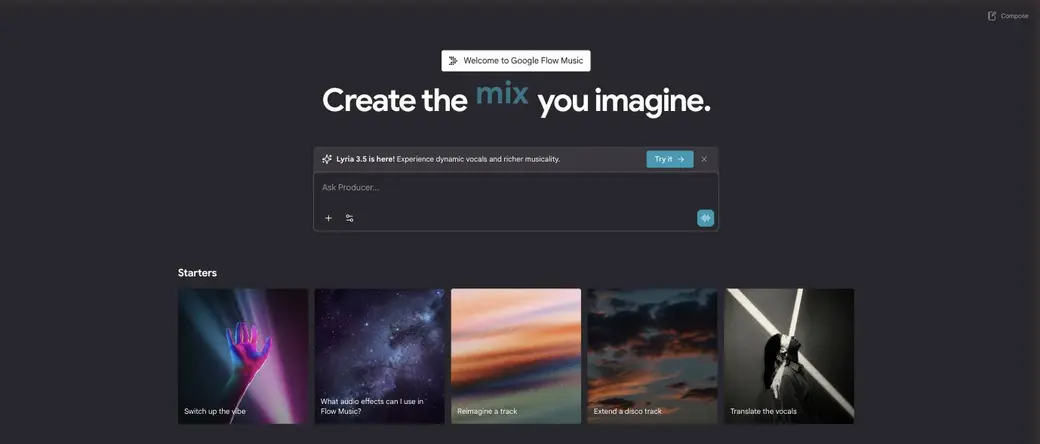
Source: Google Flow Music official site (the images below are from the same source)
MusicFX has grown into Google Flow Music. It's no longer just about turning text into music. It has been rebuilt as "Flow for music," letting you create full vocal tracks with the latest music model Lyria 3.5, generate music videos with Veo, and publish and share your songs, all in one place. This page covers the product in its current form as Google Flow Music.
How to use
The experience feels like being in a studio, building a song through conversation with a producer (the AI).
Enter a prompt
Tell "Ask Producer" the mood, genre, BPM, and anything else about the song you want to make, in plain words.
Lyria 3.5 generates it
A full track with vocals is generated. Fine-tune every detail by talking it through with the producer.
Edit and remix
Polish it with audio effects, remixing, stem separation, lyric translation, and more.
Publish and share
Turn tracks into playlists and publish your songs and music videos to be followed and discovered.
You can start for free with nothing but a Google account, and no credit card is required.
Key features
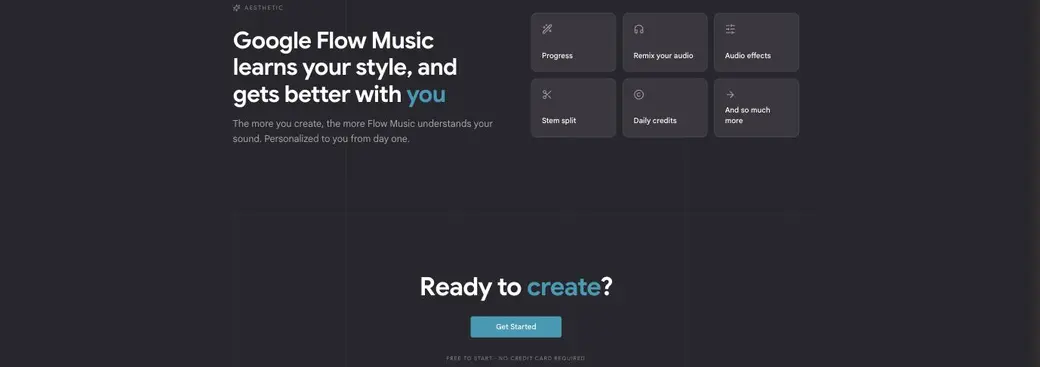
01Create
Generate full vocal tracks with the latest music model, Lyria 3.5. Work every detail of the song by talking with the producer. The more you use it, the more it learns your taste and personalizes to you.
02Music videos
Add visuals to the songs you make with the Veo video model. You direct the characters, art style, and staging yourself, with no film crew needed.
03Spaces (vibe-code)
"Spaces" let you build audio plugins, music games, your own DAW, and more, all in code. Even a small app like a mini keyboard can be put together on the spot.
04Edit and share
Remix audio, apply effects, and split stems. Turn your songs into playlists and publish them, follow the artists you love, and discover new music every day through a social layer built right in.
Pricing
Google Flow Music is free to start (no credit card required). Even on the free tier, you receive daily credits to spend on generation.
| Plan | Price | What you get |
|---|---|---|
| Free to start | $0 | Sign up with a Google account. Try generating and editing with daily credits |
| Google AI paid plans | Follows your Google AI subscription | More credits and priority access to the latest models. Shares a billing structure with Google's AI creation tools such as Flow |
Pricing reflects the official terms as of August 2026. Flow Music clearly states "free to start, no card required, daily credits." Because usage limits and access to the latest models follow your Google AI subscription (Google AI Pro, Ultra, and so on), please check the latest details of each plan for caps and pricing.
How it differs from other AI music tools
What sets MusicFX (Google Flow Music) apart is that it is made by Google and lets you go from composing a song to making a music video to publishing and sharing, all on a single platform. It isn't limited to generating a standalone track; visualization with Veo and social discovery features are built in as well.
| Aspect | MusicFX (Google Flow Music) | Other major music-generation AIs |
|---|---|---|
| Provider | Various companies (startups and others) | |
| Model | Lyria 3.5 (vocals supported) | Each company's own model |
| Visualization | Music video generation with Veo | Mostly audio only |
| Reach | A social base for publishing, sharing, and discovery | Mainly downloading what you generate |
| Pricing | Free to start, daily credits | Free tier plus subscription is typical |
If you want to easily churn out full vocal tracks, Suno and Mureka are options; for BGM and instrumental work aimed at video and games, AIVA and beatoven.ai are worth considering. When you want to handle everything from composition to visuals to publishing end to end within Google's ecosystem, Google Flow Music is a strong choice.
FAQ
Q. Can I no longer use MusicFX?
As a standalone product, MusicFX has evolved into and been merged with its successor, Google Flow Music (flowmusic.app). The old URL redirects to Flow Music, and text-to-music generation is still available.
Q. Is it free to use?
Yes. If you sign up with a Google account, you can start for free, and no credit card is required. You receive daily credits to spend on generation.
Q. Can I make songs with vocals?
Yes. The latest model, Lyria 3.5, supports dynamic vocals and can generate full tracks. There's also a feature to translate lyrics into another language.
Q. Can I use the songs I make commercially?
Usage is governed by Google's terms of service and the conditions of each plan. Since how generated content may be used can change, please check the latest terms.
The information on this page is based on what was published on the official site as of August 2026. MusicFX has evolved into Google Flow Music, and features and pricing are subject to change. For the latest details, please check the Google Flow Music official site.
Frequently compared services


Articles featuring MusicFX
[2026 Edition] 11 Essential AI Tools for Illustrators | Full Coverage from Auto-Generation and Coloring to Style Transfer and BGM Creation
A curated selection of AI tools that support illustration work — rough sketching, coloring, style transfer, and BGM creation. The 2026 edition thoroughly covers the latest tools for prompt-based generation and art style conversion that help creators unlock their creativity.
![[2026 Edition] 11 Essential AI Tools for Illustrators | Full Coverage from Auto-Generation and Coloring to Style Transfer and BGM Creation](/_next/image?url=%2Fimages%2Farticles%2Fai-illustration-tools-for-illustrators.png&w=3840&q=75 "[2026 Edition] 11 Essential AI Tools for Illustrators | Full Coverage from Auto-Generation and Coloring to Style Transfer and BGM Creation")
[2026 Edition] 17 AI Tools for Video Creators | Full Coverage from Auto-Editing and Subtitles to Narration, BGM, and Social Media Videos
Supercharge your video production with AI. A curated selection of the latest tools supporting every stage — editing, subtitles, narration, BGM, and virtual appearances. [2026 Edition]
![[2026 Edition] 17 AI Tools for Video Creators | Full Coverage from Auto-Editing and Subtitles to Narration, BGM, and Social Media Videos](/_next/image?url=%2Fimages%2Farticles%2Fai-tools-for-video-creators.png&w=3840&q=75 "[2026 Edition] 17 AI Tools for Video Creators | Full Coverage from Auto-Editing and Subtitles to Narration, BGM, and Social Media Videos")