Mureka
: How to use it, features, and the business problems it solves
Add bookmark
What is Mureka?
Mureka is an AI music generator run as the AI music business of China's Kunlun Tech (the operating company in its terms is SKYWORK AI PTE. LTD. in Singapore). Pricing: the free plan allows 4 songs a day (no downloads, no commercial use); Pro is $8/month billed annually ($10 monthly) and Premier $24/month billed annually ($30 monthly), priced in USD. Tracks made on a paid plan belong to the user and can be used commercially. It offers the latest V9.5 model, up to 12-stem separation, and Mureka Co for operating a DAW in plain language. Servers are in the US, and uploaded material is also licensed to Mureka, so check the terms (as of October 2026).
Business problems it solves






About "Mureka"
What is Mureka
Mureka is a music production platform where AI generates tracks from lyrics, style prompts, or a reference audio file. It runs in the browser and as an app, and covers everything from creating a track through editing and exporting in one place.
Mureka is run as the AI music business of Kunlun Tech (China; listed on the Shenzhen ChiNext board), and the operating company named in the Terms of Service is SKYWORK AI PTE. LTD. in Singapore. Since its launch on August 14, 2024, its in-house music models have moved from V6/O1 → V7 → V7.5 → V7.6/O2 → V8 → V9 → V9.5.
Pricing and safety at a glance (as of October 28, 2026)
- Pricing: The free plan allows 4 songs per day (no downloads, no commercial use). Paid plans are Pro at $8.00/mo billed annually ($96/yr) or $10 monthly, and Premier at $24.00/mo billed annually ($288/yr) or $30 monthly. Prices are shown in US dollars even when viewed from Japan
- Commercial use and rights: Tracks generated by paid subscribers (or credit purchasers) belong to the user and can be used commercially. Rights to tracks made on the free plan belong to Mureka; free users may use them only for non-commercial purposes with credit to Mureka
- Data handling: Servers are in the United States, and data may be transferred to jurisdictions where group affiliates are based. Uploaded material and generated tracks are subject to a broad licence to Mureka, and the terms say not to upload confidential material
The "Pricing" and "Safety" sections below explain the details based on the official pricing page, Terms of Service, and Privacy Policy.
It is not a "generate one song and you're done" tool. Alongside generation with the latest V9.5 model, it includes Mureka Studio (timeline editing, stem extraction), Splitter (separation into up to 12 stems), Remix (genre swapping, lyric rewriting), and Mureka Co (operating your DAW in plain language).
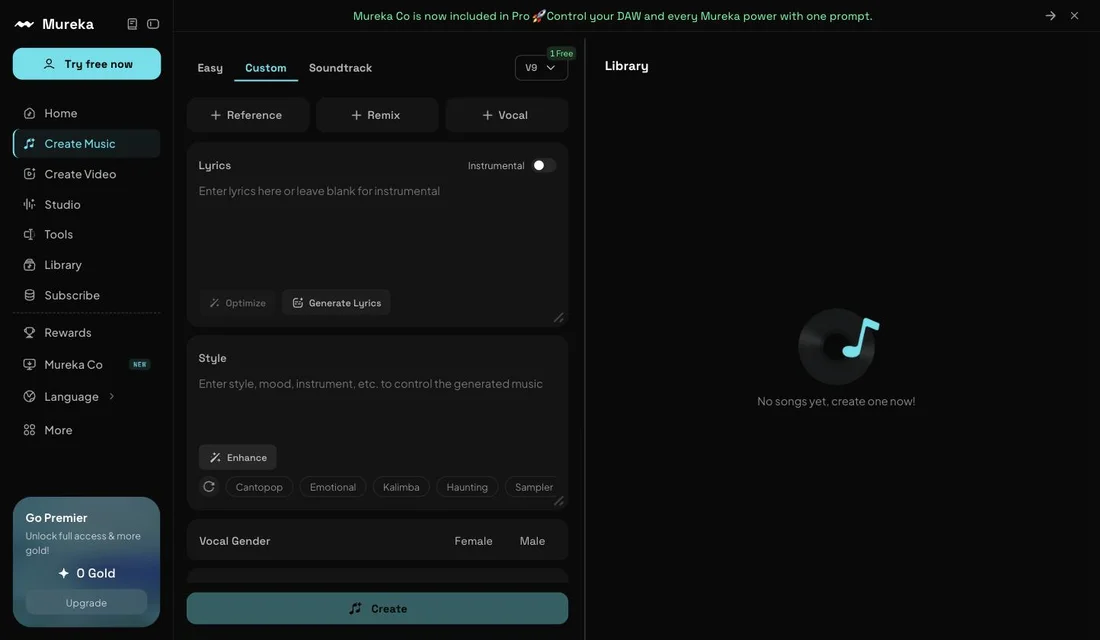
Source: Mureka official site (the screen below is from the same source)
Pricing (as of October 2026)
Credits are denominated in "Gold." Annual billing saves 20%.
| Free | Pro | Premier | |
|---|---|---|---|
| Monthly (annual billing) | $0 | $8.00 | $24.00 |
| Monthly (monthly billing) | $0 | $9 | $27 |
| Yearly | — | $86 | $259 |
| Gold | — | 5,000 / month | 20,000 / month |
| Songs | 4 / day | 500 / month | 2,000 / month |
| Speech | — | 250 min / month | 1,000 min / month |
| Models | Free model (v7.5-all) | V9, V8, O2, V7.6 | V9, V8, O2, V7.6 |
| Mureka Co | No | Basic access | Full access |
| Stem separation | No | No | Up to 12 |
| Mureka Studio | No | No | Yes |
| Download | No | MP3 | MP3, WAV, stems, MIDI, DAW session |
| Commercial use | No | Yes | Yes |
| Voice cloning | No | No | Yes |
| Concurrent generations | 2 (shared queue) | 10 (priority queue) | 10 (priority queue) |
It is a Gold (credit) system, not per-song pricing. Pro's 5,000 Gold corresponds to "up to 500 songs, or 250 minutes of speech." Consumption differs depending on whether you generate music or speech, so the ceiling moves with how you use it.
If you run out of Gold, Pro and Premier members can buy additional Gold packs (not available on the free plan). Using Mureka Co to work in a DAW may also consume Gold depending on the complexity of the task.
Billing and cancellation: Paid plans renew automatically each month or year. Cancel through the channel you subscribed with (App Store, Google Play, or Stripe on the web) at least 24 hours before the current period ends. Under the Terms of Service, refund requests go directly to Apple, Google, or Stripe, and Mureka accepts no liability for refunds except where required by law.
Amounts are based on the official pricing page as displayed from Japan on October 28, 2026 (USD). Pricing is subject to change, so please confirm on the official site before purchasing.
Safety: operator, commercial use, rights, and data handling
Whether Mureka is "risky" is easier to judge from what its terms actually say than from general impressions. Below, point by point, is what the Terms of Service (effective May 13, 2026) and the Privacy Policy (effective July 9, 2025) state as of October 28, 2026.
| Point | What the official documents say |
|---|---|
| Operator | The operating company in the Terms of Service is SKYWORK AI PTE. LTD. (Singapore). Kunlun Tech, a listed Chinese company, describes Mureka as its AI music business in its annual report |
| Governing law and disputes | Singapore law; disputes are resolved by arbitration at the Singapore International Arbitration Centre (SIAC) |
| Rights to generated tracks (paid) | Ownership and IP rights in tracks (Output) generated by credit purchasers and paid subscribers belong to the user |
| Rights to generated tracks (free) | Rights belong to Mureka. Users may use the tracks only for lawful, internal, non-commercial purposes, with credit to Mureka |
| Mureka's own use | On both paid and free plans, users grant Mureka an irrevocable, royalty-free, broad licence over generated tracks (including reproduction, distribution, derivative works, and commercial use) |
| Uploaded material | Reference audio and other material is licensed to Mureka for promotion, providing the service, commercial use, and more. The terms state that you must not upload confidential or proprietary material |
| Uniqueness | Output may resemble tracks made by other users; uniqueness is not guaranteed, nor is eligibility for copyright registration |
| Data storage | Servers are in the United States. Personal data may be transferred to and processed in jurisdictions where group affiliates are based |
| Use for AI training | Neither the terms nor the policy contains a clause that explicitly states whether uploaded material or generated tracks are used to train its models |
| Age | In the United States, not for users under 13, and paid services not for users under 18. Elsewhere, parental consent is obtained where local law requires it |
01Commercial use assumes a paid plan
Rights to tracks made on the free plan sit with Mureka, so they cannot be used commercially. The pricing FAQ says that while a paid subscription is active, commercial rights extend even to tracks made before subscribing. Neither the terms nor the FAQ states how commercial rights are treated after cancellation. For tracks you plan to release or deliver to clients, confirm the rights while you are subscribed.
02Using someone's voice or someone else's song
When you upload voice data, you warrant that you have all necessary rights and permissions (Privacy Policy). If you use another person's song or voice without permission, the responsibility is yours.
03Keep confidential material out
Uploaded material is treated as non-confidential, and Mureka receives a broad licence to it. As a rule, do not use material that must not leave your hands, such as unreleased songs or audio entrusted to you by a client.
On the free plan you can neither download nor use commercially
There is a constraint worth knowing up front. The free plan is for trying the product — you cannot take the generated track off the platform, and you cannot use it for work.
Free plan
- 4 songs per day
- Free model (v7.5-all) only
- Audio download not available
- Commercial use not permitted
- 2 concurrent jobs in a shared queue
Pro / Premier plans
- 500 / 2,000 songs per month
- V9, V8, O2, and V7.6 available
- MP3 (Premier also WAV) download
- Commercial use permitted
- 10 concurrent jobs in a priority queue
You will see Mureka described as "commercially usable," but that applies only to the paid plans. If you are evaluating it on the free tier, work from that assumption.
The weight sits after generation, not in it
What Mureka lists officially under "Exclusive Member Features" shows where the product's center of gravity is.
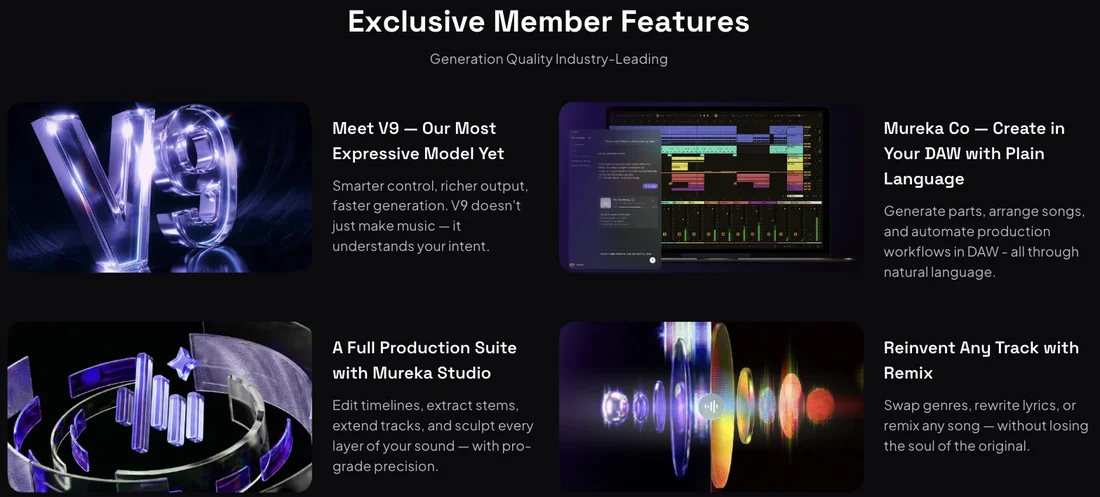
01V9.5 — the latest generation model
The official description: "natural melodies, vivid performances, diverse styles." Paid plans can choose V9.5 as well as V9, V8, O2, and V7.6 depending on the task.
02Mureka Co — driving a DAW in plain language
This is where it differs most from other music generation AI. Generating parts, arranging songs, and automating production workflows can be done from inside a DAW through natural-language instructions. Rather than exporting a generated track into a DAW, the AI comes into the DAW work itself. Pro gets basic access; Premier gets full access.
03Mureka Studio — the place to edit
Timeline editing, stem extraction, track extension. Treats generated output as material and lets you build it up layer by layer. Premier only.
04Splitter / Remix / Reference
Splitter separates an existing track into up to 12 stems (Premier only). Remix swaps genres or rewrites lyrics while keeping the character of the original. Reference lets you upload a reference track so its style and mood carry over.
How to use
-
Create an account
Sign up on the official site. You can try up to 4 songs a day on the free plan.
-
Choose a mode
Easy (from a short prompt), Custom (specify lyrics, style, and vocals in detail), or Soundtrack (for scoring).
-
Enter lyrics and style
Write lyrics yourself or use Generate Lyrics. A single toggle switches to instrumental. In the style field, describe genre, mood, and instruments — Enhance can fill in the rest.
-
Add a reference or a voice (optional)
Upload a reference track with Reference, specify vocals with Vocal, or rework an existing song with Remix. Vocal gender is selectable.
-
Generate and refine
Create the track, edit it in Studio, separate stems with Splitter, and lengthen it with Extend.
-
Export
Pro exports MP3; Premier exports WAV, stems, MIDI, and DAW sessions.
Features
01Create
- AI music generation — From lyrics, style, or a reference track. Easy / Custom / Soundtrack modes
- Generate Lyrics — Lyrics from a theme, with Optimize for refinement
- Reference — Carries over the style and mood of a reference track
- Text-to-speech — Pro and above
- Create Video — Turns a track into a music video with lip-sync
02Refine and extend
- Remix — Genre swapping and lyric rewriting
- Extend — Lengthen a track
- Partial editing — Fine-tune lyrics or melody in a selected region
- Mureka Studio — Timeline editing and stem extraction (Premier)
- Splitter — Up to 12 stems (Premier)
03Connect to your production setup
- Mureka Co — Operate your DAW and local files in plain language (basic on Pro, full on Premier)
- Export — MP3, or WAV / stems / MIDI / DAW session (Premier)
- Voice cloning — Premier only
- AI cover art generator — Generates artwork for a track
Reception and traction
The only scale figure the company publishes is "200,000+ paying subscribers." In the pricing FAQ, answering people who worry that paid features may not meet expectations, Mureka states that over 200,000 creators and musicians worldwide have already subscribed to Pro or Premier (as of October 2026).
Named customers, retention, and third-party audio-quality evaluations are not published. Music generation is a taste-driven category, so the surest check is the free plan (4 songs a day) on your own genre before committing.
FAQ
Q. Is Japanese supported?
Yes. Japanese is available in the UI language settings, alongside English, Chinese (Simplified and Traditional), Korean, Spanish, Portuguese, German, French, Italian, and Russian. Generation from Japanese lyrics is supported.
Q. How far does the free plan go?
Four songs a day with the Free model (v7.5-all). However, downloading and commercial use are not available. Treat it as an allowance for judging quality by listening.
Q. Can I use generated tracks commercially?
While your paid plan (Pro or Premier) is active, full commercial rights apply not only to new tracks but also to creations you made before subscribing (per the official FAQ). You can release them on streaming platforms, use them in ads or film, and so on. The free plan carries no commercial rights.
The company adds that distribution on third-party platforms must still comply with those platforms' own terms.
Q. Is there a monthly cap on downloads?
No. The official FAQ states there are no download limits and that generated songs can be downloaded any number of times (available formats depend on your plan).
Q. Is there local-currency pricing?
No. Everything is priced in US dollars (Pro from $8.00/mo, Premier from $24.00/mo on annual billing). If you pay with a non-US card, the amount you are actually charged depends on the exchange rate and fees applied by your card issuer at the time of payment, so a fixed local-currency figure cannot be quoted here.
Q. What does one song cost?
Working from the official allowances, fully used:
| Plan | Monthly (annual billing) | Songs | Per song |
|---|---|---|---|
| Pro | $8.00 | up to 500 | ~1.6 cents |
| Premier | $24.00 | up to 2,000 | ~1.2 cents |
Gold is also consumed by speech generation, so real-world cost per song rises if you use both.
Q. Who owns the copyright in generated tracks?
The Terms of Service state that ownership and IP rights in tracks generated by paid subscribers (or credit purchasers) belong to the user, while rights to tracks generated on the free plan belong to Mureka. On both plans, however, you also grant Mureka a broad licence to use generated tracks, and Mureka does not guarantee that AI-generated output can be registered for copyright (as of October 2026). For uses where ownership matters (client work, deliveries involving a transfer of rights), check the relevant clauses (Section 3(e)–(g)) of the terms.
Q. How should I judge whether it is safe to use?
The "Safety: operator, commercial use, rights, and data handling" section above sets out, as written in the terms, who runs the service (SKYWORK AI PTE. LTD. in Singapore, the AI music business of China's Kunlun Tech), the conditions for commercial use and rights, where data is stored, and the scope of the licence you grant. Two points in particular are worth knowing before you start: tracks made on the free plan cannot be used commercially, and uploaded material is also licensed to Mureka.
Q. Can I cancel or get a refund?
You can cancel at any time. The official FAQ says you can cancel your subscription freely at any time, with no strings attached. Cancel through the channel you subscribed with (App Store, Google Play, or Stripe) at least 24 hours before the current period ends. Refund requests go directly to Apple, Google, or Stripe, and the Terms of Service state that Mureka accepts no liability for refunds except where required by law (as of October 2026). Keep this in mind if you are considering annual billing.
Q. Can I export WAV?
Premier only. Pro goes up to MP3. Stems, MIDI, and DAW session export are also Premier features.
Q. What is Mureka Co?
A feature that lets you operate a DAW and local files through natural-language instructions — generating parts, arranging songs, and automating production workflows from inside the DAW. Pro covers the basics; Premier unlocks everything.
How it differs from other music generation AI
Most products in this space stop at generating the track. Mureka's distinguishing trait is that it reaches into the work that comes after — which matters more the more your process depends on a DAW.
| Aspect | Mureka | Typical music generation AI |
|---|---|---|
| Generation | Choice of V9.5 and five other models | Their own model |
| Editing | Timeline editing and stem extraction in Mureka Studio | Mostly regeneration and extension |
| Stem separation | Up to 12 (Premier) | Varies by product |
| DAW integration | Plain-language control via Mureka Co | Export and import manually |
| Export | MP3, WAV, stems, MIDI, DAW session | Mostly MP3 and WAV |
| Free tier | 4 songs/day (no download, no commercial use) | Varies by product |
| Pricing | From $8.00/month (annual) | Typically $8–30/month |
For vocal track generation, Suno and Udio are the comparison points. For background music and scoring, AIVA and Beatoven.ai are closer, overlapping with Mureka's Soundtrack mode.
Information on this page is based on what was published on the official site (pricing page, Terms of Service, and Privacy Policy) as of October 28, 2026, and on Kunlun Tech's 2025 annual report. Please check the official site for the latest specifications and pricing.