

Voicemod
: How to use it, features, and the business problems it solves
Add bookmark
What is Voicemod?
A voice changer and soundboard app that transforms your voice into another in real time. With 200+ voices, AI voices, and Voicelab (custom voices), it pipes your transformed voice straight into Discord, OBS, and in-game voice chat. Windows/Mac/mobile. Free plan available; Pro comes in monthly, annual, or lifetime options.
Business problems it solves



About "Voicemod"
What is Voicemod
Voicemod is a voice changer and soundboard app that transforms your voice into another in real time. It turns your mic input into any of 200+ voices on the spot — from AI anime characters to soldiers and robots — and pipes that Voicemod voice straight into Discord or in-game voice chat. It runs on PC (Windows/Mac) and mobile, and is a go-to tool widely used in streaming, gaming, and calls with friends.
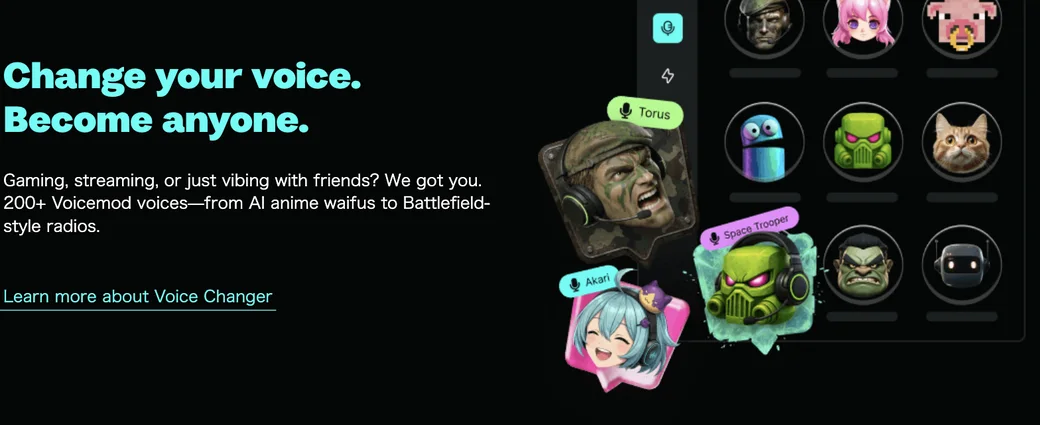
Source: Voicemod official site (the image below is from the same source)
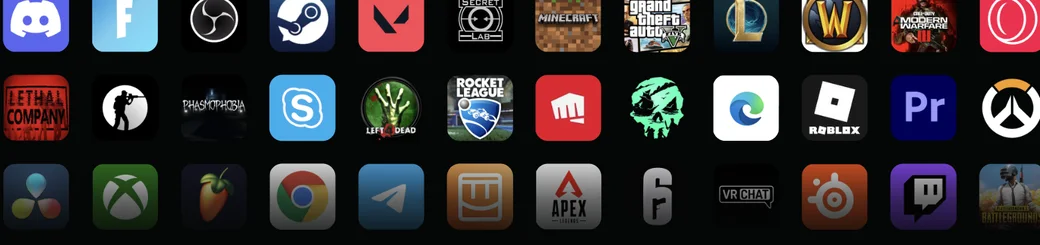
Works across every streaming, gaming, and call app
Voicemod's strength is that it behaves as an "input device" for your PC rather than being tied to one app. Just set each app's mic input to the "Voicemod Virtual Audio Device," and you can use your transformed voice everywhere — Discord, OBS, Steam games, Zoom-style calls, and more.
How to use
-
Install and set up
Download and install Voicemod from the official site, then set your microphone and headphone devices.
-
Pick a voice filter
Choose a voice from "VOICEBOX" and your voice is transformed in real time.
-
Use the soundboard
Register sound effects and set key bindings to play them instantly during streams or calls.
-
Customise in Voicelab
Combine effects to create and save your own original voice.
-
Connect to other apps
Set the input device to "Voicemod Virtual Audio Device" in Discord, OBS, and the like to use Voicemod's audio.
Features
01Change your voice
- Real-time voice changer — Switch among 200+ voices on the fly
- AI voices — AI voices trained by professional voice actors
- Voicelab — Combine effects to create and save an original voice
02Liven up the room
- Soundboard — Register sound effects and trigger them instantly with key bindings
- Multilingual — Usable in several languages, including Japanese
03Connect and extend
- Virtual audio device — Output transformed audio to Discord, OBS, games, and call apps
- Voicemod Key — A dedicated USB device to use it on consoles (Xbox / PlayStation / Switch)
Pricing
The free plan lets you try basic voice changing, but all voices, Voicelab, and AI voices require Pro. Pro comes in monthly, annual, and lifetime options.
| Plan | Approx. price | Voices | Soundboard | Voicelab / AI voices |
|---|---|---|---|---|
| Free | Free | A rotating daily selection | Limited slots | Not available |
| Pro (monthly) | ~$10/mo | All 200+ | Unlimited | Available |
| Pro (annual) | Cheaper per month | All | Unlimited | Available |
| Pro (lifetime) | ~$44.99 (one-time) | All | Unlimited | Available |
The free plan's voices are "only a rotating daily subset," and soundboard slots are limited too. Always-on access to all voices, plus Voicelab, AI voices, and Voicemod Key support, require Pro. The lifetime (one-time) option suits long-term users who don't want a subscription. Prices vary by promotion and region.
Prices are a guide as of August 2026 (USD, varying with discounts). Check the official site or in-app for the exact latest amounts.
How it differs from other voice AIs
Voicemod is specialised in "changing your voice in real time," which sets it apart from narration-style text-to-speech (TTS). Rather than reading a script to produce an audio file, its main purpose is transforming your own voice on the spot during calls and games.
| Aspect | Voicemod | TTS / narration tools |
|---|---|---|
| Main use | Real-time transformation in calls, streams, and games | Generate audio files from a script |
| Input | Your own voice into the mic | Text |
| Output | Directly into Discord, games, and call apps | An audio file (export) |
| Strength | Soundboard and virtual-device integration | High-quality narration and multilingual TTS |
For the same real-time transformation, Voice AI is a comparison point. To create narration or read-aloud audio, ElevenLabs or CoeFont (strong at Japanese synthesis) fit better. To liven up game streams and calls on the spot — soundboard included — Voicemod is a strong choice.
FAQ
Q. Is Voicemod free to use?
Yes. The free plan lets you try basic voice changing. However, the available voices are only a rotating daily subset, and the soundboard is limited. Using all voices, Voicelab, and AI voices requires Pro.
Q. What apps can I use it with?
Discord, OBS, Steam games, and call apps like Zoom — set the input device to "Voicemod Virtual Audio Device." It supports many games, including Valorant, Minecraft, Overwatch, and VRChat.
Q. Does it support Japanese?
Yes. The UI supports several languages including Japanese, so Japanese speakers can use it.
Q. Is there a lifetime plan?
Yes. In addition to subscriptions (monthly/annual), a lifetime (one-time) option is available. For long-term use, lifetime can be cheaper. Amounts change with promotions, so check the official site.
Q. Can I use it on consoles?
With the dedicated USB device "Voicemod Key," you can use Voicemod's features on consoles like Xbox, PlayStation, and Switch.
Information on this page is based on what was published on the official site as of August 2026. Features and pricing may change, so check the official site for the latest.



![[2026 Edition] 14 AI Tools to Supercharge Social Media Management | Post Creation, Short Videos, Avatars, and Voice Conversion All in One](/_next/image?url=%2Fimages%2Farticles%2Fai-tools-for-sns-managers.png&w=3840&q=75 "[2026 Edition] 14 AI Tools to Supercharge Social Media Management | Post Creation, Short Videos, Avatars, and Voice Conversion All in One")