
FineVoice
: How to use it, features, and the business problems it solves
Add bookmark
What is FineVoice?
An AI audio production platform from Fineshare (Hong Kong / Chengdu) that combines text to speech, voice cloning, AI voice design, a voice changer, sound effects, BGM, speech to text, and voice translation in one place. Offers 2,700+ voices and 154+ languages and accents, with a Japanese interface and Japanese voices. Available in the browser, as Windows/Mac apps, and via a developer API. Free plan available (output for non-commercial use only); paid plans start at Basic $8.99/month or $71.99/year ($5.99/month).
Business problems it solves



About "FineVoice"
What is FineVoice?
FineVoice is an online platform that brings AI audio production together in one place, provided by Fineshare. Text to speech (TTS), voice cloning, "AI Voice Design" (creating a voice from a written description), a voice changer, sound effect generation, background music generation, speech to text, voice translation, and audio cleanup such as noise removal are all available under one account and one pricing plan.
According to the official site, it offers more than 2,700 AI voices and supports more than 154 languages and accents. The interface can be switched to Japanese, and Japanese voices are available for text to speech. It is used mainly in the browser, and there are also desktop apps for Windows and macOS and an API for developers. It suits people who want to prepare narration for videos, podcasts, online courses, or ads without recording or hunting for audio assets.
Per the official site
Including Japanese
Output non-commercial only
$8.99 billed monthly
How to Use
-
Open the official site and choose your language
On the official site, choose the language at the top right (Japanese is available). The home page says no sign-up is needed, and text to speech can be tried before registering. To keep using it, create an account with "Sign up" at the top right.
-
Pick a tool from the left menu
Text to Speech, Voice Cloning, AI Voice Design, Voice Changer, Sound Effects, Speech to Text, BGM Generator, and more are listed. Each tool has its own screen, and on the free plan the remaining daily allowance is shown at the top.
-
For text to speech, paste your text and choose a voice
Paste your script, choose a voice and model in the settings on the right, adjust pitch and speed, and press "Create." There is also a setting to strengthen emotional expression and "emotion tags" to specify emotion within the text. The maximum input per generation is 1,000 characters on the free plan and 5,000 characters on paid plans.
-
If you need your own voice, create it with voice cloning or AI Voice Design
To use your own voice, record or upload audio in Voice Cloning. To create a brand voice without using an existing voice, describe the voice in text with AI Voice Design. The voices you create go into "My Voices" and can be selected directly in text to speech and the voice changer.
-
Download and use in your video or podcast
Download the generated audio and import it into your editing software. Commercial use requires a paid plan (see "Pricing" and "What to Check Before Using a Voice" below).
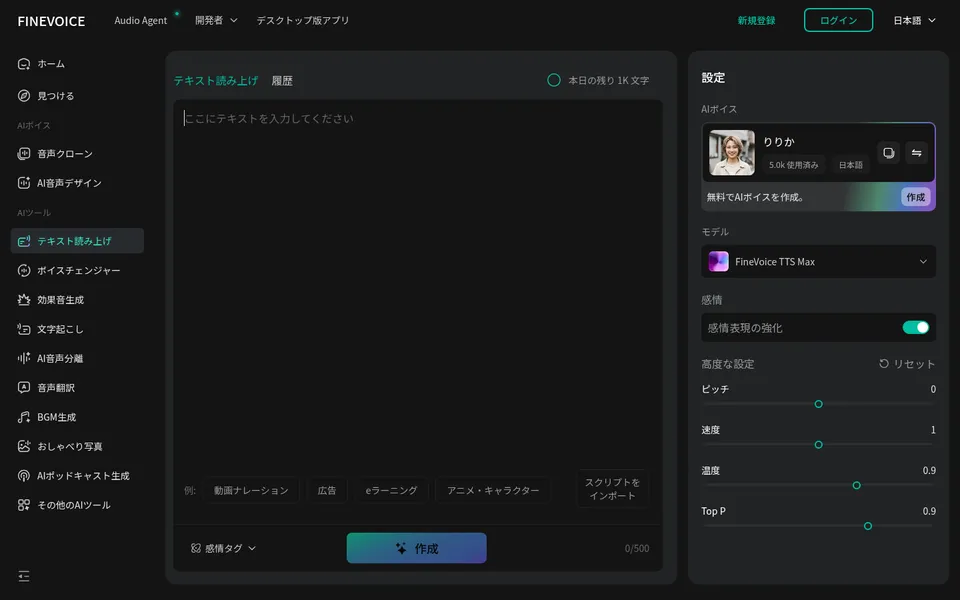
This is the text to speech screen. You enter the script in the center and choose the voice, model ("FineVoice TTS Max" in the screenshot), emotional expression, pitch, speed, and other settings on the right. The left menu takes you to the other tools, such as voice cloning and sound effect generation.
Features
01Create and voice
The core tools for turning a script into audio.
- Text to Speech — Choose from 2,700+ voices and 154+ languages and accents, and adjust pitch, speed, and emotion
- AI Voice Design — Describe a voice in text to create an original voice not in the library
- Voice Cloning — Two methods: "Instant," which reproduces a voice from a short recording, and "Professional," which captures fine detail from about 10 minutes of high-quality recording. Importing RVC (V1/V2) voice models is also supported
- AI Podcast Generator / AI Talking Photo — Create podcast-style audio from a script, or turn a single photo into a talking video matched to audio
02Change and clean up recordings
Tools for processing audio you already have.
- Voice Changer — Change the pitch, age, or gender of a recorded voice, or turn it into a robot or fantasy-character style voice
- AI Voice Enhancer — Noise removal, cutting silent segments, removing mouth sounds, filler words, and breaths, automatic EQ, normalization, and more
- AI Voice Isolator — Extract only the voice from background sound
- Voice Translator / Lip Sync — Turn speech into audio in another language and match the mouth movements in a video
03Sound effects, BGM, and transcription
Audio assets beyond narration, and turning audio into text.
- Sound Effects — Generate sound effects from text, video, or images, with control over length and a negative prompt (sounds to leave out). The official FAQ describes generated sound effects as royalty-free
- BGM Generator — Generate royalty-free tracks by mood or genre
- Speech to Text — Transcribe audio or video up to 30 minutes per file and export as TXT, JSON, SRT, or VTT, with automatic punctuation and language detection
04Where to use it
The same account works in each of these.
- Browser — No installation needed. All the tools above work in the browser
- Desktop app — Windows and macOS versions are available from the official site
- API — Text to speech, speech to text, voice changer, voice cloning, sound effects, audio enhancement, BGM generation, and more via a REST API (documentation at api.finevoice.ai)
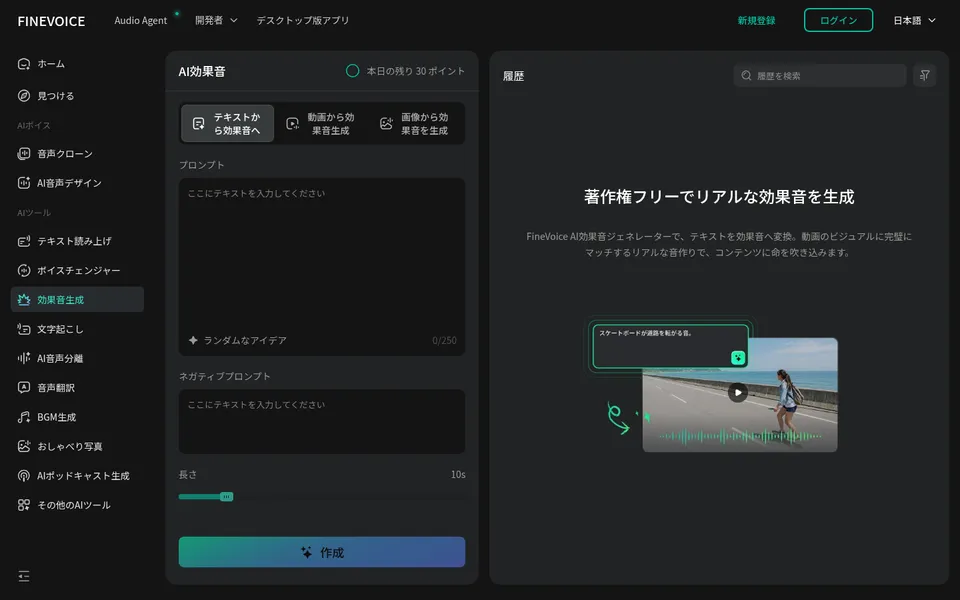
This is the sound effect screen. You switch between three input methods — text to sound effect, video to sound effect, and image to sound effect — then set the prompt, negative prompt, and length, and generate. On the free plan, a daily allowance of 30 points is shown.
Clone Your Own Voice at One of Two Levels of Accuracy
Voice cloning offers Instant Voice Clone, which you can try quickly, and Professional Voice Clone, which takes longer for higher accuracy. In the official steps, Instant uses a clear recording of roughly 10–45 seconds, and Professional uses about 10 minutes of high-quality recording (the required length is stated as both "10 seconds" and "30 seconds" in different places on the official site). A cloned voice can also speak other languages, so one voice can narrate in multiple languages.
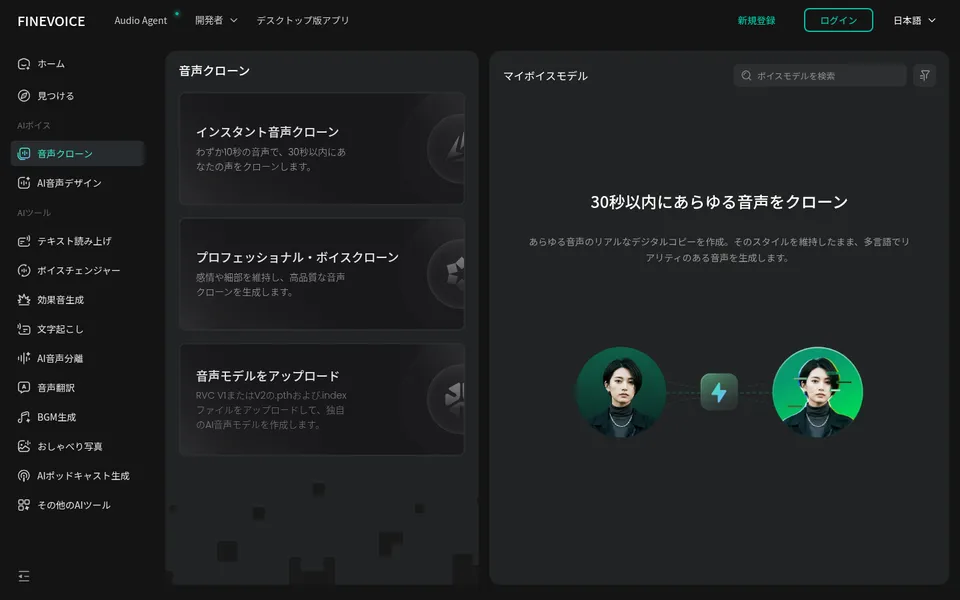
On the voice cloning screen, you choose from three options: Instant Voice Clone, Professional Voice Clone, and Upload Voice Model (RVC V1/V2 .pth and .index files). The voices you create collect in "My Voice Models" on the right.
What to Check Before Using a Voice
Voice cloning, the voice changer, and voice model imports are tools that can also be used with other people's voices. Check the following before you use them.
Get the speaker's consent. FineVoice's Terms of Service require that, if you upload someone else's recording, you represent and warrant that you have permission from the voice owner to clone and synthesize their voice. Securing that permission is your responsibility. For any RVC model you import, also confirm the rights to the voice it was built from.
Do not use the voices of real people or characters publicly or commercially. In Japan, using a celebrity's voice in ads or products without permission can infringe their right of publicity, imitating the voice or lines of an anime or game character can infringe copyright, and making someone appear to say things they did not say can be defamation. The Terms also prohibit impersonating other people or entities.
Disclose that the audio is AI-generated. The official FAQ also says that while creating AI voices is legal in itself, you must respect copyright, privacy rights, and publicity rights, and that copying someone's voice without permission or using it for fraud is illegal. To keep listeners from mistaking it for a real person, it is safest to note in the description or credits that the voice is AI-generated.
Pricing
There is a free plan and three paid plans: Basic, Pro, and Ultra. The pricing page can display US dollars, Japanese yen, or Taiwan dollars, and annual billing is cheaper (checked on the official pricing page in October 2026).
| Plan | Monthly billing | Annual billing (per month) | TTS allowance | Voice cloning (Instant / Professional) | Main differences |
|---|---|---|---|---|---|
| Free | $0 | $0 | 1,000 characters/day | 3 / 0 | Output for personal, non-commercial, and evaluation use only |
| Basic | $8.99 (¥1,404) | $71.99/year ($5.99; ¥11,244/year) | 100,000 characters/month | 50 / 5 | Voice changer 24 hours, speech to text 120 minutes |
| Pro | $17.99 (¥2,809; first month $12.99 / ¥2,028) | $99.99/year ($8.33; ¥15,617/year) | 300,000 characters/month | 100 / 10 | Unlimited voice changer, speech to text 240 minutes |
| Ultra | $24.99 (¥3,903) | $129.99/year ($10.83; ¥20,303/year) | 600,000 characters/month | 300 / 15 | Speech to text 420 minutes, enhancer 90 minutes, 30 BGM generations |
Yen amounts are those shown when the pricing page is set to Japanese and JPY. The per-month figures for annual billing are the official display of the annual price divided by 12.
The Ultra pricing card lists every feature as "Unlimited," but the plan comparison table on the same page shows limits such as 600,000 TTS characters per month. The table above uses the comparison table's figures. Check the pricing page and checkout screen before buying. The pricing page also notes that sales tax may be applied based on your residence.
Pros and Cons
Pros
- One subscription covers text to speech, voice cloning, sound effects, BGM, transcription, and audio cleanup, so you can gather audio assets without switching tools
- The interface is available in Japanese, and Japanese voices are available
- The free plan lets you try the main tools with daily allowances
- Annual billing works out to $5.99–$10.83 per month, which is inexpensive for the range of tools
- Three ways to use it: browser, desktop app, and API
Cons
- Free plan output cannot be used commercially. Monetized YouTube videos or ads require a paid plan
- Yen prices are the pricing page's converted display, and some details on the page do not match, such as Ultra's "Unlimited" versus the limits in the comparison table
- The Terms of Service exist only in English (last updated February 5, 2024) and contain no clause stating the operating company's legal name, address, or governing law (see "The Company Behind It" below)
- Under the Terms, you grant FineVoice a license to use your uploads and outputs to improve its services and AI models. Take care when handling confidential audio
Reviews and Reputation
The official home page shows user testimonials about using it for video voiceovers, course narration, game voices, and transcription, and claims a 4.9/5 rating and more than 10 million users worldwide. However, these are statements on the official site, and no source survey or third-party review site is cited.
As third-party information, the US trade publication Speech Technology Magazine reported the launch of "FineVoice 1.5" in January 2024. At that time it was described as a product with text to speech, a voice changer, dubbing, voice duplication, and transcription; sound effects, BGM, voice design, and other tools have since been added to form the current lineup.
The Company Behind It
FineVoice is operated by Fineshare. The About page on the official site lists the company name "Fineshare," two addresses — in Hong Kong (New Territories Plaza, Tsuen Wan) and in Chengdu, China (No. 1700 Tianfu Avenue North) — and contact addresses (support@finevoice.ai / support@fineshare.ai). The company's own site (fineshare.com) also lists the webcam software FineCam and the audio production agent Aunio alongside FineVoice.
The Terms of Service (updated February 5, 2024) mention "FineVoice Inc." as the copyright holder of the software, but there is no clause stating the legal name or address of the contracting entity, or the governing law and jurisdiction. If you are contracting as a business, it is safest to ask in advance who issues invoices and who the contracting party is.
How It Differs from Other AI Voice Generators
FineVoice stands out because narration, voice cloning, sound effects, BGM, and transcription are all covered by a single plan starting at $5.99 per month on annual billing.
| Aspect | FineVoice | ElevenLabs | CoeFont | Voice AI |
|---|---|---|---|---|
| Main use | Audio production from TTS to sound effects, BGM, and transcription | High-quality TTS and voice cloning, dubbing, conversational AI | TTS with 10,000+ voices, registering your own voice | Real-time voice changer |
| Free use | Free plan (non-commercial) | Free tier | Free plan (non-commercial) | Free tier |
| Paid entry point | Basic $8.99/month ($5.99/month annually) | From $6/month | Standard $20/month | Starter from $5 |
| Sound effects / BGM | Both | Sound effects and music generation | — | — |
Columns for other products reflect what is stated on each product page as of when it was checked.
If you are choosing on voice quality, multilingual dubbing, and conversational AI, compare ElevenLabs; if the range of Japanese voices matters most, CoeFont; and for free Japanese character voices, VOICEVOX. To change your voice live while streaming or gaming, Voice AI or Voicemod fit better, and to create songs with vocals, Suno. FineVoice fits when you want narration, sound effects, and BGM in one place at a low cost.
FAQ
Can I use FineVoice for free?
Yes. The free plan includes allowances such as 1,000 TTS characters per day, 3 minutes of voice changer per day, and 3 Instant Voice Clones. However, audio generated on the free plan is limited to personal, non-commercial, and evaluation use.
Does it support Japanese?
Yes. The official site and the app interface can be switched to Japanese, and Japanese voices can be chosen for text to speech. The Terms of Service, however, are available only in English.
Can I use the output commercially?
On the paid Basic, Pro, and Ultra plans, you own the output and may use it commercially. Free plan output may not be used for sales, ads, client work, or monetization. On any plan, using someone else's voice or rights-protected material requires the rights holder's permission.
Can I use the voices of celebrities or characters?
Avoid using them publicly or commercially. In Japan this can raise issues of publicity rights, copyright, and defamation. The Terms also prohibit impersonation and require you to warrant that you have the speaker's permission when uploading someone else's voice.
Can I cancel or get a refund?
Monthly and annual subscriptions can be canceled at any time, and no further charges occur after cancellation. The pricing page FAQ describes a 15-day money-back guarantee.
The information on this page is based on what was published on the official website as of October 2026. Please check the official website for the latest specifications and pricing.