
How to Use Sakana AI Fugu: From API Key to Claude Code | Pricing, Free Tier, and Performance
A guide to Sakana AI's multi-agent platform Fugu: issuing an API key at console.sakana.ai, calling the OpenAI-compatible API, and wiring it into Codex and Claude Code. Covers choosing between Fugu, Fugu Ultra, and Fugu Cyber, pricing and whether a free tier exists, and benchmark performance.
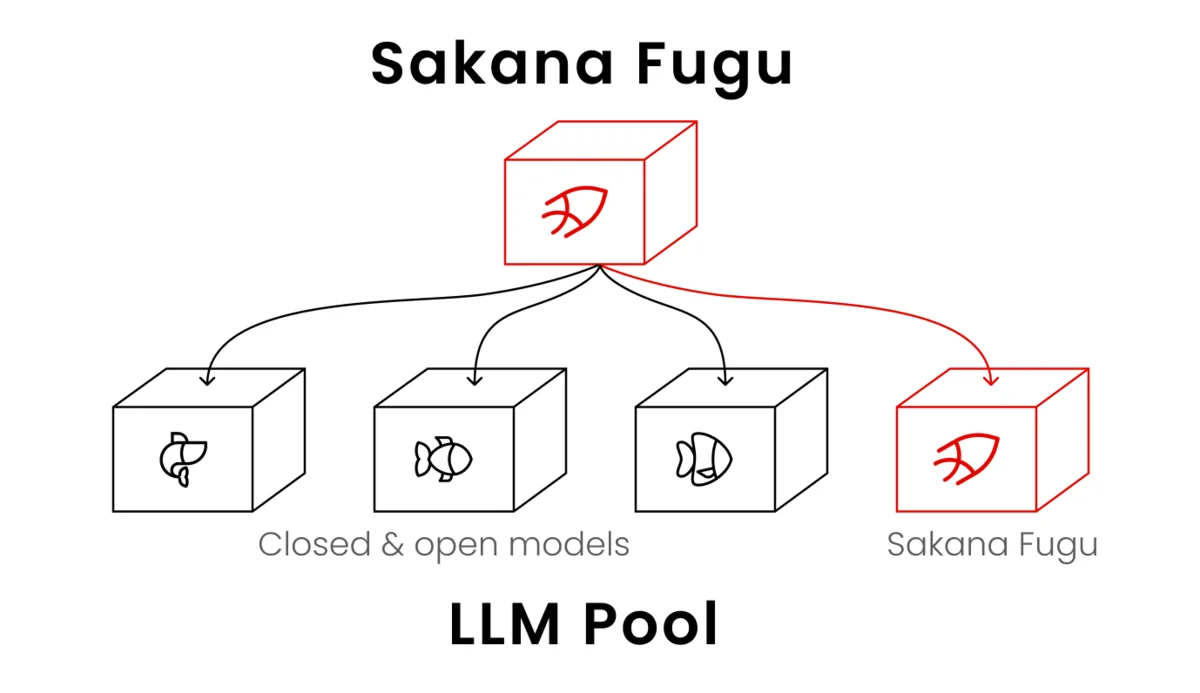
Image source: Sakana AI, "Sakana Fugu" official page. All figures in this article are quoted from Sakana AI's official site.
On June 22, 2026, Sakana AI made Fugu generally available — an AI platform that dynamically orchestrates multiple large language models (LLMs) and exposes them through a single API. Rather than relying on one frontier model, it conducts several of the world's leading models internally and behaves as though it were a single model.
This article walks through the concrete steps from issuing an API key to your first request, how to drive Codex and Claude Code with Fugu, how to choose between Fugu, Fugu Ultra, and Fugu Cyber, what it costs and whether a free tier exists, and how it performs on benchmarks — all based on the official documentation.
What is Sakana Fugu?
Sakana Fugu is a multi-agent orchestration platform built by Sakana AI. To the user it is a single API — an OpenAI-compatible one at that — but internally it calls specialized models (agents) dynamically according to the task, handling delegation, verification, and integration automatically.
- Used like a single model: model selection and delegation are handled internally, so none of that complexity reaches the caller.
- Dynamically bundles models: it selects the best model from a pool of agents, and may recursively invoke Fugu itself when needed.
- Avoids vendor lock-in: if one provider restricts access, it reroutes to another model and continues.
- Stable persona across long sessions: it maintains consistent responses and persona through extended exchanges.
Fugu reached general availability on June 22, 2026, following a beta with roughly 500 early users. Today the lineup centers on Fugu, with purpose-built models available under the same API key.
How to use Fugu: from API key to first request
Everything starts at console.sakana.ai. Issue an API key there, then simply repoint your OpenAI-compatible client.
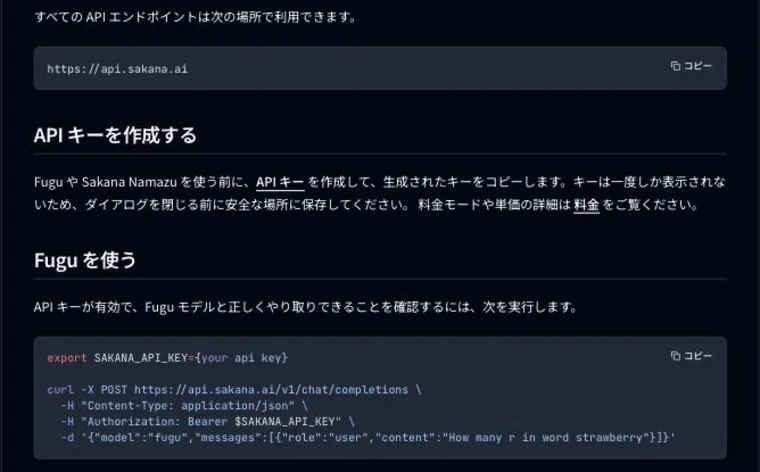
Source: Sakana AI Console, "Get started"
1. Create an API key
Log in to the console and create an API key. The generated key is shown only once, so copy and store it before closing the dialog. You also choose the billing mode (subscription or pay-as-you-go) per key at this point.
Enabling Fugu custom model pool when creating the key lets you narrow which providers Fugu routes to. If data handling or compliance requirements rule out certain providers, exclude them here. Leave it off to use the default pool.
2. Verify connectivity with curl
All API endpoints live at https://api.sakana.ai. Start with a connectivity check.
export SAKANA_API_KEY={your api key}

curl -X POST https://api.sakana.ai/v1/chat/completions \
  -H "Content-Type: application/json" \
  -H "Authorization: Bearer $SAKANA_API_KEY" \
  -d '{"model":"fugu","messages":[{"role":"user","content":"How many r in word strawberry"}]}'
3. Call it from the OpenAI SDK
Fugu supports the standard OpenAI SDK interface, so swapping base_url is enough to reuse existing code. For generation requests, the vendor strongly recommends the Responses API for better performance.
from openai import OpenAI

client = OpenAI(
    base_url="https://api.sakana.ai/v1",
    api_key="YOUR_API_KEY",
)

response = client.responses.create(
    model="fugu-ultra",
    input="Write a concise explanation of how TLS works",
    timeout=120.0,
)

print(response.output_text)
Supported endpoints are the OpenAI-compatible Chat Completions API, Responses API, and Models API, plus the Anthropic-compatible Messages API.
Set generous timeouts. Because Fugu coordinates several models internally, a single request takes longer than it would against one model. The documentation warns that complex tasks — especially with fugu-ultra and fugu-cyber — may require extending the client-side timeout. That is why the example above passes timeout=120.0.
4. Control reasoning effort
Fugu exposes a reasoning.effort parameter to control how deeply it thinks. The accepted values differ by model.
| Model | Accepted effort | Default (Responses API) |
|---|---|---|
fugu-ultra (= v1.1) | high / xhigh / max | xhigh |
fugu | high / xhigh (max maps to xhigh) | high |
fugu-ultra-v1.0 / fugu-cyber | high / xhigh (max maps to xhigh) | — |
max functions as a distinct maximum level only on fugu-ultra-v1.1, reserved for the hardest problems. Any other value is rejected.
Note that temperature, top_p, stop, and seed are accepted but ignored. previous_response_id is not accepted at all, so the full conversation history must be sent in input on every turn.
5. Use built-in tools such as web search
The Responses API supports OpenAI-compatible built-in tools. Just add web_search to the tools array.
response = client.responses.create(
    model="fugu",
    tools=[{"type": "web_search"}],
    input="Search the web for today's top AI news and summarize it with citations.",
)
Driving Codex and Claude Code with Fugu
The most practically significant capability is that you can swap the engine behind a coding agent for Fugu. Official instructions exist for two: Codex CLI and Claude Code.
One-line installation
The simplest route is the official installer (Ubuntu and macOS).
curl -fsSL https://sakana.ai/fugu/install | bash
After installing, start each tool through its dedicated launcher.
codex-fugu   # start Codex on Fugu
claude-fugu  # start Claude Code on Fugu
On Windows, or where the installer does not complete, set it up manually instead.
Configuring Claude Code manually
You can point Claude Code at Fugu with environment variables alone, without the launcher. Note that you use ANTHROPIC_AUTH_TOKEN, not ANTHROPIC_API_KEY.
export ANTHROPIC_BASE_URL="https://api.sakana.ai"
export ANTHROPIC_AUTH_TOKEN="fish_..."            # your Sakana API key
export ANTHROPIC_DEFAULT_OPUS_MODEL="fugu-ultra[1m]"
export ANTHROPIC_DEFAULT_SONNET_MODEL="fugu[1m]"
export ANTHROPIC_DEFAULT_HAIKU_MODEL="fugu[1m]"
export CLAUDE_CODE_SUBAGENT_MODEL="fugu[1m]"

claude
The Opus tier maps to fugu-ultra[1m], and Sonnet and Haiku both map to fugu[1m]. The settings apply only to the current shell session.
Expect cosmetic quirks. Claude Code is closed source, so Fugu can only steer it through the documented ANTHROPIC_* variables and a server-side gateway. As a result the effort slider shows six levels while Fugu collapses them onto two real ones (high and xhigh), and the model picker displays two identical rows because Sonnet and Haiku both resolve to fugu[1m]. Per the documentation these are purely display issues — the actual responses, streaming, tool use, and subagents all behave as configured.
Can you use it from Cursor or other tools?
Official instructions cover only Codex and Claude Code, but because Fugu is served as an OpenAI-compatible API, any tool that lets you set an arbitrary base URL and API key can connect the same way — Cursor's custom OpenAI-compatible model registration being the obvious case. There is no official support statement or setup guide for it, so treat it accordingly.
The model lineup and when to use each
The same API key gives you access to all of the following.
| Model ID | Position | Billing |
|---|---|---|
fugu | Balanced performance and latency, for everyday work | Subscription / pay-as-you-go |
fugu-ultra | Maximizes answer quality; defaults to v1.1 | Subscription / pay-as-you-go |
fugu-ultra-v1.0 | The previous version (also called fugu-ultra-20260615) | Subscription / pay-as-you-go |
fugu-cyber | Cybersecurity specialist; defaults to v1.0 | Pay-as-you-go only, by application |
sakana-namazu | Japanese-specialized LLM with built-in web search and code execution | Pay-as-you-go only |
Fugu suits embedding into tools like Codex for coding and code review, or running a responsive chatbot. Fugu Ultra coordinates a broader pool of specialist agents to maximize answer quality on hard, high-stakes problems — Kaggle competitions, paper reproduction, cybersecurity analysis, literature and patent research.
Fugu Cyber targets workflows where depth and precision matter: security analysis, vulnerability research, threat detection. Access requires submitting an application form stating your intended use and verifiable contact information, which Sakana AI reviews and approves manually. The vendor reports success rates of 86.9% on CyberGym and 72.1% on CTI-REALM, calling it comparable to leading security-specialized frontier models such as GPT-5.5-Cyber and Mythos-Preview.
Sakana Namazu is a separate line: an LLM specialized for Japanese, with web search and code execution as built-in tools. It also supports image input, file input (PDF, XLSX, CSV, DOCX and more), and extended thinking. It is excluded from the subscription plans and available on pay-as-you-go only.
Fugu pricing: is there a free tier?
The short answer first: Fugu has no free tier — no free trial and no starter credits. Using it requires either a subscription plan or buying tokens on pay-as-you-go.
Subscription plans
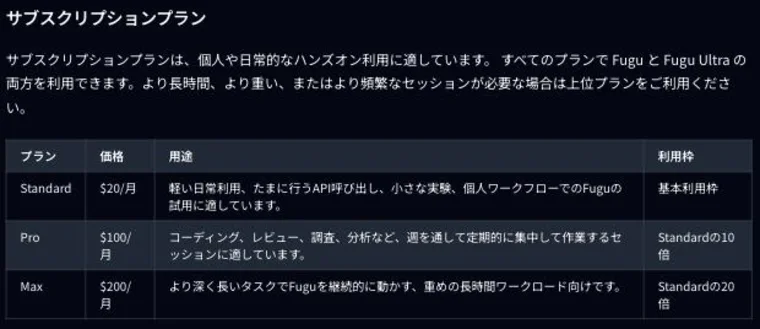
Source: Sakana AI Console, "Pricing"
| Plan | Monthly | Allowance | Intended use |
|---|---|---|---|
| Standard | $20 | Base allowance | Light daily use, occasional API calls, small experiments |
| Pro | $100 | 10x Standard | Regular focused sessions throughout the week |
| Max | $200 | 20x Standard | Running heavy, long-duration workloads continuously |
Every plan includes both Fugu and Fugu Ultra. The plans do not differ in which models you can reach — only in the size of the allowance.
Pay-as-you-go (Fugu Ultra)
Fixed rates for fugu-ultra-v1.1 and fugu-ultra-v1.0, per million tokens.
| Token type | Standard rate | Context > 272K |
|---|---|---|
| Input | $5 | $10 |
| Output | $30 | $45 |
| Cached input | $0.50 | $1.00 |
fugu-cyber-v1.0 pricing is not published on the official pricing page as of August 2026; it is handled as a sales inquiry (it was listed previously). sakana-namazu-v1.0 is far cheaper at $0.95 input, $4.00 output, and $0.15 cached input, with web search billed separately at $7.00 per 1,000 calls and code execution at $0.12 per hour.
Multiple agents do not stack the bill. With one agent you pay only the normal rate of its underlying model; when several agents are involved, model charges are not stacked — you pay a single rate based on the highest-tier model that participated. That said, Fugu Ultra also returns orchestration tokens in fields such as orchestration_input_tokens, and those do count toward the final price, at the same rate as ordinary input and output tokens.
Also worth knowing: tokens purchased on pay-as-you-go are processed at higher priority than monthly-plan tokens. Pay-as-you-go is recommended for production workloads where reliability matters.
Fugu benchmark performance
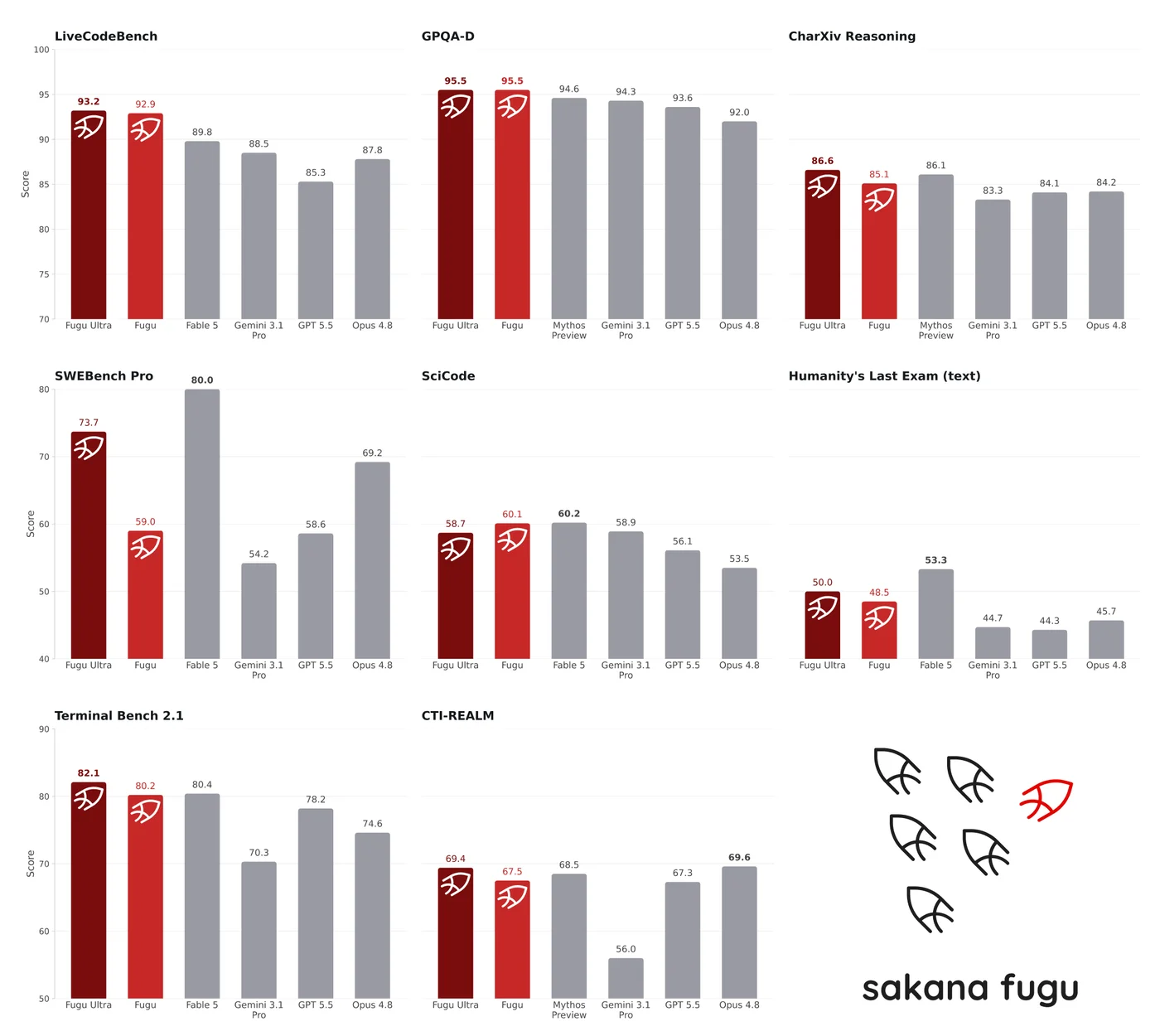
The table below is the official benchmark comparison of Fugu / Fugu Ultra against Opus 4.8, Gemini 3.1 Pro, and GPT 5.5. Fugu's scores are from the v1.0 models.
| Benchmark | Domain | Fugu | Fugu Ultra | Opus 4.8 | Gemini 3.1 Pro | GPT 5.5 |
|---|---|---|---|---|---|---|
| SWE Bench Pro | Agentic coding | 59.0 | 73.7 | 69.2 | 54.2 | 58.6 |
| TerminalBench 2.1 | Agentic coding | 80.2 | 82.1 | 74.6 | 70.3 | 78.2 |
| LiveCodeBench | Coding | 92.9 | 93.2 | 87.8 | 88.5 | 85.3 |
| LiveCodeBench Pro | Coding | 87.8 | 90.8 | 84.8 | 82.9 | 88.4 |
| Humanity's Last Exam | Cross-domain reasoning | 47.2 | 50.0 | 49.8 | 44.4 | 41.4 |
| CharXiv Reasoning | Chart reasoning | 85.1 | 86.6 | 84.2 | 83.3 | 84.1 |
| GPQA-D | Science | 95.5 | 95.5 | 92.0 | 94.3 | 93.6 |
| SciCode | Scientific coding | 60.1 | 58.7 | 53.5 | 58.9 | 56.1 |
| τ³ Banking | Financial agents | 21.7 | 20.6 | 20.6 | 8.4 | 20.6 |
| Long Context Reasoning | Long-context reasoning | 74.7 | 73.3 | 67.7 | 72.7 | 74.3 |
| MRCRv2 | Long-context retrieval | 86.6 | 93.6 | 87.9 | 84.9 | 94.8 |
| CTI-REALM | Threat intelligence | 67.5 | 69.4 | 69.6 | 56.0 | 67.3 |
It posts top scores on many items, including GPQA-D (95.5) and LiveCodeBench (93.2), and on SWE Bench Pro Fugu Ultra's 73.7 exceeds Opus 4.8's 69.2. What stands out is that an approach built on bundling models matches or beats single frontier models.
Table source: Sakana AI Console, "Models"
How Fugu works (multi-agent orchestration)
As the opening diagram shows, Fugu conducts a pool of LLMs — closed and open models, plus Fugu itself — and routes each task to the best-suited model. At its core are two papers Sakana AI presented at ICLR 2026.
- Trinity: a lightweight, evolutionarily optimized "coordinator" directs multiple LLMs across several turns, assigning roles such as Thinker, Worker, and Verifier and delegating adaptively by task.
- Conductor: trained with reinforcement learning, it discovers coordination strategies in natural language on its own, learning non-obvious but efficient patterns rather than relying on hand-designed workflows.
Fugu itself is a language model specialized in understanding when to delegate and how to combine specialist outputs.
Related research: Sakana Fugu technical report (arXiv:2606.21228), Trinity (arXiv:2512.04695, ICLR 2026), Conductor (arXiv:2512.04388, ICLR 2026)
Why Fugu matters right now
Fugu's timing reflects the fact that the supply of frontier models has begun to face geopolitical risk. Anthropic's latest models, Fable 5 and Mythos 5, were abruptly cut off in June 2026 by US export-control direction (see the Claude Fable 5 article for details).
Fugu positions itself as a practical answer to that single-vendor dependency risk. Because the design bundles multiple models, it can reconfigure the agent pool and hold frontier-class performance even when one provider becomes unavailable — the idea Sakana frames as "AI sovereignty."
Real use cases and user feedback
During the beta, Fugu was applied to automated data science research, paper reproduction, cybersecurity analysis, code review, and patent and literature searches. A few officially published comments:
- Code review: "In code review, Fugu Ultra was clearly better than GPT-5.5. Where a competitor found only three issues, Fugu flagged more than twenty." (software engineer)
- Stability over long sessions: "Output quality matched the top frontier models. On top of that, the persona stayed remarkably stable across long sessions." (head of an enterprise platform)
- Security assessment: "From a single scope instruction, Fugu ran a security assessment end to end — reconnaissance, XSS/SQLi checks, authentication review, and report writing." (security engineer)
Other reports have it outperforming Gemini 3.1 Pro, Opus 4.8, and GPT 5.5 on multi-step hard tasks including generating a Rubik's Cube solver, mechanical CAD design, blindfold chess at expert level, and stock trading analysis (achieving an average return of +19.43%).
You can also see an overview of Sakana Fugu on the card below.

Things to be aware of
- Regional availability: while work continues toward GDPR and EU-specific compliance, service is not provided to users in EU or EEA member states.
- Model update cadence: when a new frontier model is released publicly, Sakana expects to spend roughly two weeks training and evaluating updated Fugu models before rolling them out.
- Fugu Cyber is gated: you must submit an application form with your intended use and verifiable contact details and pass a manual review.
- Send the whole history every turn:
previous_response_idis not supported, so multi-turn conversations require including the full history ininput.
Frequently asked questions about Sakana Fugu
Does Sakana Fugu have a free tier?
No. Using it requires either a subscription plan (Standard $20 / Pro $100 / Max $200 per month) or buying tokens on pay-as-you-go. If you only want to try it, the $20 Standard plan is the cheapest entry point.
Is Sakana Fugu a single model?
From the user's perspective it behaves as one API and one model, but internally it is a multi-agent platform that dynamically bundles and coordinates multiple specialist LLMs.
How do Fugu and Fugu Ultra differ?
Fugu balances performance and latency for everyday work; Fugu Ultra coordinates a broader pool of specialist agents to maximize answer quality on hard problems. Both are available on every subscription plan. Reasoning depth differs too: only fugu-ultra-v1.1 accepts max as a distinct maximum level.
Which model ID should I specify?
Use fugu for everyday work and fugu-ultra (v1.1 by default) for hard problems. To pin the older version, specify fugu-ultra-v1.0 (also known as fugu-ultra-20260615). There is also the security-focused fugu-cyber and the Japanese-specialized sakana-namazu.
Can I use it from Cursor or Claude Code?
Claude Code is officially supported: install with curl -fsSL https://sakana.ai/fugu/install | bash and launch with claude-fugu. Codex works the same way via codex-fugu. There is no official procedure for Cursor, but since Fugu is an OpenAI-compatible API, any tool that lets you set the base URL (https://api.sakana.ai/v1) and an API key can connect on the same principle.
Which APIs is Fugu compatible with?
The OpenAI-compatible Chat Completions API, Responses API, and Models API, plus the Anthropic-compatible Messages API. For generation requests the vendor strongly recommends the Responses API on performance grounds.
Does running multiple agents cost more?
Model charges are not stacked; you pay a single rate based on the highest-tier model involved. That said, on Fugu Ultra the tokens spent on orchestration are included in usage and count toward the final price, at the same rate as ordinary input and output tokens.
Is it available in Japan?
Yes. The only exclusion is users in EU and EEA member states; there are no restrictions on use from Japan.
Summary
- Sakana Fugu is a multi-agent platform that dynamically bundles multiple LLMs behind a single OpenAI-compatible API (generally available since June 22, 2026)
- To use it, create an API key at console.sakana.ai and repoint
base_urltohttps://api.sakana.ai/v1. Codex and Claude Code are covered by a one-line installer - The models are
fugu,fugu-ultra,fugu-cyber(by application), and the Japanese-specializedsakana-namazu— all under the same API key - There is no free tier; choose a subscription ($20 / $100 / $200) or pay-as-you-go (Fugu Ultra at $5 input and $30 output per million tokens). Max's allowance is 20x Standard
- Built on the Trinity and Conductor research (ICLR 2026), it matches or beats single frontier models with SWE Bench Pro 73.7, GPQA-D 95.5, and LiveCodeBench 93.2
Fugu's approach of bundling models is a genuinely new idea — worth putting to work in your own products and workflows.
AI tools featured in this article


Related articles
What Is Cloudflare OS? A Deep Dive into the Open-Source AI Agent Workspace (Architecture, Gatekeepers, Self-Hosting, Pricing)
Cloudflare open-sourced Cloudflare OS, an AI agent workspace, on August 5, 2026. This article covers its zero-permission Gatekeeper security, model selection and cost control via AI Gateway, Gadgets (small personal apps), how to deploy it into your own Cloudflare account, and pricing — based on the official blog and GitHub.
What Jev Is [September 2026]: The AI That Generates No Text — How System One Models Work, Pricing and Use Cases
On 15 September 2026, TypeSafe AI came out of two years of stealth with $40M in funding and shipped Jev — and it spread past social media into developer communities, with Qiita running an official campaign from 16 September to 2 October. What caught on was not the benchmarks but the positioning: an AI that does not generate text. Jev does not chat; it picks from options you defined and returns the answer with a probability attached. This article covers what the three question types (Choice, Score, Noul) actually return, the speculative fan-out that makes stacking questions free in latency, the pricing model of $0.042 per million input tokens with output free, the path from waitlist to Python SDK, HTTP API and the Claude Code skill, how to gate on confidence and route the uncertain cases to a person, and where it pays off — support triage, LLM guardrails, RAG re-ranking. It also covers what TypeSafe publishes about its own weak spots: lower accuracy on CJK scripts, unreliable counting, and weak date comparison.
![What Jev Is [September 2026]: The AI That Generates No Text — How System One Models Work, Pricing and Use Cases](/_next/image?url=%2Fimages%2Farticles%2Fjev-typesafe-ai-guide.png&w=3840&q=75 "What Jev Is [September 2026]: The AI That Generates No Text — How System One Models Work, Pricing and Use Cases")
What GPT-6 Astra Is [September 2026]: Which ChatGPT Plans Include It, API Pricing, and How to Split Work with GPT-5.6
GPT-6 Astra, announced by OpenAI on 3 September 2026 (US time), is a flagship tuned for computer use and long, multi-step work, true to the pitch that it "can do anything a person can do on a computer." It scores 72.6% on OSWorld 2.0, and time per task drops 47% from GPT-5.6 Sol's roughly 75 minutes to roughly 40. This article checks what changed against the benchmarks, then lays out where each ChatGPT plan can use it (Pro at ¥16,800 / ¥30,000, Business and Enterprise get "GPT-6 Pro" in Chat; Plus at ¥3,000 gets it through ChatGPT Work and Codex; Free and Go do not), the caps such as 50 or 200 messages a week, API pricing ($10 input / $50 output, 2.5x Sol) and how to split work with Sol, Terra and Luna, and the behaviour changes on switching (more clarifying questions, more sensitivity to skill files), based on OpenAI's announcement, Help Center and model page.
![What GPT-6 Astra Is [September 2026]: Which ChatGPT Plans Include It, API Pricing, and How to Split Work with GPT-5.6](/_next/image?url=%2Fimages%2Farticles%2Fgpt-6-astra-guide.png&w=3840&q=75 "What GPT-6 Astra Is [September 2026]: Which ChatGPT Plans Include It, API Pricing, and How to Split Work with GPT-5.6")
Claude Fable 5 vs. GPT-5.5 vs. Gemini 3.1 Pro: Which Should You Choose? A Deep Dive into Performance, Pricing, and Use Cases [July 2026]
A thorough comparison of the latest flagship models from the industry's three leading AI labs, all released in the first half of 2026: Claude Fable 5, GPT-5.5, and Gemini 3.1 Pro. Covers benchmark performance, API pricing, context windows, multimodal support, and how to use them on consumer plans like ChatGPT Plus, Claude Pro, and Google AI Pro — with recommendations by use case, based primarily on official data.
![Claude Fable 5 vs. GPT-5.5 vs. Gemini 3.1 Pro: Which Should You Choose? A Deep Dive into Performance, Pricing, and Use Cases [July 2026]](/_next/image?url=%2Fimages%2Farticles%2Fai-model-compare-claude-fable-5-gpt-5-5-gemini-3-1.png&w=3840&q=75 "Claude Fable 5 vs. GPT-5.5 vs. Gemini 3.1 Pro: Which Should You Choose? A Deep Dive into Performance, Pricing, and Use Cases [July 2026]")
What Is Claude Fable 5 | A Deep Dive into Anthropic's Latest Frontier Model: Performance, Pricing, and How to Use It
A comprehensive look at Claude Fable 5, Anthropic's latest model released in June 2026. Covers benchmark performance in coding, knowledge work, and science, how it compares to Mythos 5, API pricing, and usage guidance — all backed by official data.

[2026 Latest] 16 AI Tools to Maximize Sales Performance | Dramatically Improving Meeting, Proposal, and Call Efficiency
A curated look at the AI tools getting attention in sales today. Covers the latest AI for every workflow challenge — from lead generation and proposal decks to meeting note creation.
![[2026 Latest] 16 AI Tools to Maximize Sales Performance | Dramatically Improving Meeting, Proposal, and Call Efficiency](/_next/image?url=%2Fimages%2Farticles%2Fai-sales-tools-recommendation.png&w=3840&q=75 "[2026 Latest] 16 AI Tools to Maximize Sales Performance | Dramatically Improving Meeting, Proposal, and Call Efficiency")