

AI文章チェッカー
: How to use it, features, and the business problems it solves
What is AI文章チェッカー?
AI文章チェッカー (aihantei.com) is an AI text detection tool for Japanese: paste in a text and it shows the likelihood that generative AI wrote it as a percentage, with a confidence level (low, medium, high). It combines style statistics such as variation in sentence length and conjunction frequency with per-sentence evaluation by an external AI model (Anthropic's Claude), and members get highlights of AI-like sentences and improvement points for each one. Every result screen notes that the result is an estimate and cannot prove who wrote a text, and the body text you enter is not stored. Pricing: Free (3 checks a day up to 2,000 characters; one trial without login), Standard ¥480/month (30 checks a day, 5,000 characters, 7-day free trial for first-timers), Pro ¥980/month (50 checks a day, 10,000 characters), tax included. Run solo by an international student developer living in Japan (SIN JISEOP); launched in October 2026 (as of November 2026).
Business problems it solves

About "AI文章チェッカー"
What is AI文章チェッカー
AI文章チェッカー (AI Text Checker, aihantei.com) is an AI text detection tool for Japanese: paste in a text and it shows, as a percentage, how likely it is that generative AI wrote it. It is used for self-checks before submitting or publishing reports, job application essays (entry sheets) and blog posts, and by readers who want to check a text. It is developed and run by an individual — an international student developer living in Japan — and was launched in October 2026.
The operator's page notes that many AI detectors made overseas are built for English and may not handle how Japanese sentences break or Japanese writing style well. AI文章チェッカー is designed around Japanese sentence boundaries, sentence endings and conjunctions.
Source: AI文章チェッカー official website (the same applies to the images below)
How to use
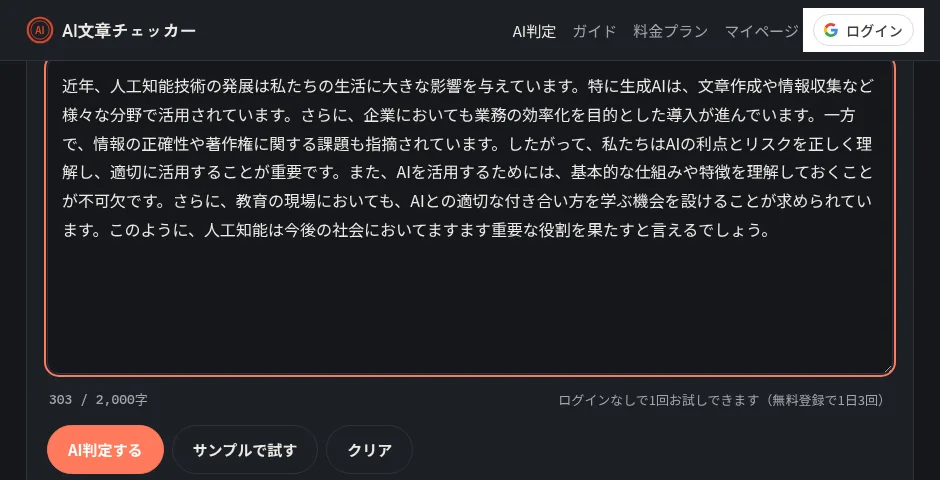
- Paste your text Enter at least 150 characters (two or more sentences) in the box on the top page and press "AI判定する" (Check with AI). The first check works without logging in. Around 300 characters or more is recommended so there is enough to judge.
- Check the result The likelihood of AI generation (%) and the confidence of the judgment (low, medium, high) are shown. On the free tier, you see the percentage and the single "most AI-like sentence".
- Register for free to keep using it Sign up with one button using a Google account; no password needed. Free members can run 3 checks a day, up to 2,000 characters each.
- Choose a member plan to fix sentence by sentence Standard and Pro show highlights of how AI-like every sentence is, improvement points for each sentence, and your check history.
Two methods combined
The overall score (%) and per-sentence highlights come from combining two methods.
When the AI model is temporarily unavailable, the screen says the result is a simplified check based on style statistics only. As AI-like traits, the official site lists uniform sentence length and rhythm, many connective phrases, generalities with few concrete experiences, and ending with "〜と言えるでしょう" ("it can be said that…"); as human-like traits, a mix of short and long sentences, colloquial or idiosyncratic phrasing, and concrete details such as dates, places and feelings.
Depending on the percentage, below 35% is shown as "likely written by a human", 35–65% as "a mix of AI and human traits", and above 65% as "likely generated by AI" (per the official guide on reading results).
Results are estimates, not proof of who wrote a text
The official site is explicit about how to treat results:
- AI detection is a probabilistic estimate; a result alone cannot prove that someone used AI
- Well-formed texts such as explanations and official documents can look AI-like even when a person wrote them
- Texts by non-native Japanese writers, or texts where AI only fixed typos, can also score high
- In schools and workplaces, combine it with other methods such as asking the writer or seeing drafts
The operator's page says the tool is tuned to err on the conservative side to avoid such false positives, and that the same caution appears on every result screen. There is also a guide article for teachers on checking AI use in reports fairly.
Improvement points for people rewriting their own text
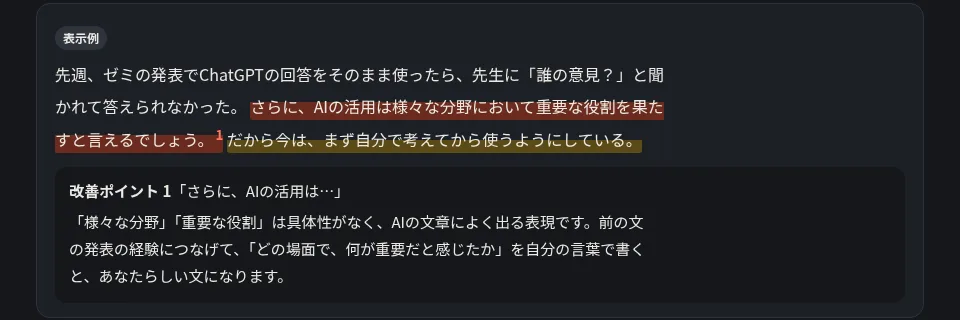
On member plans, each sentence judged AI-like comes with why it looks that way and how to rewrite it in your own words. In the example on the pricing page, for the sentence "さらに、AIの活用は様々な分野において重要な役割を果たすと言えるでしょう。" ("Furthermore, it can be said that the use of AI plays an important role in various fields"), the improvement point says that "various fields" and "important role" are vague phrases common in AI writing, and suggests linking it to the presentation experience in the previous sentence and writing it in your own words.
The site has 19 guide articles (as of November 2026), on topics such as how to disclose AI use in a report, what to watch for in graduation theses and entry sheets, and the causes of and fixes for false positives. According to the operator's page, factual content is checked against primary sources such as public bodies and universities, and the site does not publish content that helps cheating, such as "how to reliably get past AI detection".
Features
01Detection
Shows how AI-like a pasted text is, as a number.
- Likelihood of AI generation — an overall score (%) and a three-level verdict
- Confidence — low, medium or high, depending on how much there is to judge
- English texts — designed mainly for Japanese, but English can be checked too (reasons are shown in Japanese)
02For members
Check and fix sentence by sentence.
- Per-sentence highlights — every sentence color-coded by how AI-like it is
- Improvement points and reasons — why each sentence looks AI-like and how to fix it
- Check history — date, character count and score of past checks
- No ads — the ads shown on the free plan are removed
Pricing
| Plan | Monthly (tax incl.) | Checks per day | Characters per check | Main contents |
|---|---|---|---|---|
| Free | ¥0 | 3 | 2,000 | Percentage and the single most AI-like sentence. No history, with ads |
| Standard | ¥480 | 30 | 5,000 | Per-sentence highlights, improvement points, reasons, check history, no ads. 7-day free trial for first-timers |
| Pro | ¥980 | 50 | 10,000 | Same features as Standard with higher limits |
- You can try one check without logging in
- The Standard 7-day free trial is once per person. A credit card is required, and the first fee is charged the day after the trial ends. Cancel from My Page during the trial and you pay nothing
- Member plans renew monthly. Payment is by credit card (Stripe); you can cancel or switch plans from My Page at any time. Paid fees are not refunded pro rata
(As of November 2026, per the official pricing page and the Specified Commercial Transactions Act notice)
How your text is handled
According to the official site, the body of the text you enter is not stored. It is sent to an AI analysis service for the check and discarded after the result is returned; only the date, character count and score are kept in your history.
Running costs (servers and AI model fees) are covered by ads on the free plan (Google AdSense) and member plan revenue, and the site says results do not change depending on ads or membership.
How it differs from other AI text detection tools
| Product | Type | Role of AI text detection |
|---|---|---|
| AI文章チェッカー | An AI text detector specialized for Japanese | Detection is the main feature; mainly Japanese (English also possible), with per-sentence improvement points |
| Quillbot | A writing tool built around paraphrasing | One feature alongside paraphrasing, grammar checking and plagiarism checking |
| Grammarly | An AI writing assistant for English | One feature alongside proofreading (mainly English) and rewriting |
Details for the other products are as of the check dates stated on their product pages.
Unlike tools where detection is one feature among writing and proofreading tools, AI文章チェッカー focuses on detection and on rewriting flagged sentences in your own words. It suits people who want to check Japanese texts and read the reasons in Japanese.
FAQ
Q. Can I use AI文章チェッカー for free? Yes. You can try one check without logging in, and with free registration via a Google account you get 3 checks a day, up to 2,000 characters each. The free tier shows the percentage and the single most AI-like sentence.
Q. Can it check texts written with ChatGPT, Claude or Gemini? According to the official site, it is not limited to specific services; it judges based on traits common in generative AI writing (uniform rhythm, formulaic connectives, lack of concrete detail, and so on).
Q. Is it 100% accurate? No. The official site itself says AI detection is only an estimate: careful human writing may be judged as AI, and edited AI writing may be judged as human. It asks users not to conclude that someone cheated based on the result alone.
Q. Is the text I enter stored? The body text is not stored. It is sent to an AI analysis service for the check and discarded after the result is returned; only the date, character count and score remain in your history.
Who makes it
AI文章チェッカー is run by an individual, SIN JISEOP. According to the operator's page, it is developed and run solo by an international student developer living in Japan. The Specified Commercial Transactions Act notice names SIN JISEOP as both seller and operations manager, and says the address and phone number are disclosed without delay upon request. The contact address is contact@aihantei.com.
The information on this page is based on what was published on the official website, pricing page, operator page, guide articles and Specified Commercial Transactions Act notice as of November 2026. Features and prices may change, so please check the official website for the latest information.