
Quillbot
: How to use it, features, and the business problems it solves
Add bookmark
What is Quillbot?
An AI writing assistant from Learneo, Inc. (US) built around AI paraphrasing (formerly styled QuillBot). It combines nine paraphrasing modes plus Custom modes, grammar checking, AI content detection, a Humanizer, plagiarism checking, summarizing, translation and citation generation, and also works through browser extensions, a Word add-in and mobile apps. Paraphrasing and translation support Japanese (grammar checking does not, and the interface is in English). Free plan available; Premium is $19.95/month or $99.95/year.
Business problems it solves


About "Quillbot"
What is Quillbot?
Quillbot (formerly styled QuillBot) is an AI writing assistant operated by Learneo, Inc. in the United States. Its flagship feature is paraphrasing—rewriting text in different words without changing its meaning—and it bundles grammar checking, AI content detection, a Humanizer that makes AI-sounding text more natural, plagiarism checking, summarizing, translation and citation generation in one place.
It was born in 2017 as a tool to help non-native English students with their writing, and according to the official site more than 35 million people (35+ M) use it every month. Its main users write English papers, reports, emails and blog posts, and the paraphrasing and translation features also support Japanese text.
(6M+ users)
Figures as stated on the official site (About page and home page), checked October 2026
How to use
- Open a tool From the left menu on quillbot.com, choose a tool such as Paraphraser or Grammar Checker. Paraphrasing and grammar checking can be tried without creating an account.
- Enter your text Paste or type text into the input box. The Paraphraser also lets you upload a document. The language is detected automatically.
- Choose a mode and how much to change For paraphrasing, pick a mode such as Standard, Fluency or Formal from the tabs at the top, and adjust how many words get replaced with the Synonyms slider. Moving it left keeps the output closer to the original; moving it right produces bolder rewrites.
- Polish the result Click any word in the output to see synonym suggestions and swap in the one that fits the context. Words you don't want changed can be locked with Freeze Words.
- Use it in your usual editor With a browser extension such as Chrome or the Word add-in, you can paraphrase and check grammar directly in text fields on websites and in Word.
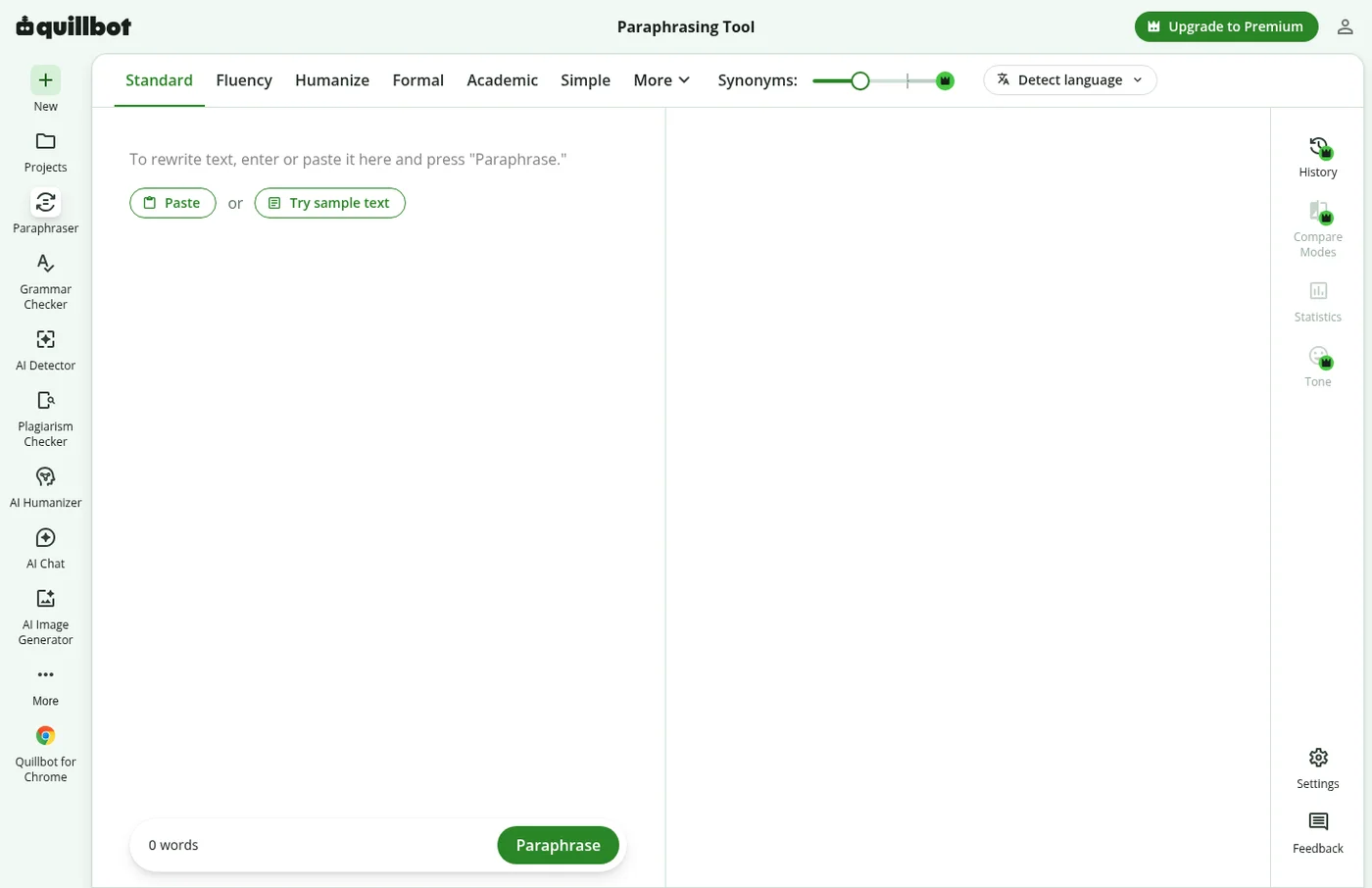
Source: Quillbot official website (the same applies to the screen images below)
Rewrite the same sentence nine ways for different purposes
Quillbot's Paraphraser works like a "full-sentence thesaurus." It doesn't just swap words; it reorders words and restructures sentences to produce a different sentence with the same meaning.
There are nine predefined modes. The free plan includes two; Premium unlocks all of them plus unlimited Custom modes, which you create by writing your own description.
| Mode | What it does | Plan |
|---|---|---|
| Standard | Rewrites with new vocabulary and word order | Free |
| Fluency | Improves clarity and readability | Free |
| Formal | Makes text more sophisticated and formal | Premium |
| Academic | Uses a technical, scholarly style | Premium |
| Simple | Presents text in an easy-to-understand way | Premium |
| Creative | Rephrases in an original, inventive way | Premium |
| Expand | Makes text longer | Premium |
| Shorten | Makes text concise while keeping the meaning | Premium |
| Humanize | Rewrites text to sound more human and natural | Premium |
| Custom | Rewrites text to match a description you write | Premium |
Premium also includes Compare Modes, which shows one sentence rewritten in several modes side by side, and a history of past paraphrases. Paraphrasing supports more than 20 languages including Japanese, and English can be set to US, UK, Canadian or Australian conventions.
Features
01Rewrite
Features that change or refine the wording of your original text.
- Paraphraser — Paraphrase with nine modes plus Custom modes, with a synonyms slider, synonym suggestions and Freeze Words
- AI Humanizer — Rewrites AI-generated text so it sounds natural and human-written
- Translator — Translates between 40+ languages including Japanese
- Summarizer — Condenses long text. Custom summaries are a Premium feature
02Fix mistakes
Features for checking errors and how your writing comes across before you submit or send it.
- Grammar Checker — Detects grammar, spelling and punctuation errors. Supports English plus German, Spanish, French and more (Japanese is not supported). Premium adds advanced suggestions such as removing passive voice and rewriting for clarity
- Tone insights — Analyzes how readers will perceive your writing (Premium)
03Check originality
Features that help students and writers confirm their work is their own before submitting.
- AI Detector — Identifies whether text was generated by AI. Supports 20+ languages. There is also an AI Image Detector for AI-generated images
- Plagiarism Checker — Detects overlap with existing text and missed citations (up to 25,000 words/month on Premium)
- Citation Generator — Creates reference lists in formats such as APA, MLA and Chicago
04Create
Since 2025, Quillbot has added more tools for creating from scratch, not just refining text.
- AI Chat — Brainstorming, drafting and answering questions, with a seamless move into Docs or Designs
- AI Image Generator / Presentation Creator — Create images and slides from text
- PDF tools — Ask questions about PDFs (ChatPDF), edit, merge, split, convert and more
Pricing
There is a free plan, the paid Premium plan and a Team Plan for organizations. Premium's monthly cost varies greatly depending on the billing cycle.
| Plan | Price (USD) | What's included |
|---|---|---|
| Free | $0 | Paraphrasing (up to 125 words at a time, two modes: Standard and Fluency), basic grammar fixes, Humanizer (up to 125 words, limited usage), summaries (up to 1,200 words), AI Detector (limited) |
| Premium (monthly) | $19.95/month | Unlimited paraphrasing with all modes and Custom modes, advanced grammar suggestions, unlimited Humanizer, 6,000-word and custom summaries, full AI Detector, plagiarism checking up to 25,000 words/month |
| Premium (semi-annual) | $79.95 per 6 months ($13.33/month) | Same as above |
| Premium (annual) | $99.95/year ($8.33/month) | Same as above |
| Team Plan | Depends on team size (discount for 5+ members; contact sales for details) | All Premium features plus team usage metrics, user management, centralized billing, data control and priority support |
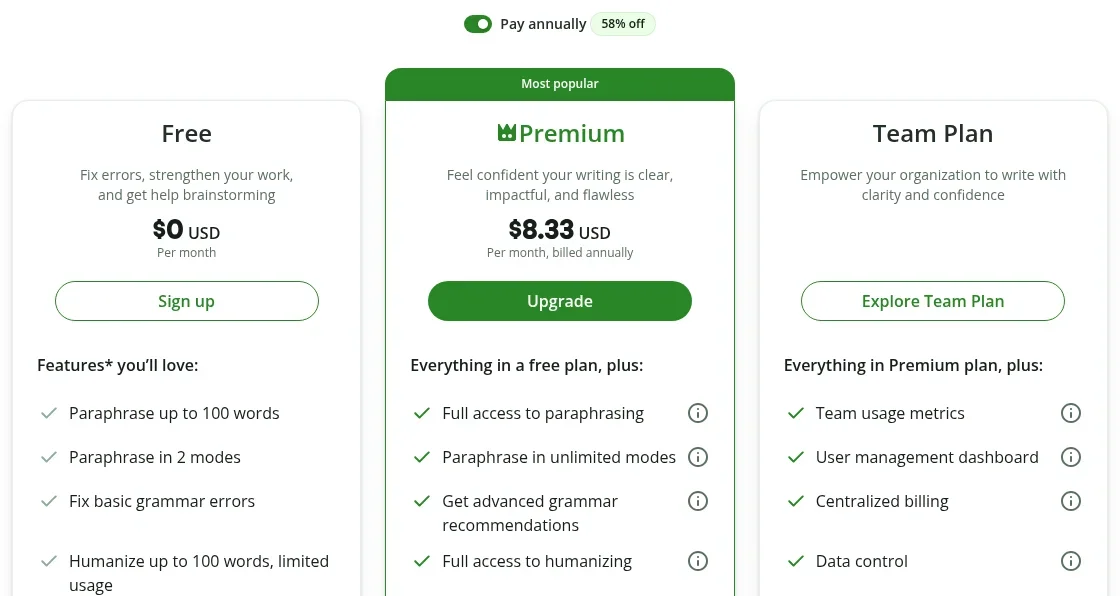
Prices are based on the official pricing page (USD, checked October 2026). The annual discount (shown as 58% off) may change over time.
Supported platforms
Track record and reputation
Quillbot began in 2017 when Anil Jason started building it in a college dorm to help English language learner (ELL) students with writing; together with friends Rohan Gupta and David Silin he created the Paraphraser. It spread after going viral on Reddit and became part of Learneo (formerly Course Hero) in 2021. The same group includes Scribbr, known for academic proofreading, and the grammar checker LanguageTool.
The official pricing page features comments from named users.
"As someone who makes money online by writing… Quillbot is one of my favorite tools, and I use it daily. It will save you time and money." — Jerry Keszka (content creator)
"My favorite Quillbot tools are the Paraphraser and the AI Detector. These aren't static tools; they're constantly evolving and helping me improve my technical, commercial and creative writing." — Nico Zwaneveld (published author)
The official site cites a 4.7 rating and more than 6 million users for its Chrome extension. On the other hand, the grammar checker does not support Japanese and the interface is English-only, so keep in mind that it cannot be used as a proofreading tool for Japanese text.
Security and data handling
The privacy policy of the operator, Learneo, states that it may use the data it collects (including personal data) to train its algorithms and AI models, and that details about the models and training data used for Quillbot are provided in the Help Center. If you handle highly confidential documents, review this policy beforehand.
FAQ
Q. Is Quillbot free? A. Yes. Paraphrasing (Standard and Fluency modes, up to 125 words at a time), basic grammar checking, summarizing and AI detection are available for free. All modes, unlimited paraphrasing and plagiarism checking require Premium.
Q. Does it support Japanese? A. The Paraphraser and Translator support Japanese. However, the grammar checker covers English, German, Spanish, French and others, but not Japanese. The interface is also in English.
Q. How much is Premium? A. $19.95/month billed monthly, $79.95 billed semi-annually, or $99.95 billed annually ($8.33/month) (USD, checked October 2026).
Q. Can I use it on my phone? A. There are iOS and Android apps, and if you install it as a keyboard you can use it while writing in other apps.
How it differs from other AI writing tools
| Tool | Strength | Japanese | Highlights |
|---|---|---|---|
| Quillbot | Paraphrasing | Paraphrasing and translation supported; grammar checking not supported | Nine modes plus Custom, with plagiarism checking, AI detection and citations included |
| Grammarly | English grammar and spelling correction | Proofreading effectively unsupported | Strong at real-time correction and tone adjustment |
| Wordtune | English rewriting and tone changes | Effectively unsupported | Good at offering rewrite suggestions sentence by sentence |
| DeepL | Translation | Supported | A translation service known for natural output |
If you want to put English text into your own words and check plagiarism and AI detection before submitting, Quillbot has it all in one place. To fix English grammar as you write, use Grammarly; to turn ideas written in Japanese into natural English, pair it with DeepL. For proofreading Japanese text, compare it with Shodo, which is built for Japanese.
The information on this page is based on what was published on the official website and Help Center as of October 2026. Please check the official website for the latest specifications and pricing.