

Gencraft
: How to use it, features, and the business problems it solves
Add bookmark
What is Gencraft?
A consumer 'AI Studio' (Gencraft, LLC) that generates images and video from text and handles editing, FaceSwap, and custom model training. Many styles, with iOS/Android apps. Free generations are non-commercial (CC BY-NC 4.0); commercial use needs a paid plan.
Business problems it solves







About "Gencraft"
What is Gencraft
Gencraft is an "AI Studio" that generates images and video from text and handles editing and character creation in one place. Run by Gencraft, LLC (Seattle, USA), it uses the taglines "One Prompt. Endless Possibilities." and "Design. Animate. Transform. All in one AI Studio." From an image-first tool, it has grown to include video generation, image editing, and variations from your own photos.
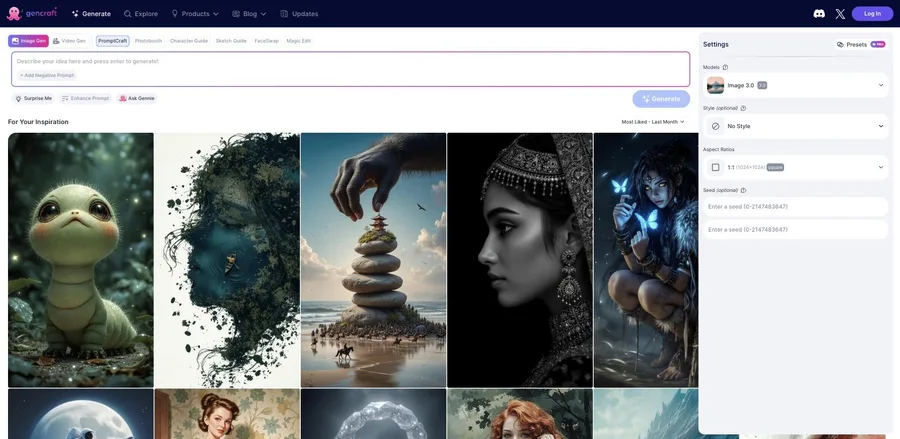
Gencraft's core is generating images in many styles from prompts. It supports negative prompts, styles, aspect ratios, and seed control, and you can repaint just part of a result with Magic Edit. It also does video generation, image-to-image, custom model training on your own photos (Signature Style), and FaceSwap.
Gencraft has grown beyond image generation into an "AI Studio" covering video generation, editing, and character creation. It supports text-to-video, image-to-image, Magic Edit (partial repaint), FaceSwap, Photobooth, and Genmoji, with iOS/Android apps. The default model is its own "Image 3.0," with 20+ models available (the underlying base model names are not disclosed).
How to use
Enter a prompt and generate, then extend to editing or video.
Enter a prompt
Describe what you want (negative prompts supported).
Pick style/ratio
Set model, style, aspect ratio, and seed, then generate.
Edit
Repaint part with Magic Edit; try FaceSwap and variations.
Video & export
Animate with Video Gen and export your work.
You can try it free, but free generations are non-commercial (CC BY-NC 4.0). Commercial use and image-to-image require a paid plan.
Key features
01Image generation & styles
Generate images in many styles from prompts, with negative prompts, presets, aspect ratios, and seed control. It also offers variations from your own photos (Photobooth) and emoji generation (Genmoji).
02Video, editing, FaceSwap
Supports text-to-video (Video Gen), image-to-image, partial repaint with Magic Edit, FaceSwap, and guided generation via Character/Sketch Guide.
03Custom models & apps
Train a custom model in your own style with up to 500 images ("Signature Style"). iOS/Android apps let you generate on the go.
Pricing
You can start free. Paid comes in Free / Starter / Pro; there's no public pricing page (managed in-app via Manage Plan). Figures below are US App Store references and vary by region, platform, and over time.
| Plan | Weekly | Monthly | Highlights |
|---|---|---|---|
| Free | $0 | $0 | Non-commercial (CC BY-NC 4.0), limited generation |
| Starter | $3.99 | $7.99 | Commercial use, image-to-image |
| Pro | $9.99 | $19.99 | Higher-tier features, video generation |
Free generations are non-commercial (CC BY-NC 4.0); commercial use and image-to-image require a paid plan. Custom model training is $2.99. Subscriptions auto-renew, must be canceled before renewal, and refunds go through Apple/Google (the company states refunds are not guaranteed). Weekly plans exist, so review the renewal terms. Prices change — check the official site/app for the latest (as of August 2026).
How it differs from other image/video AI
Gencraft stands out as a consumer-friendly "AI Studio" spanning image-to-video, FaceSwap, and custom model training, approachable for beginners. That's a different direction from pro-oriented creation platforms or single-purpose tools.
| Aspect | Gencraft | Leonardo.Ai | NightCafe |
|---|---|---|---|
| Focus | Consumer AI Studio | Creation platform | Many models + community |
| Scope | Image, video, editing, FaceSwap | Image, video, training | Image & video generation |
| Apps | iOS / Android | Web-centric | Web / mobile |
Alternatives to compare include the creation platform Leonardo.Ai, NightCafe for using many models in one place, and Midjourney, known for its model's image quality. If you want to enjoy image, video, and editing in one place — even on your phone — Gencraft is an option (note that the free tier is non-commercial).
Information on this page is based on the official website as of August 2026. Please check the official site for the latest specs and pricing.


![[2026 Edition] 11 Essential AI Tools for Illustrators | Full Coverage from Auto-Generation and Coloring to Style Transfer and BGM Creation](/_next/image?url=%2Fimages%2Farticles%2Fai-illustration-tools-for-illustrators.png&w=3840&q=75 "[2026 Edition] 11 Essential AI Tools for Illustrators | Full Coverage from Auto-Generation and Coloring to Style Transfer and BGM Creation")