
json2video
: How to use it, features, and the business problems it solves
Add bookmark
What is json2video?
A video generation API: write the structure in JSON, POST it, get back an MP4. Templates and variables let you mass-produce videos of the same shape, with scene composition, voiceover (100+ languages), and captions completed in one pipeline. Integrations for Make.com, n8n, Zapier, and MCP. 600 free credits; from $16.95/month.
Business problems it solves




About "json2video"
What is json2video
json2video (JSON2Video) is a video generation API: write the structure of a video in JSON, POST it, and get back an MP4. Officially, "Your video editing API." It combines templates and variables to produce video ads, social media stories, and product videos at scale.
Rather than a person operating an editor to make one video at a time, this is a tool for generating hundreds or thousands of videos of the same shape from a program. That is what fundamentally separates it from ordinary video editing tools.
Source: JSON2Video official site (the diagram below is from the same source)
Not an API that only renders
One line on the official site captures the positioning well.
"Other APIs just render. JSON2Video composes scenes, creates voiceovers, adds captions and renders. All in one pipeline."
Making a single video means laying out assets, adding a voice, burning in captions, and exporting. Assembling that from separate services means writing the glue and the waiting logic yourself. json2video closes that loop inside one API.
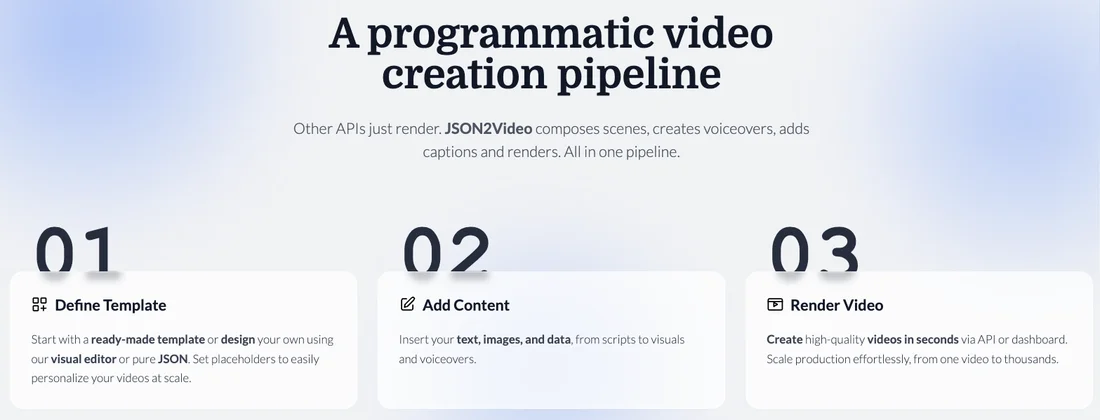
Define the template
Build the shape from a ready-made template, the visual editor, or raw JSON, and mark the parts to be swapped as placeholders
Add the content
Pour in text, images, and data — from scripts through to voiceovers
Render
Output via API or dashboard. Scales from one video to thousands without changes
Templates are versioned and can be shared and cloned across teams. Swapping content alone requires no code.
You can also wire it in without writing code
"API" suggests developers only, but integrations exist for Make.com, n8n, and Zapier. You can build a workflow like "a new row appears in a spreadsheet, so produce a video" with no code at all.
An MCP server is also provided, so coding agents can call it directly.
How to use
-
Get an API key
Create an account on the official site and obtain an API key. The free plan requires no credit card and comes with 600 credits.
-
Prepare a template
Pick a ready-made template, design one in the visual editor, or write the JSON directly. Mark the parts you want to swap as placeholders.
-
Assemble the JSON
Describe scenes, text, images, timing, and transitions in JSON. HTML5 and CSS3 custom elements are available.
-
POST to /movies
Sending a request to the REST API starts the render, which completes in under two minutes on average.
-
Collect the result
The URL of the finished MP4 is returned. Set a webhook and you will be notified on completion.
-
Wire it into automation
Connect it to your existing workflow via Make.com, n8n, Zapier, or the MCP server.
Features
01Compose
- JSON schema configuration — Describe scenes, elements, and timing in code
- Visual editor — Design templates on screen without writing JSON
- Templates and variables — Versioned, shareable across teams, cloneable
- HTML5 / CSS3 custom elements — Bring your own layouts and styling
- Text animations — 100+ fonts
02Add sound and captions
- Text-to-speech — Voiceovers in 100+ languages
- Automatic subtitles — Captions generated automatically
03Output and connect
- MP4 output — Low quality through Full HD (1080p) and 4K. 16:9 / 9:16 / 1:1 / custom
- Global CDN — Asset delivery
- Webhooks — Notification on render completion
- No-code integrations — Make.com / n8n / Zapier
- MCP server — Callable from coding agents
Pricing
The base rule is 1 credit = 1 second of video. 4K output consumes credits equal to four times the video's length.
Subscriptions (monthly)
| Plan | Monthly | Yearly | Credits | Minutes | Max length per video | Support |
|---|---|---|---|---|---|---|
| Free | $0 | — | 600 | — | — | — |
| Hobby | $16.95 | $203.40 | 3,000 | 50 min | 1 min | Chatbot |
| Professional | $49.95 | — | 12,000 | 200 min | 10 min | Chatbot + email |
| Startup | $99.95 | — | 30,000 | 500 min | 30 min | Chatbot + email + video calls |
Pre-paid (one-time)
| Amount | Credits | Minutes |
|---|---|---|
| $49.95 | 7,200 | up to 120 min |
| $99.95 | 15,600 | up to 260 min |
Pre-paid plans also include watermark removal and priority support. An Enterprise plan is available separately for high-volume use.
Videos generated on the free plan carry a watermark. The 600 credits (about 10 minutes' worth) require no credit card, but the output is not usable for publishing as-is. If you rely on external text-to-speech or transcription services, those may incur their own charges.
Amounts are based on the official pricing page (USD) as of August 2026. Pricing is subject to change, so please confirm on the official site before purchasing.
FAQ
Q. Do I need programming knowledge?
Not strictly. You can design templates in the visual editor, and integrations with Make.com, n8n, and Zapier let you automate without code. That said, it comes into its own with bulk generation through the API, so it suits teams with development capacity.
Q. Can I produce videos in Japanese?
Yes. Text-to-speech covers 100+ languages and handles Japanese text. However, the dashboard and documentation are English only.
Q. How far does the free plan go?
600 credits (about 10 minutes of video) with no credit card. Generated videos carry a watermark.
Q. Can I output in 4K?
Yes, but credit consumption is four times the video's length. A 60-second 4K video costs 240 credits.
Q. Does it include AI image or video generation?
Plans are described as covering "all API features" excluding native AI generation capabilities. If you need AI generation, confirm the terms on the official site.
How it differs from other video tools
This space divides by whether a person makes one video at a time or a program makes them in bulk. json2video is squarely the latter, and it does not assume anyone will touch an editing screen.
| Aspect | json2video | AI video generation tools | Video editing tools |
|---|---|---|---|
| Primary use | Send JSON to an API | Write a prompt | Edit on screen |
| Expected volume | Hundreds to thousands | One at a time | One at a time |
| Where footage comes from | Your assets plus templates | Generated by AI | Your assets |
| Voiceover | Built-in TTS (100+ languages) | Varies by product | Recording or external TTS |
| Captions | Generated automatically | Varies by product | Usually automatic |
| Automation | REST API / webhooks / MCP / no-code | Limited | Limited |
| Pricing | From $16.95/month (1 credit = 1 second) | Roughly $10–30/month | Free tier plus subscription |
For automatically producing short videos from assets, AI Shorts applies; for editing and finishing by hand, Descript or VEED. Unless your requirement is producing many videos of the same shape with swapped content, json2video is overkill. If that is your requirement, little else fills the same position.
Information on this page is based on what was published on the official site as of August 2026. Please check the official site for the latest specifications and pricing.