

Descript
: How to use it, features, and the business problems it solves
Add bookmark
What is Descript?
Descript is an AI editing platform where you edit video and audio as if editing the transcript—delete the text and the corresponding footage/audio is deleted too. It centers on the agentic AI co-editor "Underlord" (cuts, structure, video creation from prompts) and offers AI Voices, captions, and translation/dubbing (30+ languages). Note: the UI is English-only and Japanese transcription is not supported. Pricing: Free / Hobbyist $24 / Creator $35 / Business $65 (AI-credit based).
Business problems it solves


About "Descript"
What is Descript
Descript is an AI editing platform where you edit video and audio as if editing the transcribed text. Provided by Descript, Inc. (US), it bills itself as "AI editing for every kind of video." When you load a video, it's transcribed automatically, and its defining trait is that deleting the text also deletes the corresponding video and audio. Lately it centers on "Underlord," an agentic AI co-editor.
The core of Descript's ease of use is that you can finish a video just by editing the transcript—no need to learn professional editing software. Unwanted lines and filler words like "um" disappear from the footage just by deleting the text. Cutting, captions, translation, and noise removal (Studio Sound) are all done as an extension of text editing.
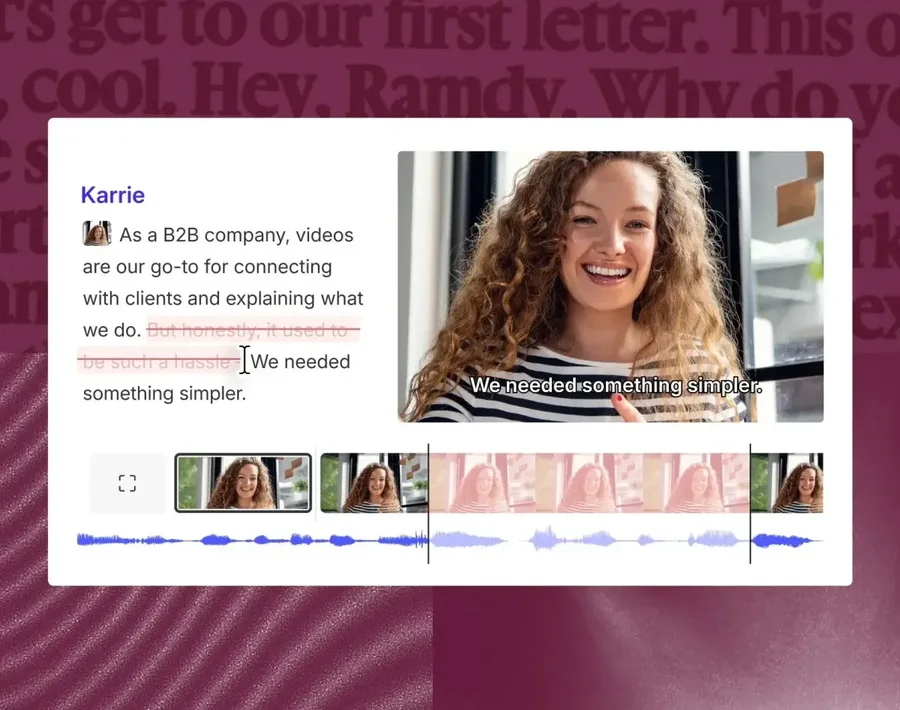
Source: Descript official site (the screenshots below are from the same source)
Hand the editing itself to "Underlord"
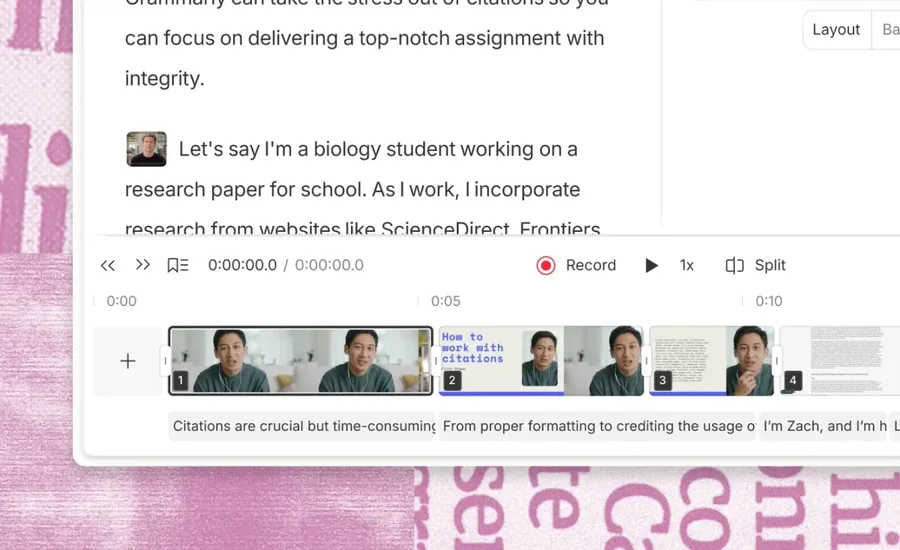
What sets Descript apart from other AI video tools is that you can leave even the editing decisions to AI. Underlord reads the script, watches the video, and—just from prompts—handles cuts, structure, clip extraction, and turning documents or slides into video. You can still use traditional timeline editing, switching between what you leave to AI and what you do by hand.
It also supports multitrack timeline editing for fine control over scene ordering and captions. "Create Clips" extracts highlights from long footage to make shorts for social.
How to Use
-
Get the app
Create an account on the web app or the desktop app (Windows/Mac).
-
Import material
Drag and drop the audio/video you want to edit. It is transcribed automatically.
-
Edit with text
Edit the transcript to cut, and direct Underlord to finish it.
-
Refine and export
Polish with Studio Sound and captions, and export the video/audio (free is watermarked).
Features
01Edit
- Text-based editing & auto transcription — edit the text to edit the video/audio
- Filler-word removal & Create Clips — remove "um"s; extract highlights
- Underlord (AI co-editor) — cuts, structure, and video creation from prompts
02Refine & generate
- Studio Sound, Eye Contact, Green Screen — noise removal, gaze correction, background removal
- AI Voices (voice cloning) — voice clones and stock voices (formerly Overdub)
- AI Avatars & Generate Media — avatars and text-to-media generation
03Deliver & connect
- Captions & translation/dubbing (30+ languages) — multilingual subtitles and dubbing
- Screen recording & Rooms — recording and remote recording
- Brand Studio & API/MCP — brand consistency, external integration
Note on Japanese support. Descript's UI is English-only, and Japanese transcription is not officially supported (support centers on Latin-script languages). For Japanese audio/video, consider a Japanese-capable tool.
Pricing
It is free to start, with paid plans like Hobbyist / Creator / Business. Tiers are gated by monthly transcription hours and "AI credits" used for generative AI. Amounts are in USD, and annual billing is cheaper.
| Plan | Monthly (monthly / annual) | Transcription | AI credits | What's included |
|---|---|---|---|---|
| Free | $0 | 60 min/mo | 100 (one-time) | 720p, watermarked |
| Hobbyist | $24 / $16 | 10 hrs/mo | 400/mo | 1080p, no watermark |
| Creator (Popular) | $35 / $24 | 30 hrs/mo | 800/mo | 4K, full Underlord, AI video gen |
| Business | $65 / $50 | 40 hrs/mo | 1,500/mo | Brand Studio, translate/dub 30+ langs, custom avatars |
The previously mentioned "Creator $15 / Pro $30 / Business $50" differs from the current plans (a new Hobbyist tier was added, the old Pro was dropped, and prices were revised). Generative features consume AI credits. Underlord lets you choose among several AI models (such as Claude Sonnet 4.5). Pricing may change, so check the [official pricing page](https://www.descript.com/pricing) for the latest (as of August 2026).
How it differs from other video-editing tools
Descript's strengths are transcript-based editing and Underlord, which lets you delegate the editing. Its approach differs from template-based editing tools.
| Aspect | Descript | VEED | Opus Clip |
|---|---|---|---|
| Focus | Text-based editing + AI co-editing | Browser editing + AI generation | Long-form → short clips |
| Japanese | English UI; JP transcription unsupported | Japanese supported | Multilingual |
| Best at | Podcasts, explainer videos | Social, captions | Viral clips |
The browser-based VEED, the Japanese-caption-strong Vrew, and the clipping tool Opus Clip are comparison points. If you want to quickly edit English audio/video on a transcript basis, Descript is a strong choice.
The information on this page is based on what was publicly available on the official site as of August 2026. Please check the official site for the latest specifications and pricing.




![[2026 Edition] 17 AI Tools for Video Creators | Full Coverage from Auto-Editing and Subtitles to Narration, BGM, and Social Media Videos](/_next/image?url=%2Fimages%2Farticles%2Fai-tools-for-video-creators.png&w=3840&q=75 "[2026 Edition] 17 AI Tools for Video Creators | Full Coverage from Auto-Editing and Subtitles to Narration, BGM, and Social Media Videos")