
Sourcegraph
: How to use it, features, and the business problems it solves
Add bookmark
What is Sourcegraph?
An enterprise code-intelligence platform that lets both humans and AI agents search, understand, and change large, complex codebases across all repositories. It offers cross-repo code search, natural-language Deep Search, large-scale Batch Changes, and an MCP server; its AI assistant Cody is now an Enterprise feature. (Note: its former agentic tool Amp was spun out into a separate company in December 2025.)
Business problems it solves

About "Sourcegraph"
What is Sourcegraph
Sourcegraph is an enterprise code-intelligence platform that lets both humans and AI agents search, understand, and change large, complex codebases across all repositories. Under the banner "Take control of your codebase," it provides cross-repo code search, natural-language Deep Search, and large-scale Batch Changes. Its AI coding assistant, "Cody," is now positioned as a feature of Sourcegraph Enterprise.
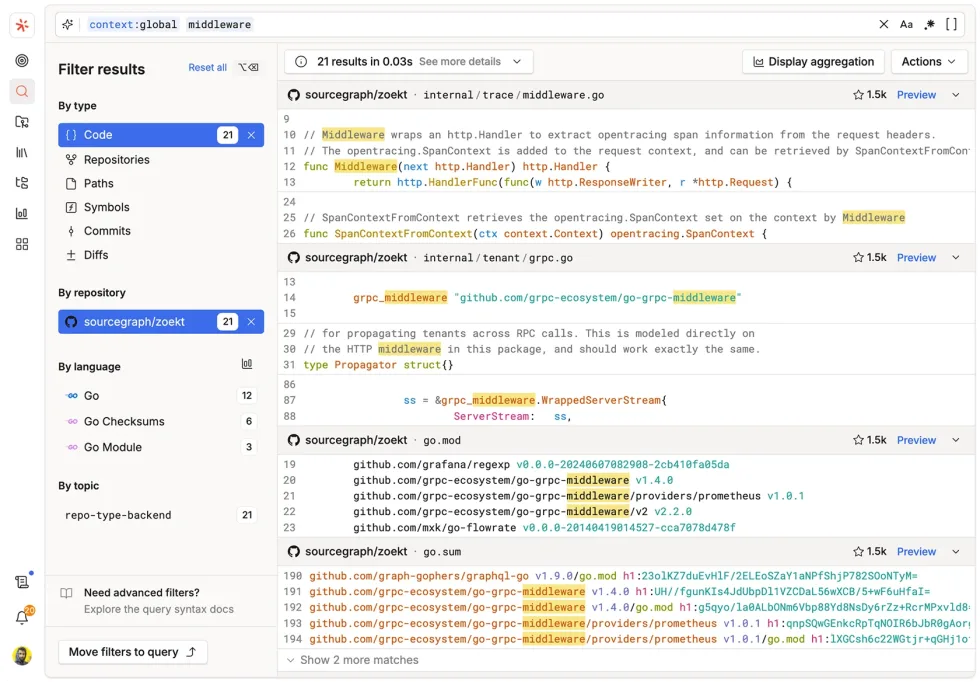
At its core, Sourcegraph searches and navigates an entire, huge codebase and safely automates changes. It offers code search, Deep Search, go-to-definition/references, large-scale Batch Changes (including an agentic version) across many repositories, code metrics (Code Insights) and monitoring, an MCP server that gives external agents context, and an API/CLI.
Note on product structure: Sourcegraph now centers on enterprise code intelligence. Its AI assistant "Cody" is offered as an Enterprise feature, and the agentic coding tool "Amp" that the company used to develop was spun out into a separate company (ampcode.com) in December 2025. Its models are described as "the latest LLMs," with specific names not disclosed.
How to use
Connect your repositories and search, navigate, and make batch changes.
Connect
Connect repositories from your code hosts to Sourcegraph.
Search across
Search and navigate code across all repositories.
Understand
Grasp code context quickly with Deep Search or Cody.
Batch change
Automate changes across many repositories with Batch Changes.
It is offered to enterprises, deployed self-hosted or on a dedicated cloud. AI features can pool credits across your whole organization.
Key features
01Code search & navigation
Supports cross-repo code search, natural-language Deep Search, and go-to-definition/references, accelerating understanding of large codebases.
02Batch changes, analysis, monitoring
Includes Batch Changes (with an agentic version) to automate large-scale changes across many repositories, Code Insights to visualize code metrics, and Code Monitoring to detect changes.
03Cody, MCP, API
Supports the Enterprise AI assistant Cody (chat, auto-edit, prompts, context; in VS Code, JetBrains, etc.). It also offers an MCP server that gives external agents code context, and an API/CLI.
Pricing
It is an enterprise offering, with pricing listed as "from $16K" (details by inquiry).
| Plan | Price | Main content |
|---|---|---|
| Enterprise | From $16K (contact sales) | Search, Deep Search, Batch Changes, MCP, API/CLI, Cody, self-hosted/dedicated cloud |
Only the Enterprise entry price (from $16K) is published; per-seat details are by inquiry. The AI coding tool Amp is now offered by a separate company (ampcode.com). Prices are in USD and subject to change; check the official site for the latest (as of August 2026).
How it differs from other AI coding assistants
Sourcegraph stands out as an enterprise foundation that provides "search, understanding, and batch changes" of huge codebases to both humans and AI agents. It differs from tools focused on individual code completion in the scale it handles and the breadth of code context.
| Aspect | Sourcegraph | GitHub Copilot | Cursor |
|---|---|---|---|
| Focus | Code search/understanding + batch changes (enterprise) | AI code completion/agents | AI code editor |
| Strength | Org-wide search, Batch Changes, MCP | GitHub integration, ubiquity | Editor experience, context |
| Audience | Enterprises with large codebases | Broad developers | Individuals to teams |
GitHub Copilot, for code completion, and Cursor, an AI code editor, make good points of comparison. For enterprises that want to search and understand huge codebases across the org and safely automate changes, Sourcegraph is a strong option.
The information on this page is based on the official site as of August 2026. Please check the official site for the latest specifications and pricing.