

Cursor
: How to use it, features, and the business problems it solves
Add bookmark
What is Cursor?
Cursor is an AI coding agent (AI code editor) from Anysphere. A VS Code-based desktop app (macOS / Windows / Linux), it takes natural-language instructions and has an agent that understands your codebase handle planning, implementation, and fixes. You can choose its in-house Composer model, Grok, or frontier models from various providers, and it supports running multiple tasks in parallel, cloud agents, agentic code review by Bugbot, MCP, skills, and hooks, and privacy mode. A Cursor CLI and iOS app are also available. Pricing includes Hobby free, Pro $20, Pro+ $60, Ultra $200, and Teams $40 (per user, per month), among others.
Business problems it solves

About "Cursor"
What is Cursor
Cursor is an AI-powered code editor that describes itself as "an AI coding agent for building ambitious software." Built on VS Code, it's a desktop app (macOS / Windows / Linux) where an agent that understands your entire codebase takes natural-language instructions and handles planning, implementation, and fixes. It goes beyond simple autocomplete: you can run multiple tasks in parallel or hand work off to agents running in the cloud.
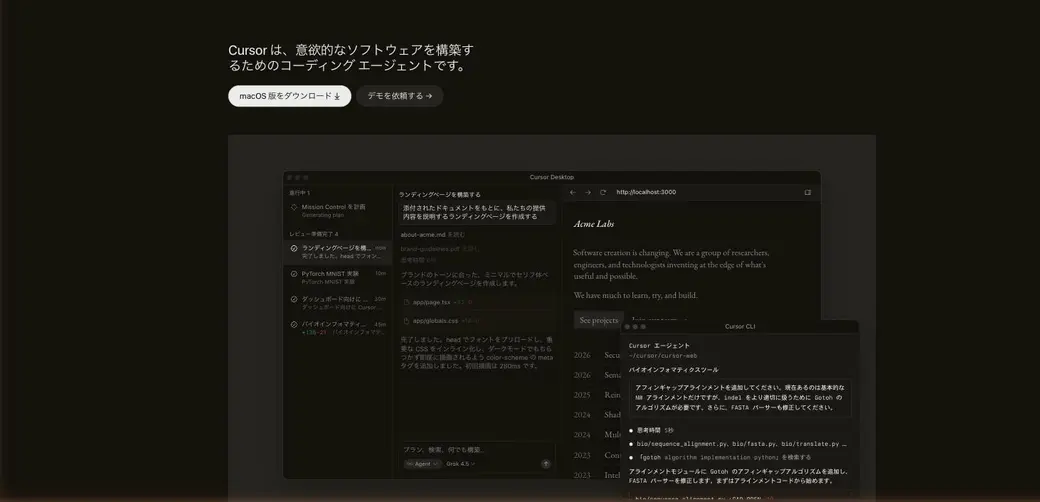
Source: Cursor official site (the image below is from the same source)
How to use
It starts with opening your own codebase and describing what you want to do in plain words.
Install and open
Download from the official site and open an existing project (codebase).
Instruct in natural language
Give an instruction such as "add this feature." The agent draws up a plan and implements it.
Review the diff
Check the changes as a diff, and take advantage of agentic code review by Bugbot.
Accelerate with parallel and cloud work
Run multiple tasks in parallel and expand your work with cloud agents and the CLI.
Enabling privacy mode guarantees that your code is never used for training (enabled in settings or by a team administrator).
Key features
01Coding agent
It plans in response to your instructions and edits across the codebase. It supports running multiple tasks in parallel as well as cloud agents that run in the cloud.
02Model selection (Composer and frontier models)
In addition to Composer, its own fast in-house model, you can access Grok and frontier models from various providers, choosing whichever suits the task.
03Bugbot (agentic code review)
Bugbot automatically reviews your changes and flags potential bugs before they take root. On team plans, it can be built into code review across the whole team.
04Extensibility and security
Connect external tools and workflows via MCP, skills, and hooks. Work anywhere with Cursor CLI and the iOS app, and privacy mode guarantees your code isn't used for training.
Pricing
For individuals there are Hobby / Pro / Pro+ / Ultra; for teams, Teams; and for enterprises, Enterprise (as of August 2026, in US dollars, exclusive of tax).
| Plan | Price | What it roughly includes |
|---|---|---|
| Hobby | Free | No credit card required / limited agent requests / Composer access |
| Pro | $20/mo | Expanded agent usage limits / frontier models / MCP, skills, hooks / cloud agents / Bugbot (usage-based) |
| Pro+ | $60/mo | 3x the agent usage limits of Pro |
| Ultra | $200/mo | 20x Pro's usage limits plus priority access to new features |
| Teams | $40/user/mo | Team billing and administration / team marketplace / Bugbot code review / SAML and OIDC SSO (Premium is 5x) |
| Enterprise | Contact sales | Usage pooling / invoicing and PO / SCIM / access control / audit logs / SLA |
Pricing is based on the official listing as of August 2026 (in US dollars, exclusive of tax). Each plan includes a set amount of model usage, and any overage can be used on demand (pay later). Cursor subscriptions are sold only on the official site (cursor.com); purchasing through a reseller is unauthorized. For the latest details, check the [official pricing page](https://cursor.com/pricing).
How it differs from other AI coding tools
Cursor's strength is that within a familiar editor (VS Code-based), you can entrust an agent that understands your codebase with everything from implementation to review. It goes further than completion-focused assistants, covering planning, parallel execution, and cloud execution.
| Aspect | Cursor | Other AI coding assistants |
|---|---|---|
| Form | AI editor (VS Code-based) plus CLI and iOS | Extensions / editors / cloud-based, and more |
| Agent | Planning, parallel execution, cloud agents | Some are completion-focused |
| Review | Agentic code review by Bugbot | May require a separate tool |
| Models | Choose Composer plus frontier models | Often fixed |
Its role differs from Devin, which autonomously produces PRs on its own, and from v0 and Replit, which build web apps from a prompt. Cursor is suited to developers writing code day to day in their own codebase.
FAQ
Q. Can I use Cursor for free?
Yes. The Hobby plan (free, no credit card required) gives you limited agent requests and Composer. For serious use, go with Pro ($20/mo) or above.
Q. Which models can I use?
In addition to Composer, its own fast in-house model, you can access Grok and frontier models from various providers, choosing them based on the task.
Q. Is my code used for training?
When privacy mode is enabled, it's guaranteed that your code data is never used for training by Cursor or the model providers. It can be enabled in settings or by a team administrator.
Q. Which operating systems are supported?
It's a desktop app for macOS / Windows / Linux. In addition, a Cursor CLI and an iOS app are also available.
The information on this page is based on what was published on the official site as of August 2026. Pricing, models, and features are subject to change, so please check the Cursor official site for the latest details.
Frequently compared services







Articles featuring Cursor
[2026 Edition] The Complete Guide to Claude Code: From Installation to Advanced Techniques
A comprehensive guide covering Claude Code installation, basic operations, practical tips, and pricing plans. Packed with best practices you can apply immediately to real projects — suitable for beginners through intermediate users.
Top 4 AI Coding Tools Compared | Choosing Between Claude Code, Cursor, Codex, and Antigravity
A side-by-side comparison of the leading AI coding tools — Claude Code, Cursor, Codex, and Antigravity. Guides you to the right choice based on features, strengths, and ideal use cases.

[2026 Edition] 20 AI Tools Transforming Developer Workflows | Coding Assistance, Automated Code Review, No-Code Web Development, and Workflow Automation
A curated look at the best AI tools for developers in 2026. Covers 18 tools across coding assistance, automated code review, no-code development, and workflow automation — all aimed at improving productivity.
![[2026 Edition] 20 AI Tools Transforming Developer Workflows | Coding Assistance, Automated Code Review, No-Code Web Development, and Workflow Automation](/_next/image?url=%2Fimages%2Farticles%2Fdeveloper-ai-programming-tools.png&w=3840&q=75 "[2026 Edition] 20 AI Tools Transforming Developer Workflows | Coding Assistance, Automated Code Review, No-Code Web Development, and Workflow Automation")