

Veena
: How to use it, features, and the business problems it solves
What is Veena?
Veena is a browser-based AI DAW from US-based Veena Studio Inc. (founded in Los Angeles in 2025) with a built-in AI music producer called CoProducer. Describe the song you want in plain words (Japanese works too) and CoProducer sets the tempo, key and sections, then writes drums, bass, chords and melody as real, editable tracks, offering three options for each part. It includes a piano roll, mixer, recording, 4-stem separation and real-time collaboration, and runs your own VST3/AU plug-ins through Veena Bridge. The free plan includes the whole studio with uncapped, watermark-free WAV, MP3, MIDI and stem exports (CoProducer has a daily request allowance and projects are limited to five). Veena Pro costs US$20 a month, removes the daily request cap and unlocks premium models (as of November 2026).
Business problems it solves


About "Veena"
What is Veena?
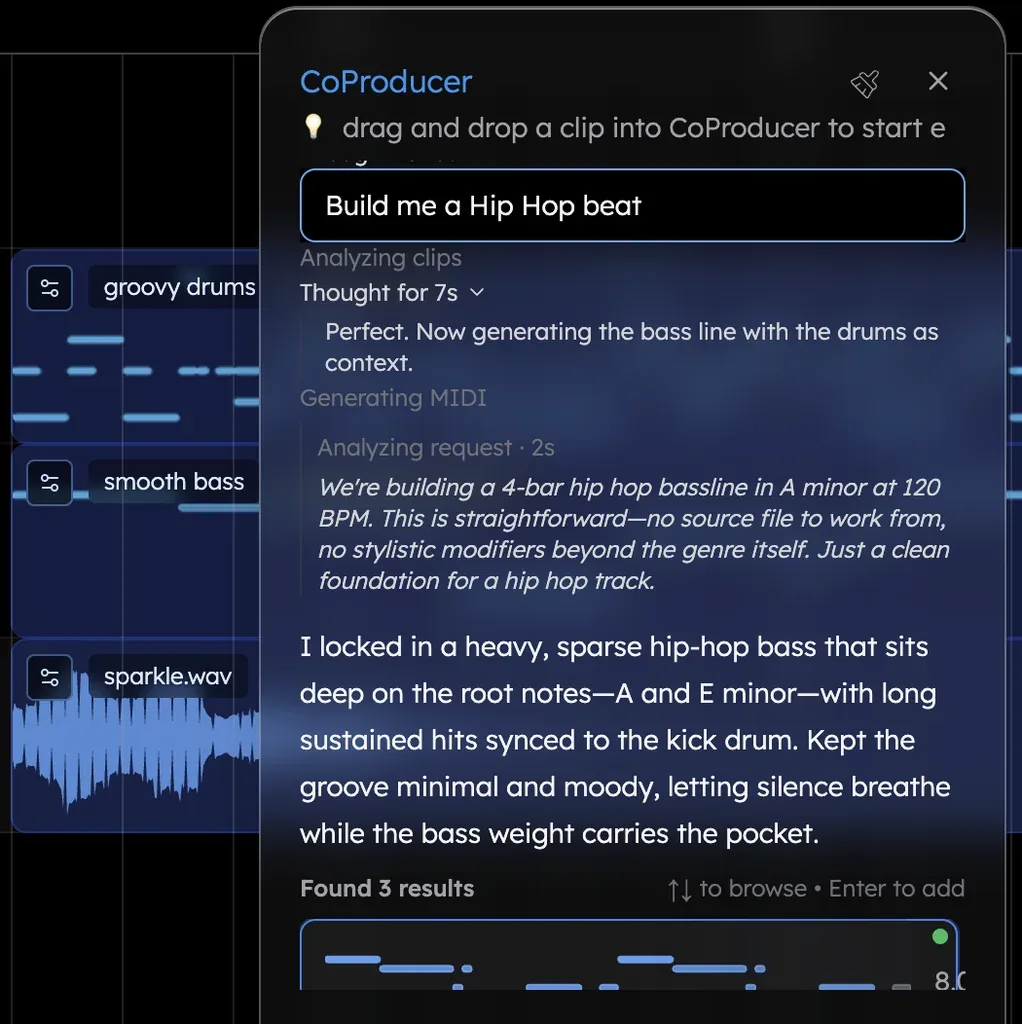
Veena is a browser-based AI DAW (music production software) with a built-in AI music producer called CoProducer, made by US-based Veena Studio Inc. Describe the song you want in plain words and CoProducer sets the tempo, key and sections, writes the drums, bass, chords and melody one part at a time, and lays them out on the timeline as editable tracks.
Most AI song generators return one mixed song as a single audio file. If you only want quieter hi-hats, you have to regenerate the whole song. Veena returns a session split into parts: the drums as a programmed track, the bass as notes in the piano roll, and so on. As Veena's Japanese page puts it, "make the hi-hats softer in the verse" is a one-line instruction, not a re-roll.
Source: Veena official site and About (also for the images below)
How to use it
- Open the studio Go to daw.veena.studio and sign in with a Google account. Nothing to install and no GPU needed. The AI models run on Veena's servers, and on a phone you open Pocket Studio.
- Describe the song (Japanese works too) The official example is an order like "Make a lo-fi hip-hop track at 82 BPM in A minor… a 4-bar intro, a 16-bar beat, an 8-bar break with the drums out…". CoProducer understands requests written in Japanese.
- Pick from three options for each part CoProducer builds the sections and writes the parts one by one. It offers three versions of each part and does not write the next part that has to fit it until you choose.
- Finish in words or by hand, then export Fix things in words ("drop the bass for the 4 bars before the chorus") or move the notes yourself in the piano roll. CoProducer's changes can be undone with Ctrl+Z. When done, export a 24-bit/48 kHz WAV, a 320 kbps MP3, MIDI, or per-track stems.
Choose and fix each part, not the whole song
Veena's approach shows in the "Your taste leads" principle on its About page. CoProducer brings options, not verdicts: every new part arrives as three takes, and you keep the one you want.
Typical AI song generators
- One mixed song arrives as one file
- If one part is wrong, regenerate the whole song
- The chorus you liked disappears too
Veena
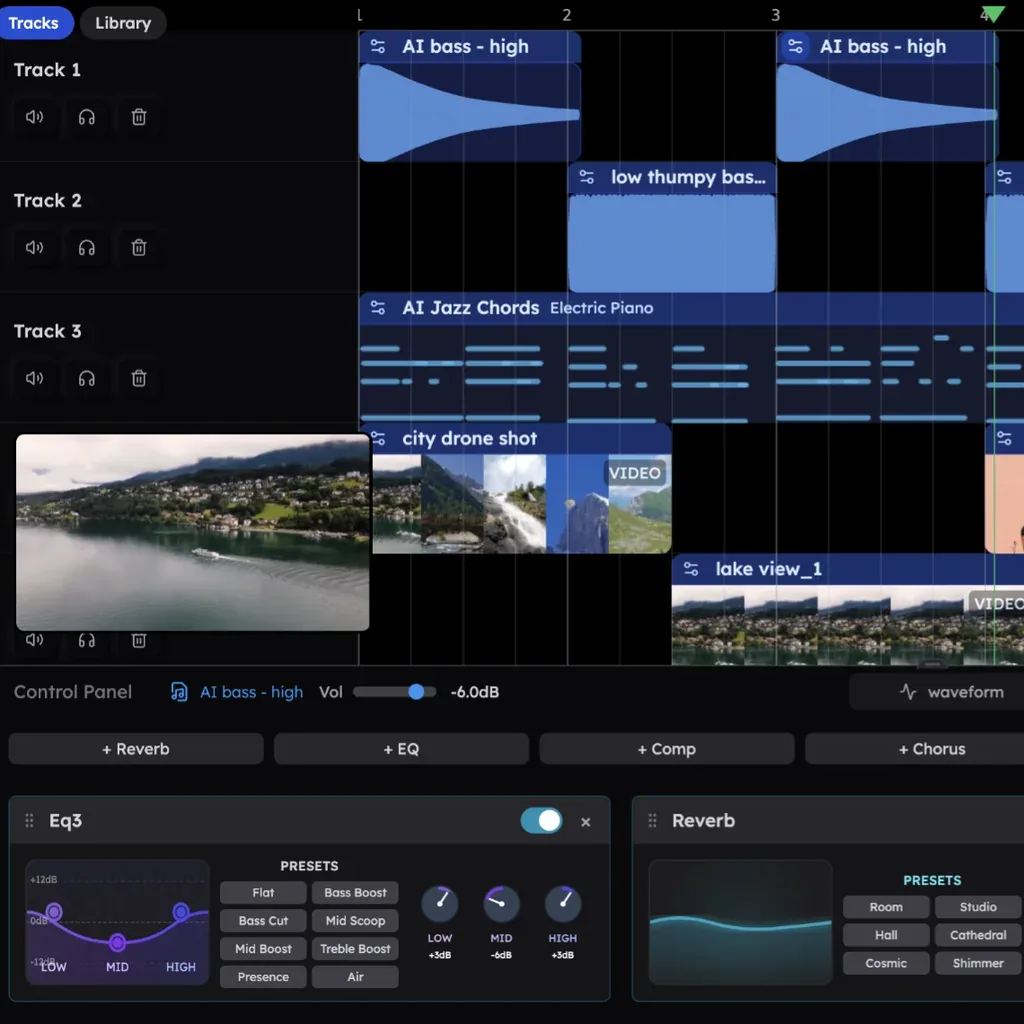
- Drums, bass, chords and melody are separate tracks
- Swap only the bass without touching the drums, turn the piano into a Rhodes, rewrite just the chorus
- CoProducer reads the timeline before writing a new part so it fits what is already there
You can also start from your own material. The official examples include recording vocals or guitar over the track, importing a voice-memo melody so CoProducer builds the song at that take's tempo, and splitting an old mix into 4 stems (vocals, drums, bass, other) for a new arrangement.
Your own plug-ins, and collaborating from anywhere
Even though it is a browser DAW, installing the Veena Bridge helper on your computer lets you play your own VST3 and AU plug-ins inside Veena. Macs use AU and VST3 (Intel and Apple Silicon), Windows uses VST3. On a Chromebook, Linux or a phone you use the built-in instruments and effects (official help: "Use your VST and AU plugins with Veena Bridge").
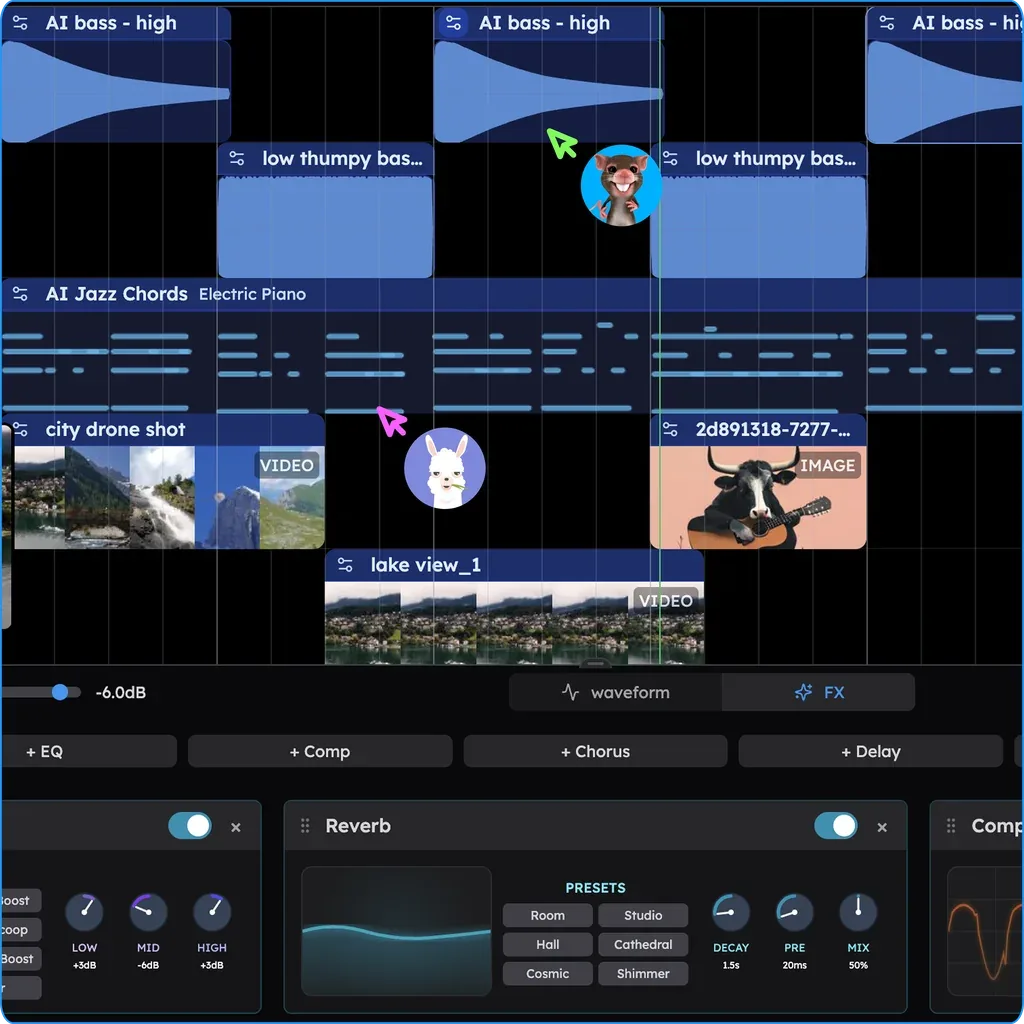
Send a link and others can join your session in real time, with CoProducer working for everyone in it. When a plug-in is used in a collaboration, the computer that has the plug-in renders its sound into the shared song.
Features
01CoProducer (AI producer)
Builds a song from a written request.
- Building the song — sets tempo, key and sections, and writes drums, bass, chords and melody
- Three options — every new part comes as three takes to choose from
- Fixing in words — change just one part with requests like "a more live-sounding drum kit"
- Mixing and mastering — mixes and masters for streaming on every plan
02Studio
The features you expect from a DAW.
- Track editing — a multitrack timeline for audio, MIDI, drums, samples and video, a piano roll and a mixer
- Sounds and material — 61 instrument presets, 8 drum kits, a 16-pad sampler, a step sequencer and search across 27,000+ samples
- Audio processing — time-stretch, pitch shift, audio-to-MIDI and 4-stem separation
- Recording — record from a microphone or play in from a keyboard
03Connect and export
Take your song out of Veena.
- Export — WAV (24-bit/48 kHz), MP3 (320 kbps), MIDI and stems; MP4 for projects with video. No caps, no watermark
- Veena Bridge — use your own VST3 and AU plug-ins
- Collaboration — invite people to a session by link and work in real time
- Pocket Studio — the studio in your phone's browser
Pricing
| Free | Veena Pro | |
|---|---|---|
| Price | $0 | $20/month (monthly only; no annual plan) |
| CoProducer | Daily request allowance | No daily cap (metered in credits) |
| AI models | Basic models | Basic + premium models |
| Projects | Up to 5 | No limit |
| Studio, exports, stem separation, plug-ins, collaboration | Included | Included |
| Watermark on exports | None | None |
- The free plan is not a trial: it has no end date and needs no card
- On the free plan, one request is one message you send to CoProducer. Picking or skipping a part option and continuing a build do not count, and failed runs do not count. The allowance resets daily at midnight UTC
- Veena Pro adds 1,000 credits for every dollar paid each month, and unused credits roll over while you stay subscribed. Top-ups of $5, $10, $20 or $50 are available and never expire
- If you cancel, you keep Pro until the end of the paid period and then return to the free plan with your projects and exported songs intact
- Prices are in US dollars. Checkout is handled by Stripe. The pricing page does not say whether taxes are included, and the terms of service state that you are responsible for applicable taxes
(As of November 2026, from the official pricing page)
Rights to the music you make
The terms of service say "you own the Output you generate through your use of the Service", so the songs you make are yours on every plan, and the official pricing page lists commercial use as "Every plan: you own the Output". The terms do, however, forbid extracting Veena's built-in samples and other materials to redistribute or resell as standalone files or sample packs, or using them to train machine-learning models.
How it differs from other AI music generators
| Product | How you make music | Key features |
|---|---|---|
| Veena | Build part by part with an AI producer inside a DAW | Returns editable tracks. Uncapped exports on the free plan; runs your own plug-ins |
| Suno | Generates a full song with vocals, lyrics and backing from text | Supports Japanese vocals. Editing and stem separation in Suno Studio. Downloads capped at 20/month on Pro and 60/month on Premier |
| AIVA | Composes in 250+ styles | Edit by track; export MP3 and MIDI |
| Soundverse AI | Generates songs by instructing the AI producer "Agent One" | Stem separation, extend, remix, lyric generation |
| Mureka | Generates songs from text | Up to 12-stem separation; Mureka Co operates a DAW in natural language |
Details for the other products are as stated on each product page at the time it was checked. If you want a finished song with vocals right away, a generator like Suno fits; if you want to shape each part and finish it as your own song, Veena fits.
FAQ
Q. Is Veena free? Yes. The free plan includes the whole studio, CoProducer with a daily request allowance, uncapped and watermark-free exports, 4-stem separation, plug-ins and collaboration. Projects are limited to five.
Q. Can I give instructions in Japanese? Yes. Veena's official Japanese page says CoProducer understands requests in Japanese and you can keep giving revisions in your own words.
Q. Can it make songs with vocals? Veena does not generate vocals; it builds the song around your voice. CoProducer writes the instrumental parts, and you record your vocals with a microphone on a separate track in Veena and mix them in.
Q. Who can use it? The terms require users to be at least 13, and users under 18 need a parent's or guardian's permission.
Provider
Veena is provided by Veena Studio Inc., a Delaware corporation. It was founded in Los Angeles in May 2025 by Palaash Agrawal (CEO) and launched publicly on 20 June 2025. The official About page says more than 20,000 musicians use it (as of the October 2026 update). Contact: hi@veena.studio.
The information on this page is based on what was published on the official site (Japanese page, pricing, About and help), the terms of service and the privacy policy as of November 2026. Features and pricing may change, so please check the official site for the latest information.