

Vic.ai
: How to use it, features, and the business problems it solves
Add bookmark
What is Vic.ai?
An AI-native accounting platform that autonomously automates invoice processing (accounts payable / AP). It automates reading, coding, PO matching, approvals, and payment with high accuracy (99% per the vendor), cutting manual AP work. It also integrates with major ERPs like SAP, Oracle, and NetSuite.
Business problems it solves

About "Vic.ai"
What is Vic.ai
Vic.ai is an AI-native accounting platform that autonomously automates invoice processing (accounts payable / AP). Under the banner "AP automation, reimagined," it automates reading, coding, PO matching, approval, and payment with high accuracy. Recently it has shifted toward autonomous finance operations powered by "agentic AI (VicAgents)."
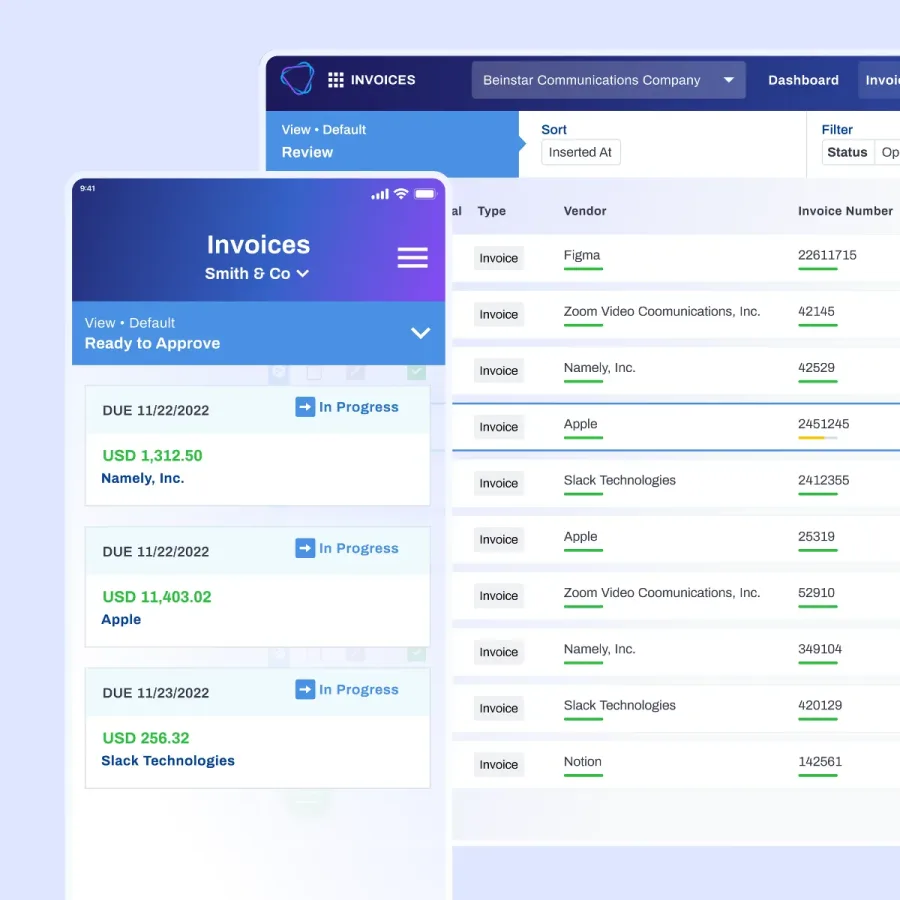
At its core, Vic.ai reads invoices without templates and greatly reduces manual AP work. It automates PO matching, approval flows, and payment (Bill Pay), and the vendor cites ~99% invoice accuracy and 5x faster processing. It integrates with major ERPs like SAP, Oracle, and NetSuite. The AI model used is not publicly disclosed.
Vic.ai calls itself an "AI-native accounting platform" and is expanding into agentic AI. It offers "VicAgents" (agentic AI partners for finance workflows, such as "Victoria" for the AP Inbox), expense management and a corporate card (VicCard), and analytics (VicAnalytics). Its integrations include NetSuite, Sage Intacct, Microsoft Dynamics, SAP S/4HANA, and Workday, among many others.
How to use
Import invoices, and it proceeds from reading to payment automatically.
Import invoices
Bring received invoices into Vic.ai.
Read autonomously
AI reads, codes, and PO-matches without templates.
Approve
Review in the approval flow (much is no-touch/automatic).
Pay & integrate
Run Bill Pay and integrate with your ERP.
It is offered B2B/enterprise and assumes ERP integration. Pricing is not public (request a demo), and the no-touch rate is said to rise as adoption matures.
Key features
01Autonomous invoice processing & AP automation
Reads invoices without templates and automates coding, PO matching, approval, and payment. The vendor cites a rising no-touch rate over time (up to 85%), ~99% invoice accuracy, and 5x faster processing.
02VicAgents, expense, analytics
Offers "VicAgents" (agentic AI for finance workflows), expense management with the VicCard corporate card, and the VicAnalytics dashboard.
03Broad ERP integration
Integrates with major ERPs including NetSuite, Sage Intacct, Acumatica, Microsoft Dynamics, Oracle Fusion, Workday, and SAP S/4HANA.
Pricing
Pricing is not public (contact sales / request a demo). It is an enterprise offering that assumes ERP integration.
| Item | Details |
|---|---|
| Delivery | ERP integration (enterprise) |
| Pricing | Not public (request a demo) |
| Note | Template-free autonomous processing, high no-touch rate |
Specific amounts are not published on the official site. Request a demo/inquire when evaluating adoption. See the official site for the latest (as of August 2026).
How it differs from other invoice/accounting AIs
Vic.ai stands out by processing invoices autonomously without templates and automating the whole AP function with agentic AI. Compared with tools focused on data conversion or manual work, it goes further into autonomy including payment and ERP integration.
| Aspect | Vic.ai | invox (invoice receiving) | Manual |
|---|---|---|---|
| Focus | Autonomous automation of the whole AP | Invoice-receiving data conversion | Manual entry |
| Strength | Template-free, payment, ERP integration | High-accuracy conversion (for Japan) | Flexible but slow |
| Audience | Mid–large enterprises (ERP-based) | Japanese companies | — |
invox, for invoice receiving in Japan, and traditional manual work make good points of comparison. For mid-to-large enterprises that want to autonomously automate the whole AP function on top of an ERP, Vic.ai is a strong option.
The information on this page is based on the official site as of August 2026. Please check the official site for the latest specifications and pricing.




