

artflow AI
: How to use it, features, and the business problems it solves
Add bookmark
What is artflow AI?
An AI avatar app: train an Actor on photos of your own face, then generate consistent images and videos of yourself from templates or prompts—your own content, no photographer required.
Business problems it solves




About "artflow AI"
What is artflow AI
artflow AI is an AI avatar app where you train an "Actor" on photos of your own face, then generate consistent images and videos of yourself. Under the banner "You. Reimagined." — "Your face. Your brand. Your content. No photographer required." — it is run by Artflow AI PTE LTD (Singapore) and is featured as the "#1 AI Avatar App" on Product Hunt.
artflow AI has shifted from a general AI-art/character tool into an "AI avatar app for creating your own likeness (Actor)." The old four-studio structure ("Actor Builder / Image Studio / Video Studio / Story Studio") is gone; the nav is now "Home · Actors · Studio · Tools" (Story Studio was discontinued).
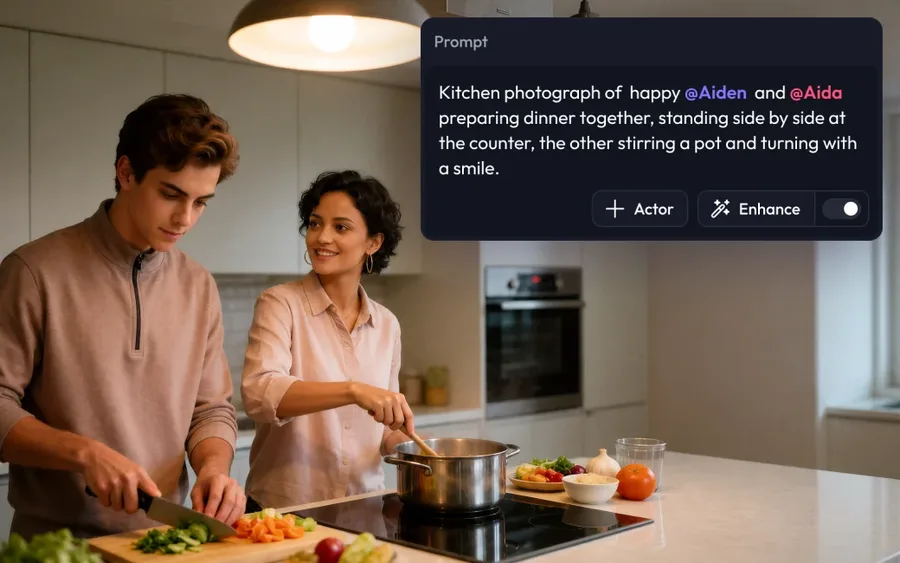
The "Actor" is at the center. Upload 10–20 photos of yourself and the AI learns your features, so every image and video you generate afterward looks like you, consistently. Then just pick a template or describe a scene with a prompt. From templates like Professional, Travel, and Lifestyle, you can make yourself the star in one tap.
How to use
Once you create your Actor, you can generate as much as you like from templates or prompts.
Upload photos
10–20 photos of your face (no sunglasses, hats, or group shots).
Train your Actor
The AI learns your features (10–30 min); afterward output stays consistent.
Template / prompt
Pick a category template or describe a scene with a prompt, then generate.
Edit & export
Refine with background removal, upscaling, etc., and export up to 64MP.
You may only train with photos of yourself (or people you have rights to); using someone's likeness without consent violates the Terms of Service.
Key features
01Actor (your own likeness)
Train your face into a personal AI identity, so every subsequent image and video looks like you, consistently. You can reference an Actor by @handle in prompts, and Dual Actors lets you place two Actors in one scene (multi-Actor support is coming).
02Image/video generation and templates
Many templates by use case — Professional, Lifestyle, Travel, Fantasy — let you become the star in one tap. Beyond images, it supports video generation (Video Model Access), and Props & Sets lets you bring your own products or brand into a scene.
03Editing & export tools
Includes background removal, upscaling (up to 64MP), image expansion (Expand), natural-language editing (Instruct), erase, and inpaint. You can export at resolutions high enough for a magazine cover.
Pricing
You can try it free (no credit card required). Paid plans are a four-tier credit system; figures below are monthly (annual is about 20% off).
| Plan | Monthly | Credits/mo | Highlights |
|---|---|---|---|
| Basic | $7.50 | 150 | Video model, no watermark |
| Creator (recommended) | $15 | 500 | + Background removal, upscale, bulk download |
| Pro | $35 | 1,500 | + Unlimited Spark Gen., 15% off extra credits |
| Ultra | $99 | 5,000 | Pro features + 25% off extra credits |
The old "Free / Starter $8 / PRO $25 / Enterprise" plans and story-minute/video-minute quotas no longer exist. It is now a unified credit system where images and videos consume different amounts, and credits renew monthly. No-watermark images are included on all paid tiers, including Basic, and commercial use is allowed on all paid plans (the old CC BY 4.0 / attribution distinction is gone). One Actor is included per plan; additional Actors cost credits or a pack (from $2.99/actor). Prices change, so check the official site for the latest (as of August 2026). Note: voice, lip-sync, API, and multilingual prompts are not confirmed in current official materials, so they are not listed here.
How it differs from other AI avatar / headshot tools
artflow AI stands out because it lets you mass-produce images and videos across many scenes — from everyday to business — using an Actor trained on your face. That differs from ID-photo-style uses or tools focused on talking videos.
| Aspect | artflow AI | Aragon AI | Creati.ai |
|---|---|---|---|
| Focus | Your Actor for images/video | AI headshots | AI influencer |
| Training | 10–20 of your photos | Your photos | Also fictional people |
| Output | Many scenes, video | Pro headshots | Social images/video |
Alternatives to compare include Aragon AI, focused on professional AI headshots, Creati.ai, for creating AI influencers, and HeyGen, for talking AI avatar videos. If you want to create content for any scene with your own likeness, no photographer required, artflow AI is a strong choice.
Information on this page is based on the official website as of August 2026. Please check the official site for the latest specs and pricing.


![[2026 Edition] 11 Essential AI Tools for Illustrators | Full Coverage from Auto-Generation and Coloring to Style Transfer and BGM Creation](/_next/image?url=%2Fimages%2Farticles%2Fai-illustration-tools-for-illustrators.png&w=3840&q=75 "[2026 Edition] 11 Essential AI Tools for Illustrators | Full Coverage from Auto-Generation and Coloring to Style Transfer and BGM Creation")