
Remini
: How to use it, features, and the business problems it solves
Add bookmark
What is Remini?
A photo and video enhancement app from AI Creativity S.r.l. (Italy, part of the Bending Spoons group) that uses AI to turn blurry, old or low-quality photos into sharp, high-definition images. It offers face enhancement, background and color adjustments, short-video enhancement, and AI Photos and AI Filters that create portraits from your selfies, and is available as an iOS/Android app and in the browser as Remini Web. The app is free to download (with ads) and supports Japanese; paid plans run weekly, monthly or yearly, and the prices shown vary by user.
Business problems it solves

About "Remini"
What is Remini?
Remini is an AI photo and video enhancement app that turns blurry, old or grainy photos into sharp, high-definition images. It is available as a mobile app (iOS and Android) and in the browser as Remini Web, and is provided by AI Creativity S.r.l. of Milan, Italy (part of the Bending Spoons group). On the App Store, the seller is Bending Spoons Apps ApS, another company in the same group.
Its signature feature is Enhance: upload a photo and Remini sharpens the details, removes scratches and noise, and outputs an HD-quality image. It works not only on photos taken with a smartphone or images saved from the web, but also on prints from a paper album that you have re-photographed with your phone. Remini has since added AI Photos, which creates portraits of you in different styles from your selfies, AI Filters, which applies art styles to a selfie, and enhancement for short videos.
(App Store description)
Figures from the Japanese App Store listing, checked October 2026
How to use it
- Install the app (or open the web version) Install Remini from the App Store or Google Play. To use it on a PC, open remini.ai (Remini Web) and sign up via Log In / Sign Up in the top-right corner with a Google, Apple or Facebook account.
- Choose a photo Select and upload the photo (or video) you want to enhance. On Remini Web, enhancement starts as soon as you drag and drop a file.
- Compare and adjust Drag the slider left and right to compare the before and after. On Remini Web, the AI toolbar on the left lets you adjust face enhancement, background enhancement and colors.
- Save When you are happy with the result, save it (on Remini Web, choose an output format and download). Processing happens on Remini's servers, so you need an internet connection; the app cannot be used offline.
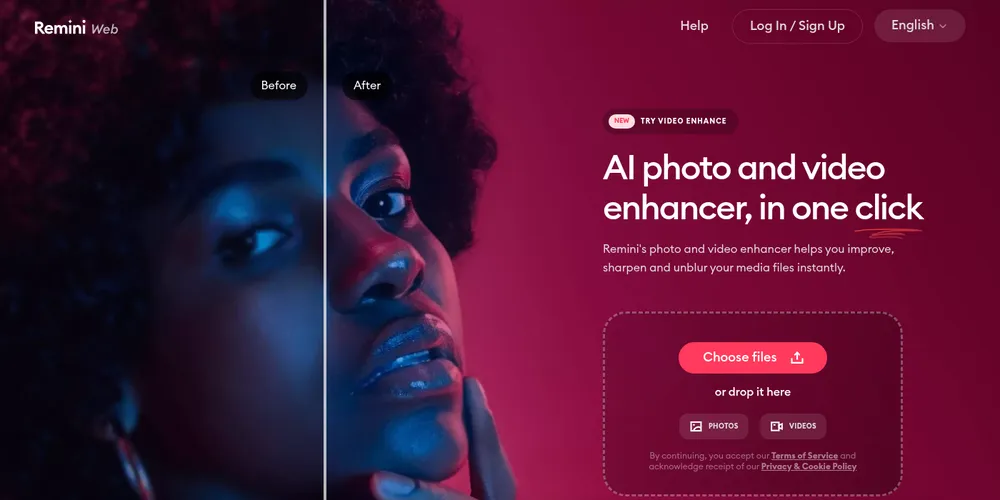
Source: Remini Web official website
Features
01Enhance
The core of Remini.
- Enhance (photo enhancement) — Fixes blur, graininess and scratches, sharpens details and outputs HD quality. Works on old photos and scanned prints too
- Video Enhance — Enhances short videos. Paid plans only, with length and file-size limits per plan (in the app, the limit resets every Monday)
02Fine-tune the result (Remini Web's AI toolbar)
After enhancement, the toolbar on the left lets you adjust the image in detail.
- Face Enhance — Improves the fine details of faces in the photo
- Beautify — Applies subtle beauty filters to faces
- Background Enhance — Enhances everything other than faces. A lighter Base option is also available
- Color Correction — Adjusts and stylizes colors
- Pre-applied settings — Saves your preferred settings as defaults for future enhancements
03Create new images from your photos (mobile app)
Alongside enhancement, Remini offers features powered by generative AI.
- AI Photos — Choose up to 12 of your photos, pick a gender and a model image that sets the mood, and Remini generates portraits of you in a variety of styles
- AI Filters — Upload one selfie and choose a filter to restyle it
- Ageing videos and more — Some styles and features are in a trial phase and may not appear for every user
04Use it for work (Remini Web Business plan)
Features for high-volume and commercial use.
- Bulk enhancer — Enhance up to 15 photos at once and download them together
- Photoshop plugin — Install it from the Adobe Creative Cloud Marketplace and add enhanced images as layers in Photoshop
- PNG and TIFF export, commercial use, high-priority processing
Note that the developer API has been discontinued (according to the official Help Center), and the mobile app does not yet support batch enhancement.
Pricing
The mobile app and Remini Web are billed separately. A plan bought in the app cannot be used on Remini Web, and vice versa.
Mobile app (iOS and Android)
The app is free to download (with ads), and some features can be used for free with limits. Video enhancement and some other features require a paid plan. Paid plans renew automatically on a weekly, monthly or yearly basis, and the official Help Center states that the plans and prices shown differ by user and over time. For reference, the in-app purchases listed on the Japanese App Store are as follows.
| In-app purchase | Price (App Store Japan) |
|---|---|
| Remini Lite Weekly | ¥700 / ¥1,000 / ¥1,200 |
| Remini Pro Weekly | ¥1,350 / ¥1,500 |
| 1 Month | ¥1,250 |
The same item appears at several prices because the offers shown vary by period and user. Check the actual amount on the in-app purchase screen (paywall). Lower-tier plans do not include every feature of higher tiers, and some features are not included in any plan and must be purchased separately.
Web version (Remini Web)
After signing up for Remini Web, you choose a Personal or Business plan and a weekly, monthly or yearly term. Prices are shown in US dollars on the paywall.
| Plan | Photos you can enhance | Main features |
|---|---|---|
| Personal | 20 per week / 80 per month / 1,040 per year | JPG export, video enhancement (up to 60 MB or 60 seconds per video, 240 MB or 240 seconds per week), no watermark on download |
| Business | Unlimited | JPG, PNG and TIFF export, video enhancement (up to 120 MB or 120 seconds per video, 480 MB or 480 seconds per week), no watermark, high-priority processing, commercial use, bulk enhancer, Photoshop plugin |
Prices are based on the Japanese App Store listing and the official Help Center (checked October 2026).
Supported platforms
Pros and cons
Pros
- Just pick a photo and Remini does the rest; no photo-editing skills needed
- Strong at enhancing faces, making it well suited to restoring old family photos and rescuing blurry portraits
- Processing runs on Remini's servers, so results do not depend on your device's performance
- Remini Web's Business plan adds bulk enhancement, Photoshop integration and commercial use
Cons
- In-app prices depend on the offer shown, so there is no fixed price list
- The app and Remini Web are billed separately, and a plan on one cannot be used on the other
- Even on paid plans, a watermark may remain with some tools. Remini explains that watermarks may be required by law or industry guidelines to show that content was generated or modified with AI
- Some features fall outside the paid plans and may require a separate purchase
Reputation and reviews
On the Japanese App Store, Remini has an average rating of 4.5 from 52,000 ratings (checked October 2026). Reviews often praise the results, with comments such as "photos of my great-grandparents and grandparents came out remarkably clearer" and "I tried several enhancement apps and this one was the best."
On the other hand, some users complain about the pricing structure, for example having to subscribe to a plan bundled with features they do not use just to get full enhancement, and there are reports of bugs such as results not appearing after watching an ad in the free version. Regarding image handling, the official Help Center states that uploaded photos are not stored on its servers except for the short period needed to provide the features, and that even when you explicitly consent to their use for improving the AI, they are deleted after a limited period.
Frequently asked questions (FAQ)
Q. Can I use Remini for free? A. The app is free to download, and some features can be used for free with ads and limits. Video enhancement and use beyond the limits require a paid plan. Remini Web generally requires signing up for a plan.
Q. Does it support Japanese? A. Yes, the mobile app supports a Japanese interface.
Q. How much does it cost? A. In the app, the plans and prices shown vary by user and over time. The Japanese App Store lists in-app purchases such as Lite (from ¥700 per week), Pro (from ¥1,350 per week) and 1 Month (¥1,250) (checked October 2026).
Q. Can I use a plan bought in the app on my PC? A. No. The app and Remini Web are billed separately, and plans cannot be transferred between them.
Q. Can I enhance several photos at once? A. With Remini Web's Business plan, you can enhance up to 15 photos at once. The mobile app does not support batch enhancement.
Q. How do I cancel or get a refund? A. If you subscribed via the App Store or Google Play, cancel from their subscription settings; App Store refunds are requested from Apple. On Remini Web, cancel from your account page and request a refund through the contact form under the conditions of the refund policy (for example, within 20 days for weekly and monthly plans).
How Remini compares with other image AI tools
| Tool | Strengths | Best for |
|---|---|---|
| Remini | Enhancing photos and faces, restoring old photos | Individuals and social media managers who want to clean up photos easily on their phone |
| Magnific | Upscaling images and adding fine detail | Creators who want to enlarge generated images or illustrations |
| Aragon.ai | Generating professional headshots from selfies | People who need a business profile photo |
| Claid.ai | Enhancing product photos and generating backgrounds | E-commerce sellers who want polished product images |
If you want to make the photos you already have look better, Remini is the one to try. If you want to upscale generated images or illustrations and add detail, compare it with Magnific; if you want to create a new business headshot, compare it with Aragon.ai.
The information on this page is based on what was published on the official website, the official Help Center and the App Store as of October 2026. Please check the official website for the latest features and pricing.