

capsul
: How to use it, features, and the business problems it solves
Add bookmark
What is capsul?
capsul is a command-line tool (CLI) from PENRA, a French sole proprietorship run by Adrien Pennetier, that sends the AI coding agents Claude Code and Codex CLI only the files and excerpts a task needs, within a token budget. It drives the agent CLI you are already signed in to, so no API key is needed. capsul context shows what would be sent and the savings without calling the model, and capsul stats and capsul burn summarize savings and usage from local records. In the official benchmark (September 2026, short questions), input sent fell by a median of 67% across 12 Claude models. Pricing: free (10 prompts), Pro €5.99/month (launch price; regular €9.99), Team from €20.99/month (15 seats included). macOS, Linux and Windows (Node.js 20+). The official website is available in Japanese (as of November 2026).
Business problems it solves

About "capsul"
What is capsul
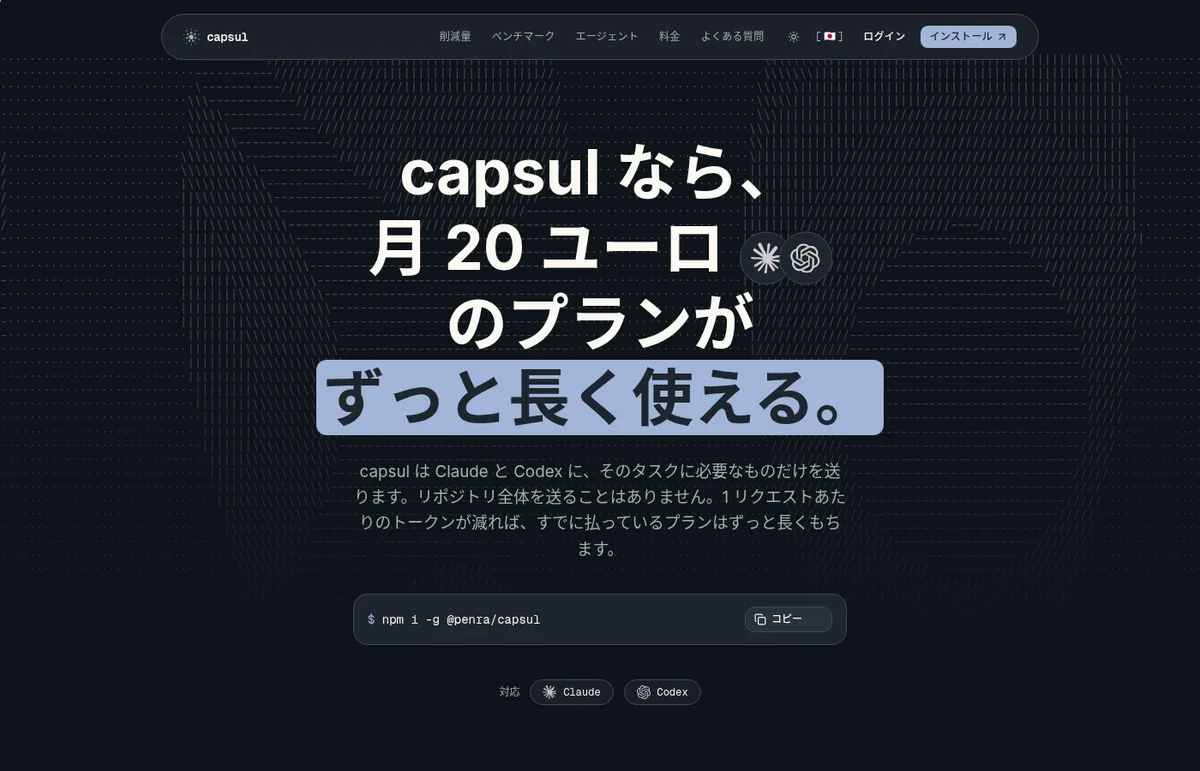
capsul is a command-line tool (CLI) from PENRA, a French sole proprietorship, that sends the AI coding agents Claude Code and Codex CLI only what a task needs. Instead of the whole repository, it passes the files you name plus short excerpts from the repository you are working in, within a token budget you set. The official pitch is that when each request sends less, the Claude or ChatGPT plan you already pay for lasts much longer.
capsul itself does not run an AI model. It drives the Claude Code or Codex CLI you are already signed in to, so no API key is needed and there is no separate model bill (you can also use it with an API key). It does not raise usage limits; it reduces how much each request uses. The official website and the terms of service are available in Japanese.
Source: capsul official website (also for the image below)
How to use it
- Install it
Node.js 20 or later is required. Install with
npm i -g @penra/capsul(on macOS and Linux, Homebrew also works). Installing needs no token or account. Also install the CLI of the agent you want to drive (Claude Code or Codex). On Windows 10 and 11, it works from PowerShell. - Check your machine
capsul doctorlists the agent CLIs installed, the credentials configured and where they are stored. It only reads and never writes to another tool's configuration. - Start it inside a repository
Typing
capsulinside a repository opens an interactive session where you pick an agent and keep asking./agentswitches between Claude and Codex,/modelpicks the model, and/economysets how aggressively capsul trims what it sends. - Use one-shot commands
For scripts or CI,
capsul ask "<question>"asks once and returns the answer.
See what will be sent, and how much, before sending
capsul's distinguishing point is that you can check what will go to the model, and how much, before it is sent. capsul context '<task>' shows what would be sent and what that saves, without calling the agent. Because no model is called, it does not use your plan's quota.
According to the official site, JavaScript and TypeScript get the highest precision, and Python, Go, Rust, Java and Ruby are well covered. Other languages work as long as the files are text.
Official benchmark: median 67% less input sent
The official website publishes a comparison in which the same five short questions were sent to the same model through capsul and through claude -p (Claude Code run as is), measuring the input sent to the model (September 2026). Across 12 Claude models, the reduction ranged from 50% (Sonnet 4.6) to 80% (Opus 4.8), with a median of 67%. The site says that none of the 12 Claude models failed an answer check when using capsul.
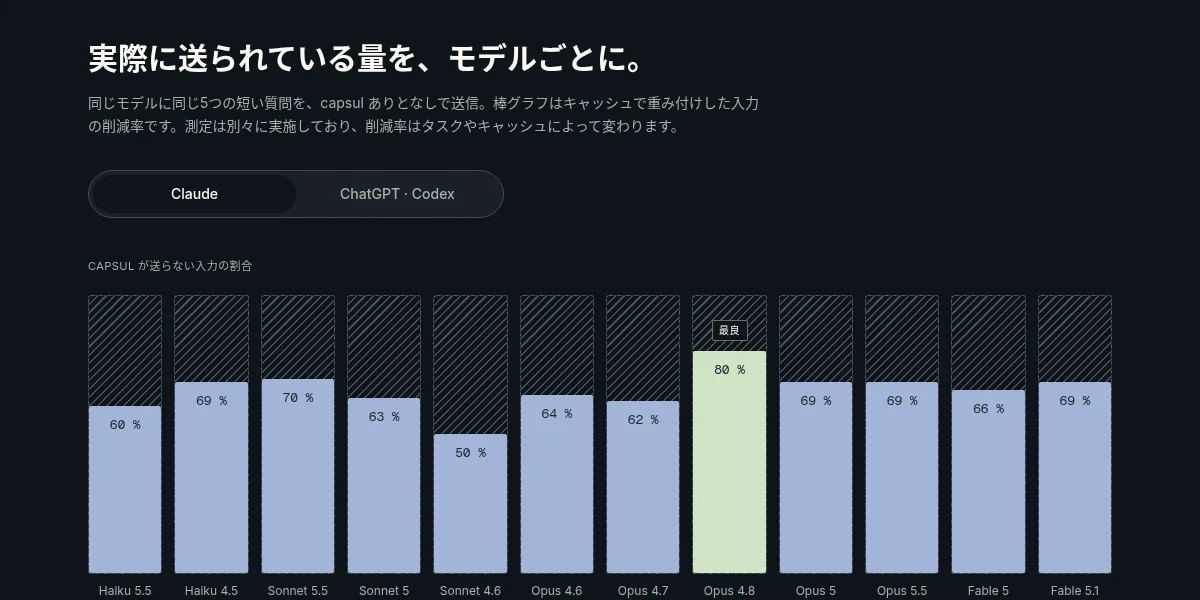
The official site also explains how to read these numbers:
- The measurement used one-line questions, where the savings are largest. A separate measurement on September 4, 2026 with ten-line prompts showed gains of 1.09× to 3.34×, and two rows showed no effect
- It measures the input sent to the model, not how much of a subscription's quota that consumes
- The reduction varies with the task and with caching
Features
01Sending less
capsul picks only what the task needs and passes it to the agent.
- Interactive session — start with capsul and keep going, choosing the agent, model, reasoning effort and trimming level
- capsul ask — a one-shot question, with options for token budget, model and reasoning effort
- capsul context — shows what would be sent and what it saves, without calling the agent
02Seeing what you used
The records are local files, and their contents are never uploaded.
- capsul stats — tokens and cost saved over time
- capsul burn — where your spending goes, by agent, by model and by project
- /usage — what is left of your agent plan
03Authentication and management
You can check locally how keys and credentials are handled.
- capsul doctor — lists where keys are stored, what protects them and which CLIs were found (offline; never prints key contents)
- capsul login — use an Anthropic or OpenAI API key instead of a subscription; the key is stored in the OS keychain
- capsul push — push the current branch through the GitHub CLI
Code and prompts go straight from your machine to the provider
Even through capsul, prompts and code go directly from your machine to Claude's or Codex's provider; capsul's servers do not relay them. According to the privacy policy, on the free plan the server only increments a counter on your account for each prompt (no logs, timestamps, device identifiers or content), and on a paid plan it records nothing. Prompts, repositories and responses never reach it. Keys are stored in the OS keychain first, and other CLIs' credentials are read only to check whether you are signed in.
Pricing
| Plan | Price (EUR) | Details |
|---|---|---|
| Free | €0 | 10 prompts, no credit card. Claude and Codex, all features |
| Pro | €5.99/month (launch price; regular €9.99) | Unlimited prompts. Savings history across multiple machines |
| Team | From €20.99/month | 15 seats included, then €3.50 per seat up to 30; beyond that, a quote. Each seat is an independent account with unlimited prompts |
- Annual billing may be offered at 17% off the monthly price (per the terms of service)
- The operator is VAT-exempt, so no VAT is charged. Prices are in euros
- Payment and cancellation are handled in the portal of the payment provider Polar (Polar Software Inc.). Cancellation takes effect at the end of the paid period, with no refund for the remainder
- Claude or ChatGPT plans and API fees are paid separately to each provider
- Team does not include API access or BYOK. Using an API key in the CLI is available on every plan
(As of November 2026, based on the pricing section of the official website and the terms of service)
How capsul differs from other AI coding tools
capsul does not replace a coding agent; it is used together with Claude Code and Codex.
| Product | Type | Highlights |
|---|---|---|
| capsul | CLI that trims what is sent to Claude Code and Codex | Preview of content and volume before sending, token budget, savings records. 10 free prompts, Pro €5.99/month |
| Claude Code | Anthropic's AI coding agent | One of the agents capsul drives. Included in Claude Pro/Max/Ultra |
| Codex | OpenAI's AI coding agent | One of the agents capsul drives. Available with ChatGPT plans |
| Cline | Open-source agent that runs in your editor and terminal | Separates planning and acting, with approval along the way. Model costs are pay-as-you-go |
| Kilo Code | Open-source agent for VS Code, JetBrains and the CLI | Use the same agent across several environments |
Details of the other products in the table are as of the check date shown on each product page.
If you are choosing the agent itself, compare Claude Code, Codex, Cline and Kilo Code. capsul suits people who already use Claude Code or Codex and hit their plan's usage limits early, or who want to check what is sent before using it.
FAQ
Q. Is capsul free?
The free plan lets you try 10 prompts without registering a credit card. After that, you need Pro (€5.99/month, launch price) or Team (from €20.99/month). capsul context does not call the model, so it does not use your agent plan's quota.
Q. Do I need an API key?
No. capsul drives the Claude Code or Codex CLI you are already signed in to. If you prefer an API key, capsul login registers an Anthropic or OpenAI key.
Q. Is my code sent to capsul's servers? No. Prompts and code go directly from your machine to Claude's or Codex's provider. According to the privacy policy, the server records only the free plan's prompt counter, and nothing at all on a paid plan.
Q. Does it raise my usage limits? No. It does not raise usage limits; it reduces how much each request sends. The official benchmark also measures input sent, not quota consumed.
Q. Is it open source? No. capsul is proprietary software that you may install and run under the terms in its LICENSE.
Provider
capsul is operated by Adrien Pennetier, a sole proprietor trading as "PENRA" in Strasbourg, France (SIREN 989 816 947). The operator is named in the legal notice and the terms of service on the official website, and the French version of the terms is the legally binding one. The contact address is contact@capsul.chat.
The information on this page is based on what was published on the official website, the terms of service and the npm package as of November 2026. Features and prices may change, so please check the official website for the latest information.