Kilo Code
: How to use it, features, and the business problems it solves
Add bookmark
What is Kilo Code?
Kilo Code is an MIT-licensed open-source AI coding agent that runs the same way in VS Code, JetBrains, the CLI, and the cloud. You switch between purpose-built agents — Code, Plan, Ask, Debug, and Review — to generate code, refactor, chase bugs, and review changes. It supports 500+ models with mid-task switching, and charges no markup on AI inference: you pay the provider's rate. You can bring your own API keys or run local models with Ollama. Platform access is free for individuals and $15 per user per month for Teams. Anaconda acquired the company in July 2026, and Kilo Code now has more than 3 million users.
Business problems it solves

About "Kilo Code"
What is Kilo Code
Kilo Code is an MIT-licensed open-source AI coding agent that runs the same way in VS Code, JetBrains, the CLI, and the cloud. It writes code in your editor, refactors, chases bugs, keeps documentation current, and runs terminal commands.
The sharpest difference from its competitors is the pricing structure. Kilo Code adds no markup to AI inference. You pick from 500+ models, switch between them mid-task, and pay the model provider's rate. You can bring your own API keys, or run local models through Ollama.
More than 3 million people use it, and on July 15, 2026 Anaconda — best known for its Python distribution — acquired the company. It has continued as an open-source product since.
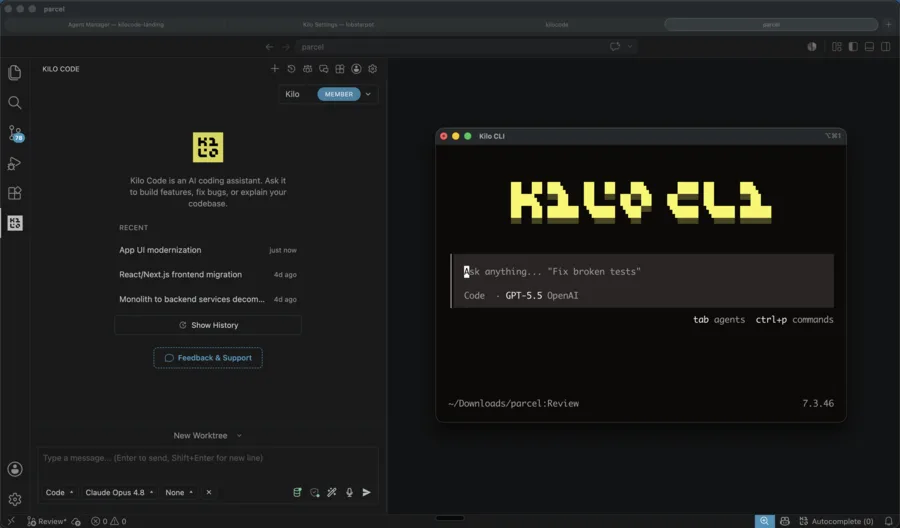
Source: Kilo Code official repository (the screenshots below are from the same source)
Kilo Coders
Across 60+ providers
Cumulative
MIT licensed
You pay what the model costs
Use an AI coding tool long enough and the bill stops being legible. Kilo Code splits it into three layers you pay for separately.
Platform
- Free for individuals
- Team features at $15 per user per month
AI inference
Choose free models, local models, your own API keys, Kilo Gateway (pay-as-you-go at cost), or Kilo Pass (a monthly credit subscription). Even through the Gateway, there is no markup
Cloud compute
- Usage-based, for cloud agents
- Billed separately from inference
Because platform access and model cost are decoupled, you can see where the money is actually going.
There is also Auto Model: pick a tier — Frontier (the latest, most capable paid models), Efficient (session-aware routing for smarter spend), or Free (the best free models available) — and Kilo chooses the model strategy per task for you.
How to use it
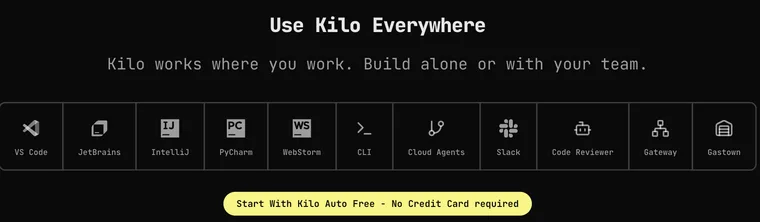
Start by choosing where you want to work. The same open-source agent runs behind every entry point.
- VS Code — Install the Kilo Code extension from the Marketplace. If you use a VS Code-like editor, it is also on Open VSX.
- CLI —
npm install -g @kilocode/cli, then runkiloin any project directory. Homebrew (brew install Kilo-Org/tap/kilo) and the AUR are supported too. - JetBrains — Install the Kilo Code plugin from the JetBrains Marketplace, or search "Kilo Code" under
Settings → Plugins. - Cloud agents — Run Kilo from the web with no local machine at
app.kilo.ai/cloud. - Code reviews — Set up automated AI reviews on your pull requests at
app.kilo.ai/code-reviews.
No API key is required to start. Kilo Auto Free routes to free models with no credit card.
Features
01Agents for each kind of task
Switch agents by task. You can also build your own.
- Code — The default. Implements and edits code from natural language
- Plan — Designs architecture and writes implementation plans before any code is written
- Ask — Answers questions about your codebase without touching any files
- Debug — Troubleshoots and traces issues
- Review — Reviews your changes across performance, security, style, and test coverage
02Core implementation capabilities
- Multi-file code generation — Changes that span the codebase, from natural language
- Inline autocomplete — Ghost-text suggestions, Tab to accept
- Self-checking — The agent reviews and corrects its own work
- Terminal and browser control — Runs commands and automates the web
- MCP marketplace — Find and wire up MCP servers to extend what the agent can do
03One command center for every agent
Local and cloud, IDE and CLI, controlled from one place.
- Parallel isolated worktrees — Run several agents at once without collisions
- Session handoff — Start in VS Code, continue in the CLI or the cloud
- Transparency — Audit the prompt, context window, and decisions in MIT-licensed source. No silent model switching
Fully autonomous runs in CI/CD
The Kilo CLI has an Autonomous Mode that runs with no prompts at all.
kilo run --auto "run tests and fix any failures"
--auto disables every permission prompt and lets the agent execute any action without confirmation. The project states plainly that it should be used only in trusted environments, and positions it as a feature for CI/CD pipelines.
Pricing
Kilo Code bills platform access, AI inference, and cloud compute separately.
Platform
| Plan | Price (monthly) | What's included |
|---|---|---|
| Free & Open Source | $0 | Open-source VS Code, JetBrains, and CLI extensions; agentic coding; code completion and generation; works with any AI model (usage billed separately) |
| Teams | $15 / user | The above plus usage analytics and reporting, AI adoption score, shared agent modes, centralized billing, shared BYOK, team management, data privacy controls, and priority support (14-day free trial) |
| Enterprise | Custom | The above plus model and provider restrictions, a shared private Gateway, audit logs, SSO/OIDC/SCIM, SLA commitments, and dedicated support channels |
AI inference
| Option | Price | Details |
|---|---|---|
| Free models / local / BYOK | $0 | Auto Free routes to free models via Kilo Gateway. Bring Anthropic, OpenAI, Google, Azure, AWS Bedrock or other keys, or run local models with Ollama or LM Studio |
| Kilo Gateway | Usage-based, no subscription | 500+ models across 60+ providers at exact provider rates, with no markup. Top up credits only when you need them |
| Kilo Pass | From $19 | Subscribe to a monthly credit amount and earn up to 50% bonus credits |
Cloud compute for cloud agents is billed separately from inference, based on usage.
Adoption and reception
The official site names Meta, Amazon, Airbnb, PayPal, Square, and Red Hat among the companies whose developers use Kilo, and it has taken the #1 spot for Open Source Product of the Month on Product Hunt.
Third-party numbers, as of August 2026:
| Metric | Value |
|---|---|
| VS Code Marketplace installs | ~1.42 million |
| VS Code Marketplace rating | 4 stars (205 ratings) |
| GitHub stars | 26,888 |
| GitHub forks | 3,057 |
The official FAQ also states that Kilo CLI is a fork of OpenCode, enhanced to work within the Kilo platform. That kind of disclosed lineage is part of why teams choose open source.
How it differs from other AI coding tools
| Product | Delivery | Model choice | Pricing model |
|---|---|---|---|
| Kilo Code | Open source (MIT); extension, CLI, cloud | 500+, switchable mid-task | Free for individuals; inference at provider cost |
| Cline | Open source; VS Code extension | Any model with your own API key | Extension free; inference at cost |
| Cursor | Dedicated editor (closed) | The vendor's model lineup | Subscription |
| Claude Code | CLI (closed) | The Claude family | Bundled with Claude plans |
| GitHub Copilot | IDE extension (closed) | The vendor's model lineup | Subscription |
As a guide: choose Kilo Code if you want to inspect the prompts and reasoning, pick your own models, and see the cost broken out. Choose Cursor if you want one editor experience tuned end to end. Choose Claude Code if you work in the terminal and already pay for Claude. Choose Cline if all you want is a lightweight open-source extension.
FAQ
Q. Is it really free? Platform access is free for individuals, and the extensions, plugin, and CLI are all MIT-licensed open source. The only cost is AI inference — and choosing free or local models brings that to zero as well.
Q. Does it work in Japanese? Yes. A Japanese UI locale is included, and the official README has a Japanese version.
Q. Can I use my own API key? Yes. Bring Anthropic, OpenAI, Google, Azure, or AWS Bedrock keys, or run local models with Ollama or LM Studio.
Q. Does it support MCP? Yes. You can find and connect MCP servers through the MCP marketplace.
Q. Is it still open source after the Anaconda acquisition? Yes. It continues as an open-source product for individuals, teams, and organizations.
The information on this page is based on what was published on the official site and repository as of August 2026. Features and pricing may change; please check the official site for the latest details.