

Cheso
: How to use it, features, and the business problems it solves
What is Cheso?
Cheso is an AI creation agent run by Hong Kong Gathering Media Limited (which its terms of service define as "Tencent"). Give it files, links and notes and tell it what you want to make, and the AI researches and analyzes the material, then produces editable slides, interactive web pages (H5), posters, images and videos. Slides can be edited by hand or by selecting an area for AI edits, and exported as PPTX or PDF; it also offers view analytics for shared links, speaker-script generation and live Q&A assistance during presentations. It automatically switches among Gemini, Hunyuan, DeepSeek, GLM and Qwen. Pricing is credit-based: the free tier gives 7,000 credits once at sign-up; the 1-Month plan is $21.9 (no auto-renewal); the Monthly plan is $1.9 for the first month, then $10.9; the Annual plan is $118.8 (each with 21,900 credits per month). The app can be displayed in Japanese (as of November 2026).
Business problems it solves


About "Cheso"
What is Cheso?
Cheso is an AI creation agent that researches and analyzes the files, links and notes you already have, then produces editable slides, interactive web pages (H5), posters, images and videos. It is run by Hong Kong Gathering Media Limited, which its terms of service define as "Tencent."
The official site calls it an "AI Presentation Maker," and presentations are at its core. But as the official user guide puts it, the materials you need to get an idea across are not limited to slides. A poster to announce an event, a web page people can click through, an image that sets the tone, a video that tells the story in motion — Cheso's idea is that you can make each of these in the same conversation.
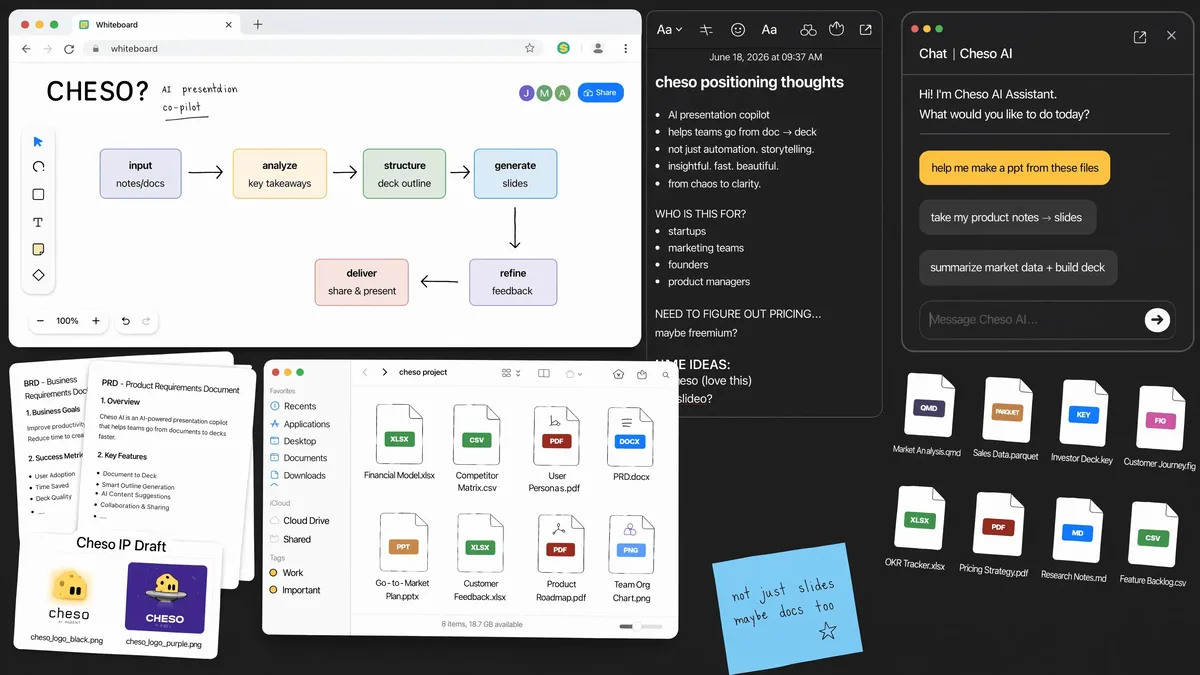
Source: Cheso official site and official blog (same for the images below)
How to use it
- Create an account Sign up from "Start Now" at cheso.ai with a Google, Apple, X or GitHub account. New accounts receive the free tier's credits (7,000 credits, one time only). You must be 18 or older.
- Hand over your materials Upload background material or data you want analyzed. According to the app, it accepts text, Markdown, CSV, Excel, Word, PDF, PowerPoint, images, video, audio and more. Paid plans allow up to 500 MB per file. You can also start from links or notes.
- Say what you want to make Choose Slides, Image Generation, Video Generation and so on below the prompt box, or just ask in words, such as "make a presentation introducing X." For slides, pick a built-in template or upload your own. If you forget, a template picker appears before Cheso starts building the deck.
- Finish it Polish the result by hand or by selecting an area and having the AI change it. When it's done, present it, send a share link, or export it.
Take slides from "almost right" to finished without starting over
AI-made slides often have a good structure but details you don't like. Cheso offers three ways to fix them without regenerating the whole deck (official blog, "How to Edit AI-Generated Presentations in Cheso").
Edit by hand
- Enter edit mode with Edit in the upper right
- Select text and change the font, weight, alignment and position
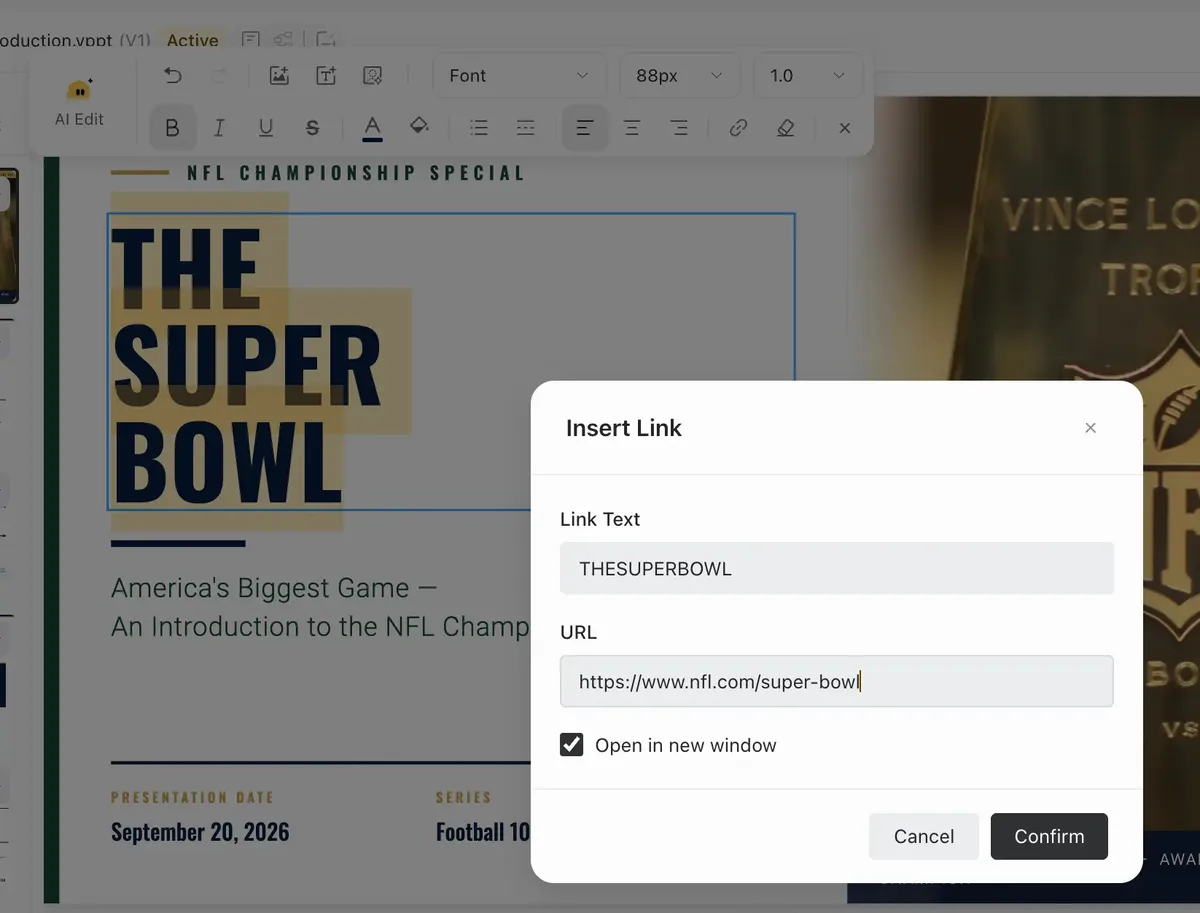
- Add links to text
Let the AI edit
- AI Edit — select the area to change and ask, e.g., "make this number gold." Only that part changes
- Quote and Edit — quote the selected part into the conversation and edit it using what you've already worked out
Slides are built in Cheso's own VPPT format. The company explains this addresses two problems: ordinary PowerPoint files are hard for AI to edit, and AI-made slides tend to have overlapping elements. Finished slides can be downloaded as PPTX or PDF from the app's export menu, or exported as an offline HTML presentation that keeps the animations for presenting in a browser. Exporting to Google Slides or Google Drive and delivery by email work once you set up the corresponding connector (official blog "6 Reasons to Try Cheso").
After you create — view analytics, and help before and during the talk
The official User Guide 02 covers features for after you share your work.
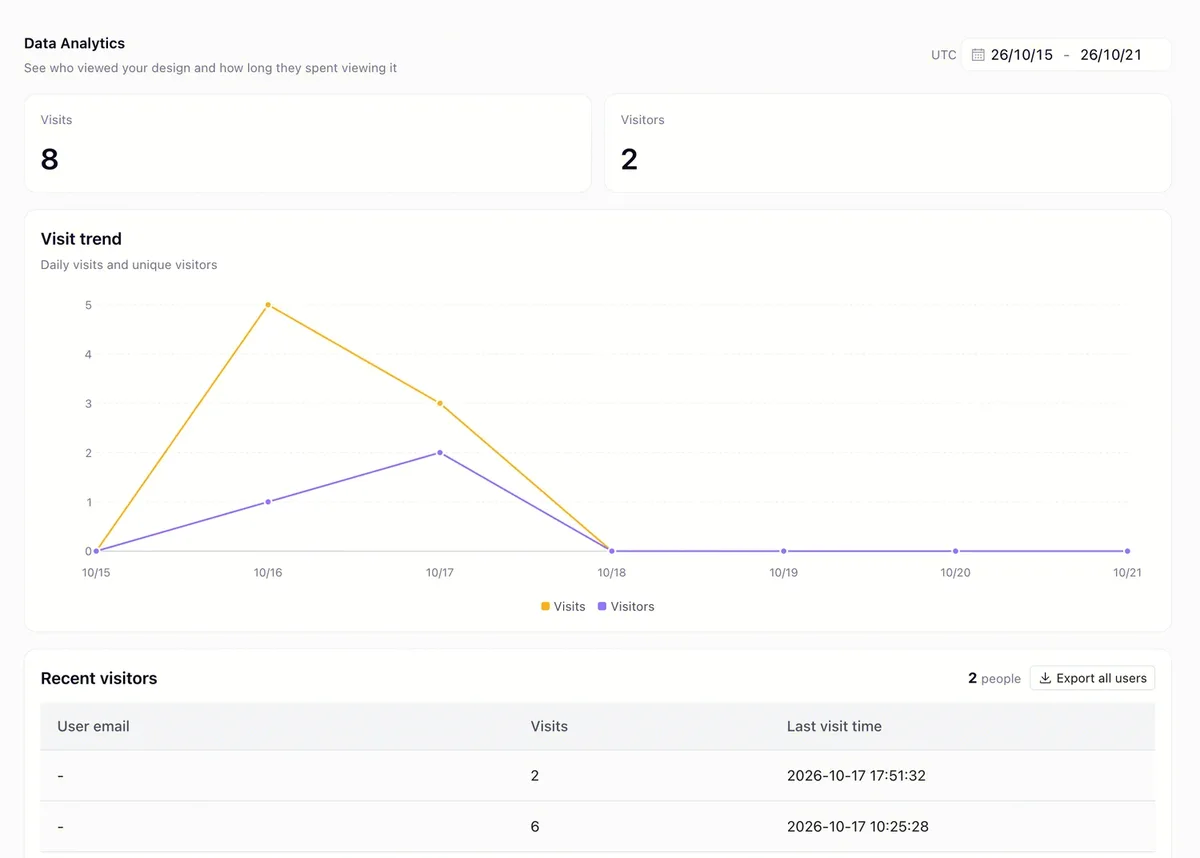
- Analytics — See visits, visitors and a trend chart for work shared via a link. The example is posting a shop's promotional poster on social media and checking how many people opened it
- Speaker script generation — "Generate script" under the slides writes a script that follows your deck, using web search where needed
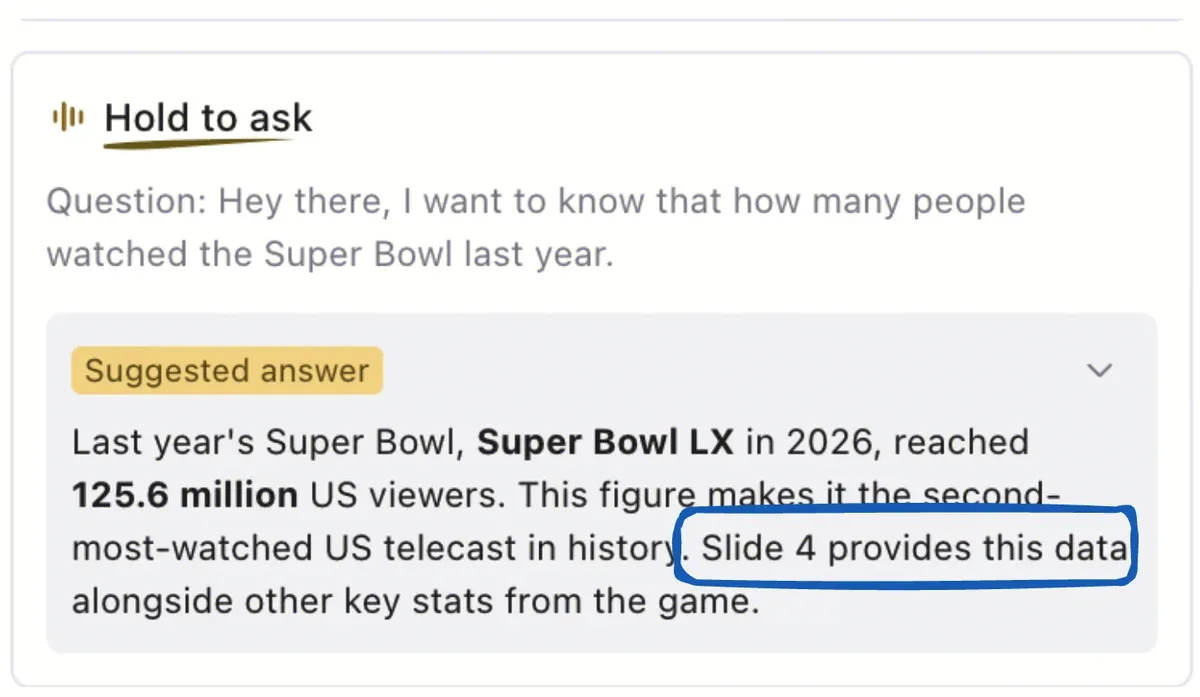
- Live presentation assistance — In Presenter View, click "Start live assist" and Cheso suggests answers to audience questions and points to the relevant slide number. The company itself reminds you to check figures and dates before saying them
Features
01What you can make
The five types listed in the official User Guide 01.
- Slides — with a built-in template or your own
- Posters — single-page visuals for events, products and social media
- H5 (web pages) — pages people can open and interact with, even small games like a personality quiz
- Images — via image-generation models, including artwork created automatically for slides or pages
- Videos — MP4 from a video-generation model, or Vmotion, which builds text animation in code
02Research and synthesis
It can do the groundwork before you create.
- Research — turns your materials and web information into slide-ready insights and a storyline
- Reports — compiles findings into an HTML report with navigation, interactive charts and source references (an official blog example)
- Brainstorming — think it through together before you've decided what to make
03Finish and deliver
Everything after creation happens in the same place.
- Editing — manual editing, AI Edit, Quote and Edit
- Sharing and analytics — create a share link per file and count views
- Presenting — Presenter View, speaker-script generation, live Q&A assistance
- Remix — build your own version from work published in the Explore Center
Pricing
Pricing is credit-based. Each report, slide deck, poster, web page and so on consumes credits according to the task's complexity.
| Plan | Price | Credits | Main inclusions |
|---|---|---|---|
| Free | $0 | 7,000 (once at sign-up; not reset or replenished) | Limit on the number of files you can export in the last 24 hours. Top-up packs not available |
| 1-Month | $21.9 (one-time, no auto-renewal) | 21,900 in total | Unlimited exports, up to 500 MB per file, premium AI models (text, image, video, audio) |
| Monthly | $1.9 for the first month, then $10.9/month (auto-renews monthly) | 21,900/month | Everything in 1-Month plus priority task execution |
| Annual | $118.8/year (avg. $9.9/month; auto-renews yearly) | 21,900/month (granted monthly) | Everything in Monthly plus highest-priority task execution and premium support |
- The Monthly plan's $1.9 first month is labeled "Limited-Time 91% Off," and the Annual plan "Limited-Time 55% Off." Next to the Monthly price, the pricing table shows "$21.9/mo" struck through as the original price, and the note says "Then $10.9/mo · auto-renews monthly" from the second month
- Paid-plan credits are valid for 30 days from the grant date and do not carry over. The Annual plan also grants credits once a month
- While on a paid plan, you can buy credit top-up packs (valid for 30 days from purchase)
- Refunds can be requested from support@cheso.ai within 24 hours of purchase if no credits have been used
- Prices are shown in US dollars; the pricing table does not state how tax is handled
(As of November 13, 2026, based on the pricing table on the official site, the in-app pricing FAQ and the terms of service)
How your data is handled
According to the privacy policy, Cheso's data, logs and backups are stored in Singapore. Depending on the feature, data may also be processed or accessed in the United States and, to the extent needed for technical support and troubleshooting, in mainland China. Listed data processors include Tencent Shenzhen Computer Systems Limited and AWS (Singapore), with Midas (Harvest Sharp Limited) for payments.
On training, the privacy policy says Cheso does not use your inputs to train its models unless it gives any required notice and obtains any required consent, and that it takes steps so third-party AI providers do not train on your inputs. The terms of service (updated August 20, 2026, the same as the privacy policy), however, grant a license over user content for operating and improving the service, including training AI models. If you handle business material, it's safest to read both documents before use. Inputs and outputs are deleted within 90 days after you delete the task or your account.
How it differs from other AI agents and presentation tools
| Product | Type | What it mainly makes |
|---|---|---|
| Cheso | AI creation agent (presentation-focused) | Slides, posters, H5 web pages, images and videos, plus view analytics after sharing and presentation assistance |
| Skywork | All-in-one AI agent with deep research | Websites, slides, documents, spreadsheets, posters, videos, podcasts |
| Genspark AI | All-in-one AI workspace | Slides, sheets, documents, and actions such as AI phone calls |
| Manus | General-purpose autonomous AI agent | Deliverables such as research, documents, websites and apps |
| GAMMA | AI presentation and document tool | Presentations, documents, websites, social posts |
| Lovart | AI design agent | Logos, posters, packaging, ads, videos |
Details for other products reflect the information on each product page as of when it was checked.
FAQ
Q. Can I use Cheso for free? Yes. Signing up gives you 7,000 free credits, once. When they run out, you are not switched to a paid plan automatically, and free credits are not replenished. On the free tier, the number of files you can export in the last 24 hours is limited.
Q. Can I use it in Japanese? The app's display can be switched to Japanese, and screens such as the pricing FAQ appear in Japanese. The website's top page, blog and terms of service are in English (as of November 2026).
Q. Can I open the slides in PowerPoint? You can download them as PPTX (editable in PowerPoint) or PDF from the app's export menu. With a connector set up, you can also export to Google Slides. Inside Cheso, slides use its own VPPT format, which supports manual editing and partial AI edits.
Q. What is the relationship with Tencent? Your contract is with Hong Kong Gathering Media Limited, which the terms of service define as "Tencent." The privacy policy lists Tencent Shenzhen Computer Systems Limited as a data processor and Tencent International Service Europe B.V. as its EU representative.
Provider
Cheso is run by Hong Kong Gathering Media Limited (Room 907, Wing Tuck Commercial Centre, 177–183 Wing Lok Street, Hong Kong). The terms of service are governed by Singapore law, and disputes go to arbitration at the Singapore International Arbitration Centre (SIAC). Contact: support@cheso.ai.
The information on this page is based on what was published on the official site, the in-app pricing information, the official blog (user guides), the terms of service and the privacy policy as of November 2026. Features and pricing may change, so please check the official site for the latest information.