
MELO音楽
: How to use it, features, and the business problems it solves
Add bookmark
What is MELO音楽?
MELO音楽 (MELO Music; Chinese: MELO音乐) is an AI song-making service run by Beijing Lingxi DeepMind Technology Co., Ltd. (北京灵犀深智科技有限公司) in Beijing, China. From a one-line description, lyrics, humming or a photo, it generates songs up to 8 minutes long with lyrics, melody, arrangement and vocals, and also offers covers, voice cloning, up to 12-stem WAV export, and MIDI and sheet-music export. Available on iOS, Android, as a WeChat Mini Program and on the web. Free points reset daily, and paid membership starts at ¥1,100/month (Japanese App Store). The interface is in Chinese (partly English) with no Japanese UI, but songs with Japanese lyrics are supported.
Business problems it solves



About "MELO音楽"
What is MELO音楽?
MELO音楽 (MELO Music; Chinese: MELO音乐) is an AI song-making service that turns a one-line description, lyrics, a hummed melody or a photo into a finished song with lyrics, melody, arrangement and vocals. It is run by 北京灵犀深智科技有限公司 (Beijing Lingxi DeepMind Technology Co., Ltd.) in Beijing, China, which lists its company name and Chinese ICP registration number (京ICP备2023007891号-8) in the footer of the official site. The same company also operates the AI live-streaming service "秒播" (Miaobo).
The company says it uses its own music generation model and positions the quality alongside Suno and Udio. Its headline strength is natural pronunciation when singing in Chinese, and it says it also handles Chinese dialects such as Cantonese and Hokkien, as well as Tibetan, Mongolian and Uyghur. Lyrics in foreign languages such as Japanese, English, Korean and Spanish are supported too.
As of October 2026, MELO音楽's interface is in Chinese (the App Store lists Simplified Chinese and English), with no Japanese interface. You can write songs with Japanese lyrics, but navigation, membership purchases and the terms are all in Chinese. Its main audience is in mainland China, and the distribution channels it highlights are Chinese services such as QQ Music, NetEase Cloud Music and Douyin (the Chinese version of TikTok).
How to use it
When you open the app, you get a screen where you simply type the kind of song you want into the input box. Buttons below the box let you attach images, video, audio or documents.
The chips above it are song prompts such as "late-night drive" or "rainy-day EMO"; tapping one starts a song right away. Everything on screen is in Chinese.
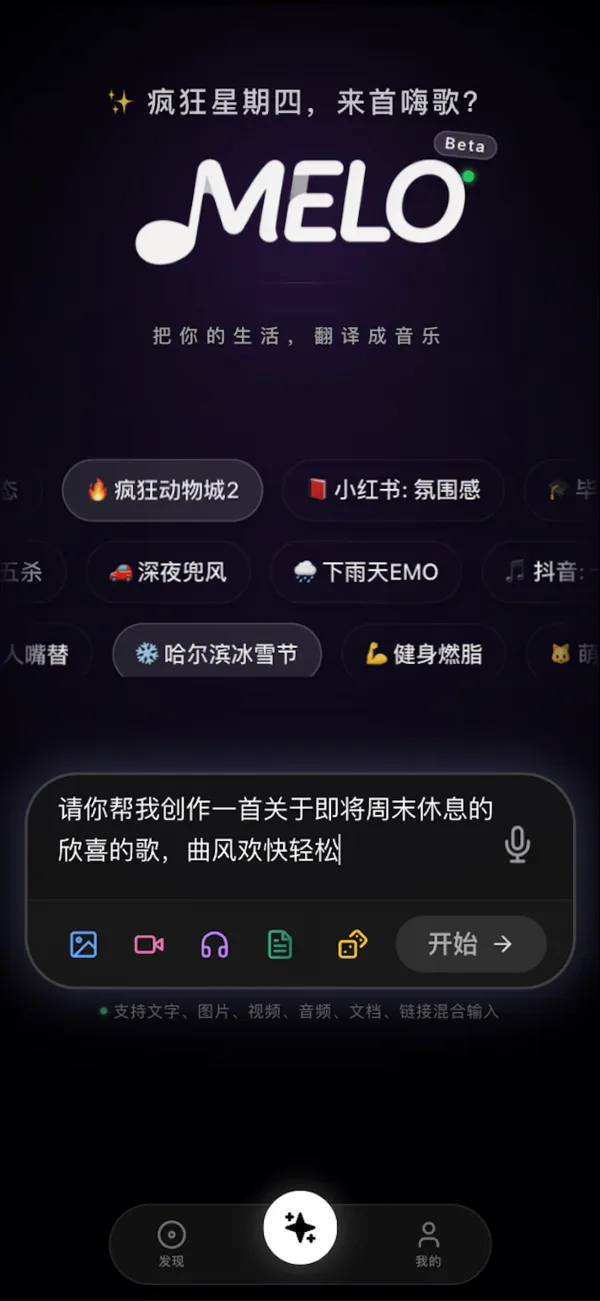
Source: MELO音楽 official website (the same applies to the screenshots below)
- Open the app or web version and sign in It is available on iPhone (App Store), Android (APK downloaded from the official site), as a WeChat Mini Program, and in the browser (h.51melo.com). Your account and songs sync across devices, and the company says there are no feature restrictions on any platform. The web sign-in screen offers registration and login by mobile phone number (SMS code or password), WeChat or Douyin.
- Enter the "inspiration" for your song Type a sentence such as "write a song about graduation", describe a mood, paste your own lyrics, or upload humming, a photo, a video or audio. You can also specify a style (pop, K-pop, folk, EDM, rock, rap, Chinese traditional style, etc.), instruments and vocal style (child's voice, husky voice, choir and so on) in the prompt.
- Refine it through conversation You can also compose conversationally, telling the AI in chat things like "make it brighter" or "shorten the chorus" and regenerating. The company describes the design as usable without touching detailed parameters.
- Listen, export and share Finished songs play in the app and can be exported as WAV (lossless), MP3, MIDI, numbered musical notation (jianpu) or staff notation. Video templates are provided for sharing to Douyin, Kuaishou and similar platforms.
Features
Once you send your request, the AI replies in a chat and proposes several song ideas in different styles (Plan A, B and so on). Each comes with a title, genre tags such as City Pop and Funk, and a description of how the song will feel.
You pick a plan, or use the box at the bottom to ask for changes such as "make it brighter", and the song is reworked.
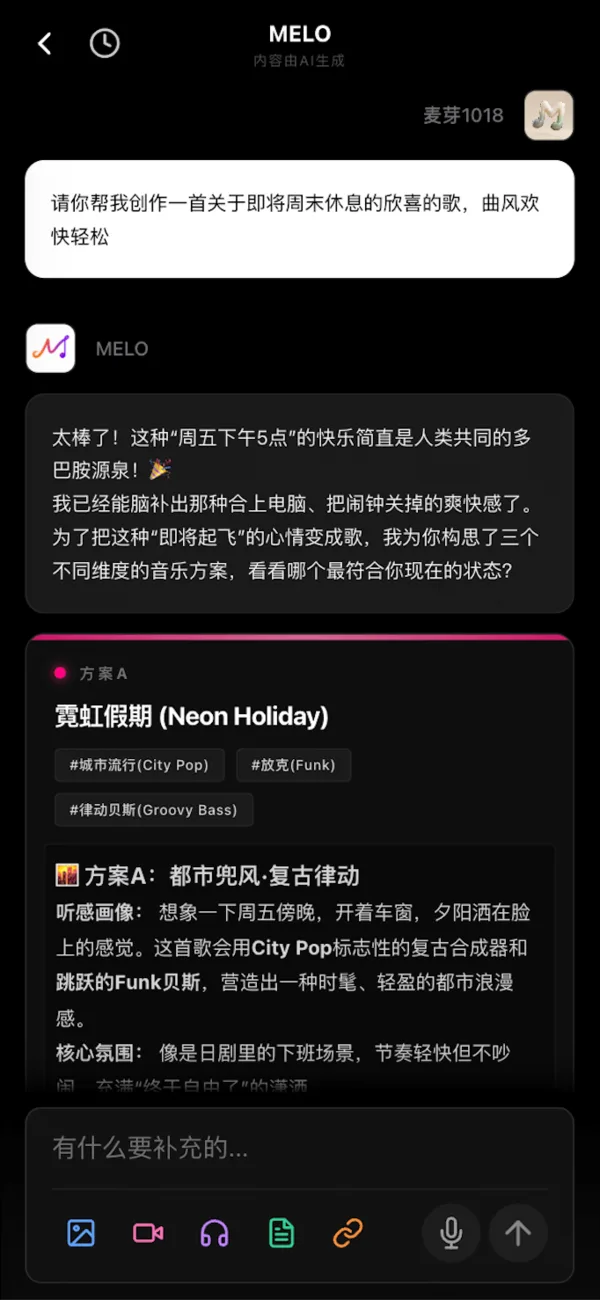
01Make a song from your input
The core feature is producing a finished song without any knowledge of music theory or instruments.
- Text or lyrics to song — From a one-line description or your own lyrics, it writes, composes, arranges, sings and mixes. Songs can be up to 8 minutes long
- Multimodal input — Songs can also be made from humming, photos, videos or audio, for example background music that matches the mood of a photo
- Conversational composing — Regenerate the song while telling the AI what you want in chat
- Lyric writing — Writes rhyming lyrics from keywords
02Work with existing songs
- Covers — Upload an original recording or an a cappella vocal and have the AI sing it again
- Accompaniment extraction and re-arrangement — Pull out just the backing track for karaoke, or rework it into a different arrangement
- Continuation — Upload a half-written chorus and let the AI suggest where it goes next
- New music for the same lyrics / "make one like this" — Keep the lyrics and rewrite the music, or use a song from the community as a reference for a new one
03Voice cloning
Upload a short recording of your own voice (without accompaniment) and it builds a personal "voice card" that can sing any song in your voice. It supports male-female duets and multi-voice choirs, and the company says you can adjust vocal qualities such as breathy or husky tones.
04Production-ready exports
- Lossless export — Export as WAV (lossless) or MP3
- Stem separation — Set the BPM and key and export up to 12 separate WAV stems for finishing in a DAW
- MIDI and sheet music — Export MIDI (usable for further arranging), numbered notation and staff notation
05Listen and share
- AI music plaza — Browse songs made by other users by genre, and "make one like this" from songs you like
- Social sharing — Share to Douyin, Kuaishou and others with visual templates
- Library — Manage all your songs from your personal page
Pricing
The basic service is free: free points that reset every day cover light use (there is also a sign-up allowance and extra generations from daily check-ins). Beyond that, you either become a member (monthly or yearly) or buy additional points. The official site has no pricing page; the figures below are the in-app purchases shown on the App Store (checked October 2026).
| Item | App Store (Japan, tax incl.) | App Store (China) |
|---|---|---|
| Membership "生活艺术家" (monthly, auto-renewing) | ¥1,100 | CNY 45.80 |
| Membership "MELO音乐会员58 (生活艺术家)" | ¥1,300 | CNY 58.00 |
| Membership "生活艺术家" (single month) | — | CNY 68.00 |
| Membership "传奇音乐人" (yearly, auto-renewing) | — | CNY 358.00 |
| 500 points | ¥500 | CNY 23.80 |
| 1,600 points | ¥1,300 | CNY 58.80 |
| 5,000 points | ¥3,000 | CNY 118.00 |
| 8,000 points | ¥4,000 | — |
| 16,000 points | ¥8,000 | — |
| 30,000 points | ¥11,000 | CNY 518.00 |
| Rights certificate (确权证书) | ¥150 | CNY 10.00 |
| Copyright transfer + rights certificate | ¥500 | CNY 20.00 |
Ownership and commercial use
According to the official FAQ, songs generated by paying members belong to the user and can be freely used commercially and distributed. Free users can obtain ownership of a song by purchasing a "proof of creation" (存证), which corresponds to the "rights certificate" and "copyright transfer + rights certificate" items in the table above. Songs can also be registered on a blockchain as proof.
Voice cloning is presented as a feature for using your own voice. Cloning someone else's voice and making it sing without their permission can raise portrait-right and publicity-right issues, so avoid it.
Platforms and specs
Reviews and reputation
The iOS app is new, released in March 2026. On the Chinese App Store it averages 4.7 from 84 ratings (checked October 2026) and appears in the Music category rankings. The Japanese App Store, by contrast, has almost no ratings yet, and we found no reviews from Japanese-language users. Chinese blogs and media carry articles saying its Chinese pronunciation sounds more natural than Suno's, but some are hard to distinguish from the company's own promotion, so the most reliable approach is to try it with the free points.
Pros and cons
Pros
- Makes a finished song with vocals from a single sentence, humming or a photo
- Natural Chinese singing, including dialects and minority languages
- Voice cloning, covers and accompaniment extraction all in one app
- Exports up to 12 separated WAV stems plus MIDI and sheet music for finishing in a DAW
- Daily-resetting free points let you try it at no cost
Cons
- Interface, terms and support are in Chinese; no Japanese interface
- No pricing page on the official site, so points per song and membership details are unclear
- Free users must buy a certificate to obtain ownership of their songs
- The distribution and sharing channels it promotes are mainly Chinese services
- No reviews yet from Japanese users on the quality of Japanese-language songs
FAQ
Q. Is MELO音楽 free? A. Yes. There are free points that reset every day, so light use costs nothing. For heavier use you become a member or buy more points.
Q. How much does it cost? A. On the Japanese App Store, the "生活艺术家" membership is ¥1,100 per month (auto-renewing), and points start at ¥500 for 500 points (checked October 2026). On the Chinese App Store there are memberships at CNY 45.80 per month and CNY 358.00 per year.
Q. Does it support Japanese? A. It can compose songs with Japanese lyrics, but the app and web interface are in Chinese with no Japanese display (as of October 2026).
Q. Can I use the songs commercially? A. According to the official FAQ, songs made by paying members belong to the user and can be used commercially and distributed. Free users can obtain ownership by purchasing a proof of creation (存证).
Q. Can it sing in my own voice? A. Yes. Upload a short recording of your own voice without accompaniment, and it can sing any song in that voice.
Q. Which devices does it run on? A. iPhone, Android, WeChat Mini Program and the browser-based web version, with songs synced through your account.
How it differs from Suno and Mureka
| Tool | Provider | Strengths | Ease of use in Japanese |
|---|---|---|---|
| MELO音楽 | 北京灵犀深智科技有限公司 (China) | Chinese and dialect singing, voice cloning, 12-stem separation, MIDI and sheet-music export | Supports Japanese lyrics; interface in Chinese |
| Suno | Suno (US) | The go-to tool for making songs with vocals from prompts or lyrics, with a large user base and plenty of how-to information | Supports Japanese singing |
| Mureka | Kunlun Tech (China) | Composing with its own model, plus editing and export in one place | Interface also available in Japanese |
If you want to make Chinese-language songs, or handle voice cloning and stem separation in one app, consider MELO音楽; to start with a well-documented standard, consider Suno; and to use a China-based service with a Japanese interface, consider Mureka.
The information on this page is based on what was published on the official site (51melo.com), the official blog and the App Store as of October 2026. Please check the app for the latest features and pricing.