StemTab
: How to use it, features, and the business problems it solves
Add bookmark
What is StemTab?
StemTab is a stem-separation and automatic transcription tool from Changsha Blue Fox Information Technology Co., Ltd. in China. It splits a song into two parts (vocals and accompaniment) or six parts (vocals, guitar, bass, drums, piano and other), turns the chosen part into an editable score draft, and lets you correct it in the score and piano roll before exporting PDF, MusicXML, MIDI or separated audio (it does not create guitar TAB). The web version processes in the cloud and sells processing time outright (5-minute free preview, from $9.98); the iPhone/iPad app processes on the device and costs ¥1,500 on the Japanese App Store.
Business problems it solves


About "StemTab"
What is StemTab
StemTab is a stem-separation and automatic transcription tool that splits a song into vocals, accompaniment and individual instruments, then turns the part you want into an editable score draft (MIDI, MusicXML and PDF). Load an audio or video file and it separates it into two parts (vocals and accompaniment) or six parts (vocals, guitar, bass, drums, piano and other), then transcribes the chosen part into a standard-notation draft. The waveform and the score follow the playhead, so you can fix pitch, duration and rests while you listen, and then export.
The official site states clearly that the transcription is a draft that a person is expected to check and correct, and that StemTab does not create guitar tablature (TAB). It is a tool for getting a quick starting point for learning songs by ear and practicing, not a service that outputs a finished score automatically.
StemTab is provided by Changsha Blue Fox Information Technology Co., Ltd. in Changsha, China (the name on the web terms, the privacy policy and the App Store seller). It comes in two forms: a browser-based Web Studio (processed in the cloud) and an iPhone/iPad app released on the App Store on October 26, 2026 (processed on the device). A Mac version is "coming soon" and is not yet available for download as of November 2026.
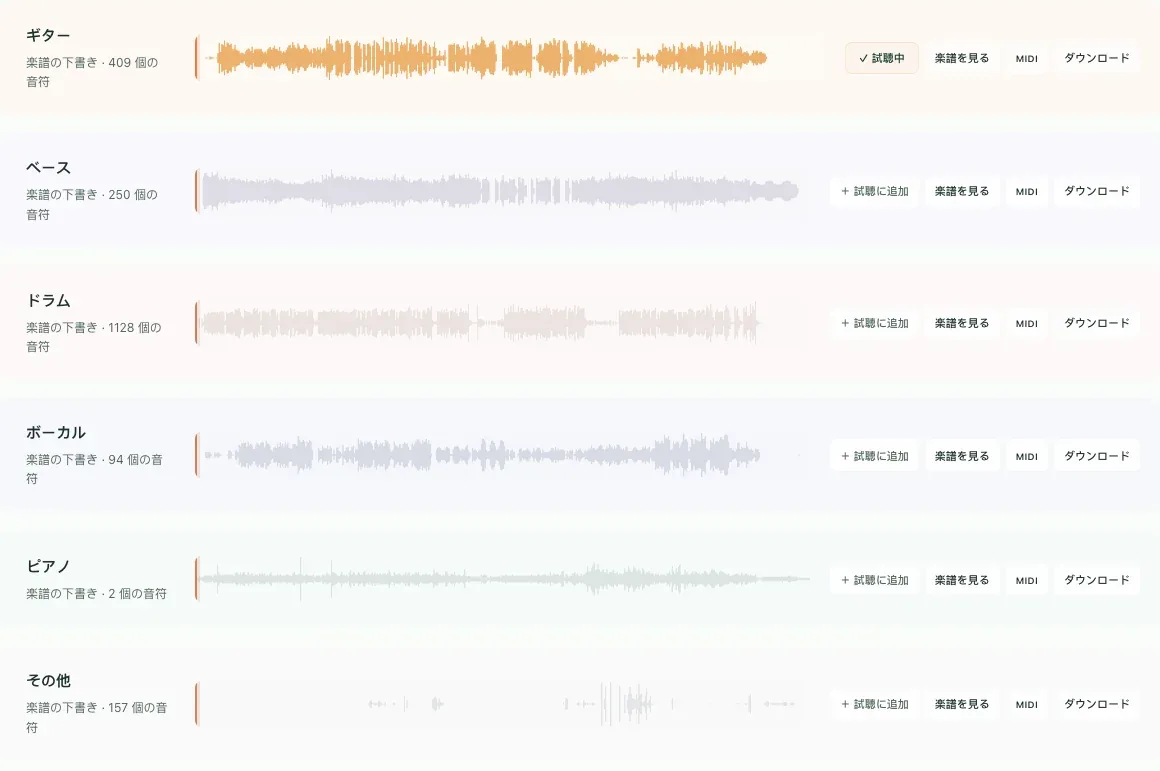
Isolate just the part you want and hear it clearly
Tracks sit side by side in one workspace, with add, mute, solo and playhead controls in the same place. You can play only the vocals or only the bass, or combine parts to audition a mix. The official site says the waveform on screen matches the audio you export.
Choose two parts to make a backing track without vocals for singing practice, or six parts to check each instrument. The iPhone/iPad app also offers section looping and speed changes, so you can repeat only the difficult phrase.
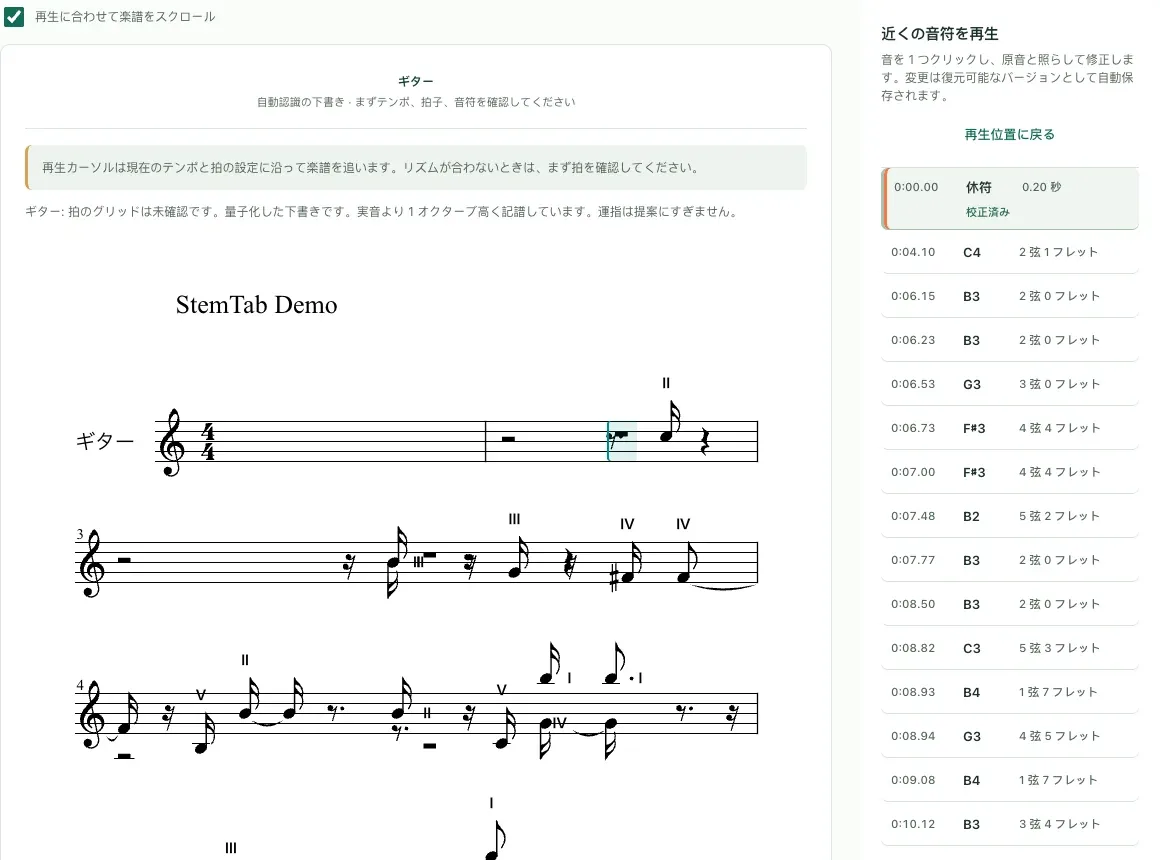
The score draft follows playback, so correcting a transcription is quick
StemTab creates a standard-notation draft from a separated part, and the score follows the playhead. Check it bar by bar while listening and correct pitch, note length and voices in the score and the piano roll. On the web version, re-exporting after corrections costs nothing extra.
The official site notes that accuracy depends on recording quality, mix density and playing style. According to the App Store description, note recognition works best on a solo or already separated part, and drum recognition currently covers kick, snare and closed hi-hat.
Source: StemTab official site
Hand off to a DAW or notation software and keep working
You can export the separated audio, a printable PDF, MusicXML, MIDI and a StemTab project. The official guide describes PDF as suited to reading and printing, MusicXML to further editing in other notation software, and MIDI to importing into a DAW.
| Export | Web Studio | iPhone/iPad app |
|---|---|---|
| Separated audio | MP3, WAV, FLAC | The original file format, plus MP3, WAV, M4A, ALAC, AIFF |
| Score | Printable PDF, MusicXML | Printable PDF, MusicXML |
| MIDI | Yes | Per transcribed part |
| Other | Full project | Share via AirDrop, Files and other apps |
Sources: StemTab pricing page and the App Store (as of November 2026)
On iPhone and iPad, processing stays on the device
The iPhone/iPad app runs separation and transcription on the device with Core ML, and needs neither a StemTab account nor a subscription. The web privacy policy also states that the native apps do not send your audio to the operator unless you contact them yourself. You can record with the microphone and analyze right away, or record on an Apple Watch and send it to the paired iPhone for analysis.
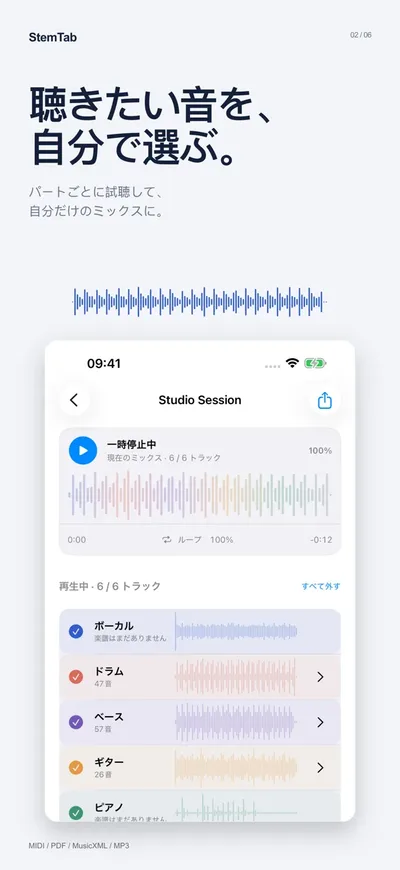
On-device transcription requires an A14/M1-class chip or later and at least 6 GB of memory, and the available processing and limits vary by device (App Store description).
How to use it
The official site describes the workflow in five steps.
- Choose your material — upload an audio or video file
- Choose the result — two stems, multiple instruments, or transcription only
- Watch progress — see the processing stages and progress
- Listen and fix — tracks, waveform and score stay on the same playhead, so you correct while listening
- Export and use — export audio, PDF, MusicXML, MIDI or the project
What you load is your own audio or video file. According to the App Store description, protected content and streaming-only content with no exportable file cannot be imported.
Pricing
Web Studio (one-time purchases of processing time, shown in USD)
| Plan | Price | Processing time | Project storage |
|---|---|---|---|
| Free preview | $0 | 5 minutes (once per verified email address) | Preview kept for 24 hours |
| Lite | $9.98 | 15 minutes | 7 days |
| Creator | $25.98 | 45 minutes | 30 days |
| Studio | $69.98 | 150 minutes | 90 days |
Source: StemTab pricing page (as of November 2026). Taxes and the final amount are shown at checkout
- You buy processing time rather than a subscription. Purchased minutes add up and never expire
- Paid processing is counted once according to the length of the source audio, and reserved time is returned if a job fails or is canceled
- The free preview lets you audition parts and mixes, generate and proofread the score, edit in the piano roll, generate and audition MIDI, and practice along with the accompaniment. Exporting and downloading require purchasing a paid plan
- Web refunds cover unused processing time within 14 days of purchase (refund policy)
iPhone/iPad app
The price on the Japanese App Store is a one-time ¥1,500. The purchase includes the features that run on the device, with no account or subscription required. Note that, according to the terms, an App Store purchase does not include web processing time.
How it differs from other music AI tools
| Product | Main use | Part separation | Score / MIDI | Entry price |
|---|---|---|---|---|
| StemTab | Split an existing song and make a score draft for learning by ear and practice | 2 parts / 6 parts | Standard-notation draft (PDF, MusicXML) and MIDI | Web: 5-minute free preview, from $9.98. App: ¥1,500 |
| MELO音楽 | Create songs from a description or lyrics | WAV export of up to 12 separated tracks | MIDI and score export | Daily free points; paid membership from ¥1,100/month |
| Suno | Create songs with vocals from text | Stem separation in Suno Studio | — | Free plan; Pro ¥1,500/month |
| AIVA | Create original music by choosing a style | Edit by track | MIDI export | Free €0, Standard €11 (monthly, billed yearly) |
| Soundverse AI | Create songs and voices from prompts | Stem separation | — | Free (1,000 tokens), Creator from $9.99 (monthly, billed yearly) |
- If you want to learn or practice an existing song, or put it into notation, StemTab fits, with separation, transcription and proofreading on one screen
- If you want AI to create the song itself, consider Suno or MELO音楽
- If you want to edit generated music track by track as MIDI, there is also AIVA
Pros and cons
Pros
- Choose between two parts (vocals and accompaniment) or six parts, and play only the sound you want to hear
- Separation, transcription, proofreading in the score and piano roll, and export all happen on one screen
- Exports to PDF, MusicXML and MIDI, so you can continue in notation software or a DAW
- The web version sells processing time outright instead of a subscription, and purchased minutes never expire
- The iPhone/iPad app processes on the device and needs no account
Cons
- Automatic transcription is a draft that needs checking and correcting by hand. It does not create guitar TAB
- The web free preview does not allow exporting or downloading
- The web version's processing servers are in mainland China (privacy policy). If your organization has rules about where uploaded audio may go, check them first
- There is no Mac version yet (as of November 2026)
- It launched in October 2026, and App Store ratings have not built up yet
Reviews and reputation
As of November 2026, the Japanese App Store does not yet have enough ratings or reviews to show a summary, and the official site lists no case studies or user testimonials. The web version offers a 5-minute free preview per verified email address, so the safest approach is to check how the separation sounds and how accurate the draft is on a song you want to practice before buying processing time.
FAQ
Q. Can it create guitar tablature (TAB)? No. StemTab creates standard-notation drafts and MIDI, and scores can be exported to PDF and MusicXML (official FAQ).
Q. What can I do for free? The web version gives a one-time 5-minute free preview per verified email address, covering part auditioning, score generation and proofreading, piano-roll editing, and MIDI generation and playback. Exporting and downloading require a paid plan (from $9.98). The iPhone/iPad app is a paid app at ¥1,500.
Q. Where is the audio processed? The iPhone/iPad app processes on the device and stores projects there. The Web Studio processes in the cloud, and according to the privacy policy its processing servers are in mainland China. The same policy states that uploaded audio and scores are not used to train machine-learning models.
Q. Can I use it on a Mac? The Mac app is "coming soon" and cannot be downloaded yet as of November 2026. The official guide advises choosing the Web Studio or iPhone/iPad if you want to use StemTab now.
Q. Can I load commercially released songs? The terms ask you to upload only content you have the right to use, such as your own recordings or licensed works. The official guide also cautions that being able to separate or transcribe a song is separate from being allowed to publish, distribute or perform it or its score.
Provider
StemTab is provided by Changsha Blue Fox Information Technology Co., Ltd. (Changsha, China). The web terms, the privacy policy and the App Store seller name all show this company. The web terms are governed by the laws of the People's Republic of China, and the contact address is support@stemtab.app.
The information on this page is based on what StemTab published on its official site (product page, pricing page, guide, terms of service, privacy policy and refund policy) and on the App Store as of November 2026. For the latest features and pricing, please check the official site and the App Store listing.