

Rask AI
: How to use it, features, and the business problems it solves
Add bookmark
What is Rask AI?
An AI localization platform that automatically translates and dubs videos and audio into 130+ languages. With natural AI voices, voice cloning (32 languages), multi-speaker detection, lip-sync, and subtitle editing, it takes existing videos global as-is.
Business problems it solves





About "Rask AI"
What is Rask AI
Rask AI is an AI localization platform that automatically translates and dubs videos and audio into 130+ languages. Under the banner "Translate videos with realistic AI voices," it offers natural AI voices, voice cloning, multi-speaker detection, and lip-sync, and is used by global businesses and creators. It has 3.4 million users.
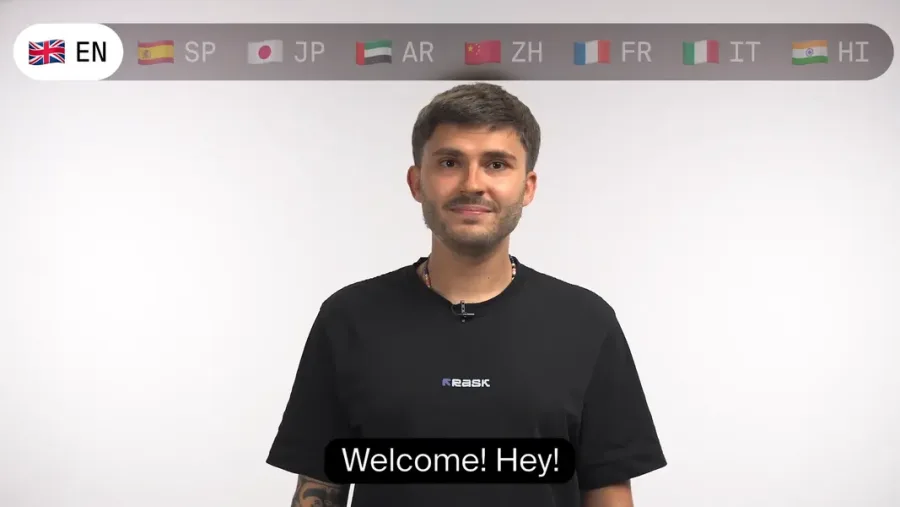
At its core, Rask AI dubs a single video into many languages, taking into account each speaker's voice and mouth movements. Translation and dubbing cover 130+ languages, and voice cloning is available in 32. It also includes subtitle (SRT) editing and export, transcription, and a dubbing editor. The AI model used is not publicly disclosed.
Rask AI specializes in multilingual video localization. It handles translation, dubbing, subtitles, and transcription in one place, with multi-speaker detection and lip-sync that matches mouth movements (enhanced lip-sync consumes 3x the credits). It is SOC 2 Type II certified.
How to use
Add a video and pick a language to translate and dub it.
Add a video
Upload a video/audio file, or load it by URL.
Pick a language
Select the language to translate and dub into.
Translate & dub
Dub with AI voices; supports multi-speaker and lip-sync.
Edit & export
Refine subtitles/script and export as video or SRT.
The free trial is 3 minutes total. Usage is counted in "minutes of translated video," and enhanced lip-sync consumes 3 minutes of credit per 1 minute.
Key features
01Video translation & dubbing
Supports translation and dubbing into 130+ languages, with voice cloning in 32. With multi-speaker detection and lip-sync that matches mouth movements, you can create natural multilingual versions.
02Subtitles, transcription, editing
Supports AI subtitle generation, SRT upload/download and editing, and video transcription. You can finish in a dubbing editor with script adjustment, timestamp control, and a translation dictionary.
03TTS, API, and shorts
Supports text-to-speech (TTS) and API integration for automation. It also offers "AI Shorts" (beta), which auto-selects highlights to create short videos.
Pricing
You can start with a free trial. The figures below are the monthly price when billed annually (monthly billing is higher), and plans differ by usage (minutes).
| Plan | Monthly (billed yearly) | Monthly billing | Minutes per month |
|---|---|---|---|
| Free trial | $0 | — | 3 min total |
| Creator | $33 | $60 | 25 min/mo |
| Creator Pro | $78 | $150 | 100 min/mo |
| Business | $500 | $750 | 500 min/mo |
Usage is counted in "minutes of translated video." Enhanced lip-sync consumes 3 minutes per 1 minute, and overage is $3 per minute. Annual billing saves up to ~33% (Enterprise is also available). Prices are in USD and subject to change; check the official site for the latest (as of August 2026).
How it differs from other video-translation / avatar AIs
Rask AI stands out by dubbing a single video into 130+ languages while accounting for each speaker's voice and mouth movements. Its purpose differs from tools that build videos from scratch with avatars, or that only add subtitles.
| Aspect | Rask AI | HeyGen | Captions |
|---|---|---|---|
| Focus | Translating/dubbing existing videos | Generating AI-avatar videos | Editing/captioning short videos |
| Strength | Many languages, voice cloning, lip-sync | Avatars, generation from a script | Captions, clip editing |
| Use | Video localization | In-house video creation | Social video production |
HeyGen, which generates videos with AI avatars, and Captions, strong at editing and captioning short videos, make good points of comparison. If you want to take an existing video into many languages with natural voices and matching mouth movements, Rask AI is a strong option.
The information on this page is based on the official site as of August 2026. Please check the official site for the latest specifications and pricing.





![[2026 Edition] 17 AI Tools for Video Creators | Full Coverage from Auto-Editing and Subtitles to Narration, BGM, and Social Media Videos](/_next/image?url=%2Fimages%2Farticles%2Fai-tools-for-video-creators.png&w=3840&q=75 "[2026 Edition] 17 AI Tools for Video Creators | Full Coverage from Auto-Editing and Subtitles to Narration, BGM, and Social Media Videos")