Weydub
: How to use it, features, and the business problems it solves
Add bookmark
What is Weydub?
Weydub is an AI localization tool for remaking existing videos and images for other languages. In one workspace it removes burned-in subtitles, logos and on-screen text without blurring, generates subtitles with speech recognition (ASR) and OCR, translates with AI, dubs with AI voices including voice cloning, and translates text inside images, with batch processing of up to 100 files and an API. It is the international brand built on the technology of the Chinese video tool GhostCut and is operated by PixelRock Limited in Hong Kong. A Japanese interface is available. Pricing is pay-as-you-go credit packs (from $10 for 200 credits, with an expiry period).
Business problems it solves



About "Weydub"
What is Weydub?
Weydub is an AI media localization tool for remaking existing videos and images for other languages. Rather than generating new videos, it specializes in turning material you already have into something usable in another market — training videos, product videos, short dramas and so on.
At its core is subtitle removal, which erases subtitles, logos and on-screen text burned into the picture. On top of that, a single workspace covers subtitle generation with speech recognition (ASR) and OCR, AI translation, AI dubbing including voice cloning, and translation of text inside images. Weydub is the international brand built on the media localization technology of the Chinese video editing tool GhostCut, and the operating company named in its terms of service is PixelRock Limited in Hong Kong. A Japanese site and interface are available.
Manage, subtitle, remove, translate, dub, export
Videos and images
Subtitle generation also 100+
200 credits, valid 7 days
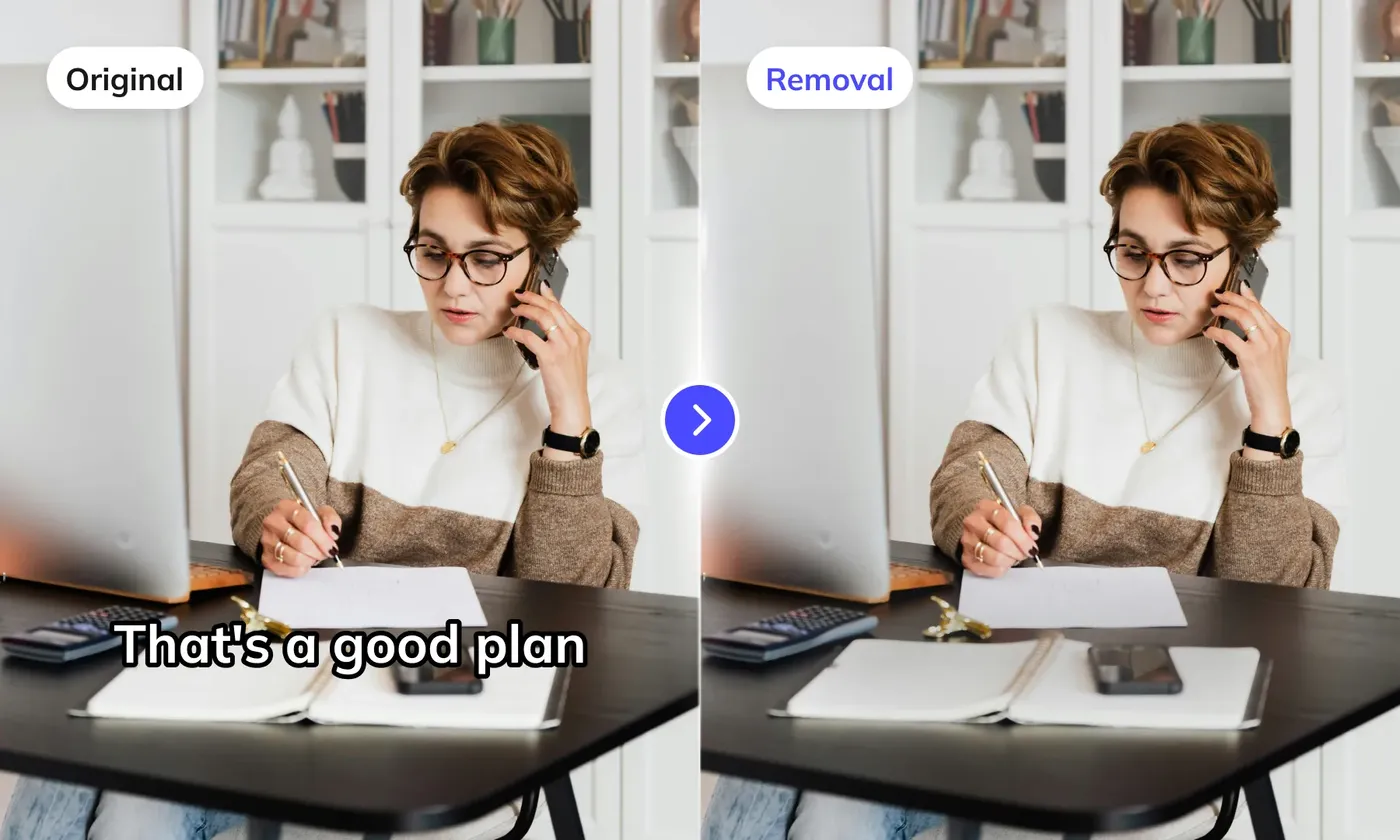
Erase burned-in subtitles without blurring
Source: Weydub official website (applies to the images below as well)
Unlike hiding a subtitle track, Weydub deals with text written into the picture itself (burned-in or hard subtitles). It finds the text regions with OCR and fills in the background that should have been there with AI inpainting, so the traces are far less noticeable than with mosaics or blurring. Besides subtitles, it handles lower thirds, logos, watermarks and scrolling text.
There are two quality levels: Lite, which detects text regions automatically, and Pro, which processes a specified area. It does not perfectly restore the original pixels, and results vary with the background and how the text overlaps it. The Weydub team itself recommends checking the processed video by eye.
How to use
-
Upload your videos
Upload MP4, AVI, MOV, MKV or MPG videos (up to 15 minutes and 1 GB per video on paid credit packs). You can add several at once, or paste links to social videos on YouTube, TikTok and the like.
-
Choose what to do
Select the processing you need — subtitle removal, subtitle generation, video translation and so on. For video translation you set the source and target languages, the subtitle source (speech recognition, OCR of burned-in subtitles, or an uploaded subtitle file), the dubbing voice and how to treat background audio (keep BGM / keep sound effects only / mute).
-
Review subtitles and speakers
Fix the timing and wording of the generated subtitles in the online SRT editor. The AI identifies speakers automatically so you can assign a voice to each role. It is safest to have a person check proper nouns and timing at this stage.
-
Render and download
Render the video with subtitles, dubbing and BGM combined, and download the video and SRT files together. You can also export project files for editing software such as Premiere Pro and CapCut.
Seven steps handled as one flow
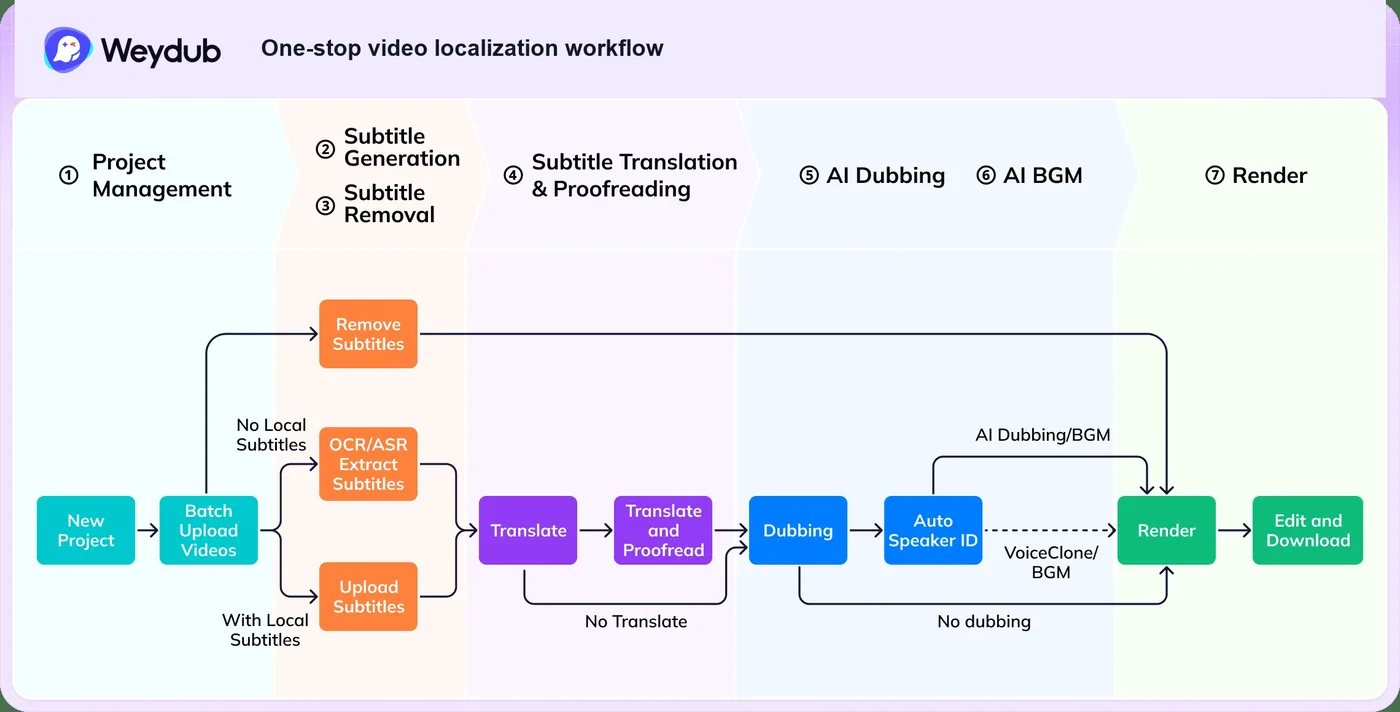
You can use a single function — just removing or just generating subtitles — but Weydub is designed to run "clean the source → transcribe subtitles → translate → dub → export" within one project. When processing dozens of episodes of the same series, as with short dramas, speaker IDs and voice assignments carry over across episodes.
Features
01Cleaning up source material
Remove source-language text from video and images before translation or re-editing.
- Subtitle and text removal — Automatically detects and removes burned-in subtitles, captions, logos and watermarks (Lite / Pro with area selection)
- Image text removal — Erase only the text from product images and posters
02Subtitles
Create timed subtitles from both speech and on-screen text.
- Subtitle generation — Extracts subtitles with speech recognition (ASR) and OCR of burned-in subtitles, exported as SRT/VTT. Supports 100+ languages
- Subtitle translation — Translates while keeping terminology and series context, using models such as DeepSeek in a multi-agent setup
- SRT online editor — Fix timing and wording and add speaker tags
03Translation and dubbing
Rebuild the video as a target-language version.
- Video translation — 30+ target languages, including Japanese, English, Chinese, Korean, Southeast Asian and European languages
- AI dubbing — Two voice types, Classic and Ultra-realistic, combining external engines such as ElevenLabs with in-house TTS
- Emotion-aware voice cloning — Clone the original speaker's voice and dub in 30+ languages, keeping each role's voice consistent across a series
- Background audio — Keep BGM, keep sound effects only, or mute
04Images, volume and API
For e-commerce assets and teams that process large numbers of videos every day.
- Image translation — Automates OCR → translation → erasing the original text → background restoration → re-layout. 100+ languages, with "product text protection" that leaves brand names and model numbers untranslated
- Batch processing — Up to 100 videos or images at once
- API — Call text removal, video translation, subtitle generation and image translation via API and receive results through callbacks
Pricing
It is pay-as-you-go: you buy one-time credit packages and spend credits per task. There is no monthly subscription or contract term, but credits expire.
| Package | Price (USD) | Per credit | Valid for |
|---|---|---|---|
| 200 credits | $10 | $0.0500 | 7 days |
| 600 credits | $25 | $0.0417 | 30 days |
| 2,000 credits | $65 | $0.0325 | 180 days |
| 8,000 credits | $225 | $0.0281 | 365 days |
| 66,000 credits | $1,800 | $0.0273 | 365 days |
| 300,000 credits | $7,500 | $0.0250 | 365 days |
Consumption depends on the type of processing and the length of the video; Weydub publishes credits per 30 seconds. Larger packages (higher tiers) lower the rate.
| Task (per 30 seconds) | Credits |
|---|---|
| Subtitle removal Lite | 4 – 1.5 |
| Subtitle removal Pro (area selection) | 6 – 3 |
| AI dubbing Classic | 2 – 1 (some voices at half) |
| AI dubbing Ultra-realistic | 50 – 15 |
| Emotion-aware voice clone | 45 – 35 |
Pricing is from the official pricing page as of October 2026 (USD). Whether prices include tax is not stated. Check the purchase screen for the exact mapping between tiers and packages.
How Weydub differs from other video translation and AI dubbing tools
| Aspect | Weydub | Rask AI | HeyGen | Vrew |
|---|---|---|---|---|
| Strength | Removing burned-in subtitles from existing videos before localizing | Video translation and dubbing | Generating and translating AI avatar videos | Transcribing subtitles and subtitle-based video editing |
| Burned-in subtitle removal | Core feature (Lite / Pro) | Not a focus | Not a focus | Not a focus |
| Translating text in images | Yes (100+ languages) | — | — | — |
| Pricing model | One-time credits (with expiry) | Subscription | Subscription | Free plan + subscription |
Weydub fits best when the source-language subtitles are burned into the picture, so you cannot simply lay subtitles in another language on top. Chinese or Korean short dramas, product videos delivered with captions, and training videos full of on-screen text are typical cases.
- If there are no burned-in subtitles and you mainly want to compare translation and dubbing quality, see Rask AI
- For translated videos with lip-sync to the speaker, or for creating new videos with AI avatars, see HeyGen
- If voice quality is what matters most and you work with audio on its own, see ElevenLabs
- To edit videos starting from Japanese subtitle transcription, see Vrew
Customers and reputation
01Taking short dramas global
The area Weydub focuses on most. It states that it serves 80% of the leading short-drama clients expanding overseas and localizes 300,000+ episodes a day across roughly 3,000+ series (the recording date and scope of these figures are explained on an official notes page).
02Scale and customers
The official site says it is used by "2,000,000+ creators and businesses" and displays logos including Alibaba, JD.com, bilibili, Kuaishou, Anker and Fujitsu.
The official site features comments from people such as a short-drama company CEO and an e-commerce operator, but each is credited only with a partial name and an industry, without naming the company.
Pros and cons
Pros
- Removes burned-in subtitles and logos by filling in the background rather than blurring
- Runs from subtitle removal through translation, dubbing and export in one project
- Batch processing of up to 100 videos or images plus an API suit teams handling large volumes
- Image translation can leave brand names and model numbers untranslated, which helps with e-commerce assets
- A Japanese interface and site are available
Cons
- Credits expire; the smallest 200-credit pack lapses after 7 days
- The free tier is limited to 15 seconds and 720P, so testing quality on real material usually requires a purchase
- Subtitle removal infers rather than restores pixels, so traces can remain on complex backgrounds
- The mapping between pricing tiers (VIP1–7) and packages is hard to follow
- Performance figures and testimonials on the official site are self-reported, with limited third-party verification
FAQ
The information on this page is based on what was published on the official website as of October 2026. Please check the official website for the latest specifications and pricing.