DeepL
: How to use it, features, and the business problems it solves
Add bookmark
What is DeepL?
An AI translation service known for natural, context-aware output, built by Germany's DeepL SE. Beyond text and document translation it now spans DeepL Write for proofreading, DeepL Voice for speech, and the DeepL API. Prices show in your region's currency — in Japan, monthly billing is ¥1,380 Individual / ¥4,500 Team / ¥9,000 Business per user (¥1,150 / ¥3,750 / ¥7,500 as the annual monthly equivalent). The free tier caps text at 50,000 characters a month.
Business problems it solves



About "DeepL"
What is DeepL
DeepL is an AI translation service known for natural output that captures context and nuance. Built by DeepL SE (headquartered in Cologne, Germany), it centres on text translation but has grown into a platform that supports language work end to end — the writing assistant "DeepL Write," real-time "DeepL Voice," and the developer "DeepL API." More than 200,000 companies worldwide use it.
In Japanese business settings in particular, it has become the tool people reach for to polish an email or document before sending it. Click a word to swap in an alternative translation, and switch between formal and casual tone.
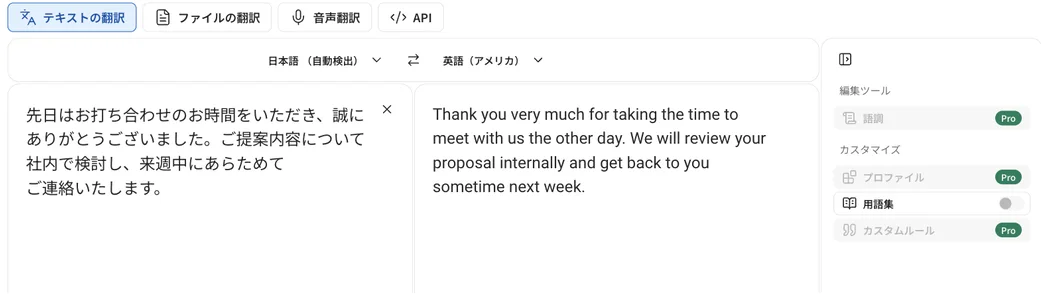
Source: DeepL official site (the screen below is from the same source)
DeepL is not just a translation tool
"DeepL" brings translation to mind, but it now spans several products you can pick between depending on the job.
01DeepL Translator
Text and document translation. Pick alternative wordings per word, and translate Word, PowerPoint, and PDF files with layout preserved. A glossary keeps company and technical terms consistent.
02DeepL Write
Proofreading and rewriting. Beyond spelling and grammar, it adjusts style and tone for your reader. It is used together with translation to make translated text read like a native wrote it.
03DeepL Voice
Real-time voice translation for conversations and online meetings, offered as "Voice for Meetings" and "Voice for Conversations."
04DeepL API / Translation Flow
An API for embedding translation into your own product or workflow. There is also "Translation Flow," which automates the localization workflow end to end.

How to use
-
Open the translator
Use it from the translator on the official site (deepl.com), or from the desktop/mobile apps and browser extensions. You can try it without signing up.
-
Enter or paste text
Type or paste text into the left box. The source language is detected automatically, and the translation appears on the right in real time.
-
Adjust wording and tone
Click a word in the translation to see alternatives and fine-tune to your intent. Switching between formal and casual tone is supported.
-
Translate document files
Upload Word, PowerPoint, PDF, and the like to translate them with layout preserved (the number of files depends on your plan).
-
Finish with DeepL Write
Run the translated text through DeepL Write to proofread and rewrite it into more natural, native-sounding phrasing.
Features
01Translate
- High-accuracy AI translation — Natural output that captures context and nuance; strong on technical documents
- Alternative wordings — Click a word to swap in another option, and switch tone
- Document translation — Word / PowerPoint / PDF translated with layout intact
- Whole-page translation — Translate an entire web page
02Refine and standardise
- DeepL Write — Fixes grammar and spelling, adjusts style and tone
- Glossary — Register translations of company and technical terms for consistency
- Custom rules — Share translation rules across a team (higher plans)
- Translation memory — Reuse past translations (higher plans)
03Connect and protect
- Apps and extensions — Windows / Mac / iOS / Android, Chrome / Firefox / Edge, Word / Outlook / PowerPoint / Google Workspace
- DeepL API — Embed translation into your own service
- Data security — Paid plans never use your text for training and delete it after translation; SOC 2 Type 2 and ISO 27001 compliant
Pricing
DeepL's plans are organised into Individual (for one person), Team and Business (for teams), and Enterprise (for large organisations). Prices are shown in your region's currency; the figures below are the Japan listing (JPY, tax included).
The thing to watch is that the pricing page defaults to showing the monthly-equivalent price on annual billing. The widely quoted ¥1,150 is what a month costs if you commit to a year; choose monthly billing and it is ¥1,380. Annual billing is 16% cheaper, but you pay a year up front.
| Plan | Monthly billing | Annual (monthly equiv.) | Text translation | File translation |
|---|---|---|---|---|
| Free | ¥0 | — | 50,000 chars/mo | 1 file/mo (up to 5MB) |
| Individual | ¥1,380 | ¥1,150 | 300,000 chars/mo | 3 files/mo (up to 30MB) |
| Team | ¥4,500/user | ¥3,750/user | 1,000,000 chars/mo/user | 20 files/mo (up to 30MB) |
| Business | ¥9,000/user | ¥7,500/user | Unlimited* | 100 files/mo (up to 100MB) |
| Enterprise | Custom quote | Custom quote | Custom | Custom |
What each tier adds:
- Individual — Data not used for training, whole-page translation, 1 saved translation
- Team — Batch file translation, 5 custom rules, team management, analytics, 10 saved translations
- Business — Unlimited* glossaries, translation memory and saved translations, 20 custom rules, SCIM user provisioning, domain control, 99.0% uptime, Write Pro included
- Enterprise — Bring your own key (BYOK), 99.9% uptime, dedicated account team, premium support
Paid plans start with a 30-day free trial (Individual and Team; cancel any time). Business begins at purchase.
"DeepL Write Pro" is an add-on. It can be added to Individual or Team for ¥1,150 per user per month (annual billing, tax incl.), and is included by default with Business. Business and Enterprise can also add "Translation Flow," which automates translation workflows end to end. Separately, a metered "DeepL API" with a free tier is available for developers.
*Business's "unlimited" is not unconditional. The official footnote states that a fair-use policy applies to the unlimited character count, glossaries, translation memory, and saved translations. If you are planning heavy automated processing, confirm the terms with sales first.
Limits that are easy to miss
Three details tend to surface only after you have picked a plan.
| Item | Free | Individual | Team | Business |
|---|---|---|---|---|
| Number of glossaries | 1 | 1 | 5 | Unlimited* |
| Entries per language pair | 5 | 5 | 1,000 | Unlimited |
| Max file size | 5MB | 30MB | 30MB | 100MB |
In particular, Individual's glossary is capped at one glossary with five entries per language pair — not enough to register in-house terminology and keep translations consistent. Serious glossary use starts at Team. Note too that team management requires 2+ users and single sign-on (SSO) requires 50+ users, so a small Team plan cannot use SSO.
Amounts are based on a hands-on check of the official pricing page (Japan, JPY) as of August 2026. Plan structure and prices are subject to change, so always confirm on the official pricing page.
Reputation
- "More natural Japanese than Google Translate" and "high accuracy even on technical documents" — its translation quality is praised again and again.
- The workflow of "translate in DeepL, then finish in DeepL Write before sending" is widely shared in business.
- At the same time, "the free version has a character cap, so you need a paid plan for real work" is a common refrain.
How it differs from other translation tools and LLMs
General LLMs like ChatGPT and Claude can translate too, but DeepL stands apart in being specialised in translation and proofreading and in offering business features like glossaries, data deletion, and team management.
| Aspect | DeepL | General LLMs (ChatGPT / Claude) | Google Translate |
|---|---|---|---|
| Strength | High-accuracy translation and proofreading | General dialogue, generation, summarisation | Quick instant translation |
| Naturalness | Renowned for context-aware, natural output | High with the right prompt, but variable | Practical, but can feel stiff |
| Business features | Glossary, translation memory, document translation, data deletion | Extendable via plugins | Limited |
| Data handling | Paid plans exclude training and delete after use | Varies by plan | Used to improve the service |
Use an LLM for ideation and long-form generation, and DeepL for pure translation quality and business operations. For proofreading alone, see Grammarly or Wordtune; for website localization, WOVN.io; and for video translation and dubbing, Rask AI.
FAQ
Q. Is DeepL free to use?
Yes. The free version covers text translation up to 50,000 characters a month, one file translation a month, and the basics of DeepL Write. To translate more or to keep your data out of training, you need a paid plan.
Q. Does it support Japanese?
Yes. It is strong at Japanese ⇔ other languages, and the UI is localised in Japanese. It supports 30+ languages, a set that keeps expanding.
Q. How is DeepL different from Google Translate?
DeepL is renowned for natural output that reflects context and nuance, and is especially well regarded for business documents and Japanese. Business features such as glossaries, document translation, and the DeepL Write proofreader are also differences.
Q. Is my translated data safe?
On paid plans, your input text is never used to train the AI and is deleted after translation. DeepL is also SOC 2 Type 2 and ISO 27001 compliant. On the free version, text may be used to improve the service, so a paid plan is a prerequisite for confidential work.
Q. Why did the plan names change?
DeepL reorganised its plans into Individual / Team / Business / Enterprise. If you come across older names like Starter / Advanced / Ultimate, map them onto the current structure. DeepL's own support pages note that some existing customers remain on legacy plans no longer offered to new customers — if your contract is one of those, its terms differ from the current table.
Q. Should I pick monthly or annual billing?
Figures like "¥1,150" on the pricing page are the monthly equivalent under annual billing. On monthly billing, Individual is ¥1,380, Team ¥4,500 per user, and Business ¥9,000 per user. Annual saves 16% but commits you to a year, so if you are unsure it will stick, start with the 30-day trial on monthly billing.
Q. How do I cancel?
DeepL states that both trials and paid plans can be cancelled at any time, from your account settings after signing in. What happens mid-term — whether you keep access for the remainder, and whether any refund applies — depends on the contract, so check the "How to cancel your DeepL Pro subscription" article in the official help centre.
Q. My free version suddenly stopped working. Why?
The free tier has monthly caps (50,000 characters of text, and 1 file translation up to 5MB). Once you use them up it stops until the next month, so check whether the translation screen is showing a limit notice. Separately, a large burst of requests, or a fault in the browser extension or app, can also block translation. For ongoing business use, a paid plan rather than the capped free tier is the realistic answer.
Information on this page is based on what was published on the official site as of August 2026. Please check the official site for the latest specifications and pricing.