Vozo AI
: How to use it, features, and the business problems it solves
Add bookmark
What is Vozo AI?
An AI video translation and dubbing tool operated by Honeybee Technology Ltd in the US. It translates videos into 165 languages and accents, with voice cloning that recreates the speaker's voice (VoiceREAL), lip sync that matches mouth movements to the translated audio (LipREAL), Visual Translate for on-screen text such as slides and captions, and translated or bilingual subtitles. Japanese site and interface available. Free ($0, 20 trial points), Creator $29/month, Studio $99/month, Enterprise by quote. For users 18 and older.
Business problems it solves



About "Vozo AI"
What is Vozo AI?
Vozo AI is an AI video translation and dubbing tool operated by Honeybee Technology Ltd in the United States. Upload a video and pick a target language, and it handles transcription, translation, AI dubbing, and subtitles automatically. On its official site the product is called "Vozo AI Video Translator."
What sets it apart is that it translates the voice, the mouth, and the screen together. It offers VoiceREAL™, a voice clone that reproduces the original speaker's voice; LipREAL™, lip sync that reshapes mouth movements to match the translated audio; and Visual Translate, which erases and re-renders text burned into the video, such as slides and captions. The official site labels Visual Translate as "exclusive to Vozo."
Translation and dubbing support 111 input and 165 output languages and accents (as listed on the official pricing page). There is a Japanese-language official site and a Japanese interface, so you can translate Japanese videos into English or Chinese, or bring overseas videos into Japanese. According to the official site, more than 7 million creators and businesses in over 40 countries use it.
You must be 18 or older. The Terms of Use (v3.1, revised July 27, 2026) state that people under 18 may not use or register for the service.
How to use
- Upload Upload a video or audio file, or paste a URL. The official page says it can import from URLs on YouTube, Google Drive, TikTok, Zoom, and more.
- Choose languages and a dubbing mode Select the target language. You can export several languages from a single project. For dubbing, choose "VoiceREAL" to keep the speaker's own voice, or "VoiceNATIVE" for the clarity of a local narrator. Turn on lip sync or Visual Translate as needed.
- Review and fix in the proofreading editor Edit the translation line by line, adjust pauses, pronunciation, and emotion in the dub, and merge, split, or retime clips. You can preview the result in real time.
- Export When you are happy with it, export and download the dubbed video or subtitle files.
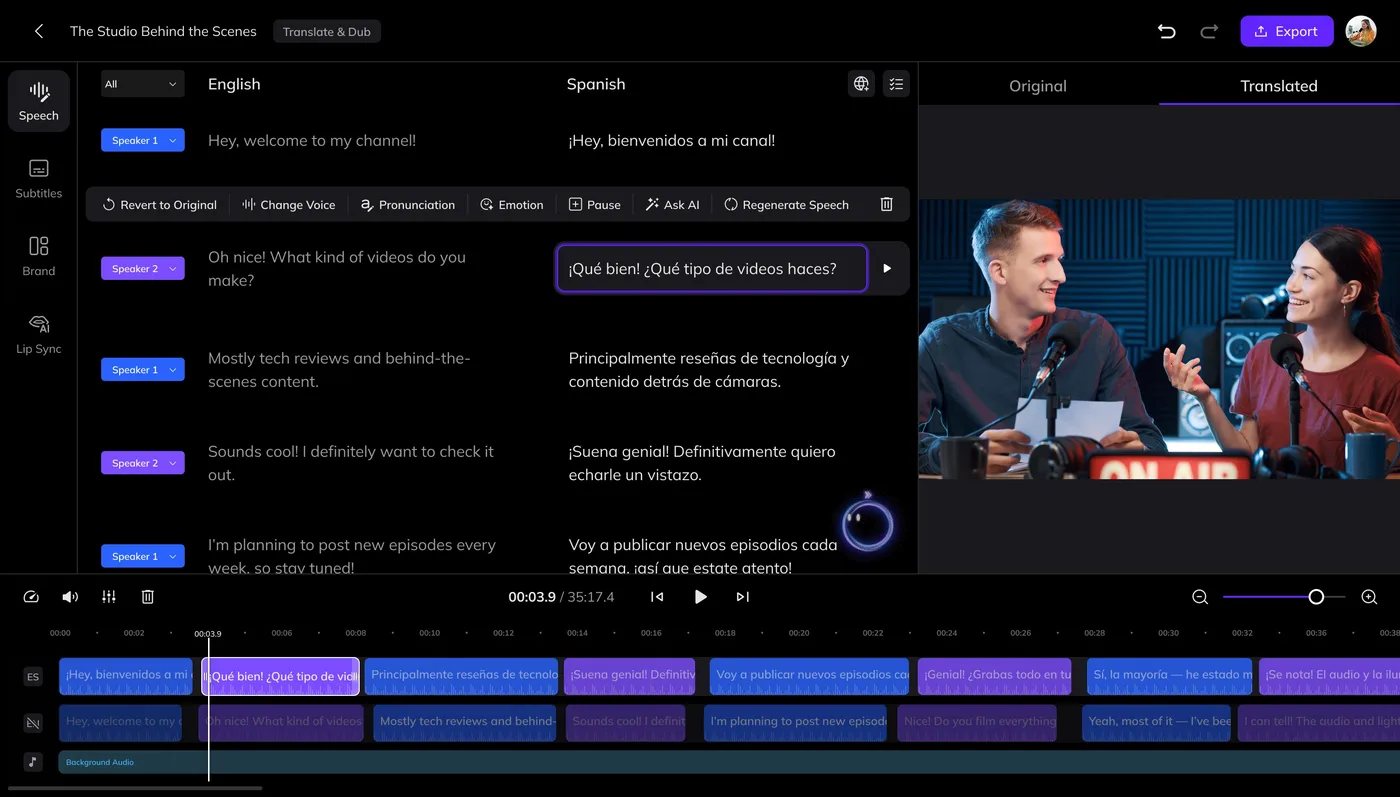
Source: Vozo AI official site (the image below as well)
Features
01Translation and dubbing
- Video translation and AI dubbing — 111 input and 165 output languages. Handles video up to 4K
- VoiceREAL™ — Recreates the original speaker's voice in another language while keeping their emotion, intonation, and pace. Suited to vlogs, dramas, and interviews
- VoiceNATIVE™ — Produces clear, natural speech that sounds like a local speaker of the target language. Suited to product demos, ads, and training videos
- Glossary and translation prompts — A glossary keeps product names and technical terms consistent, and custom translation prompts let you set tone and formality. The glossary is available on Studio and above
02Translating the mouth and the screen
- Lip sync (LipREAL™) — Adjusts each speaker's mouth movements to the translated audio. Works with multi-speaker videos, and can be used with dubbing or on its own
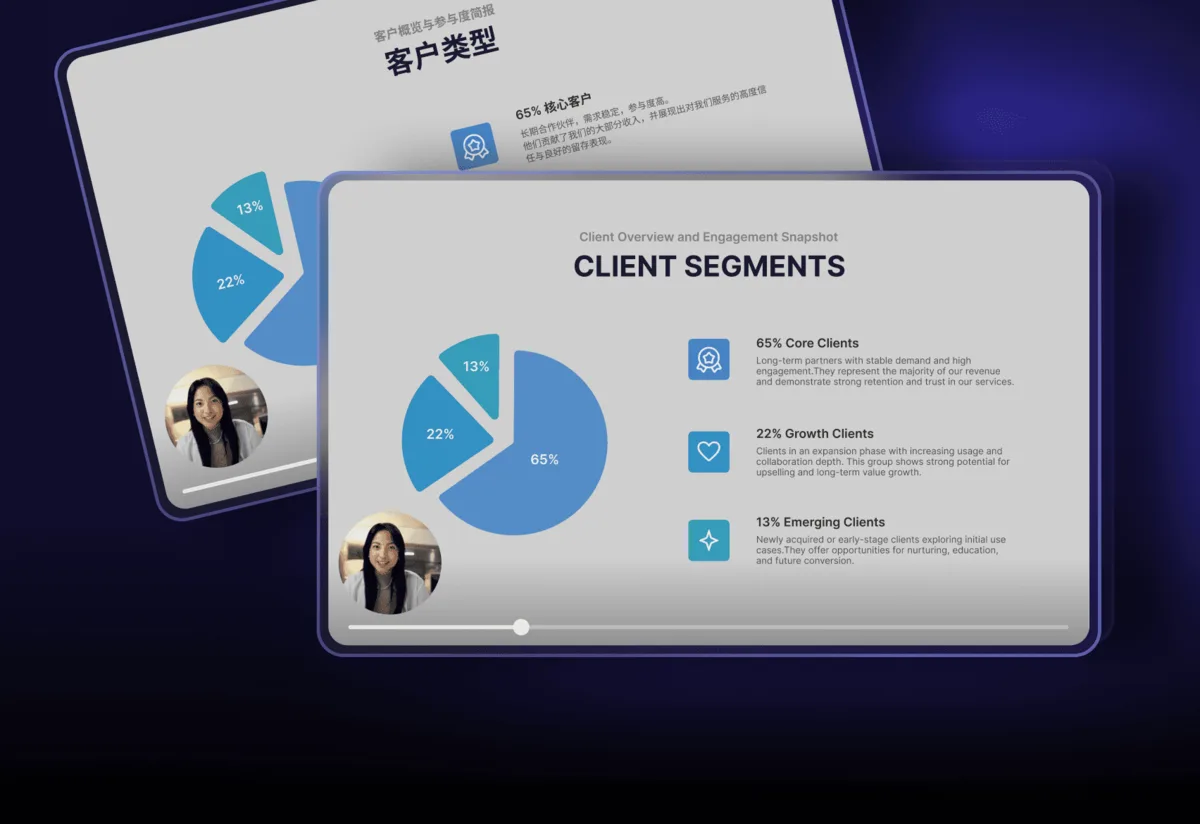
- Visual Translate — Detects and removes on-screen text such as subtitles, titles, labels, and annotations, then redraws it in the new language while keeping layout, style, and motion. 58 input and 165 output languages, up to 20 minutes per file (1080p output)
03Subtitles and other tools
- Subtitle translation — Generates translated or bilingual subtitles in one click, exported as subtitle files or burned into the video. You can also upload SRT / VTT files or extract existing burned-in subtitles with OCR
- Voice Studio — Text-based audio editing, voice cloning, and text-to-speech with a library of 12,000+ voices (29 languages)
- Talking Photo and AI Shorts Generator — Turn a photo into a talking video, or cut short clips from a long video (the shorts generator is English only)
- API and AWS Marketplace — API access on paid plans. Businesses can also purchase through AWS Marketplace
Pricing
The Free plan lets you try every AI tool on up to three projects (no credit card required to sign up). Paid plans are monthly subscriptions priced in US dollars, with a discount for annual billing (the pricing page shows up to 25% off).
| Plan | Monthly (USD, tax included) | Monthly AI points | Highlights |
|---|---|---|---|
| Free | $0 | 20 (trial, valid 7 days from sign-up) | AI translation up to 3 projects. About 6 min of dubbing, 2 min of lip sync, 2 min of Visual Translate. Videos up to 20 min |
| Creator | $29 | 150 | Unlimited AI translation. About 50 min of dubbing, 15 min of lip sync, 15 min of Visual Translate. Videos up to 60 min, no watermark, API |
| Studio | $99 | 600 | About 200 min of dubbing, 60 min of lip sync, 60 min of Visual Translate. 3 seats, videos up to 120 min, bulk upload, glossary, fast processing |
| Studio XL / XXL | See the pricing page | 1,500 / 4,000 | About 500 / 1,330 min of dubbing. 6 / 10 seats |
| Enterprise | Custom quote | Custom | Dedicated account manager, SLA, contracts and business invoices, no use of your data for AI training, optional review by professional staff |
Pricing is based on the official pricing page (Japanese version) as of October 2026. The "about N min" figures are official estimates; actual point consumption depends on the task. Note that the iPhone app "Vozo AI" has a separate in-app purchase structure from the web version, and its seller is listed as VISTRING TECHNOLOGY HOLDINGS LIMITED.
Things to keep in mind
01Rights to voices and faces
- Get consent — The Terms of Use require you to have written consent or permission from every identifiable person in the videos you upload to use their name or likeness. Take particular care when cloning someone else's voice or reshaping the mouth movements in someone else's video
- Copyright — Translating and redistributing videos owned by others requires the rights holder's permission
02How your data is handled
- Hosted in the US — According to the Terms of Use, the service is hosted in the United States, and using it from Japan transfers your data to the US
- Use for AI training — On the pricing page, "we don't use your data for AI training" is listed as an Enterprise plan item. If you handle confidential videos, check the data terms before signing up. The official site states SOC 2 Type II and GDPR compliance
03Checking the output
- Have a person review before publishing — It is safest to fix mistranslated names and terms, or awkward timing in the dub, in the proofreading editor before exporting. A glossary keeps terminology consistent
Pros and cons
Pros
- Beyond dubbing, lip sync, and subtitles, a single tool also translates text burned into the screen
- Choose between dubbing that keeps the speaker's voice and native-sounding dubbing, depending on the video
- Japanese-language site and interface, and a free plan you can try without registering a card
Cons
- Prices are in US dollars, so the cost in yen moves with exchange rates
- Because it runs on AI points, heavy use of lip sync or Visual Translate means upgrading or buying extra points
- No refunds on paid plans, and an explicit no-training commitment is only listed for Enterprise
Reviews and reputation
The official site displays a 4.6 out of 5 rating on the software review site G2 and a "#1 Product of the Month" in Product Hunt's AI category. An official case study quotes a customer who "dubbed more than 50 training videos into six languages in under a week, saving over $12,000 compared with outsourcing." These figures, however, come from the company itself. How natural the dub sounds and how accurate the lip sync is will vary with the video (number of speakers, face angles, background music, and so on), so the reliable approach is to try your own video on the free plan before choosing a paid plan.
FAQ
Q. Can I use Vozo AI for free? A. Yes. There is a Free plan, and you receive trial AI points (20 points, valid for 7 days) when you sign up. You can try AI translation on up to three projects and about six minutes of dubbing. Exporting without a watermark requires Creator ($29/month) or above.
Q. Does it support Japanese? A. Yes. There is a Japanese official site and interface, and it can translate and dub Japanese videos into other languages and other languages into Japanese.
Q. Can it dub foreign languages in my own voice? A. Yes. Choose the "VoiceREAL" mode to dub in the target language while keeping the original speaker's voice, emotion, and pace.
Q. Can I cancel or get a refund? A. You can cancel anytime from "Manage subscription" and keep using the service until the end of the billing period. Paid plans are currently non-refundable.
Q. Who runs it? A. Honeybee Technology Ltd, a company registered in Delaware, United States (per the Terms of Use). The official site describes a base in Silicon Valley (Sunnyvale, California) and says it is built by engineers and researchers from Google and Microsoft.
Vozo AI vs. Rask AI, HeyGen, and other AI video translators
| Service | Focus | Pricing model |
|---|---|---|
| Vozo AI | Centered on video translation. Two dubbing modes (voice-preserving VoiceREAL and native-sounding VoiceNATIVE), lip sync, and Visual Translate for on-screen text | Free plan + from $29/month (AI points) |
| Rask AI | AI localization focused on translation and dubbing into 130+ languages. Voice cloning, multi-speaker detection, lip sync | Free trial + Creator from $60/month (minutes-based) |
| HeyGen | Centered on generating videos of talking AI avatars. Also offers translation into 175+ languages with lip sync | Free plan + Creator from $29 |
| Weydub | Removal of burned-in subtitles and logos, subtitle generation, AI dubbing, and translation of text in images. Batch processing of up to 100 videos | One-time credit packs (from $10) |
| ElevenLabs | Built around high-quality AI voices and voice cloning. Also dubbing and speech recognition | Free plan + from $6/month |
If you want to localize explainer, training, or product videos with lots of slides and captions, voice and on-screen text included, Vozo AI is a strong candidate. If you want to start by generating avatar videos from a script, compare HeyGen or Synthesia; if narration voice quality is your top priority, look at ElevenLabs.
The information on this page is as of October 2026 and is based on Vozo AI's official website (Japanese home page, video translation page, pricing page, About, and Terms of Use) and its App Store listing. Please check the official site for the latest specifications and pricing.