

SceneMixer
: How to use it, features, and the business problems it solves
Add bookmark
What is SceneMixer?
SceneMixer is an AI filmmaking tool that reads a pasted novel or script for its characters, settings and episode structure, then creates character concept sheets, an editable storyboard and voiced video for each shot, finishing them as short dramas, series or films. Concept sheets keep faces and costumes consistent across episodes, dialogue comes in 15 languages, and both 16:9 and 9:16 are supported. Video is generated with models chosen from Wan, Seedance, Kling, MiniMax and others. Japanese interface available. Pricing is credit-based: 50 free credits on sign-up, memberships from $7.99 a month and credit packs from $1.49 (as of November 2026).
Business problems it solves


About "SceneMixer"
What is SceneMixer?
SceneMixer is an AI filmmaking tool that turns novels and scripts into short dramas, series and films. Paste in your text and it reads the characters, settings and episode structure, then creates character concept sheets, an editable storyboard and voiced video for each shot, and joins them into finished episodes.
Because the concept sheets serve as the reference for every shot, the same character keeps the same face and costume from the first episode to the last. Dialogue can be in any of 15 languages, and projects can be landscape (16:9) or vertical (9:16). The interface supports Japanese, and new accounts get 50 credits plus free concept sheets and a storyboard for their first drama (as of November 2026).
Production happens in the episode editor: concept sheets for characters, scenes and props on the left, the storyboard in the middle, the video preview on the right, and a timeline of every segment in the episode along the bottom.
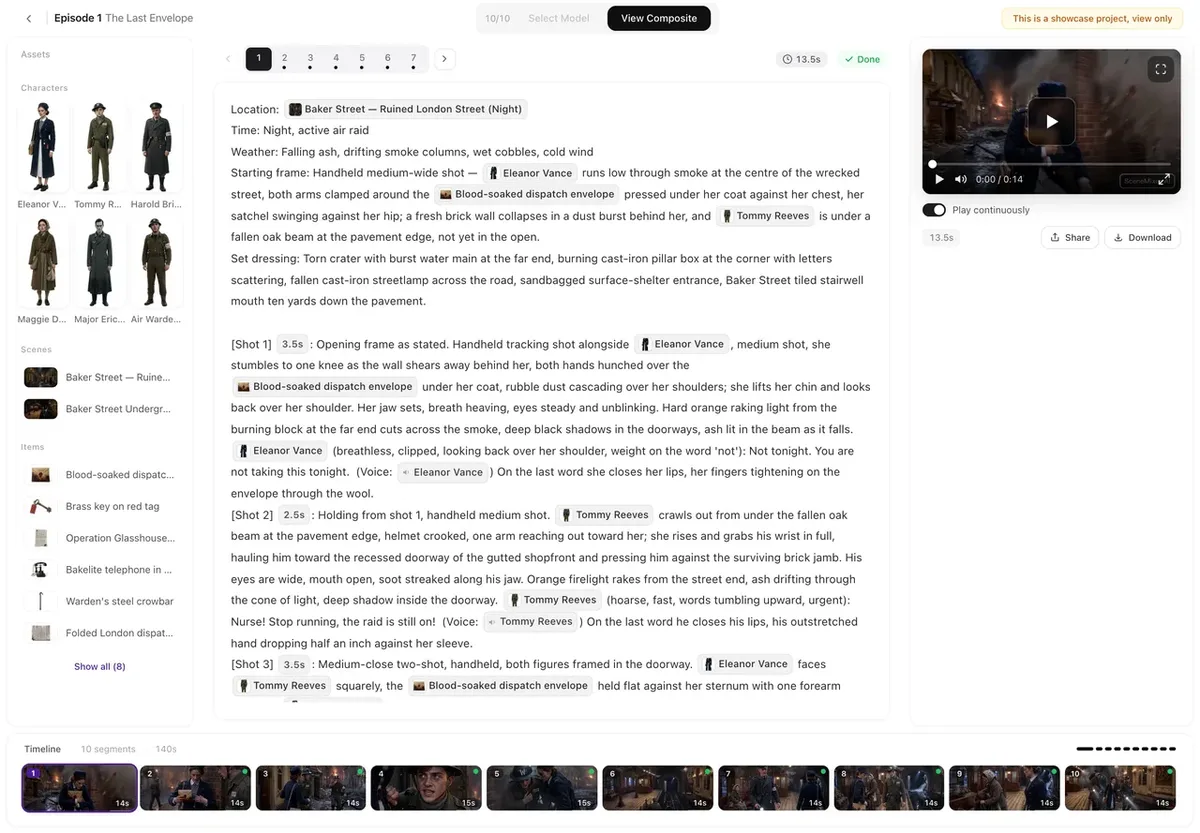
Source: SceneMixer official site and Help Center (the same applies to the images below)
How to use it
- Choose a format and add your script When creating a project, choose a short drama, a series or a film, and a visual style such as live action, anime, 3D animation or claymation. Paste in a novel or script, or upload it as a TXT, DOCX or Markdown file. You can also have the AI write a script from a one-line idea.
- Parse it and create concept sheets The AI extracts the characters, settings, props and episode breakdown, and creates a concept sheet for each. You can replace a sheet with your own photo (JPG or PNG; a membership feature).
- Create and edit the storyboard Each episode gets a storyboard listing location, time and weather, shots with durations, the characters in them, and dialogue. Editing text is free.
- Generate the video and join it Video is generated segment by segment (up to 30 seconds each) and composited into the full episode. If you don't like a segment, rewrite its text and regenerate just that part. Download the finished video and publish it yourself on TikTok, YouTube, Reels or elsewhere.
From script to finished episode in one pipeline
SceneMixer is not a tool for generating one video at a time; it takes on the process of reading a script and turning it into a drama.
Script
- Paste a novel or script
- TXT, DOCX, Markdown
- AI writes from an idea
Parsing and concept sheets
Extracts cast, settings, props and episodes, and creates sheets that every shot is based on
Storyboard
Lists shots, durations and dialogue, editable as text
Video and compositing
Generated segment by segment and joined into an episode
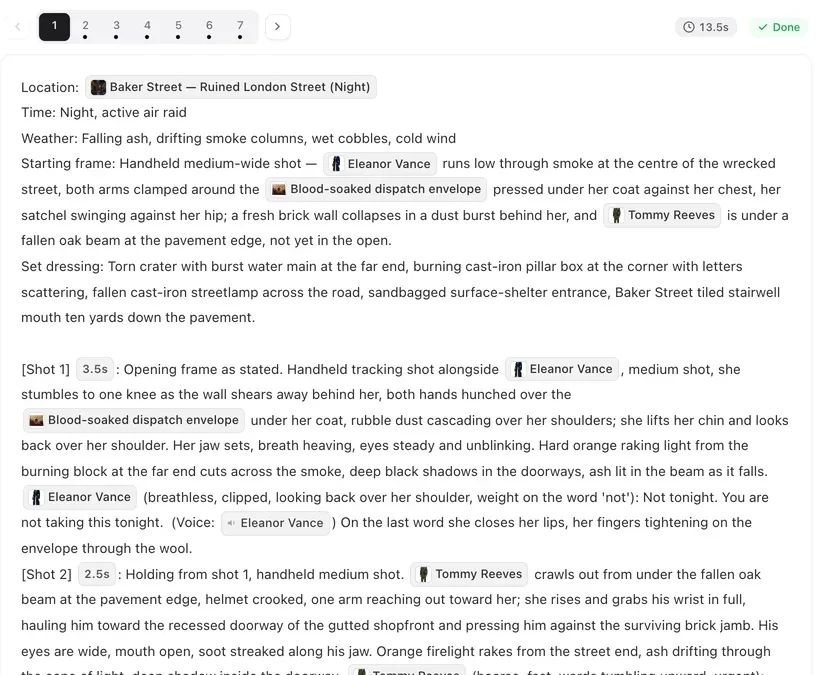
Each storyboard segment has fields for location, time and weather, followed by numbered shots with durations, chips for the characters and props that appear, and spoken lines. The synopsis, episode breakdown and descriptions of cast, settings and props are all generated from your text.
A concept sheet is passed to a shot only when the character appears as an "@name" chip. If a face changes, the company advises checking this chip first.
Faces and set layouts stay consistent
What most often breaks in an AI-made series is how characters look from episode to episode. SceneMixer draws concept sheets for every character and scene before making any video, and generates each segment from those sheets, keeping faces, costumes and locations the same from the first episode to the last.
For new projects it also builds a world model for each scene: the set, measured furniture and where every character stands, with each shot's camera placed inside it. So when the cut changes, the window stays on the same side and people stay in the same seats. It costs no extra credits, but not every set gets one, and accounts that have never paid do not get them.
The same goes for voices. Dialogue is generated together with the video, so it is performed on screen rather than dubbed afterwards. Each character keeps one voice chosen from a preset library across all episodes, and members can also upload a sample of their own voice.
The official site publishes sample works made end to end from scripts with SceneMixer, each listed with its visual style and the number of characters and sets. One of them has Japanese dialogue ("浪人の誓い"), and opening a work shows the script and video of each segment.
Features
01Four ways to start
Whichever way you start, you get the same kind of project with cast, scenes and episodes.
- Upload a script — Start from a script or a chapter of a novel
- AI writing — Have it write a script from a one-line idea
- Ad video — Make an ad from product photos
- Remake a video — Start from a reference clip you have the rights to remake
02Production and editing
Episodes are made and fixed segment by segment.
- Segments — Up to 30 seconds each (depending on the video model), up to 60 per episode. A short-drama episode usually runs 60–120 seconds
- Partial regeneration — Regenerate a single segment and pay only for its seconds; earlier versions stay in the version history
- Aspect ratio and resolution — 16:9 by default, with 9:16 available. Resolution ranges from 480P to 2K depending on the video model
- Reusing assets — Bring characters or scenes from another project, voices included
03Models used
Video, image and text generation use models from other companies, chosen by the user. The official home page lists these as its models.
- Video — Wan 3.0, Seedance 2.5 / 2.0, MiniMax Hailuo H3, Kling 4.0 (unit prices vary by model and quality)
- Image — SeedDream 5.0, Qwen-Image 3.0
- Text — Kimi K3
Pricing
Most of the cost is video, which is charged in credits per second. The cheapest video model (Wan 3.0 · 480P, the default) costs 10 credits per second. By the company's estimate, one 90-second episode comes to about 990 credits for video and compositing, with script parsing and storyboards adding only a little.
| Membership | Monthly (USD) | Credits per month | Quarterly / yearly |
|---|---|---|---|
| Pro | $7.99 | 700 | $20.99 / $74.99 |
| Studio | $19.99 | 2,000 | $52.99 / $186.99 |
| Enterprise | $44.99 | 5,000 | $119.99 / $419.99 |
| Ultimate | $94.99 | 11,500 | $252.99 / $886.99 |
| Max | $199.99 | 25,000 | $532.99 / $1,866.99 |
- Free: 50 credits on sign-up, 15 concept sheets for characters, scenes and props, the storyboard for the first episode of your first drama, and one free preview of up to 5 seconds. No card required
- Credit packs (no monthly fee): from 100 credits for $1.49 up to 115,000 credits (bonus included) for $899.49
- Main unit costs: script parsing is 4 credits per 3,333 characters of English text, an extra reference image is 7 credits, and episode compositing is 1 credit per second. Video goes up to 75 credits per second for Seedance 2.5 Pro, varying by model and quality
- Credits do not expire, and monthly membership credits roll over. Generations that deliver nothing (such as failures before reaching the model provider) are refunded automatically. Purchased credits and membership fees are non-refundable except where required by law and in similar cases
- Videos from free accounts carry a small AI badge in the corner; videos newly made with a membership have none by default
- Payment is by card through Stripe, in US dollars. Neither the pricing page nor the terms say whether prices include tax
(As of November 2026, from the official pricing page)
How SceneMixer differs from other AI video tools
| Product | Starting point | Highlights | Price guide |
|---|---|---|---|
| SceneMixer | Novels and scripts | Makes series and films through parsing → concept sheets → storyboard → video. Consistent faces across episodes, dialogue in 15 languages | From $7.99 a month; packs from $1.49 |
| Topview | Ideas, scripts, reference videos, product URLs | An AI agent designs scenes and picks models. Mainly marketing videos, and vertical dramas too | From $29 a month |
| SkyReels | Text, images, reference media | Cinematic short clips with video and audio generated together. Rooted in short-drama production | See the product page |
| Argil | Text ideas | Uses several frontier models from one screen, from social videos to short films | Pro from $100 |
| Hailuo AI | Text, images | Short video generation with its own MiniMax H3 model; consistency via reference images | See the product page |
Details of the other products are as stated on each product page at the time it was checked.
If you want individual clips at high quality, using video generation services such as Hailuo AI or SkyReels directly is a better fit. For product ad videos, Topview is also a candidate. SceneMixer suits people who want to turn an existing novel or script into a multi-episode work with a consistent cast.
FAQ
Q. Can I try SceneMixer for free? Yes. New accounts get 50 credits, 15 concept sheets, the storyboard for the first episode of their first drama, and one free preview of up to 5 seconds. Actual video segments are paid from the first second.
Q. Can I make it with Japanese dialogue? Yes. The dialogue language can be chosen from 15 languages in the project settings, regardless of the language the script is written in. The interface is also available in Japanese.
Q. Can I use the videos commercially? Under the terms of use, the output belongs to the user to the extent the law allows, and commercial use is permitted, provided you hold the rights to the script and any uploaded material.
Q. Is it a short-drama viewing app like ReelShort? No. SceneMixer is a tool for making short dramas. You download the episodes you make as files and publish them yourself on any platform.
Q. Do I get credits back if a generation fails? Yes, if nothing is delivered. Failures before reaching the model provider and upstream timeouts are refunded automatically, and when the result is unclear the credits are held for review. Clips that were delivered but not to your liking are charged.
Who runs it
The SceneMixer website and terms of use do not name an operating company (as of November 2026). In its listing request, the service stated that it is run by Sincosphere Holdings Pty Ltd in Australia, and we have confirmed that a company of that name is registered in the Australian Business Register (ABN). The terms of use are governed by the laws of New South Wales, Australia. Contact: support@scenemixer.com.
The information on this page is based on what was published on the official site as of November 2026. Features and pricing may change, so please check the official site for the latest information.