Shodo
: How to use it, features, and the business problems it solves
Add bookmark
What is Shodo?
Shodo, from ZenProducts Inc., is a cloud service that centers on Japanese-focused AI proofreading and brings writing, peer review, and task management together ("your AI editorial department"). It flags typos, mis-conversions, honorific errors, and inconsistent notation in real time, and offers Shodo Copilot sentence-ending completion, AI review, a browser extension, Docs/Word integration, and an API. Pricing: Basic free / Premium ¥1,000 / Max ¥5,000 / Business ¥2,000 per user (tax incl.).
Business problems it solves


About "Shodo"
What is Shodo
Shodo is a cloud service that centers on Japanese-focused AI proofreading and brings writing, review, and task management together in one place. Provided by ZenProducts Inc., it bills itself as "your AI editorial department." Rather than a mere proofreading tool, it supports the whole flow of writing work—writing, revising, and reviewing as a team. It "points out" rather than rewriting your text on its own, and it explicitly states that it does not use customers' documents to train the AI.
As you type into the editor, the AI flags typos, mis-conversions, honorific errors, and inconsistent notation in real time. Hover over a flag to see a suggestion and click to apply it. Because proofreading points things out—with the reason to fix them—rather than rewriting, writers can revise with understanding.
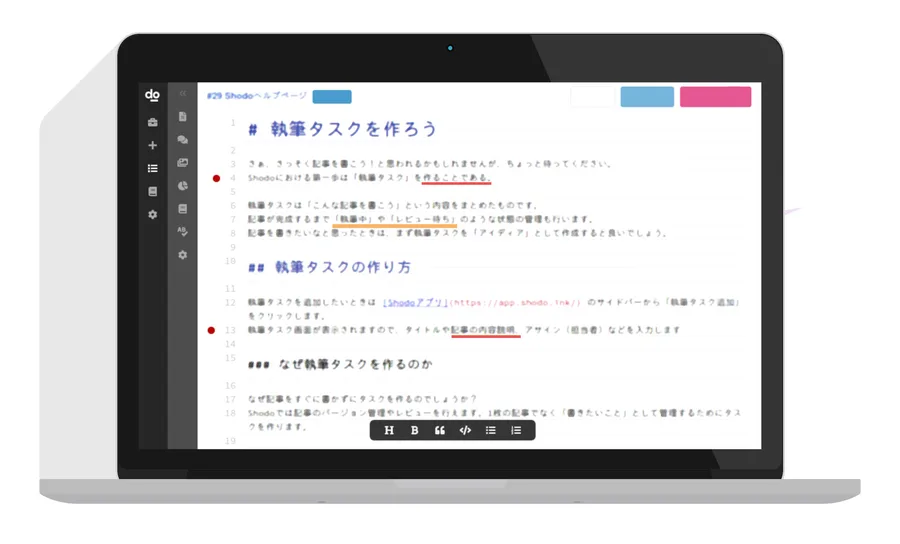
Source: Shodo official site (the screenshots below are from the same source)
It supports not just proofreading, but the write-and-review flow
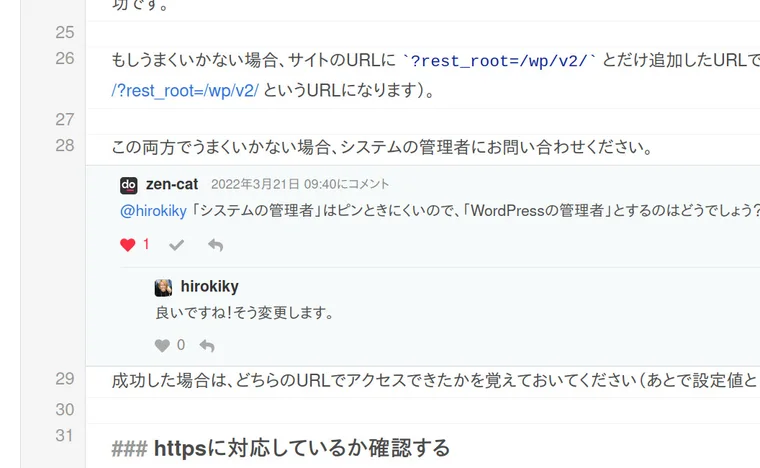
What sets Shodo apart from a typical proofreading tool is that you can run writing, peer review, and task management in the same place. Create an article as a "writing task," manage deadlines and status (drafting / awaiting review, etc.), and review as a team by leaving comments. It raises quality with proofreading while letting a team finish writing like an editorial department.
On a team, writers and editors can review while exchanging comments. You can standardize a shared dictionary and notation rules across the team, and it also has enterprise controls like Slack notifications, permission management, and IP restrictions.
How to Use
-
Register and log in
Sign up for free from the official site with a Google account, etc. (a 14-day free trial is available).
-
Write or paste
Type or paste text into the editor, and the AI automatically starts proofreading.
-
Check the flags and revise
Hover over a flag to see the suggestion, and click to apply it.
-
Use Copilot and review
Use "Shodo Copilot" to predictively complete sentence endings, or run peer review as a team.
-
Use extensions and integrations
Proofread in your existing environment with the browser extension or the Google Docs / Word add-ons.
Features
01Proofread
- Context-aware AI proofreading — flags typos and grammar with context in mind
- Mis-conversion / homophone & honorific checks — detects wrong conversions and double honorifics
- Notation consistency — aligns kanji variants, katakana long vowels, and the like
02Write & verify
- Shodo Copilot — the AI predictively completes Japanese sentence endings (confirm with Tab)
- AI review — fact-checks proper nouns/dates, tense consistency, and risky expressions (higher plans)
- PDF proofreading — proofread PDFs (higher plans)
03Connect & work as a team
- Browser extension & Docs/Word integration — proofread on note, email, and existing documents
- Task management & peer review — deadline/status management, review via comments
- API — embed proofreading into your own systems
Pricing
It is free to start, and paid plans split into personal (Premium, Max), team (Business), and a developer API plan. All prices are tax-included, and paid plans have a 14-day free trial.
| Plan | Monthly (incl. tax) | What's included |
|---|---|---|
| Basic | ¥0 | Proofread, write, share, history (1 user; 10k chars/run; weekly AI-proofread limit) |
| Premium | ¥1,000 | + browser extension, Docs/Word integration, custom dictionary (1 user; 40k chars/run) |
| Max | ¥5,000 | + PDF proofreading, AI review (1 user; 100k chars/run) |
| Business | ¥2,000/user | All Premium features + team management, Slack notifications, permission/IP restriction (3+ users) |
There are also API plans for developers (100 = ¥40,000/mo for 1M chars; 500 = ¥80,000/mo for 5M chars; 1000 = ¥120,000/mo for 10M chars). The AI is described as "the latest LLM," and no specific model name is disclosed. Pricing may change, so check the [official pricing page](https://shodo.ink/pricing/) for the latest (as of August 2026).
How it differs from other proofreading / writing AI
Shodo's strength is that it combines Japanese proofreading accuracy with team-based writing and review. Its role differs from English-first proofreading tools and from text-generating AI.
| Aspect | Shodo | Grammarly | Generators (Catchy, etc.) |
|---|---|---|---|
| Focus | Japanese proofreading + editorial workflow | English-first proofreading/suggestions | Generating text |
| Method | Points out, doesn't rewrite | Suggests / rewrites | Generates from scratch |
| Team | Task management, peer review | Mostly individual use | Shared generation |
Grammarly, strong at English proofreading; the text-generating Catchy and Rakurin (AI-BLOGKUN); and the SEO-article-focused Transcope are comparison points. If you want to finish Japanese business documents and content accurately as a team, Shodo is a strong choice.
The information on this page is based on what was publicly available on the official site as of August 2026. Please check the official site for the latest specifications and pricing.