
SHERLOOK
: How to use it, features, and the business problems it solves
Add bookmark
What is SHERLOOK?
SHERLOOK is a "proofreading tool for video" from HARAKAMI Inc. that supports the final check of finished videos. Upload a video and its AI checks on-screen caption typos, differences from the script, visual glitches such as black frames and gaps, audio levels, social media safe zones, and each client's banned and required wording, then organizes the results into a list with timecodes, the relevant frames and suggested corrections. Results can be shared via a link that needs no login, or as PDF/CSV. An MVP version for businesses is available from ¥30,000 per month (excl. tax, per account).
Business problems it solves



About "SHERLOOK"
What is SHERLOOK?
SHERLOOK is a checking AI that supports the final review of videos, developed and provided by HARAKAMI Inc. (株式会社HARAKAMI). The company calls it "a proofreading tool for video": it analyzes on-screen caption typos, differences from the script, black frames and gaps in the picture, audio levels, text and logos hidden by social media interfaces, and each client's wording rules all at once, then organizes the points that need checking into a list with the relevant frames.
It is not a tool for making videos but a service that prepares "where to look and what to judge by" before a person reviews a finished video. It is designed for review work at production companies, ad agencies and advertisers, and an MVP version for businesses has been available since August 15, 2026.
Text, script, video, audio, social, rules
1-min video incl. regulatory check (estimate)
Up to 5 min and 5 GB each
Excl. tax, per account
How to use
-
Choose videos and check items
Add videos from local MP4 files, YouTube or Google Drive, and select the items you want checked. Register a script or client-specific rules (manuals) as needed. You can select up to 30 videos at a time, each up to 5 minutes and 5 GB.
-
Wait for the analysis
Once the videos are prepared and sent to the server, analysis runs server-side. Keep the screen open until sending finishes; after that you can move on to other work.
-
Review flagged points in a list
The results list timecodes, the relevant frames, the text that was read and suggested corrections. Open the scene from any row and compare it with the original frame and audio to decide whether a fix is needed.
-
Share the results as they are
Send a view-only link by chat or email, and the recipient can see the same results without logging in. Export to PDF and CSV is also supported. Results and share links are intended for use for about 10 days from the analysis date.
Cut down on "finding, capturing and writing up" in one go
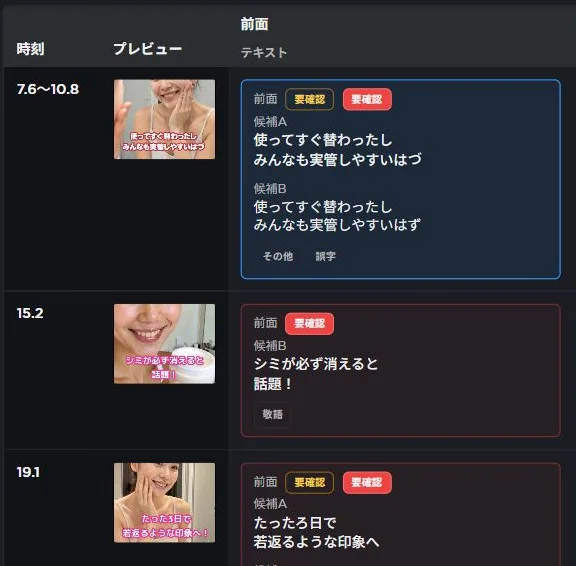
Reviewing a video doesn't end with spotting mistakes. You also have to note which scene it is, capture the frame, write up the correction and pass it on. SHERLOOK's results screen has those materials ready from the start.
The list includes timecodes, so you can jump from any row to the scene. The relevant frame is attached, so there's no need to retake screenshots. Reading candidates and suggested corrections are shown too, so you don't have to write up what to fix from scratch.
In the example on the right, it detected 「替わった」「実管」「はづ」 in the captions and suggested 「変わった」「実感」「はず」 as corrections.
Source: SHERLOOK official site (same for the screenshots below)
The company estimates that checking one 1-minute video including a regulatory (pharmaceutical advertising) check takes about 25 minutes conventionally and about 5 minutes with SHERLOOK. The 25 minutes is a breakdown based on the average of interviews with eight companies (typos and script check 7 min; video, audio and social layout 3 min; regulatory text and dialogue check 10 min; writing up feedback 5 min), and the 5 minutes is the assumed time for a person to review and share the analysis results. It excludes the time to upload and wait for analysis, and the company notes it is neither a measured result nor a guarantee.
Features
The company divides the review into six perspectives. You can analyze only the ones your project needs.
01Checking text
Finds errors in on-screen text and differences from the script.
- TEXT (typos and omissions) — review caption typos, inconsistent notation and awkward line breaks using reading candidates and suggested corrections
- SCRIPT (differences from the script) — compare the script with on-screen text to catch numbers and product names that don't match the original
02Checking picture and sound
Picks up easy-to-miss video and audio problems.
- VIDEO (picture glitches) — detects black frames at cuts and unintended bars, so you can look before and after to decide whether it's intentional or a mistake
- AUDIO (volume) — graphs volume changes so you can re-listen from points where voices are too quiet or sounds too loud
03Matching destinations and rules
Checks against platform and client requirements.
- SAFE ZONE (social media safe areas) — checks for text and logos hidden by the interfaces of Instagram Reels and Stories, YouTube Shorts and TikTok
- CLIENT RULES (wording and expression rules) — register required wording, banned wording, official spellings, substitutions and logos, and check not just captions but spoken lines too
04Sharing
Turns the review results directly into correction requests.
- View-only links — recipients can see results without logging in
- PDF and CSV export — export results you want to keep beyond the retention period
Different destinations, different places to check
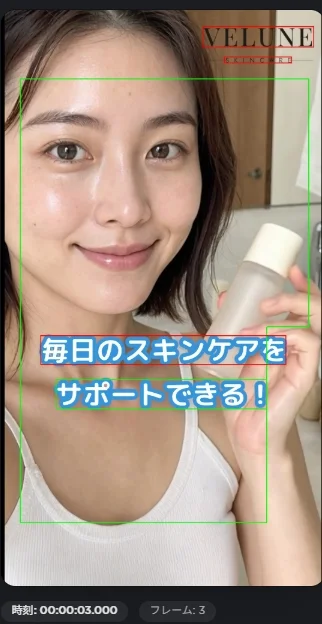
In vertical short videos, the areas covered by like buttons and captions differ by platform, even for the same video. SHERLOOK's SAFE ZONE check compares the positions of text and logos in the video with the safe areas for Instagram Reels and Stories, YouTube Shorts and TikTok, and shows anything that falls outside.
In the example on the right, green frames show the safe area and red frames show what was detected outside it. The company explains that the criteria are SHERLOOK's own.
Another feature is registering each client's rules. Once you register rules like "don't use this expression," "always include this disclaimer" or "write the product name this way," the next video can be checked against the same standard without relying on someone's memory. Because spoken content is also transcribed and checked, you can catch banned expressions that were said in the dialogue even though the captions were correct.
Pricing
| Plan | Price (excl. tax) | Details |
|---|---|---|
| MVP version | From ¥30,000 per month (per account) | Available for businesses. Plans suited to your use are offered individually |
| Trial use | Offered individually | A one-week trial is offered. Usage limits and conditions are discussed individually |
(Based on the official site as of October 8, 2026. Preferential plans are offered on a first-come basis, with conditions discussed individually.)
Applications and inquiries are accepted through the form on the official site or at info@harakami.co.jp. The trial lets you check with your own videos whether "it finds the problems that need fixing" and "it reduces the burden of finding and communicating them" before deciding.
Supported videos and current scope
The tool assumes a person makes the final decision. The company states that text on complex backgrounds, small disclaimers and briefly shown captions may be missed or misread; that the absence of flags does not prove there are no problems; and that regulatory checks do not guarantee legal compliance. Don't adopt suggested corrections as-is—judge them against the original footage.
How it differs from other tools
| Aspect | SHERLOOK | Shodo | Vrew | CapCut |
|---|---|---|---|---|
| Main role | Supporting the review (proofreading) of finished videos | AI proofreading of Japanese text | Captioning via transcription and video editing | Video editing |
| What it handles | Captions, picture, audio and dialogue in a video | Text | Video audio and captions | Video footage |
| Stage in production | After export, before submission or delivery | While writing scripts and copy | During editing | During editing |
AI proofreaders like Shodo have been used for text, and Vrew or CapCut for captioning and editing, but reviewing the exported video itself across picture, sound and text has relied on human eyes alone. SHERLOOK takes on that step and is used alongside editing tools to check videos before submission or delivery.
FAQ
Q. Can AI check caption typos in a video?
A. Yes. It reads captions as text and shows candidate typos and inconsistencies with suggested corrections, together with the relevant frame and timecode. Since text may be missed or misread, a person makes the final decision on fixes.
Q. How much does it cost?
A. The MVP version for businesses starts at ¥30,000 per month (excl. tax, per account). Suitable plans and first-come preferential plans are offered individually, and a one-week trial can also be arranged.
Q. Can it compare a video with the script?
A. It compares the script with the text shown in the video. It does not compare narration directly with the script; audio is transcribed and used to check against registered rules such as banned and required wording.
Q. What videos can it be used for?
A. Videos up to 5 minutes and 5 GB. They can be imported from local MP4 files, YouTube (public and unlisted) and Google Drive. It suits reviewing short videos for ads and social media.
Q. Does it integrate with Premiere or other editing software?
A. As of October 2026, only the browser version for checking exported videos is available. Adobe Premiere integration and an API are at the planning stage, with no release date set.
The information on this page is based on what was published on the official site as of October 2026. Please check the official site for the latest specifications and pricing.