
Sudowrite
: How to use it, features, and the business problems it solves
Add bookmark
What is Sudowrite?
An AI writing tool built specifically for fiction and creative storytelling. Features include Story Bible for developing ideas into chapter outlines, Write for suggesting continuations, Describe for vivid scene-setting, Brainstorm for idea expansion, and Expand for fleshing out prose. Designed as a creative co-author for writers. Interface and optimization are primarily English-focused; Japanese creative writing is not practically supported.
Business problems it solves

About "Sudowrite"
What is Sudowrite
Sudowrite is an AI writing tool specialised for novels and fiction. Unlike general-purpose text AI, it is optimised for advancing a story — accounting for characters, tone, and plot — and it supports the whole creative process as a co-writing partner, from idea generation through outlining, drafting, and revision. It now runs on Muse 1.5, an in-house model designed just for fiction.
Note one important caveat before you consider it: the interface and optimisation are English-centric, so it is effectively not suited to serious writing in Japanese.
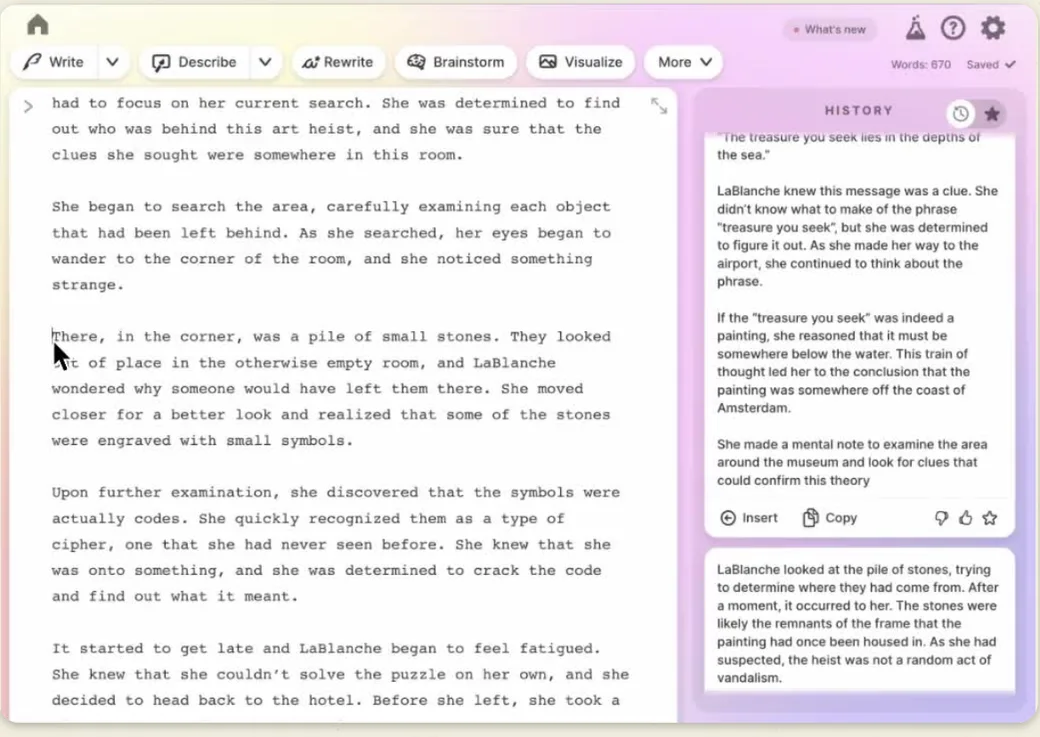
Source: Sudowrite official site
From idea to finished manuscript
Sudowrite gives each stage of creation its own tools. You set the skeleton in "Story Bible," draft with "Write," fill in descriptions or scenes as needed, and finish with rewriting and feedback.
Story Bible
Enter idea, characters, world, and synopsis, then break them down into an outline and chapter structure
Write / Describe / Expand
Suggest continuations in multiple options, add description, and flesh out rushed scenes
Rewrite / Feedback
Try alternative phrasings and understand what to improve to refine the draft
Brainstorm (for names, settings, etc.) and Canvas (for organising plot and character arcs) can be used alongside at any stage. Generation consumes credits.
How to use
-
Create an account
Create an account on the official site (sudowrite.com). A no-credit-card free trial is available.
-
Create a project (work)
Create a new work and open the editor. Manage novels, short stories, scripts, and more.
-
Set things up in Story Bible
Enter ideas, characters, world, and synopsis into Story Bible, then break them down step by step into an outline and chapter structure.
-
Draft with Write / Expand / Describe
Use Write to suggest the next passage (about 300 words) in multiple options, Expand to flesh out rushed scenes, and Describe to add scene description.
-
Finish with rewriting and feedback
Use Rewrite to try alternative phrasings and Feedback to see where to improve. Generation consumes credits.
Features
01Build
- Story Bible — The core feature that builds from idea to outline to chapter structure, step by step, in the author's voice
- Brainstorm — Unlimited ideas for names, items, and titles
- Canvas — Visually organise plot and character arcs
02Write
- Write — Suggests the next passage (about 300 words) in multiple options based on characters, tone, and plot
- Describe — Generates vivid scene and character description without breaking pace
- Expand — Fleshes out rushed scenes and evens out pacing
03Polish & extend
- Rewrite — Generates alternate versions in a direction you specify
- Feedback — Points out where to improve the draft
- Plugins — Many plugins to extend functionality
Pricing
Credit-based in USD; each generation consumes credits. A no-credit-card free trial is available.
| Plan | Monthly | Highlights |
|---|---|---|
| Hobby & Student | $10/mo | 225,000 credits/mo. For hobby and study use |
| Professional (popular) | $22/mo | 450,000 credits/mo. For substantial works like novels and scripts |
| Max | $44/mo | 2,000,000 credits/mo. For prolific authors; unused credits roll over for 12 months |
Generation features like Write, Describe, and Brainstorm consume credits each time you use them. Longer works and more generations use more, so Professional or above is realistic for substantial writing. Prices and credit amounts may change, so confirm on the official site before subscribing.
Prices are a guide as of August 2026 (USD; JPY equivalent varies with exchange rates). Check the official pricing page for the latest.
Reputation
- Novelists and creators say "idea generation and continuation suggestions keep me writing" and "Story Bible makes it easy to structure a long work."
- Users note "Describe expands my range of description" and "it's an excellent sounding board."
- On the other hand, some point out "it assumes English, so Japanese writing takes effort" and "credits can be consumed quickly."
How it differs from other AI writing tools
Even among "write with AI" tools, Sudowrite is clearly different in that it goes all-in on novel and fiction writing. Its target use is entirely separate from marketing copy generation or English proofreading.
| Aspect | Sudowrite | Jasper | Grammarly |
|---|---|---|---|
| Strength | Creative support for novels and fiction | Marketing / SEO copy generation | English grammar and spelling |
| Main features | Story Bible, Write, Describe, etc. | Template-based commercial copy | Proofreading, rewriting, tone |
| Best for | Creators writing stories | Business and promotional text | People who want correct English |
For commercial copy or SEO articles, Jasper; for English proofreading, Grammarly or Wordtune. If you write novels or scripts in English and want to co-create from ideation through revision, the fiction-specialised Sudowrite is a strong choice.
FAQ
Q. Is Sudowrite free to use?
A no-credit-card free trial is available. For ongoing use, subscribe to one of the monthly Hobby & Student / Professional / Max plans (credit-based).
Q. Does it support Japanese?
The interface and optimisation are English-centric, and it is effectively unsuited to writing in Japanese. The community shares workarounds (like specifying the language in Story Bible), but behaviour can be unstable in non-English, so it isn't suited to serious Japanese writing.
Q. Who is it for?
Authors and creators writing novels, scripts, and fiction — those who want to co-create the whole process, from ideation through drafting and revision, with AI.
Q. What is Muse 1.5?
Sudowrite's in-house AI model designed specifically for fiction, optimised to generate prose that respects a story's context and voice.
Q. What are credits?
Points consumed each time you use generation features like Write, Describe, and Brainstorm. Each plan has a monthly credit amount; longer works and more generations use more.
Information on this page is based on what was published on the official site as of August 2026. Features and pricing may change, so check the official site for the latest.