kdpbook.io
: How to use it, features, and the business problems it solves
Add bookmark
What is kdpbook.io?
kdpbook.io is an AI book studio for Amazon KDP (Kindle Direct Publishing). From a one-sentence idea or your own manuscript (Word, PDF, Markdown or plain text), its AI writes, illustrates and typesets 36 book types, including picture books, coloring books, puzzle books, journals, novels, non-fiction and comics, and applies KDP's trim, margin, bleed and spine rules in code. It exports an interior PDF, a full-wrap cover PDF with back, spine and front in one piece, a Kindle EPUB and a listing sheet. Books can be made in 34 languages including Japanese (the interface is in English). New accounts get 2,000 free credits (no card required; free exports are watermarked and not for sale), and paid plans are Starter $25, Author $49 and Studio $99 per month (excluding tax).
Business problems it solves


About "kdpbook.io"
What is kdpbook.io?
kdpbook.io is an AI book studio for making books to publish on Amazon KDP (Kindle Direct Publishing). From a one-sentence idea or a manuscript you already have, its AI writes, illustrates and typesets the book, then exports a set of files you can upload to KDP as they are.
It covers 36 book types, including picture books, coloring books, puzzle books, journals, novels, non-fiction and comics. KDP's print rules, such as trim size, margins, bleed and spine width, are applied by program code rather than by AI, and the exports are an interior PDF, a full-wrap cover PDF with back, spine and front in one piece, a Kindle EPUB and a listing sheet. It is run by THE VIBECODING AGENCY in Paris, France, and opened to the public on September 26, 2026. The same company also runs the video clipping service shortshort. kdpbook.io is an independent service with no affiliation with Amazon.
8 families, from picture books to novels and comics
Custom styles also possible
From the languages KDP publishes (incl. Japanese)
One 32-page picture book, no card
One sentence becomes the blueprint for a whole book
To start, you just type a sentence like "a bedtime picture book for a 4-year-old about a little wolf who is afraid of the dark." With the book type left on Auto, the AI picks a type that suits the idea and presents a book plan that sets the page count, illustration style, characters, target age and trim size.
In the example on the right, one sentence produced the plan "picture book, 32 pages, 13 spreads", "Watercolor storybook style", "3 characters" and "8.5 × 8.5 in paperback (premium color) plus a fixed-layout Kindle edition", along with the expected credit cost (about 1,624). Because you see the estimate before generation starts, you can change the page count or number of illustrations to adjust the cost.
Instead of handing it a single sentence, you can also choose the book type, style and trim size one by one. Both paths go through the same steps, so anything can be changed before and after generation.
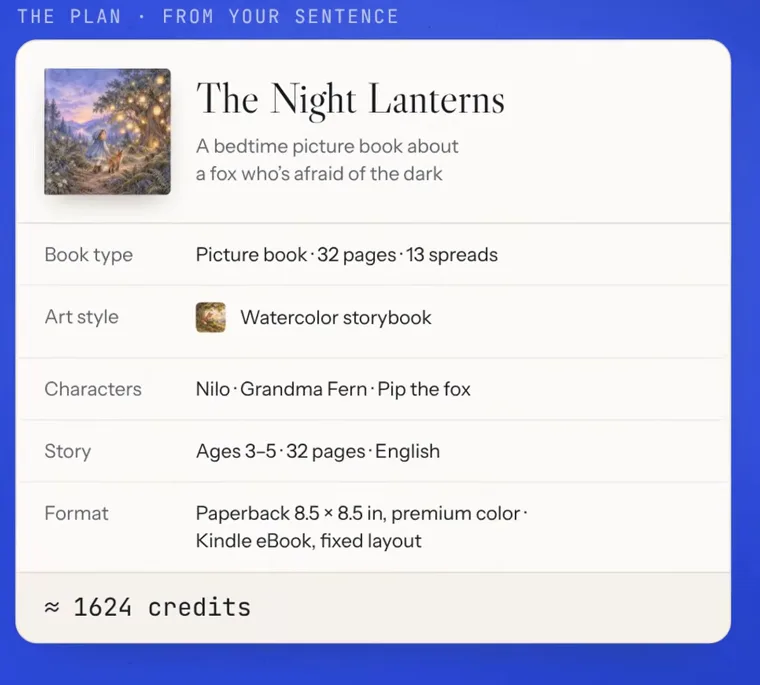
Source: kdpbook.io official website and official demo video (the same applies to the screen images below)
How to use
-
Describe an idea or import a manuscript
Type the book you want in one sentence, or import your own manuscript (Word .docx/.doc, PDF, Markdown, plain text, or pasted text). An imported manuscript is never rewritten, not even one word: it is split into chapters or pages and laid out. EPUB files can't be imported, so save them as .docx first.
-
Choose the book type and style
Pick one of the 36 book types (or leave it on Auto) and, for illustrated books, one of 40 illustration styles. You can also describe a custom style in words or build one from a reference image. Trim size, ink and paper, and page count are set here too, and you get a credit estimate before production.
-
Watch the book come together
Following the plan, the text is written and the illustrations and cover are drawn, and each part appears on screen as soon as it is made. Main characters get a character sheet first, and every illustration is drawn with it as a reference. Every step and the credits used are logged.
-
Edit and check it in 3D
In the page editor with live preview you can change text, fonts and layout by hand (manual editing is free). You can also use AI rewrites, redraw individual illustrations, or ask for changes in the chat, such as "make the text bigger". Compliance with KDP's specifications is checked continuously, and the finished book can be paged through in a 3D preview.
-
Export and upload from your own KDP account
Export the interior PDF, cover PDF, Kindle EPUB, Kindle cover image and listing sheet, then upload them and complete publishing in your own KDP account. Exports don't use credits. Only files exported on a paid plan may be sold; free-plan exports carry a watermark.
KDP's print rules are applied by code, not AI
When publishing a print book on KDP, the hard part is often not the content but the specifications of the print files. The inside margin (gutter) has to grow with the page count, books with art that reaches the edge need bleed, the spine width must be calculated from the paper and page count, and the back, spine and front have to be combined into one cover to match. kdpbook.io handles this in code, based on a "rulebook" checked against KDP Help (the site states it was checked on September 26, 2026).
Anything that doesn't meet the rules is flagged before export. If KDP sends a rejection email, you can paste its text into the chat and ask for a fix. The site states clearly, however, that KDP reviews every book itself, so acceptance is not guaranteed.
Get every file KDP asks for, in one set
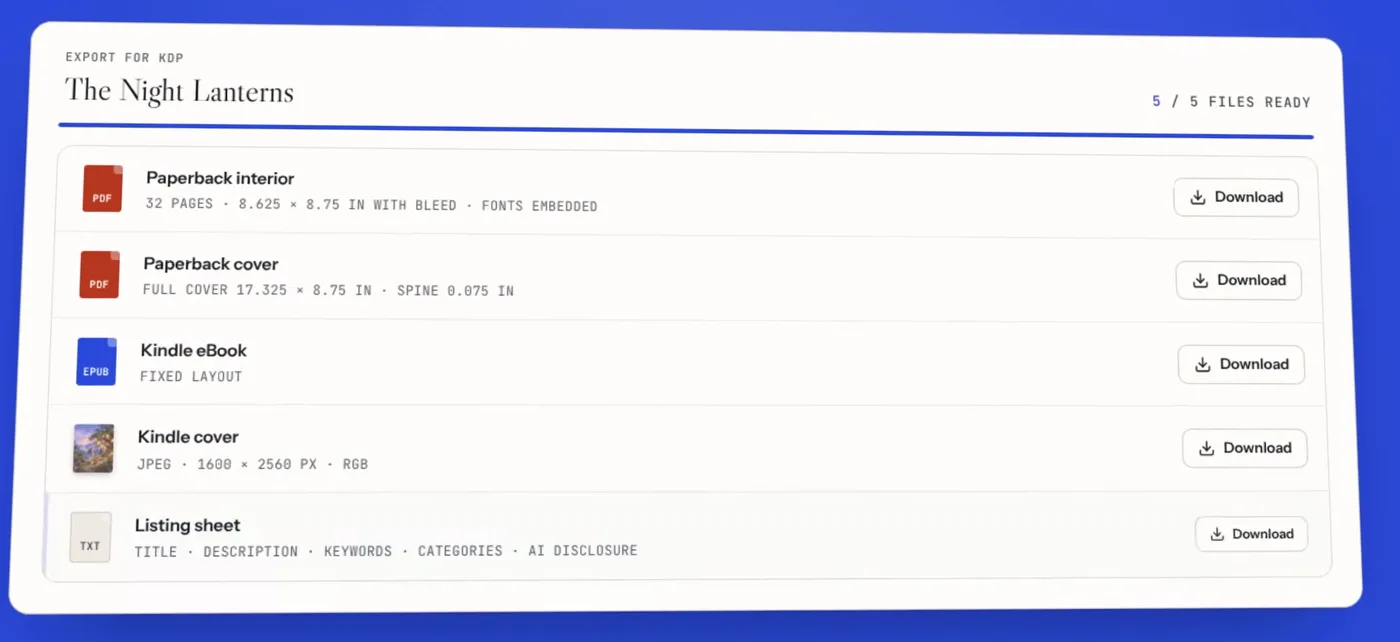
The export gives you the interior PDF and cover PDF for the paperback (or hardcover), the EPUB and cover image for Kindle, and a listing sheet. The cover PDF is a single full-wrap file with the spine width calculated from the final page count, and it is rebuilt when you add or remove pages.
The listing sheet collects the fields you fill in on KDP's publishing screens: the title, description, 7 keywords, categories and suggested answers to the AI-generated content disclosure. The suggested answers are based on what AI actually generated in that book (text, illustrations, cover). Note that the keywords are not based on search-volume data, and there is no market research feature.
Features
01Make the book
Builds the structure and content of the book from a one-sentence idea or a manuscript.
- Planning chat — Describe the book in a conversation and it drafts a plan with the type, page count, characters and more. You can also set things up step by step without the chat
- Writing — From read-aloud picture book text to the full text of long novels and non-fiction. The default novel is 336 pages
- Manuscript import — Word, PDF, Markdown and plain text are split into chapters and pages without changing the words
- Pages made by code — Puzzles such as mazes, word searches and sudoku, and planner and notebook pages, are generated in code, with answer pages
02Keep the art consistent
Makes the same characters look the same from the cover to the last page.
- 40 illustration styles — 9 families including watercolor storybook, crayon, claymation, coloring-book line art, manga screentone and photo-real. Custom styles from words or a reference image
- Character sheets — A reference sheet for each main character, used for every illustration
- Cover design — Front, spine and back, sized from the trim, paper and page count
03Refine and check
After generation, you can make changes by hand and with AI.
- Page editor — Edit text, fonts and layout with a live preview (manual editing is free)
- AI rewrites and redraws — Rewrite passages of about 350 words, redraw one illustration at a time
- Book assistant — Ask for changes in a chat, such as "make the story text bigger"
- KDP preflight — Continuously checks trim, page size with bleed, margins, image resolution and spine
- 3D preview — Turn the book, built with its real cover and spine width, and read it page by page
04Export
Gives you what KDP's upload screens ask for, as is.
- Interior and cover PDFs — Paperback (16 standard trims + custom) and hardcover (5 trims)
- Kindle EPUB — Reflowable or fixed layout. Fixed-layout EPUB 3 is checked with EPUBCheck
- Listing sheet — Title, description, 7 keywords, categories and suggested AI-disclosure answers
- Bulk export — A Studio plan feature
Check the book in 3D as if holding it
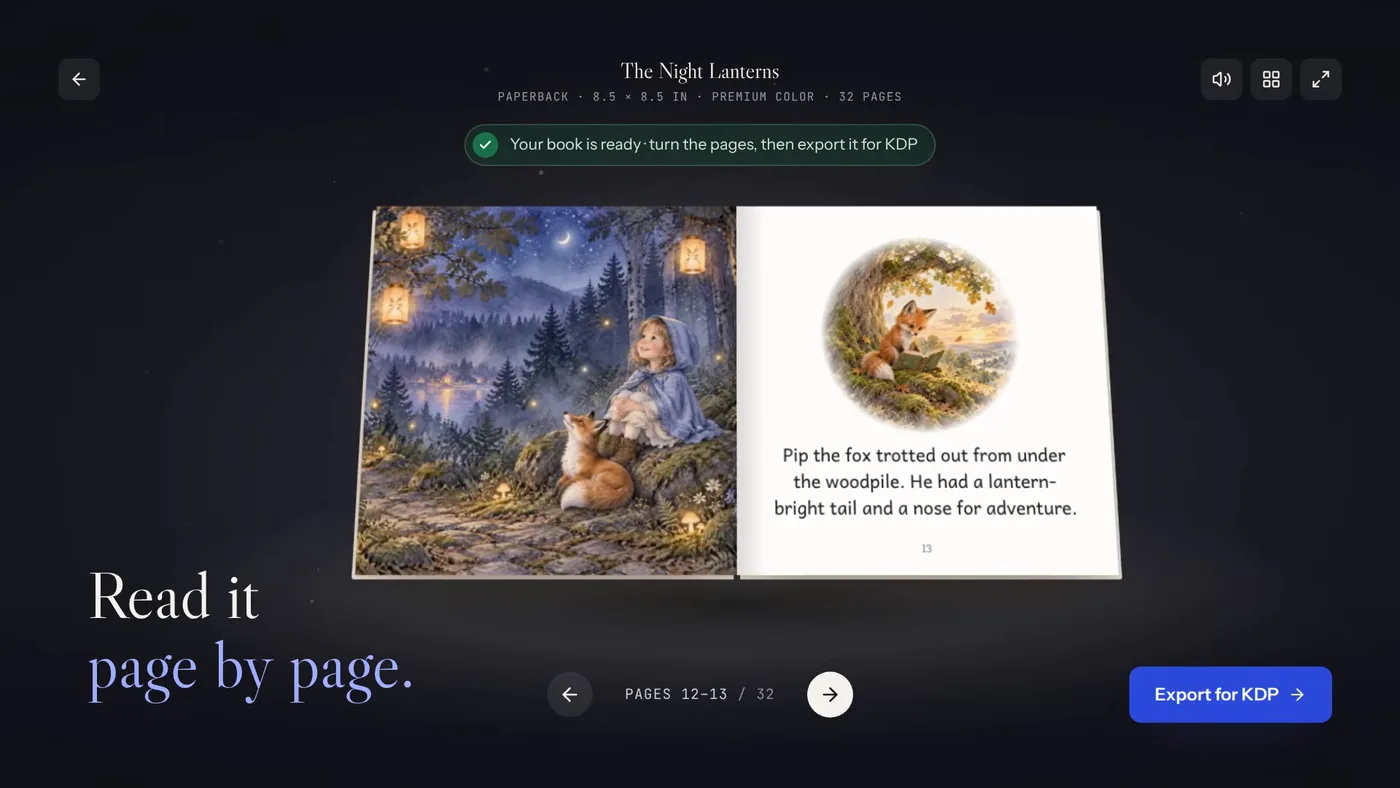
The finished book can be previewed as a 3D book built with its real cover and a spine width calculated from the page count and paper. Turn it to check the front, spine and back, then open it and read it page by page. Choose whether to publish as a paperback, hardcover or Kindle edition and go straight to export.
Book types
The 36 book types fall into 8 families. Each type comes with preset choices for where pictures go, how much text fits on a page, and which trim sizes and papers suit it.
| Family | Main types | Typical ages and page counts |
|---|---|---|
| Picture books | Baby and toddler book, picture book, ABC book, counting book | Ages 0–8, 24–48 pages |
| Illustrated stories | Illustrated storybook, early reader, bedtime story collection, kids' fact book | Ages 0–12, 24–200 pages |
| Novels and chapter books | Early chapter book, middle-grade novel, YA novel, novel, novella and short stories, poetry collection | Ages 3+, 48–700 pages |
| Non-fiction and guides | Non-fiction guide, self-help, business book, devotional, cookbook, memoir and family history | Ages 13+, 60–500 pages |
| Coloring books | Kids' and adult coloring books | All ages, 24–220 pages |
| Activity and puzzles | Kids' activity book, puzzle book, word search, sudoku, mazes, educational workbook | All ages, 24–300 pages |
| Journals and notebooks | Guided journal, gratitude journal, planner and logbook, lined notebook, sketchbook, password book | Ages 3+, 24–400 pages |
| Comics and graphic novels | Comic and graphic novel, manga (black and white, screentone) | Ages 5+, 24–240 pages |
Coloring, puzzle, activity, journal and notebook types are made as print books only, because KDP lists them as content unsuited to Kindle.
Languages and formats
Pricing
Pricing is credit-based. Each book gets an estimate before production based on its pages, word count, illustrations and cover. When generation starts, the estimate (plus up to 5% headroom) is held from your balance, only what is actually produced is charged, and the rest is released automatically. Failed illustrations are retried at no extra cost.
| Plan | Monthly (excl. tax) | Yearly (excl. tax) | Credits | Main features |
|---|---|---|---|---|
| Free | $0 | — | 2,000 at signup (once) | All book types and styles. Exports carry a "kdpbook.io preview" watermark and are not for sale. Books are public in the community |
| Starter | $25 | $250 | 2,500 per month | No watermark, commercial use. Private books. Credit top-ups |
| Author | $49 | $490 | 5,500 per month | Everything in Starter, plus priority generation, 3 books at once, series and character library, 5% off top-ups |
| Studio | $99 | $990 | 12,000 per month | Everything in Author, plus 6 books at once, bulk export, 10% off top-ups |
(Based on the official pricing page updated September 27, 2026; checked October 8, 2026)
One credit is worth about $0.01 at the Starter rate. The official estimates for default settings are:
| Example book | Pages and trim | Illustrations | Estimate (credits) | At the Starter rate |
|---|---|---|---|---|
| Picture book | 32 pages, 8.5 × 8.5 in | 14 | 1,624 | about $16 |
| Kids' coloring book | 106 pages, 8.5 × 11 in | 50 | 1,803 | about $18 |
| Puzzle book | 108 pages, 8.5 × 11 in | — | 460 | about $5 |
| Guided journal | 120 pages, 6 × 9 in | 12 | 1,611 | about $16 |
| Non-fiction guide | 192 pages, 6 × 9 in | — | 2,931 | about $29 |
| Novel | 336 pages, 5.5 × 8.5 in | — | 5,377 | about $54 |
The first four fit within the 2,000 credits given at signup. Puzzle and planner pages are generated by code, so they use almost no credits.
- Prices are in US dollars excluding tax; VAT or sales tax is added at checkout based on your billing address. Payments go through Stripe
- Yearly billing costs 10 months, and the 12 months of credits are added at once
- You can cancel at any time and keep the plan until the end of the paid period. Your books stay in your account, and credits remain on your balance after you cancel
- A book made on the free credits becomes a clean, sellable file if you re-export it after upgrading (exports use no credits)
- Consumers in the EU and UK can withdraw within 14 days of their first payment or a pack purchase without giving a reason, with a refund minus the credits used
What to check when publishing on KDP
Publishing books made with AI on KDP is allowed. KDP Help sets out rules that publishers must follow themselves, and the kdpbook.io site points to the same rules.
The tool assumes you read every page before publishing. kdpbook.io's AI content policy notes that AI can make mistakes, such as wrong facts, odd details in pictures and inconsistent names, and asks you to check every page and illustration before publishing. It also lists prohibited uses, including characters or brands that belong to others, imitating a living author's or artist's work, mass-producing near-identical books, and photorealistic images of real people. The terms of service state that AI-generated content may not be protected by copyright in some countries and that, because similar prompts can produce similar results, exclusivity over generated content is not promised.
Who can see your books, and how data is handled
What kdpbook.io doesn't do
The official site also lists what it doesn't handle.
- Keyword or niche market research (the 7 listing keywords are written without search-volume data)
- Uploading to KDP on your behalf (you upload the files from your own KDP account)
- Selling ISBNs (use KDP's free ISBN or your own; low-content books can't use a free KDP ISBN)
- Audiobooks
- Printing or shipping (KDP prints and ships)
- A public API or a mobile app
How it differs from other writing and design tools
"Making a book with AI" covers very different tools depending on how much of the job one tool takes on. kdpbook.io stands out by handling writing, illustration and typesetting through to the export of KDP-ready files in a single project.
| Aspect | kdpbook.io | NovelShaft | Sudowrite | Canva |
|---|---|---|---|---|
| Main role | Makes a complete KDP book from an idea or manuscript | A novel-writing environment that grows the manuscript, references and AI conversations as one work | Creative writing support for English fiction | General-purpose design tool |
| Text | Written by AI; your own manuscript is typeset without rewriting | The author writes; AI asks, organizes, suggests and drafts | AI assists and generates around the author's writing | You type it yourself |
| Illustrations and cover | Draws every page in 40 styles using character sheets; makes front, spine and back | Up to 1 image per request | — | You design with templates and AI image tools |
| Export | Interior PDF, cover PDF, Kindle EPUB, listing sheet | Text, Markdown, DOCX, PDF, EPUB 3 | — | PDF and more (trim, spine etc. set up yourself) |
| Pricing | Free (2,000 credits at signup) / Starter $25 / Author $49 / Studio $99 per month (excl. tax) | Free $0 / Light $15 / Standard $30 / Pro $90 (monthly) | $10 / $22 / $44 (monthly, credit-based) | Free / Canva Pro ¥11,800 per year and more |
For people who want to write the manuscript themselves, there are writing tools such as NovelShaft and Sudowrite. Because kdpbook.io imports manuscripts without rewriting them, it can be combined with those tools at the stage of turning a finished manuscript into a KDP interior, cover and Kindle edition. ChatGPT and Midjourney can also produce text and pictures, but then you have to lay out the pages and match the trim, bleed, margins, spine width and cover size yourself.
FAQ
The information on this page is based on what was published on the official site as of October 2026. Please check the official site for the latest specifications and pricing.