NovelShaft
: How to use it, features, and the business problems it solves
Add bookmark
What is NovelShaft?
NovelShaft is an AI-assisted novel-writing environment that keeps the manuscript, the manuscript outline, reference material such as characters and world-building, and conversations with AI together in one work. From shaping a fragment into an idea, through drafting and long-form revision, to export as Text, Markdown, DOCX, PDF, or EPUB 3 and publishing, everything happens on one screen, and the design puts the author in charge of what stays in the work: AI changes can be skipped before they are applied. It supports vertical writing, ruby, and read-aloud, handles Japanese and English works, and runs on the Web and iOS (iPhone and iPad). Pricing is a free Free plan (200 AI credits every 30 days) plus monthly Light $15 (4,500 credits), Standard $30 (9,450), and Pro $90 (29,700) plans, with a limited-time $3 Mini plan available until December 16, 2026.
Business problems it solves


About "NovelShaft"
What is NovelShaft
NovelShaft is an AI-assisted novel-writing environment that keeps the manuscript, the manuscript outline, reference material such as characters and world-building, and conversations with AI together in one project called a "work". You can go from talking through a fragment of a scene or a character, to drafting, to revising a long-form novel, to exporting and publishing the finished manuscript, all on the same screen. It is available on the Web and on iOS (iPhone and iPad), and supports works written in Japanese or English.
At the center of the design is the idea that the author decides what stays in the work. AI asks questions, organizes, suggests, and drafts, but limited changes it makes to the manuscript or reference material can be skipped before they are applied, high-risk actions such as deletion require explicit approval, and changes can be undone afterward with the project-wide Undo. NovelShaft is not a service that hands the story over to AI. It is designed as a collaborator for an author who has to keep facing a long story with an ever-growing pile of settings and drafts.
Valid 90 days, no payment details
Undo available after it is applied
Text, Markdown, DOCX, PDF, EPUB 3
As of August 21, 2026
Think about the next scene with the draft in view
The writing workspace is a three-pane screen: the AI conversation on the left, the manuscript outline in the middle, and the manuscript editor on the right. Once a conversation settles the core of the story, say "Emma entrusts her memory, Luca takes on the story," you can write it into the manuscript and keep the meaning of that choice in reference material, all without leaving the screen.
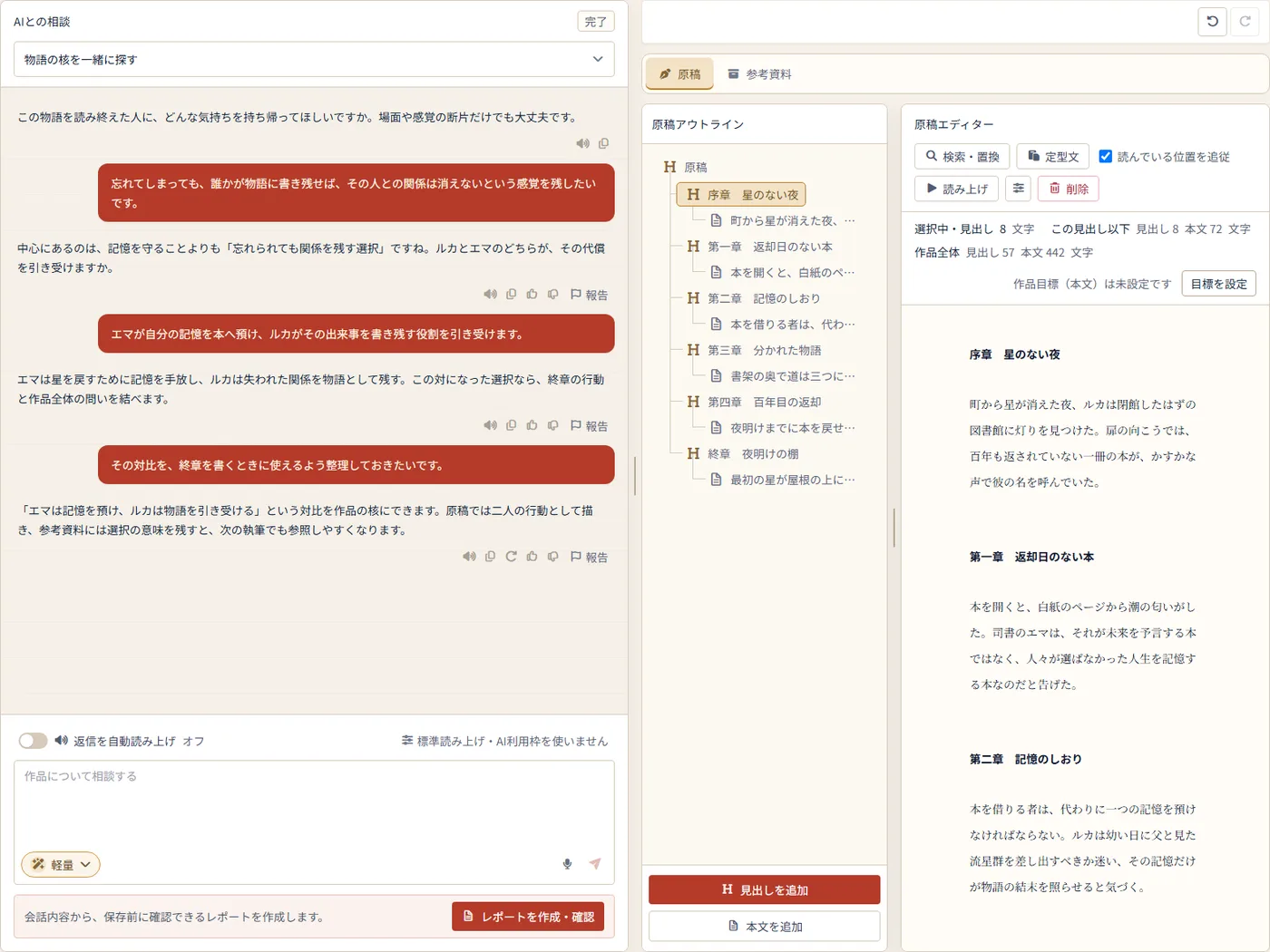
Source: NovelShaft official site (the screenshots below are from the same source)
You do not need a finished prompt; conversations run in natural sentences. AI replies come with short reply suggestions that you can pick to continue, or you can write freely. You can point AI at a selected passage or at reference material inside the work with reference tags and ask it to look at the description in a specific chapter, and for topics such as character relationships or timelines that read better as a diagram, AI adds one. A scene that comes to you on the move can be dictated with voice input, transcribed, and used in the conversation.
Conversations are split into threads by topic, so discussions about "a character's motive," "how the final chapter unfolds," and "wording" do not get mixed together. A default AI model is set per account, and individual replies can be switched to another model when needed.
AI does not rewrite on its own. You get five seconds to skip a change
Ask AI to "add a sentence to the final chapter that shows Emma entrusted her memory," and it shows what it will change and asks to confirm with "Apply changes to the work." For limited changes like this, if you choose "Do not apply" during the few-second countdown before auto-apply, the manuscript stays as it was.
After a change is applied, you can open the target and check it, then use the project-wide Undo. High-risk actions such as deletion require explicit approval, and AI is not given the ability to delete reference material at all.
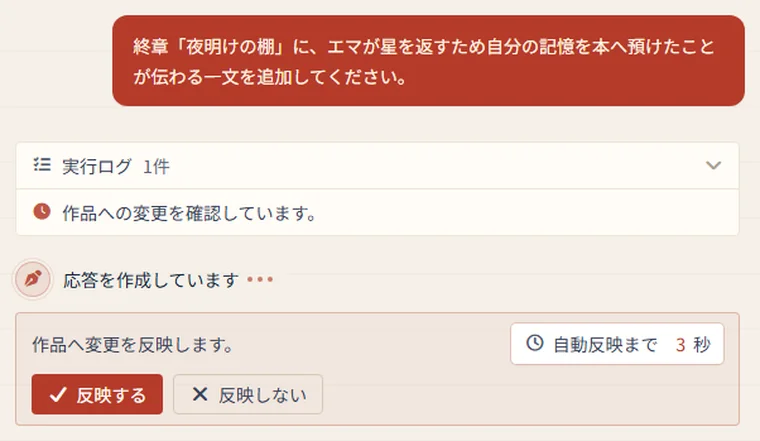
Searches and actions AI performs are kept as an execution log in order, and manuscripts or material it creates or updates can be opened from the result to check what was actually saved. If another screen or AI has already changed the same manuscript, edit-conflict protection keeps your in-progress input from being silently overwritten and lets you review the latest content before saving.
Characters, world, and timeline live outside the manuscript
Reference material is organized in folders per work. Besides free-form documents for settings and research notes, you can create plot material such as a basic plot, hierarchical outline, scene cards, and four-act structure; character, place, and world settings that organize goals, motives, and conflicts, the role of a place, and the rules of the world by field; a timeline that switches between a list and a vertical chronology; and relationship charts and family trees editable as both a diagram and a text list.
External files such as text, images, and PDFs can be brought in as reference material too. Depending on what you ask, AI searches the relevant passages in the manuscript and reference material it needs.
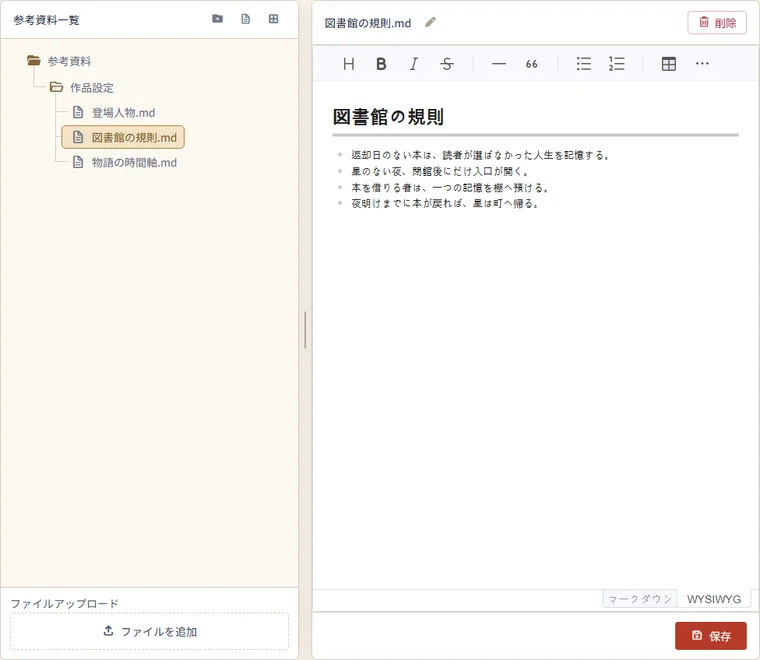
For the situation long-form writers know well, where character notes, the plot, and AI conversations each hold a different version of a setting, you can check for gaps against characters, the timeline, and the rules of the world with AI while it references the manuscript and material. The official site states that this is not a feature that guarantees complete automatic detection of contradictions; AI observations are positioned as a starting point for review.
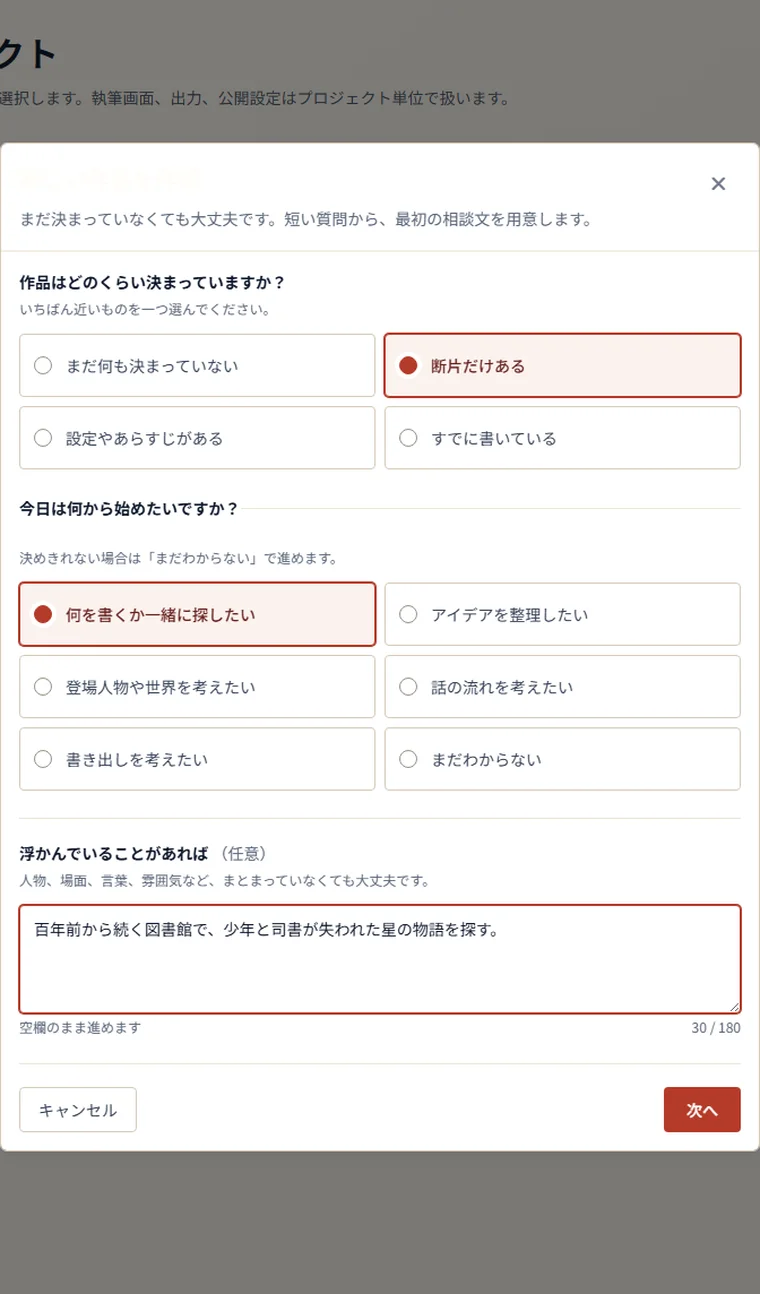
Even with only a fragment, it drafts your first prompt for you
You do not need a title or settings to create a new work. Choose which is closest, "nothing decided yet," "only fragments," "have settings or a synopsis," or "already writing," pick what you want to start with today, add a line about what is on your mind, and an editable first prompt is prepared. You can also skip AI and begin from the manuscript.
Creative assists, which explore a specific creative theme, can be reused as dedicated threads per work. The outcome of the dialogue is previewed as a report and can be saved as reference material. A creative assist never directly rewrites the manuscript or existing settings.
How to use it
-
Create an account
Sign up with an email address and password or a supported external account. No payment details are required, and you get 1,500 AI credits for 90 days from sign-up: 1,300 welcome credits plus the regular 200 Free credits.
-
Create a work (project)
Choose whether it is a Japanese or an English work. AI, search, word or character counting, typesetting, voice, and export follow the language of the work. If you already have a draft or setting documents, you can import whole files or folders when creating the work and start from there. Besides documents such as Word (.docx), PDF, text, and Markdown, it accepts spreadsheets such as Excel and CSV, images, and archives such as ZIP.
-
Write while consulting AI
Move between the conversation, outline, and editor as you write. AI replies consume credits, and usage varies with the AI you choose (Lightweight, Standard, Advanced) and the action. Changes AI makes to the manuscript or material are confirmed before they are applied.
-
Read it back and tidy it up
Switch between horizontal and vertical writing and listen back with standard read-aloud (which uses no credits) or AI voice. Manuscript search with confirmed replace, a variant-spelling check that looks up several spellings of names and places at once, and a target for the total body text are available.
-
Export or publish
Export the whole manuscript or a selected section as Text, Markdown, DOCX, PDF, or EPUB 3. A work can stay private, be shared link-only with people who have the URL, or be published publicly.
Features
01Consult
Think things through with AI, by text or by voice, with the work in reference.
- AI chat — Questions, organization, suggestions, multiple options, and draft wording. Headings, bullets, and tables inside replies are rendered
- Consult with the work in reference — Point to a selected passage or reference material with reference tags. How much can be referenced and the search capability depend on the plan
- Voice input — Record a prompt or a project name and transcribe it (uses credits)
- Threads, reply suggestions, AI personality — Separate threads by topic, pick the next line from suggestions, and set the tone of replies as a shared setting
- Diagrams and images — Relationships and sequences are shown as diagrams; an image (at most one) is generated only when asked, and can be saved to reference material
- AI-created manuscripts and material — Creates or updates headings, body text, and reference material on request, with a grace period or approval for changes
02Write and refine
Write headings and body text on one continuous surface, with the tools long-form revision needs.
- Manuscript editor and outline — See headings and body text as a hierarchy; add, delete, and reorder. Spaces and line breaks are kept as typed
- Word count and work target — Counts for the selection, its children, and the whole work, headings and body separately. Progress and remaining amount against a body-text target
- Search and replace — Supports limited regular expressions. Replace one at a time with confirmation, or in bulk after previewing the targets
- Variant-spelling check — Search several spellings of names, places, and terms at once and see which manuscript uses which
- Ruby, writing instructions, snippets — Readings and per-work writing guidance are managed inside the work; snippets are shared across works and between Web and mobile (ruby and writing instructions added September 4, 2026)
- Horizontal or vertical writing, fonts, read-aloud — Choose from Mincho, Gothic, and Google Fonts; read aloud with a standard or AI voice at 0.75x to 2.0x
03Material and settings
A place outside the manuscript for the premises of the work.
- Hierarchy and free-form documents — Organize folders, documents, and files in a hierarchy. Write settings, research, hypotheses, and reasoning without a fixed template
- Plot and structure material — Basic plot, hierarchical outline, scene cards, four-act plot
- Character, place, and world settings — Organize goals, motives, conflicts, roles, atmosphere, premises, regions, and rules by field. Images can be attached to character settings
- Timeline, relationship chart, family tree — Switch between a list and a vertical chronology, or between a diagram and a text list, while editing
- Import external files — Save text, images, PDFs, and more as reference material for the work
- Creative assists — Explore a theme in a dedicated thread and save the report as reference material. Some are free, some are paid
04Export and publish
What you write can be kept in a form that works outside the app.
- Text, Markdown, DOCX — Export the whole manuscript or a selected section, keeping spaces, blank lines, and line breaks
- PDF — Choose A5, A4, Letter, or A4 two-column layouts, and set headers, footers, and page numbers
- EPUB 3 — Reflowable. Set the author name and use an image from reference material as the cover
- Visibility — Private, link-only, or public. The saved manuscript at the moment of publishing is fixed, and the reader page changes only when you choose "Update published content"
- Reader page — A reading page focused on the title, author, blurb, table of contents, and body. Readers can adjust text size, line spacing, and background, and their reading position is saved
- Writing dashboard — Days and number of manuscript saves in the last 14 days and the change in body text. A view of where your writing stands, not a rating of the work
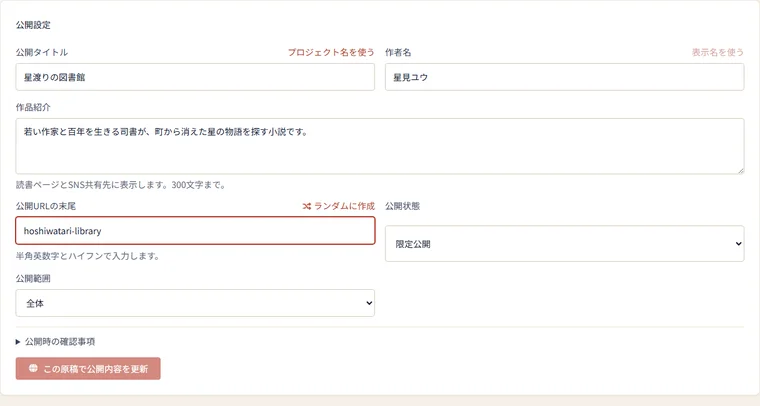
In the publishing settings you set a public title, author display name, and blurb separately from the project name you use while writing, and choose the ending of the public URL yourself. The published range can be the whole work or everything under a chosen heading, and link-only URLs can be reissued.
Because the reader page does not change automatically as you keep writing, a draft in mid-revision is never visible to readers.
Supported environments
Pricing
The Web version is billed monthly in US dollars. Free is a plan with no expiry that grants 200 AI credits every 30 days. Since September 16, 2026, Light, Standard, and Pro include more monthly AI credits at unchanged prices, and a limited-time Mini plan has been added. Paid plans expand, in addition to credits, the available AI models, reference-material storage, the reference and conversation context AI can use, and the limit on long responses.
| Plan | Monthly (Web) | AI credits | Available AI | Main differences |
|---|---|---|---|---|
| Free | $0 | 200 / 30 days | Lightweight | Try the core experience with basic conversations and a small reference collection |
| Mini (limited time) | $3 | 1,200 / month | Lightweight, Standard | A Web-only campaign plan. Reference material, conversation, and response limits are the same as Light. Ends automatically after up to three monthly charges ($9 in total) and returns to Free |
| Light | $15 | 4,500 / month | Lightweight, Standard | The smallest paid plan with Standard AI. Reference material, conversation context, and response limits are larger than Free |
| Standard | $30 | 9,450 / month | Lightweight, Standard | Reference storage, search range, conversation context, and long-output limits are substantially larger than Light |
| Pro | $90 | 29,700 / month | Lightweight, Standard, Advanced | The only plan with Advanced AI. Every limit is the largest of the current plans |
AI credits on paid plans can be used for 90 days from each monthly grant (each batch is kept until its own expiry, including after cancellation). Free credits and the welcome bonus are also valid for 90 days from each grant.
Additional AI credits can be purchased on every plan, including Free. Credits bought on the Web are valid for 90 days from the grant, while credits bought through the App Store do not expire.
| Additional AI credits | Web (USD) | App Store (JPY) |
|---|---|---|
| 1,000 | $5 | ¥1,000 |
| 3,000 | $13 | ¥2,500 |
| 10,000 | $40 | ¥8,000 |
- Mini is a limited-time campaign plan. Applications close at 20:00 JST on December 16, 2026, and it can only be purchased on the Web (not in the app). After up to three monthly charges of $3 it ends automatically and does not switch to a regular plan. You can cancel midway, and it cannot be combined with discount codes
- In-app purchases on iPhone and iPad go through the App Store, with separate yen prices. As of September 8, 2026, the App Store lists Light ¥3,000, Standard ¥6,000, and Pro ¥18,000 per month. The official site explains these as the Web USD prices plus the store's sales commission, and states that the price, currency, and tax shown on the purchase screen are authoritative
- Web payments go through Stripe Checkout and accept credit cards and the other methods shown there. Monthly plans renew automatically until canceled, with no minimum term
- The Web USD prices do not state whether tax is included
- Paid creative assists are one-time purchases priced in yen in the Web catalog (not sold in the app)
(Based on the official site, the Specified Commercial Transactions Act notice, and announcements as of October 2026, and the App Store listing as of September 8, 2026)
How your work's data is handled
When you entrust a manuscript and its settings to a service, rights and AI training are the first things to check. Here is what the official site and the Terms of Service (last revised August 25, 2026) say.
Service history
The first version of NovelShaft launched in February 2025. After reconsidering how AI should take part in creative writing, the service relaunched in its current form on July 14, 2026. The relaunch announcement put "keeping the author the author" first and set out a policy of designing AI as a collaborator rather than a replacement for the author.
The public site's changelog runs from the release of the core features on July 11, 2026 through September, with updates including structured reference material, public reader pages, English support, diagrams and images, consulting with reference tags, and ruby and writing instructions. The iOS app was released on September 4, 2026. The official site also has a contact point for business collaboration such as publishing, editing, and creative education, and for capital partnerships.
How it differs from other novel-writing AI and chat assistants
"Writing a novel with AI" covers different things depending on how much text the AI generates and where the manuscript and settings live. NovelShaft keeps the manuscript and reference material inside the work, and AI answers by referring to them.
| NovelShaft | Sudowrite | ChatGPT / Claude (general chat AI) | |
|---|---|---|---|
| Main use | Grow a Japanese or English novel as one work: manuscript, settings, and conversations | Creative support for English fiction | Discussing and generating text in general |
| Writing in Japanese | Created as a Japanese work, with vertical writing, ruby, and read-aloud | English-centric; Japanese fiction is effectively unsupported | Can converse in Japanese |
| Where the manuscript and settings live | The outline and reference material inside the work (plot, characters, timeline, relationship charts) | Characters and settings in the Story Bible | No novel-specific place for manuscripts or material |
| Handling AI changes | Skip before applying, and undo across the work afterward | Choose whether to adopt generated text | Copy the reply into your own manuscript |
| Pricing | Free $0 / Light $15 / Standard $30 / Pro $90 per month, plus a limited-time $3 Mini plan | $10 / $22 / $44 per month, credit-based | Free plan available; paid plans are monthly |
FAQ
The information on this page is based on what was published on the official site as of October 2026. Please check the official site for the latest specifications and pricing.