

CodeRabbit
: How to use it, features, and the business problems it solves
Add bookmark
What is CodeRabbit?
An AI code review platform that connects to GitHub/GitLab/Azure DevOps/Bitbucket and auto-reviews pull requests. Beyond summaries, bug/security detection, and one-click fixes, it offers free IDE reviews (VS Code/Cursor) plus CLI and AI-agent loops. Used by 17,000 companies. OSS free / Pro from $24/seat.
Business problems it solves

About "CodeRabbit"
What is CodeRabbit
CodeRabbit is an AI code review platform that connects to GitHub/GitLab and automatically reviews pull requests (PRs). Run by CodeRabbit, Inc., it now frames itself as "the control layer for software change" — a foundation for handling the flood of code changes that AI coding agents produce. It's used across 17,000 companies and 6M repositories.
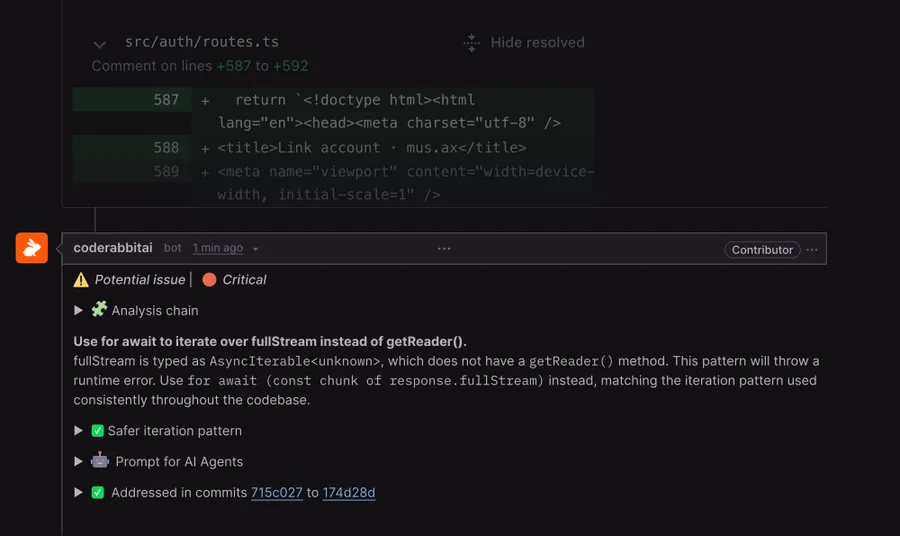
CodeRabbit's core is automatically returning a summary and line-level findings with fixes for each PR. It detects bugs, security, and performance issues, with one-click fixes and chat-based interaction. It integrates 50+ Linter/SAST tools and connects to Jira/Linear. Beyond GitHub/GitLab, it supports Azure DevOps and Bitbucket.
CodeRabbit goes beyond "PR review" into IDE reviews, CLI, and AI coding-agent loops. IDE reviews via VS Code/Cursor/Windsurf extensions are free, no subscription needed, and CLI review plugs into agent loops like Claude Code, Cursor, and Codex. The models used are stated only as "the latest foundational LLMs"; specific names aren't disclosed.
How to use
Connect a repo and it auto-reviews every PR from then on.
Connect
Connect CodeRabbit to GitHub/GitLab, etc.
Open a PR
On PR creation, the AI auto-reviews and returns a summary.
Findings & fixes
Address line-level findings with one-click fixes or chat.
IDE / CLI too
Review in the IDE before a PR; plug the CLI into agent fix loops.
Public (OSS) repos are free forever, IDE reviews need no subscription, and all plans have a 14-day free trial (no credit card).
Key features
01Automated PR review & fixes
Auto-review and summaries for every PR, visual diagrams, line-level findings, and one-click fixes. It detects bug/security/performance issues, supports agentic chat and issue creation, and learns over time (Learnings).
02IDE reviews, CLI, agent loops
Review inside the IDE before a PR with VS Code/Cursor/Windsurf extensions (free), and from the command line via CLI. It supports loops that hand findings to AI coding agents (Claude Code, Cursor, Codex) to fix.
03Integrations, security, scale
Integrate 50+ Linter/SAST tools (ESLint, Ruff, Semgrep, Trivy, etc.) and connect Jira/Linear. It adds a continuous-security add-on, pre-merge checks, a Change Stack that views large diffs by meaning, multi-repo analysis, and reports.
Pricing
Annual billing is 20% off; all are per-seat, in USD. Public (OSS) repos are free forever.
| Plan | Monthly (annual) | Highlights |
|---|---|---|
| Pro | $24/seat | PR & CLI review, one-click fix, Linter/SAST, Jira/Linear |
| Pro Plus | $48/seat | + multi-repo analysis, custom pre-merge, Issue planner |
| Enterprise | Contact us | + SSO/RBAC/audit logs, self-hosting, API, SLA |
The old Free/Lite/Pro/Enterprise structure has been retired; it's now Pro/Pro Plus/Enterprise plus add-ons (continuous security at $40/seat/mo, etc.). Public repos are free forever, IDE reviews need no subscription, and all plans have a 14-day trial. Prices are in USD and change, so check the official pricing page for the latest (as of August 2026).
How it differs from other AI code-review tools
CodeRabbit stands out by bundling the "protect the change" workflow around PR review — including IDE, CLI, and AI-agent loops. That's a different role from tools focused on code generation.
| Aspect | CodeRabbit | Greptile | GitHub Copilot |
|---|---|---|---|
| Focus | AI code review, broadly | AI code review | Code generation + review |
| Scope | PR + IDE + CLI + agents | PR review | Completion/chat-centric |
| Integrations | 50+ Linter/SAST, Jira/Linear | Codebase understanding | GitHub-centric |
Alternatives to compare include fellow AI code reviewer Greptile, code-generation-strong GitHub Copilot, and autonomous agent Devin. If you want to hand off review and change management consistently — from PRs to the IDE and CLI — CodeRabbit is a strong choice.
Information on this page is based on the official website as of August 2026. Please check the official site for the latest specs and pricing.





![[2026 Edition] 20 AI Tools Transforming Developer Workflows | Coding Assistance, Automated Code Review, No-Code Web Development, and Workflow Automation](/_next/image?url=%2Fimages%2Farticles%2Fdeveloper-ai-programming-tools.png&w=3840&q=75 "[2026 Edition] 20 AI Tools Transforming Developer Workflows | Coding Assistance, Automated Code Review, No-Code Web Development, and Workflow Automation")