
Tusk
: How to use it, features, and the business problems it solves
Add bookmark
What is Tusk?
A GitHub-integrated AI agent that analyzes pull-request code changes and auto-generates missing unit and API tests. Using codebase context and live production traffic, it runs tests in CI to catch regressions and improve coverage — positioned as a verification layer for AI-written code. YC-backed.
Business problems it solves

About "Tusk"
What is Tusk
Tusk is a GitHub-integrated AI agent that analyzes pull-request (PR) code changes and auto-generates missing unit and API tests. Under the banner "AI verification layer for coding agents," it uses production traffic and codebase context to write tests that catch regressions and quality issues before merge. It is a Y Combinator-backed product.
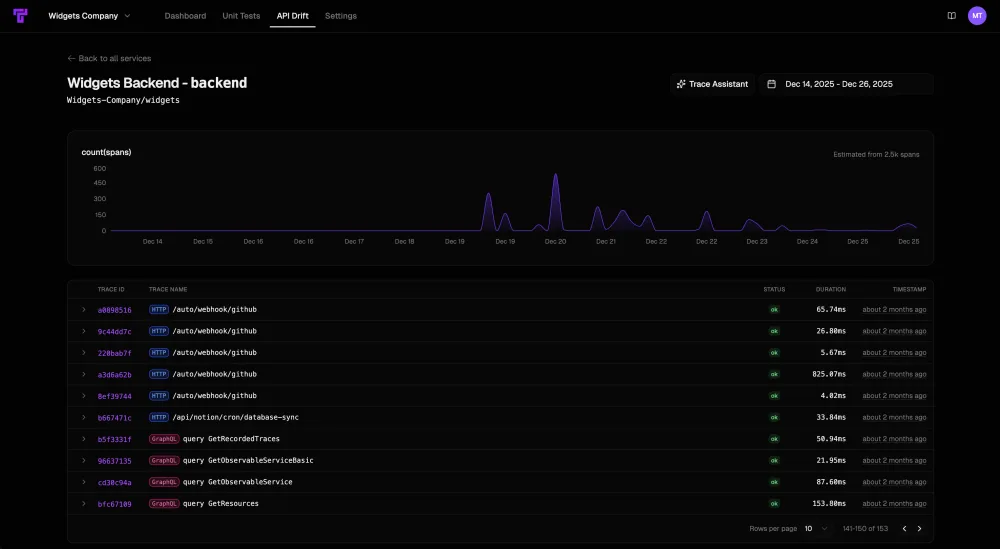
At its core, Tusk generates tests covering real edge cases in a short time, based on production traffic. Beyond unit tests, it supports API tests that record and replay live traffic (Tusk Drift), automatic PR code review, and self-healing that keeps existing tests aligned with the latest logic. It runs in CI to improve coverage and detect regressions. The AI model used is not publicly disclosed.
Tusk positions itself as a "verification layer for AI-written code." It self-iterates on tests when they error, working autonomously with no back-and-forth with an AI copilot. It also offers integrations (AI agent skills) for coding assistants like Cursor and Claude Code. Supported languages include JavaScript/Node.js, Next.js, and Python. It integrates with GitHub/GitLab, CI (GitHub Actions), Linear/Jira, and Slack.
How to use
Connect GitHub, and tests are generated per PR.
Connect
Connect Tusk to GitHub/GitLab and CI.
Analyze the PR
Analyze PR changes and identify missing tests.
Generate & run tests
Generate tests informed by production traffic and run them in CI.
Detect & improve
Detect regressions and raise coverage.
The free plan needs no credit card and includes a 14-day Team trial. Team is "$50 per active developer/month," with no seat minimum.
Key features
01Test generation (from production traffic)
Generates tests covering many edge cases in minutes, based on production traffic. Beyond unit tests, it supports API tests that record and replay live traffic ("Tusk Drift").
02PR review, self-healing, autonomy
Automatically reviews PRs for bugs and quality issues. It self-iterates on tests when they error, working autonomously without back-and-forth with an AI copilot, and self-heals to keep existing tests aligned with the latest logic on every commit.
03Integrations & agent support
Integrates with GitHub/GitLab, CI (GitHub Actions), Linear/Jira, and Slack. You can set it up with a single CLI command, and there are skills for coding assistants like Cursor and Claude Code.
Pricing
You can start for free; the figures below are monthly. Plans are per developer.
| Plan | Price | Main content |
|---|---|---|
| Free | $0 | Unit/API test generation, run locally/CI, 14-day Team trial |
| Team | $50/active developer/mo | Unlimited test generation, monitoring, CoverBot, Linear/Jira, 3 repos |
| Enterprise | By inquiry | Self-hosting, SAML/SSO, custom (200+ seats) |
The free plan needs no credit card and has no seat minimum. Enterprise is a custom offering from 200 seats. Prices are in USD and subject to change; check the official site for the latest (as of August 2026).
How it differs from other AI code review / testing
Tusk stands out by auto-generating tests that cover real edge cases based on production traffic, functioning as a "verification layer" for AI-written code. Compared with review-centric tools, it goes further into test generation and autonomous execution.
| Aspect | Tusk | Greptile | CodeRabbit |
|---|---|---|---|
| Focus | Auto test generation & verification | PR review with codebase understanding | AI PR review |
| Strength | Production traffic, self-healing, API tests | Cross-file, TREX | Summaries, line comments |
| Integration | GitHub/GitLab, CI | GitHub/GitLab | GitHub, etc. |
Greptile and CodeRabbit, which also work on review and testing, make good points of comparison. If you want to assure the quality of AI-mass-produced code with production-like tests, Tusk is a strong option.
The information on this page is based on the official site as of August 2026. Please check the official site for the latest specifications and pricing.