
Codot
: How to use it, features, and the business problems it solves
What is Codot?
Codot is a voice-first AI personal assistant from Silver Roc Pte. Ltd. in Singapore. Say something like "Call Tanaka at 9 tomorrow, move the team meeting to Thursday at 2pm," and it sorts tasks, events, reminders, notes, people notes (a personal CRM) and expense or calorie logs in one place, connecting with Google Calendar, Apple Calendar and Apple Reminders. It runs on iPhone, Apple Watch, Android and the web, with a Japanese interface and Japanese voice input. There is a free plan; timed reminders, recurring tasks, daily briefings and email triage with reply drafts require Codot Max (¥2,000 a month or ¥15,000 a year in Japan, with a 7-day free trial for new accounts).
Business problems it solves


About "Codot"
What is Codot?
Codot is a voice-first AI personal assistant that organizes your tasks, events, reminders, notes and notes about people just from what you say. It is provided by Silver Roc Pte. Ltd. in Singapore (per the App Store seller and the privacy policy).
The official site puts it this way: "You don't need another to-do list. You need an assistant that actually helps." Say whatever is on your mind without sorting it, or send a photo or link, and Codot files it into tasks, events, notes or contacts, remembers it, and answers questions about it later.
It works on iPhone, iPad, Apple Watch, Android and the web. There is a Japanese version of the official site, and Japanese is among the App Store languages. The free plan covers the core features; timed reminders, email triage and similar features are part of the paid Codot Max.
Sources: Codot official site, App Store (images below are App Store screenshots)
How to use
- Create an account Sign up for the web version from "Start Codot for free" on the official site, or install the app from the App Store or Google Play. No credit card is needed. New accounts automatically get a 7-day free trial of Codot Max.
- Connect your calendars You can connect Google Calendar, Apple Calendar and Apple Reminders. The App Store version history says you can just tell Codot "Connect to Google Calendar."
- Say what's on your mind Bundle several errands in one sentence, such as "Call the dentist tomorrow and book a restaurant for 7pm Friday." You can also type, or send photos and links. On iPhone you can talk to Codot from the lock screen, Action button, Control Center or Siri (per the App Store version history).
- Let Codot organize it, and ask later What you said is sorted into tasks, events, notes and contacts. You can later ask Codot things like "What did I talk about last week?" or "Which tasks need attention?"
Handle several errands in one sentence
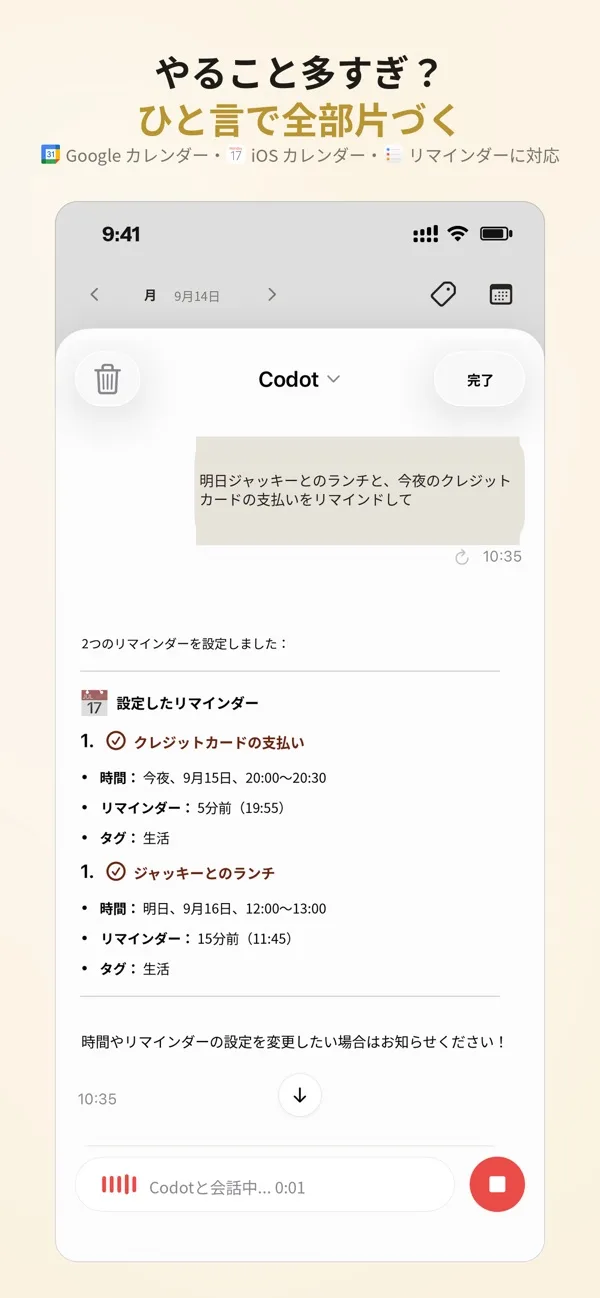
With to-do apps and calendars you open an app and enter each item separately. Codot takes in several errands from one sentence and registers each as a task, event or reminder.
In the example on the official site, saying "Tomorrow: run at 8, product review at 9:30, lunch with Sarah at noon, interview at 3, gym at 7, call Mom at 9" builds the whole day's schedule at once.
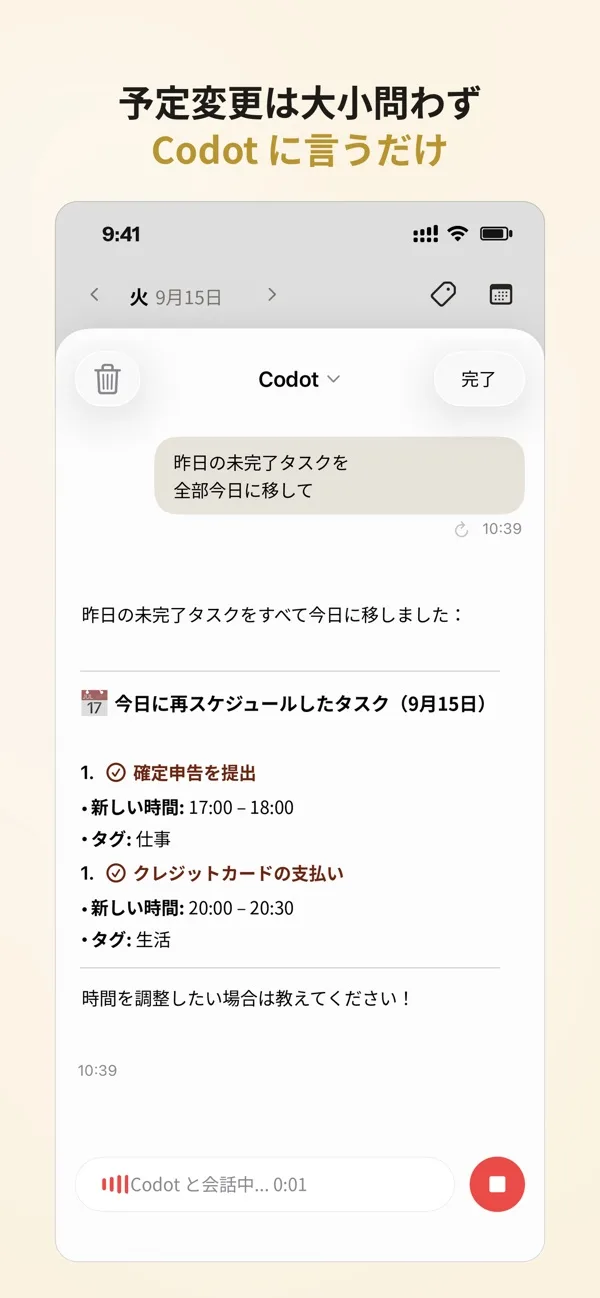
Rescheduling works the same way. Say "Move yesterday's unfinished tasks to today," and Codot fits those tasks into slots today.
According to the App Store description, Codot's AI agent learns your habits and notifies you at the right time for your routine.
For people who tend to freeze when there is too much to do, the site also describes breaking big tasks into small steps and using a focus timer to keep pace (the official site presents this as a use for people with ADHD).
Hand over everything you want to remember
The official site calls Codot "your external memory." It links events, people, meetings, money, ideas, health and things you read in one app.
01People notes (personal CRM)
Tell Codot about someone you met, and it files the details in contacts and reminds you before you meet again.
- Official example — "Met Michael today: talked about fundraising, loves golf, his daughter starts school soon, likes cafés. Remind me before we meet next time."
02Notes, voice journal and saving
- Voice notes — transcribes what you say into tagged notes, and can pull action items out of voice journal entries
- Saving content — saves links from X, Reddit, the web and Xiaohongshu and reminds you to read them when you choose
03Life logs
- Expenses — snap a receipt or say it, and the expense is categorized and logged
- Calories and exercise — log calories from a photo of your meal, and log workouts by voice
- Habits — log habits such as "Record today's 30-minute workout and 2 liters of water"
Delegate recurring work (Codot Max)
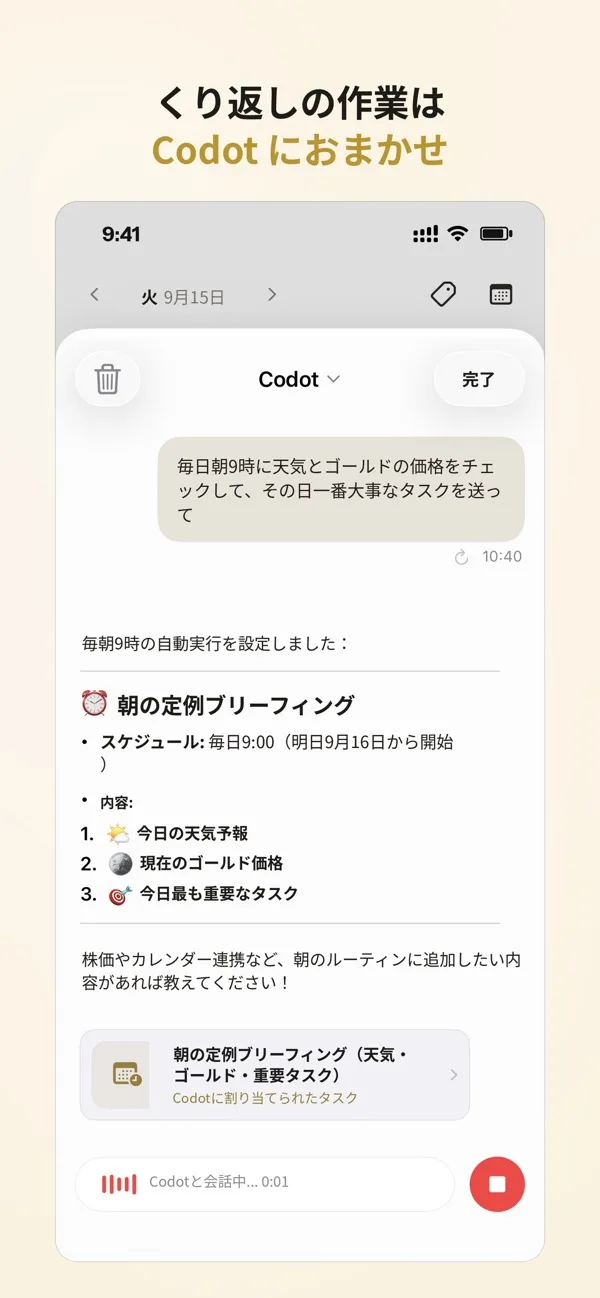
With the paid Codot Max you can hand over work you repeat every time. Examples from the App Store version history:
- Routines — say once, "Tell me today's meetings at 8 every morning"
- Daily brief — a summary of yesterday's key points and what to do today
- Email — picks only the emails that need action from Gmail or Outlook and prepares reply drafts
The pricing page lists timed reminders, recurring tasks, daily briefings, schedule automation and email triage with reply drafts as Codot Max features.
Features
01Input
- Voice and text — speak or type. The official site says you can talk to it in more than 100 languages
- Photos and links — send receipts, meal photos or article links to log them
- Devices — iPhone and iPad (iOS 17.0 or later), Apple Watch (watchOS 10.6 or later), Android and the web. On iPhone it also works from the lock screen and widgets
02Organizing and managing
- Tasks, events and reminders — prioritization and suggested next steps
- Calendar integration — Google Calendar, Apple Calendar and Apple Reminders
- Offline — checklists and to-dos can be viewed and managed offline and sync when you are back online (per the official FAQ)
03Collaboration and settings
- Spaces — places to work with a team; each Space has a project-management AI agent
- Souls — choose Codot's speaking style (brief and direct, or polite and detailed) and role
Pricing
There are two plans: Free and Codot Max (per the official pricing page and the Japanese App Store, as of November 2026).
| Plan | Price | Main contents |
|---|---|---|
| Free | ¥0 | One-off tasks and calendar, AI assistant, voice input, cross-device sync, notes and personal CRM, habit, calorie and expense logs |
| Codot Max (monthly) | ¥2,000/month | Everything in Free plus 20× the usage allowance, timed reminders and recurring tasks, daily briefings, schedule automation, email triage and reply drafts (Gmail, Outlook), priority support |
| Codot Max (annual) | ¥15,000/year (¥1,250/month) | Same as monthly |
- Free trial — every new account gets a 7-day free trial of Codot Max. No payment details are needed; after 7 days the account returns to the free plan, nothing is charged and no data is deleted
- Annual discount — the pricing page shows the annual plan as "38% off"
- In-app purchases — the App Store lists "Codot Max Monthly ¥2,000" and "Codot Max Yearly ¥15,000"
How it differs from other AI personal assistants
Codot brings tasks, events, notes, people, expenses and health logs into one app, with speaking as the main way to enter them. That is a different scope from assistants that make phone calls for you or negotiate meeting times.
| Service | Main entry point | Strengths | Price guide |
|---|---|---|---|
| Codot | Dedicated app (iPhone, Apple Watch, Android, web) | Organizes tasks, events, notes, people notes and expenses from one sentence; Japanese interface | Free; Max ¥2,000/month |
| Hey Noah | SMS, email, WhatsApp, Slack | Handles back-and-forth meeting scheduling and phone bookings; UI and guidance in English | $49/month for early users |
| Alexa+ | Echo, Fire TV, Alexa app, browser | Conversational questions, shopping, smart-home control | Included with Prime; ¥3,000/month for non-members (after early access) |
| Asmi | Phone | Calls you each morning for your errands and phones businesses on your behalf | Not stated officially |
| Wispr Flow | Keyboard (Mac, Windows, iPhone, Android) | Turns speech into polished text wherever you type | Free; Pro ¥960/month |
| Meta Muse | Meta app and web | Handles tasks through to bookings, applications and email replies (asks for approval before sending or buying) | Free with usage limits; Power $20/month |
Details of other services are as of the check dates stated on each product page.
Who it suits
Operator and data handling
| Item | Details |
|---|---|
| Provider | Silver Roc Pte. Ltd. (Singapore) |
| Release on the Japanese App Store | March 2025 |
| AI processing | Text, audio, images and other context needed to answer a request may be processed by AI service providers including OpenAI and Google Gemini (per the privacy policy) |
| Selling personal data | Not done (per the privacy policy) |
| Account deletion | Request permanent deletion in the app under Me > Settings > Delete Account |
| Contact | david@codot.ai (official contact page) |
Sources: Privacy policy, App Store
FAQ
Q. Is Codot free? Yes. The free plan includes tasks, calendar, voice notes, personal CRM, and habit, calorie and expense logs. Timed reminders, recurring tasks and email triage require the paid Codot Max.
Q. How much is Codot Max? ¥2,000 a month or ¥15,000 a year (as shown on the Japanese App Store and the official pricing page, November 2026). New accounts get a 7-day free trial and automatically return to the free plan when it ends.
Q. Can I talk to it in Japanese? Yes. There is a Japanese official site, and Japanese is among the App Store languages. The official site says you can talk to Codot in more than 100 languages.
Q. Does it sync with Google Calendar? Yes. It connects with Google Calendar, Apple Calendar and Apple Reminders.
Q. Can I use it on a computer? There is a web version you can use in a browser. On phones it supports iPhone and Android, plus iPad and Apple Watch.
The information on this page is based on what was published on the official site and the App Store as of November 2026. Please check the official site for the latest specifications and pricing.