Wispr Flow
: How to use it, features, and the business problems it solves
Add bookmark
What is Wispr Flow?
Wispr Flow is an AI dictation app that turns what you say into writing you can actually send. It types wherever your cursor is, so it works in Gmail, Slack, Notion, your terminal, ChatGPT — anywhere you can type. It strips out filler words and false starts, adds punctuation and line breaks, and can hold a different tone for each app. It handles 100+ languages including Japanese, and you can teach it proper nouns and jargon through its dictionary. Available on Mac, Windows, iPhone, and Android. There is a free plan, and Pro is ¥960 per user per month as listed for Japan (pricing is shown in local currency). Built by Wispr in San Francisco, which has raised $56M to date.
Business problems it solves



About "Wispr Flow"
What is Wispr Flow
Wispr Flow is an AI dictation app that turns what you say into writing you can actually send. It is built by Wispr, based in San Francisco.
What sets it apart from ordinary voice input is that it does not transcribe what it hears. It removes filler words, false starts, and repetition, adds punctuation and line breaks, and shapes the tone to fit the situation before it writes anything. And because it types wherever your cursor is, there is no editor to open: Gmail, Slack, Notion, your terminal, ChatGPT, Claude — if you can type there, you can Flow there.
It handles 100+ languages, including Japanese, and detects which one you are speaking automatically.
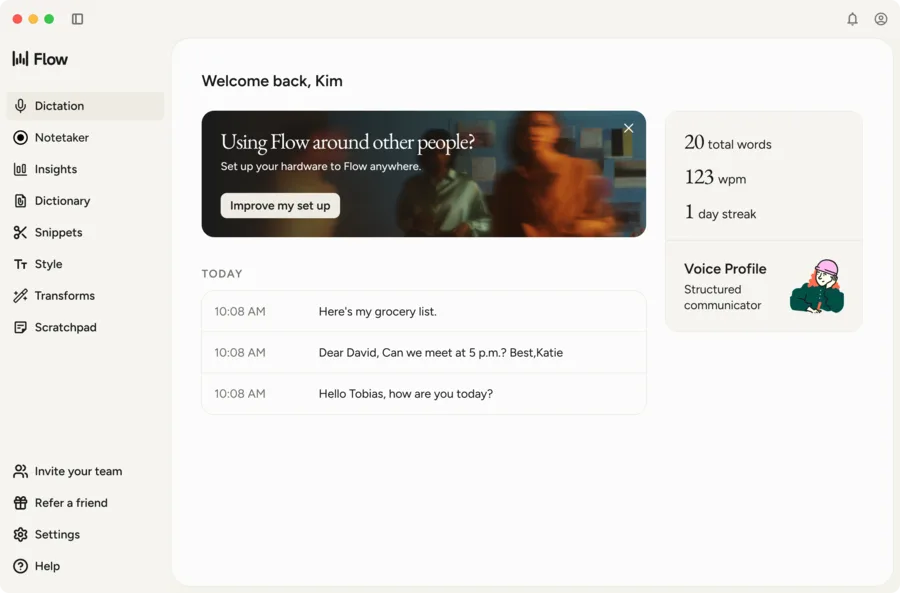
Source: Wispr Flow official media kit (the screenshots below are from the same source)
Thinking out loud, turned into something you can send
The example on the official site captures the product well. On the left is what was actually said; on the right is what Wispr Flow produced.
As spoken (ordinary voice input)
- "Hey so um can you actually wait can you tell the team that the the launch is gonna slip I think to like not Friday the following Monday because we're still waiting on uh legal to sign off on the the new terms page"
- Fillers, false starts, and repeats all survive
- No punctuation, no line breaks
Wispr Flow's output
- "Can you let the team know the launch is slipping to Monday? We're still waiting on legal to sign off on the new terms page. We'll have a firm timeline by end of day Thursday."
- Fillers, false starts, and repeats removed
- Punctuation, line breaks, and tone all handled
The company puts input speed at 45 wpm for a keyboard against 220 wpm for Flow — roughly 4x faster. Its media kit adds that "after six months, the average user types 72% of their characters with Flow across nearly 70 apps and sites."
How to use it
- Install the app — Download the macOS or Windows build from the official site. iPhone and Android apps are available too. No credit card required.
- Grant mic access and set a hotkey — Choose a key you hold while recording. That is the only gesture you need afterwards.
- Put your cursor where you want the text and speak — Email, Slack, terminal — the cleaned-up text lands wherever the cursor is. No per-app setup.
- Add proper nouns to the dictionary — Register company names, people, products, and internal jargon. Flow also learns some of them on its own.
- Set your style — Configure how it writes per app: formal for email, casual for team chat.
- Turn boilerplate into snippets — Register addresses, URLs, and bios, then say a short trigger to expand them.
Features
01Dictation
- Works in every app — Types where your cursor is. No integrations to configure for Gmail, Slack, Notion, terminals, ChatGPT, Claude, or Cursor
- Edits as you speak — Detects corrections, swaps them in, and strips fillers and repetition
- 100+ languages — Detects the language automatically and follows you when you switch mid-sentence
- Robust in the real world — Built for quiet voices, fast speech, and noisy rooms
02Adapting to you
- Dictionary — Register client names and internal terms; Flow also learns them automatically
- Snippets — Expand boilerplate from a short spoken trigger
- Style — Set a different tone per app: formal, casual, very casual
- Transforms — Post-processing applied to the text you dictate
03Notetaker (AI meeting notes)
Added in 2026, for meetings and voice memos. macOS only for now.
- Works in all meetings — No bot joins the call
- Speaker identification — Records who said what
- Ask across meetings — Query a single meeting, or all of them at once
- MCP integration — Use your notes inside Claude, ChatGPT, and other AI tools
- Calendar and Slack connections
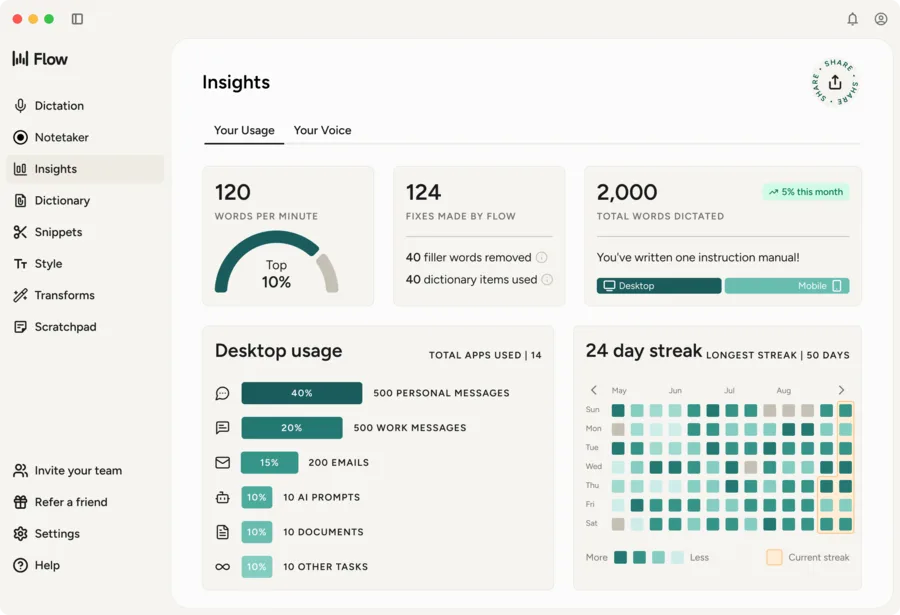
04Insights
- Speed — Your words per minute and where that sits among all users
- Fixes made by Flow — Filler words removed, dictionary items applied
- Where you use it — Personal messages, work chats, emails, AI prompts, documents
- Streaks — Consecutive days of use
Pricing
Prices are shown in local currency; from Japan they appear in yen. The free plan already includes Notetaker and most core features. The main differences are the dictation word limit and meeting limits and retention.
| Plan | Price (monthly) | What's included |
|---|---|---|
| Free | ¥0 | Speech-to-text in 100+ languages, automatic learning of names and jargon, Notetaker (macOS only), speaker identification, notes usable in other AI tools via MCP, calendar and Slack connections, training opt-out. Word limits: 2,000/week on desktop, 1,000/week on iPhone, unlimited on Android |
| Pro | ¥960 / user | The above plus unlimited dictations, more meetings kept for longer, access to advanced AI thinking models, early access to new models and features, priority support, centralized billing and user management |
| Enterprise | Custom | The above plus enterprise-grade security and admin controls, SOC 2 Type II, ISO 27001, HIPAA-ready BAA, complimentary seats for IT admins, audit logs, MDM, domain management, SAML SSO, SCIM, dedicated support, volume discounts, and training opt-out enforced for the whole team |
Annual billing is 20% cheaper.
Security and data handling
- With Privacy Mode enabled, zero dictation data is used to train the models
- The company states data is never sold and never shared
- SOC 2 Type II, ISO 27001, and HIPAA-ready. Enterprise plans can enforce training opt-out across the organization and add audit logs, MDM, and domain management
Adoption and reception
The official site names Vercel, Mercury, Microsoft, Amazon, Notion, Klarna, Groupon, and Rivian among the companies whose people use Wispr Flow.
01Named comments
- Alex Lieberman, co-founder of Morning Brew — "Wispr Flow is a top 3 favorite AI tool for me. I literally do not use my fingers to type anymore."
- Elena Verna, Head of Growth at Lovable — "I feel like I have no time to type anymore. So I just talk to my phone and my laptop all the time."
- Steven Bartlett, The Diary of a CEO — "Every important thing I do starts with a conversation. I trust Wispr Notetaker to capture it accurately, so I can focus on what comes next."
02Published results
- 90% faster message output and 2 extra productive hours per day — published by the company as an early-access result
- 20% more customer calls per day and $3.08m estimated cost savings per year — published as a separate customer result
03Press
- Fast Company — "Wispr Flow just gets it right. It is consistently so much better than the standard voice input, it'll blow your mind."
- SlashGear — "If you find it tiring to write long emails, or just need something quick to note down an idea in the heat of the moment — but typing it all feels like a drag — this app is a Godsend for you."
Who builds it
The founder and CEO is Tanay Kothari, who holds a bachelor's in Computer Science and a master's in Artificial Intelligence from Stanford, where he taught the university's Deep Learning course alongside Prof. Andrew Ng and published research at the Stanford AI Lab. A four-time founder, he was named to the Forbes 30 Under 30 list in 2023.
Wispr's stated mission is moving from screen-first technologies to voice-first experiences, and it has raised $56M from investors including Menlo Ventures, NEA, and 8VC.
How it differs from other dictation and transcription tools
| Product | Primary use | When you reach for it |
|---|---|---|
| Wispr Flow | Dictation (plus meeting notes) | Speaking instead of typing, in any input field |
| Notta | Transcription and meeting notes | Recording meetings and interviews |
| Otter.ai | Transcription and meeting notes | Recording and sharing meetings |
| Granola | Meeting notes | Automatic meeting notes |
| Fathom | Meeting notes | Recording and summarizing sales calls |
Most transcription tools exist to record a conversation that has already happened. Wispr Flow exists to dictate the text you are about to write. Its real competitor is therefore the keyboard, not Notta or Otter. If meeting records are the goal, use Notta or Granola; if it is making your daily email, chat, and prompt writing faster, use Wispr Flow. For summarizing long audio or video, something like Lilys AI fits better.
FAQ
Q. Does it work in Japanese? Yes. It supports 100+ languages and detects which one you are speaking. Pricing is also shown in yen.
Q. Is there a free plan? Yes. Dictation is capped at 2,000 words per week on desktop and 1,000 per week on iPhone, and is unlimited on Android.
Q. Do I need a special microphone? No. The company states it works without special hardware.
Q. Which platforms support the meeting notes feature? Notetaker is macOS only for now, with more platforms said to be coming.
Q. Is my speech used for training? With Privacy Mode enabled, zero dictation data is used to train the models. Enterprise plans can enforce this across the whole organization.
The information on this page is based on what was published on the official site as of August 2026. Features and pricing may change; please check the official site for the latest details.