Hey Noah
: How to use it, features, and the business problems it solves
Add bookmark
What is Hey Noah?
Hey Noah is an AI executive assistant built for founders and senior leaders. There is no app to install and no dashboard to log into — it works inside the channels you already use: SMS, email, WhatsApp, and Slack. Text it "Coffee with Sarah Thursday" and it checks your calendar, proposes times to the other party, handles the back-and-forth, and books the meeting. CC it on an email and it takes over the scheduling thread. After meetings it captures notes and next actions, and for restaurant or doctor bookings it places a real phone call and confirms. Built by Pilot Alpha Labs, LLC (US). It launched on Product Hunt on August 4, 2026, took the #1 spot of the day with 604 upvotes, and costs $49/month for its first cohort.
Business problems it solves


About "Hey Noah"
What is Hey Noah
Hey Noah is an AI executive assistant with no app of its own — it works entirely inside SMS, email, WhatsApp, and Slack. It is built by Pilot Alpha Labs, LLC in the US, for executives, founders, and senior professionals who lose their days to coordinating meetings and chasing follow-ups.
Text it "Coffee with Sarah Thursday" and Noah checks your calendar, proposes times to the other party, takes over the back-and-forth, and books the meeting. There is nothing to download and no dashboard to log into.
It launched on Product Hunt on August 4, 2026, taking the #1 spot of the day with 604 upvotes.
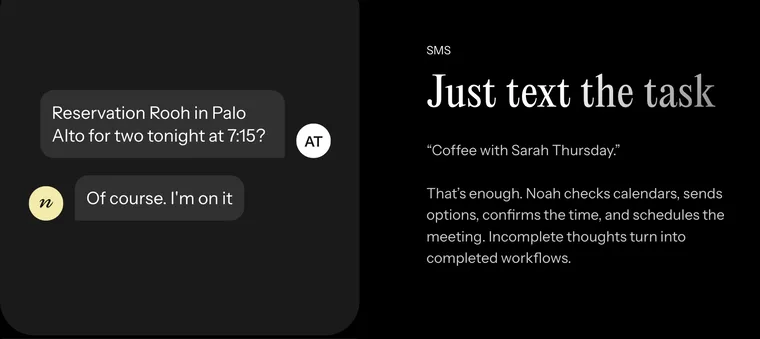
Source: Hey Noah official site (the screenshots below are from the same source)
It schedules by priority, not by open slots
What most separates Noah from a scheduling tool is that it is not looking at your free time — it is looking at what matters more. The official FAQ puts the difference with tools like Calendly this way.
Availability isn't always reflected by free time on your calendar. Noah is designed to schedule around your priorities: booking high-priority discussions over existing meetings, protecting time for deep work, and handling the back-and-forth so you don't have to.
Noah also goes well beyond scheduling. It sends email on your behalf, places phone calls, remembers the context of your relationships, and surfaces it when it is useful. That is the range the company means when it writes that "scheduling tools are great for availability. Noah is designed to be a true EA."
How to use it
Sign up
- Enter your phone number on the site
- Nothing to install
Connect your calendar
- Link Google Calendar
- Tell Noah your meeting preferences, buffers, and focus blocks
Ask, in your usual channel
Message from SMS, email, WhatsApp, or Slack the way you would talk to a human assistant. No special commands
Real requests the company publishes as examples:
- "Coffee with Ollie next week at my office, 16 W 23rd St, Floor 5."
- "Set up a meeting with Ruhie, John, and Aditya. Tuesday would be great."
- "Reschedule my call with Luke to next week."
- "Remind me tomorrow at 9am to review the quarterly report."
- "Ping Austin and offer a few 45-min slots to meet next week."
- "Book Rooh in Palo Alto for two at 7:15 today."
- "What's my day look like?"
- "Decline the 4pm. I'm overbooked. Accept the investor dinner."
You can also send voice memos, images, and attachments.
Features
01Scheduling
Connects to Google Calendar in real time and weighs priorities, buffers, and focus blocks — not just gaps.
- Multi-person scheduling — Reaches each person on their preferred channel and negotiates until everyone confirms
- Reschedules and cancellations — One text is enough; Noah sends a polite note to attendees and rebooks
- Booked end to end — Calendar invites, video links, and locations included
02Email on your behalf
Noah drafts and sends from its own account, written in your voice.
- Just CC it — Add Noah to a thread and it takes the scheduling from there
- Review before sending — Approve emails first, or let Noah send directly, based on your preferences
- Your inbox stays private — Noah only sees emails you CC it on; it has no access to your inbox
03Before and after meetings
It gives you the material going in and clears up afterwards.
- Pre-meeting briefing — Who you're meeting, what they've funded, your last interaction
- Notes and action items — Captured the moment the meeting ends, with follow-ups sent
- Carries forward — Next meetings get scheduled and reminders get set
04Real phone calls
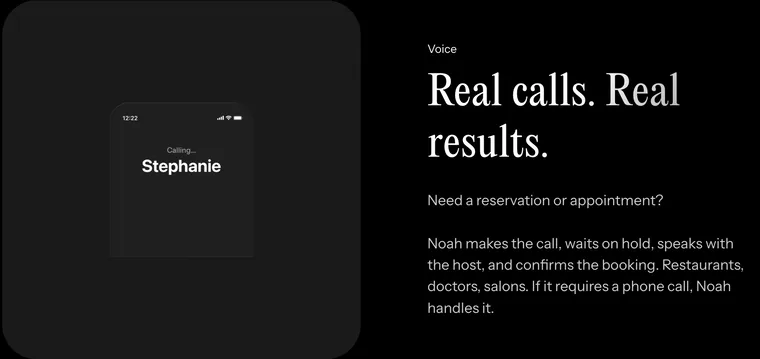
For anything that only a phone call closes, Noah makes the call.
- Waits on hold — Calls, holds, speaks with the host, confirms the booking, and texts you
- Use cases — Restaurants, doctors, salons, and follow-up calls to people who haven't replied
Integrations
Per the official FAQ, these are the most commonly used integrations. More are being added.
| Service | What it does |
|---|---|
| Google Calendar | Read/write on your primary calendar (check availability, create events) |
| Gmail | Send and read emails on your behalf |
| Zoom | Video links added to meeting invites |
| Slack | Schedule and coordinate from Slack |
| HubSpot | CRM context for meetings and contacts |
| Google Docs and Drive | Reference documents in meeting invites |
| Notion | Pull context from your workspace |
| Google Tasks | Manage your task list |
| Granola | Extract action items from meeting notes |
What it does not do
These are the limits the company states outright. They are worth knowing before you sign up.
- Travel booking (flights, hotels)
- Financial transactions, and legal, HR, or medical tasks
- Writing to multiple Google Calendars (one assistant per email account)
Noah's scope is calendar, communication, and relationship management.
Pricing
| Plan | Monthly | What's included |
|---|---|---|
| First cohort | $49 | Full functionality. No long-term contracts, no cancellation fees, cancel anytime |
The official FAQ states that Noah is "$49/month for our first cohort of early adopters" and that "pricing may change as we grow." No Japanese-yen pricing or Japan-specific terms have been published as of August 2026.
Security and data handling
- All data in transit uses encrypted connections, credentials are stored securely, and the company states data is never sold or shared with third parties
- Noah accesses only your calendar, the emails you CC it on, and your contacts. It has no access to your inbox, files, or photos
- For complex cases such as multi-party emails, Noah uses a human-in-the-loop review before anything goes out, while quick scheduling, calendar updates, and auto-replies are handled automatically
- You can disconnect your accounts at any time
Who it fits
A good fit
- Executives and founders losing hours a week to scheduling and follow-ups
- People who don't want another tool and would rather stay in SMS and email
- Anyone who wants restaurant and appointment calls handled too
Not a fit
- If you need it to operate in Japanese (English only)
- If you need travel booking, finance, or legal work covered
- If you need writes across multiple calendars
How it differs from other AI assistants
| Product | Where it runs | The work at its center |
|---|---|---|
| Hey Noah | SMS, email, WhatsApp, Slack | Scheduling, follow-ups, calls on your behalf |
| Asmi | Voice calls | Handling phone calls for you |
| Slashy | Email client | Writing and processing email faster |
| Fyxer AI | Your inbox | Sorting mail, drafting replies, meeting notes |
| TimeOS | Calendar and meetings | Recording meetings and making time visible |
If the goal is making the inbox itself lighter, look at Fyxer AI or Slashy. If it is meeting records, TimeOS. If it is handing scheduling and relationship upkeep out entirely, Hey Noah. And if you want an agent to operate business systems directly, the broader Grok Bot is the comparison to make.
The information on this page is based on what was published on the official site as of August 2026. As a recently launched service, pricing and features may change. Please check the official site for the latest details.
Frequently compared services





Articles featuring Hey Noah
What Grok Bot Is [September 2026]: The AI Teammate That Came Down to $20 a Month — Pricing, What It Does, How to Start
Grok Bot launched on 11 August 2026, and the reason it suddenly got loud in September is not that the product changed — it is that the door came down from $200–300 upper tiers to Cursor Pro at $20 a month. This article walks through what Grok Bot actually does, following the official screens: it signs in to Salesforce, pulls 52 accounts, queues 36 drafts and holds them at "0 sent" waiting for approval, then saves the approved exchange as a routine. It covers the three routes in and eight plans, how Grok Bot differs from Manus, Devin and Genspark AI at the same $20 mark (what each one operates, and whether you hand over your accounts), and the three things to settle before handing anything over — which account it signs in with, how far it may act unattended, and the one shared cloud computer per user — all as published in September 2026.
![What Grok Bot Is [September 2026]: The AI Teammate That Came Down to $20 a Month — Pricing, What It Does, How to Start](/_next/image?url=%2Fimages%2Farticles%2Fgrok-bot-guide.png&w=3840&q=75 "What Grok Bot Is [September 2026]: The AI Teammate That Came Down to $20 a Month — Pricing, What It Does, How to Start")
Autonomous AI Agents Compared: 7 Picks for August 2026 — Grok Bot, Manus, Devin and How to Choose
You tried an AI agent and it ended at "wow, impressive" — because what it returned was an answer, not finished work. That changed in August 2026, when products that leave the work inside your actual tools arrived all at once. This article compares seven of them — Grok Bot, Hey Noah, Manus, Genspark AI, Devin, Kilo Code, and Cloudflare OS — along a single axis: where the output lands. It covers the unit of isolation, how much access you hand over, the three layers of cost, and where to start, all from primary sources.