
Meta Muse
: How to use it, features, and the business problems it solves
Add bookmark
What is Meta Muse?
A personal AI agent from Meta Platforms, Inc. (U.S.). Through dedicated apps (iOS, Android) and the web (muse.ai), it handles email replies, scheduling, bookings and shopping on your behalf, asking for your approval before sending or buying. Launched in Japan on October 23, 2026 (the first region outside North America). Free with usage limits; paid plans are Power ($20/month) and Maximum ($100/month).
Business problems it solves

About "Meta Muse"
What is Meta Muse?
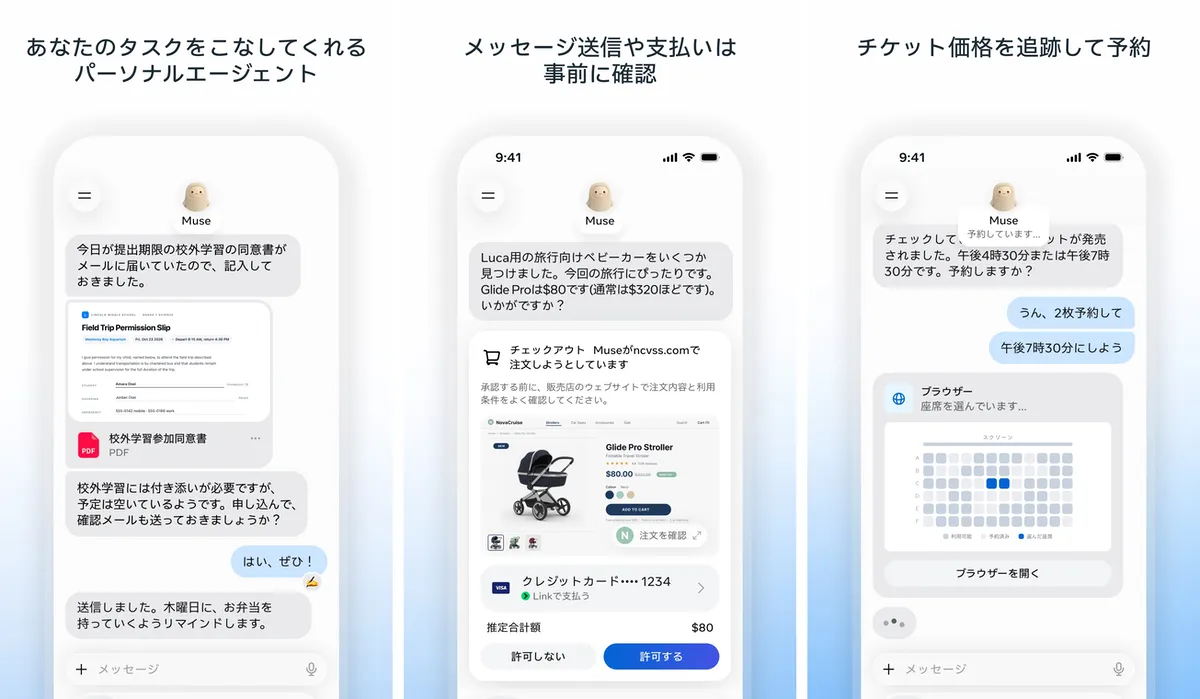
Meta Muse (app name: "Muse from Meta") is a personal AI agent from Meta Platforms, Inc., the U.S. company behind Instagram and Facebook. It does more than answer questions: tell it what you want done, and Muse makes a plan and actually carries out the work for you, such as opening a browser and filling in forms. Before important actions like sending an email or making a purchase, it always asks for your approval.
Muse launched in the U.S. in September 2026 and became available in Japan on October 23, 2026 — the first region outside North America. It is offered through dedicated apps (iOS and Android) and on the web at muse.ai.
How it differs from Meta AI and Muse Spark: "Meta AI" is an AI assistant you call up inside Instagram or WhatsApp, and it is a separate app. "Muse Spark" is the name of an AI model developed by Meta that powers Muse (the agent). Muse itself is offered as a standalone app and website (muse.ai).
What works in Japan now, and what doesn't yet
Availability in Japan, based on Meta's Japan announcement (October 23, 2026):
| Item | Status in Japan |
|---|---|
| Dedicated apps (iOS, Android) and web (muse.ai) | Available from October 23, 2026 |
| Gmail, Google Calendar, Instagram connectors | Named in the announcement for Japan |
| Stripe, Shopify, Trip.com, Agoda, Klook, etc. | Named in the announcement as connectors |
| Mercari, Money Forward ME, Ticket Pia | Integration is "in progress"; no launch date given |
| Advanced voice mode, Muse Realtime Avatar (English only), Muse's own email address | Availability in Japan "will be announced separately" |
| Muse on AI glasses | Japan support undecided |
Meta's Help Center also notes that even in supported regions, "some features may not yet be available."
How to use
- Install the app or open muse.ai Start with the "Muse from Meta" app on iOS/Android or at muse.ai on the web.
- Log in with a Meta account If you don't have one, you can create it with a Facebook or Instagram account, or with an email address or phone number.
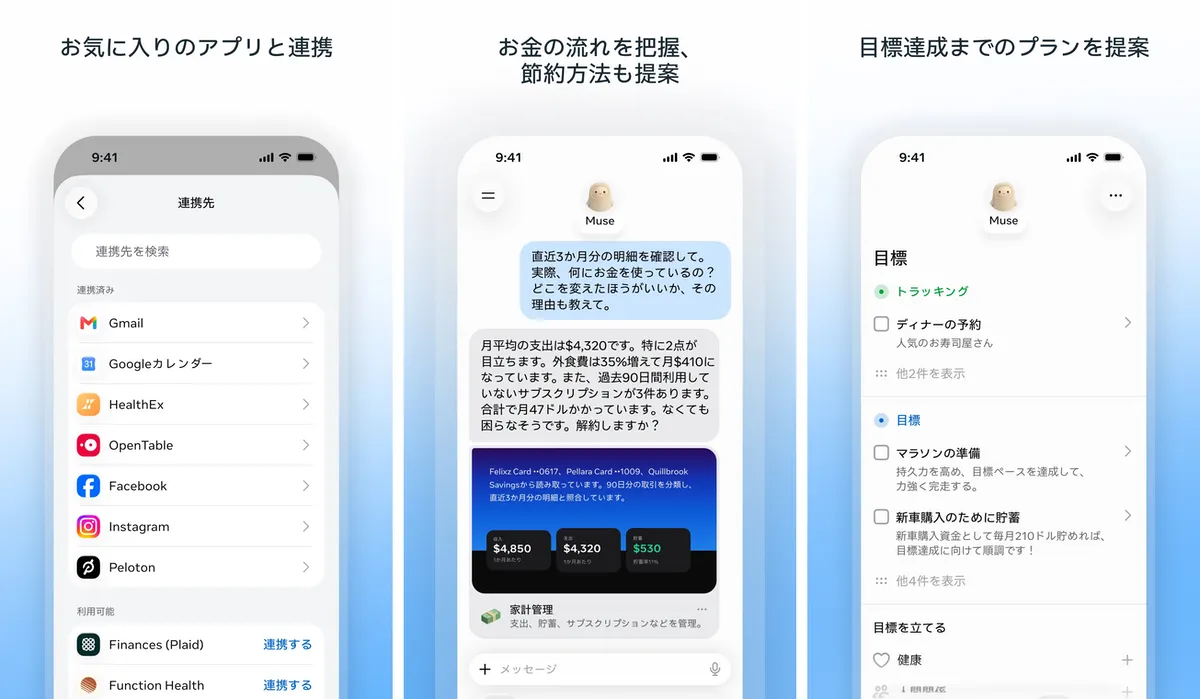
- Connect the services you use (connectors) Go to [Settings] → [Connectors] to link Gmail, Google Calendar and more. You can also ask in chat, e.g. "Link my Gmail." For email, you choose between "read only" and "allow sending on my behalf."
- Tell it what you want done Ask in chat as if messaging a person. Muse may ask clarifying questions first, and keeps working on long tasks even after you close the app.
- Approve Before important actions such as sending an email or buying something, you get a confirmation notice. Review it and choose "Allow" or "Don't allow."
Features
01Gets things done for you
- Browser actions — Muse opens a browser on its own dedicated cloud computer (Muse Secure VM) to browse sites, fill in forms and make bookings
- Long-running tasks — keeps working after you close the app and notifies you when something changes or approval is needed
- Goals and plans — helps you plan toward a goal and tracks progress
- Reminders and scheduled tasks — notifies you or runs tasks at set times
02Connects to services
- Connectors — links with Gmail, Google Calendar, Instagram and more. Facebook, Instagram and Threads are linked automatically if they are in the same Accounts Center
- Custom connectors — you can ask Muse to build one for a service not on the list (Meta does not review them, so grant permissions carefully)
- Paying for purchases — paying with Stripe's Link issues a one-time card number for each purchase
03Remembers
- Memory — remembers what matters to you and makes suggestions based on past conversations. You can tell it to "forget" specific things
- Side chats — separate threads to organize topics without cluttering the main chat
Source: Muse from Meta on the App Store
Pricing
Muse can be used for free, with usage limits. When you hit the weekly free limit, you can subscribe, buy additional tokens, or wait for the limit to reset. Paid plans raise the weekly usage limit (in Muse tokens). Meta's Help Center (Japanese edition) lists:
| Plan | Monthly price | Weekly usage |
|---|---|---|
| Free | ¥0 | Usage-limited (amount not published) |
| Power | $20 | 500 million Muse tokens |
| Maximum | $100 | 3 billion Muse tokens |
Safety and data handling
Muse is operated by Meta Platforms, Inc. in the U.S. Meta says it was designed with privacy and safety as prerequisites.
- A dedicated, isolated computer for each user: Muse runs on "Muse Secure VM", a dedicated cloud environment that also stores data and credentials from connected services
- A separate agent controls internet access: Muse cannot access the internet unless the independent "Sentinel" agent approves it
- Muse can't see passwords or payment methods: credentials are kept in secure storage and used without Muse seeing their contents
- Approval before important actions: Muse asks before sending emails or buying, and you can review a history of past and planned actions
- Training opt-out: you can opt out of having your Muse conversations used to train Meta's AI models
- Not used for ads: Meta says conversations and data in the virtual machine are not shared with its ad systems
You are responsible for transactions Muse makes on your behalf. Meta's Help Center advises checking the order and the seller's terms on the seller's site before approving, and watching confirmation emails and statements.
Pros and cons
Pros
- Hands off the work itself — bookings, applications, email replies — not just research
- Always asks for approval before sending or buying, so it won't act on its own
- Free to start, with Japanese-language apps and web
Cons
- Just launched in Japan: integrations with domestic services (Mercari, etc.) are still in progress, and dates for voice mode and Muse's own email address in Japan are undecided
- Yen pricing for paid plans has not been published
- You entrust it with a lot of information such as email and calendar, so you need to choose connected services and permission scopes yourself
Reviews
"Muse from Meta" on the App Store (Japan) is rated 4.7 out of 5 (95 ratings, as of October 24, 2026) and ranks No. 1 in the Productivity category. Since it has only just launched in Japan, there are still few ratings.
FAQ
Q. Can I use Meta Muse in Japan? A. Yes. Since October 23, 2026, it has been available via the iOS and Android apps and on the web (muse.ai). Japan is the first region outside North America.
Q. Is it free? A. Yes, with usage limits. When you hit the limit, you can subscribe (Power $20/month, Maximum $100/month), buy extra tokens, or wait for the limit to reset.
Q. How much does it cost in Japanese yen? A. Yen pricing has not been officially published (as of October 24, 2026). Check the amount shown on the sign-up screen.
Q. What is the minimum age? A. The App Store age rating is 18+. Subscribing also requires being 18 or older (or the age of majority where you live).
Q. Does it work with Mercari or Money Forward ME? A. Meta has said integrations are "in progress" and has not given a launch date (as of October 24, 2026).
Q. How is it different from Meta AI? A. Meta AI is an assistant used inside apps like Instagram, focused on answering questions and creating images. Muse is a standalone app — an agent that carries out the work itself through browser actions and connections to outside services.
How it compares with other AI agents
| Service | Provider | How it's used | Highlights |
|---|---|---|---|
| Meta Muse | Meta | Dedicated app, muse.ai | Personal agent that handles everyday errands (email, schedule, bookings, shopping) with approval steps |
| Meta AI | Meta | Inside Instagram, Facebook, WhatsApp, etc. | AI assistant you call up within social apps; focused on answering questions and creating images |
| Manus | Manus | Web, app | Plans and executes in the cloud from a goal, delivering research, documents and other outputs |
| Genspark AI | Genspark | Web, app | Agents produce slides, sheets, documents and other deliverables |
| Comet | Perplexity | AI browser | Summarizes open pages and handles browser tasks like form filling and bookings |
Other products reflect the content on each product page as of its last check.
If you want to hand off everyday errands like email, scheduling and bookings, Muse is a good fit. To have deliverables like research or documents produced, compare Manus or Genspark AI; for help inside the browser you're using, compare Comet.
Information on this page is as of October 24, 2026, based on Meta's official announcements (September and October 2026), the Meta Help Center (Japanese edition), muse.ai, and the official App Store (Japan) listing. Please check the official site for the latest specifications and pricing.