

Flex Clip
: How to use it, features, and the business problems it solves
Add bookmark
What is Flex Clip?
FlexClip, from PearlMountain (Hong Kong), is an AI-powered online video editor you use in the browser with templates and drag-and-drop, no install required. On top of 6,000+ templates and a huge stock library, it offers AI features like text/product-URL/PPT-to-video, auto subtitles in 140+ languages, AI narration, and background removal. Japanese UI supported. Pricing: Free / Plus from $11.99/mo / Business from $19.99/mo (billed annually).
Business problems it solves



About "Flex Clip"
What is FlexClip
FlexClip is an AI-powered online video editor you use from the browser with templates and drag-and-drop, no install required. Provided by PearlMountain Limited (Hong Kong, founded 2006), it bills itself as "AI-Powered Online Video Editor." On top of 6,000+ templates and a huge stock library, it offers many AI features—like text-to-video and auto subtitles. It also has a Japanese UI.
To use it, pick a template or start blank, then place video, images, and music and edit. You can handle timeline editing, transitions, text, and effects intuitively in the browser, so even beginners can make pro-quality videos. Team co-editing is supported too.
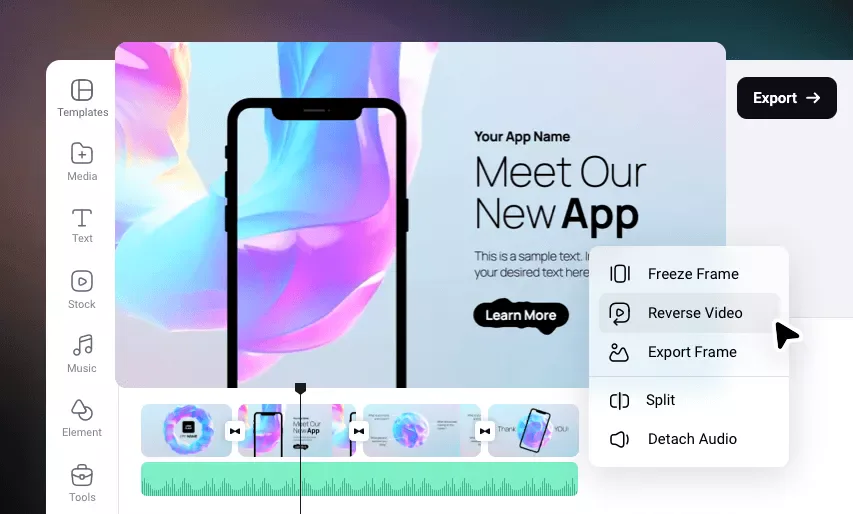
Source: FlexClip official site (the screenshots below are from the same source)
From template editing to AI generation
Beyond template editing, FlexClip's strength is its wide range of AI features. You can make videos from text, a product URL, or PowerPoint; add auto subtitles in 140+ languages; add AI narration with emotion; remove backgrounds; and turn long footage into shorts—all sped up with AI.
Your assets and projects are saved in the cloud and can be shared and co-edited in a team space. It also supports animations and 4K export to match your brand and use case.
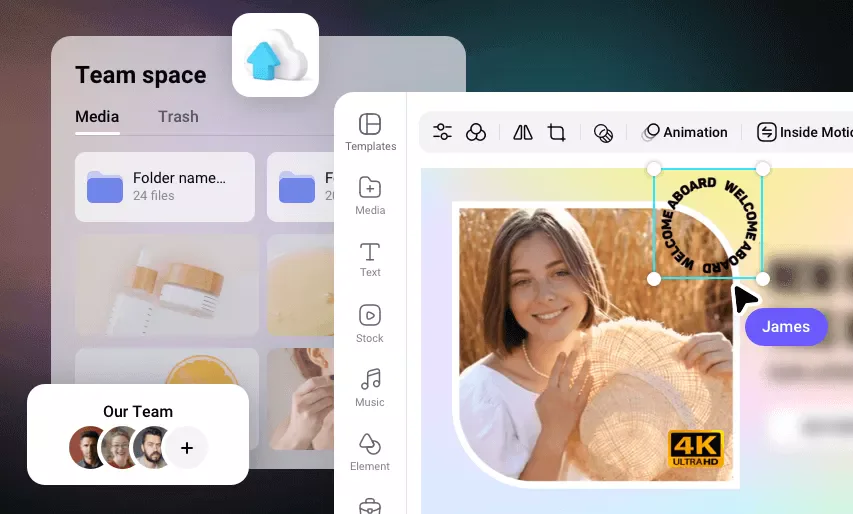
How to Use
-
Register and create a project
Create a free account and choose an aspect ratio (16:9, 1:1, 9:16, etc.).
-
Start from a template or blank
Pick a template or start editing from a blank canvas.
-
Add and edit material
Place video, images, and music, and add text, subtitles, and effects (AI generation available too).
-
Export and share
Preview, then export the video to download or share.
Features
01Create
- Template editing (6,000+) — use case-specific templates and drag-and-drop
- AI video generation — generate video from text, a product URL, or PowerPoint
- Huge stock library — many videos, photos, music, and sound effects
02Finish with AI
- Auto subtitles (140+ languages) & translation — caption speech and go multilingual
- AI narration & voice cloning — narration with emotion
- AI image generation, background/object removal — image-side editing
03Refine & work as a team
- Timeline editing, transitions, effects — intuitive editing
- Cloud storage & team co-editing — share in a team space
- AI avatar & Long-to-Shorts — avatar videos; long-to-short
Pricing
It is free to start, with paid Plus and Business plans. Amounts are in USD; annual billing is cheaper (monthly and annual differ).
| Plan | Monthly (annual / monthly) | Export | AI credits | What's included |
|---|---|---|---|---|
| Free | $0 | 720p, watermarked | trial amount | 1 stock/project |
| Plus | $11.99 / $19.99 | 1080p, no watermark | 3,600/yr | 5 stock/project, 30GB |
| Business | $19.99 / $29.99 | 4K, no watermark | 9,600/yr | unlimited stock, 100GB |
The previously mentioned "Plus $9.99 / Business $19.99 (monthly)" differs from the current reality. Plus is now $11.99/mo billed annually ($19.99 monthly), and Business is $19.99/mo billed annually ($29.99 monthly); standalone AI-credit packs are also available. Pricing may change, so check the [official pricing page](https://www.flexclip.com/pricing.html) for the latest (as of August 2026).
How it differs from other online video editors
FlexClip's strengths are its abundant templates and wide range of AI features, all easy to use in the browser. Its focus differs from transcript-based editors and Japanese-caption-specialized tools.
| Aspect | FlexClip | VEED | Vrew |
|---|---|---|---|
| Focus | Templates + varied AI | Browser editing + AI generation | Japanese captions / text-based editing |
| Templates | 6,000+ | Many | Simple |
| Japanese | Japanese UI, auto subtitles 140+ langs | Multilingual subtitles | Strong in Japanese |
The browser-based VEED, the template-based invideo, and the Japanese-caption-and-editing Vrew are comparison points. If you want to make videos quickly using templates and AI, FlexClip is a strong choice.
The information on this page is based on what was publicly available on the official site as of August 2026. Please check the official site for the latest specifications and pricing.

