

Vrew
: How to use it, features, and the business problems it solves
Add bookmark
What is Vrew?
An all-in-one AI video editor (by VoyagerX) that auto-transcribes speech so you edit video like a text editor. Beyond auto-captions and silence cutting, it bundles text-to-video, AI voice, and AI images. Free tier available; paid is credit-based from ¥1,590/mo.
Business problems it solves


About "Vrew"
What is Vrew
Vrew is an all-in-one AI video editor that lets you edit video like a text editor — based on automatic speech-to-text transcription — and now bundles generative AI too. Run by VoyagerX, Inc. (Korea-based), its tagline is "edit less, create more." Beyond its signature experience — delete part of the transcript and the corresponding video is cut too — it includes AI voice, AI images, and text-to-video generation in one app.
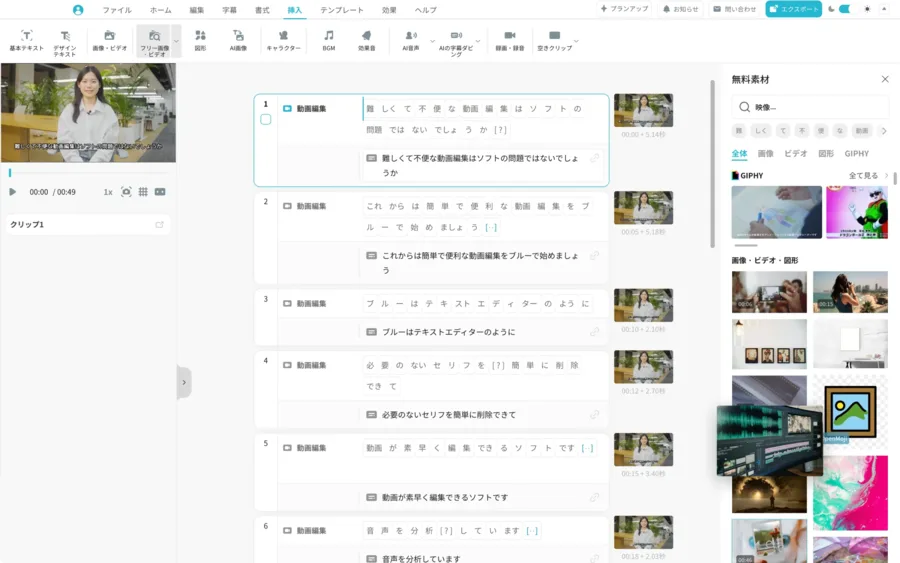
Vrew's core is editing video "as text." It auto-transcribes audio, and deleting unnecessary lines or silent gaps in the text trims the video too. Beyond auto-captions, silence cutting, and 100+ language translation, you can create the assets you need — AI voice (TTS), AI images, AI video, and text-to-video — right in the app.
Vrew has grown from a "transcript-editing tool" into an all-in-one AI video editor with generative AI built in. It offers text-to-video, AI voice (TTS), AI image/video generation, AI characters, a Vrew Agent, and PDF-to-video. The underlying base AI models are not publicly disclosed.
How to use
Import a video or script, edit it as text, and export.
Import / create
Import a video, or generate a video from a script.
Auto-transcribe
Automatically transcribe the audio and generate captions.
Edit as text
Delete unwanted lines or silence in the text; insert AI voice and AI images.
Export
Export in various ratios and formats (unlimited export on paid).
The free plan gives 200 credits/month, adds a Vrew watermark, and can't download AI images/videos (unlocked on Light and up).
Key features
01Edit video as text
Auto-transcribe with speech recognition, and deleting text cuts the corresponding video. Includes auto-captions, silence cutting, a Speech Editor (regenerate audio in the same voice by editing text), 100+ language translation, and noise removal.
02Generative AI
It bundles generative AI: video generation from a script, AI voice (TTS), AI image/illustration generation, AI video generation, AI characters, voice cloning, PDF-to-video, and a Vrew Agent.
03Assets & export
Use royalty-free images, video, BGM, sound effects, and fonts, plus screen/audio recording. It supports various ratios and formats, with unlimited export on paid plans.
Pricing
There's a free plan (no expiry); paid is a credit system with monthly or annual (20% off) billing. Credits are shared across features and granted monthly (no rollover). All prices are tax-inclusive in JPY.
| Plan | Monthly | Annual | Credits/mo |
|---|---|---|---|
| Free | ¥0 | ¥0 | 200 |
| Light | ¥1,590 | ¥15,200 | 2,000 |
| Standard (recommended) | ¥2,490 | ¥23,900 | 10,000 |
| Business | ¥4,490 | ¥43,000 | 12,000 |
Credits are shared across voice analysis, AI voice, translation, and AI image/video (e.g., AI voice: 20k chars on Free / 1M on Standard; AI video: 20 on Free / 1,000 on Standard). Free has a watermark, no AI image/video downloads, and no cloud storage. There's a 20% education discount and a one-time "period pass" option. Prices change, so check the official pricing page for the latest (as of August 2026).
How it differs from other AI video tools
Vrew stands out by centering on "editing video as text" via transcription, then completing everything — AI voice, AI images, text-to-video — in a single app. That's a different scope from tools focused on clipping or social publishing.
| Aspect | Vrew | Captions | quso.ai |
|---|---|---|---|
| Focus | Text-based editing + generative AI | Presenter/subtitle styling | Long→short + social |
| Generation | AI voice, AI images, script→video | AI avatars, captions | Clip generation, captions |
| Form | Desktop app | App/cloud | Cloud |
Alternatives to compare include Captions, strong at subtitles and presenter styling, quso.ai for long-to-short and social, and Opus Clip for clipping. If you want to center on transcription and handle everything from assets to export in one place, Vrew is a strong choice.
Information on this page is based on the official website as of August 2026. Please check the official site for the latest specs and pricing.




![[2026 Edition] 17 AI Tools for Video Creators | Full Coverage from Auto-Editing and Subtitles to Narration, BGM, and Social Media Videos](/_next/image?url=%2Fimages%2Farticles%2Fai-tools-for-video-creators.png&w=3840&q=75 "[2026 Edition] 17 AI Tools for Video Creators | Full Coverage from Auto-Editing and Subtitles to Narration, BGM, and Social Media Videos")