

FramePack
: How to use it, features, and the business problems it solves
Add bookmark
What is FramePack?
A next-frame-prediction video-generation AI (open source, Apache-2.0) from lllyasviel (Lvmin Zhang), the author of ControlNet. Because it compresses input frames to a constant length, compute stays the same regardless of video length, and even 6GB of VRAM can generate minute-class long videos locally. Based on HunyuanVideo (13B), it supports the RTX 30/40/50 series and frame-by-frame sequential preview.
Business problems it solves


About "FramePack"
What is FramePack
FramePack is an open-source video-generation AI that lets even an ordinary gaming GPU generate long videos. It was developed by Lvmin Zhang (lllyasviel), known as the author of ControlNet, and fellow researchers at Stanford University. At its core is "next-frame prediction"—predicting the next frame from existing frames in order, extending the video step by step. Because it compresses past frames (the input context) to a constant length, the compute per frame stays the same no matter how many seconds the video runs, so even 6GB of VRAM can generate minute-class videos. Its motto: "make video diffusion feel as easy as image generation."
Long videos, without growing memory
Typical video generation handles more frames as the video gets longer, so compute and memory balloon and an expensive GPU becomes necessary. FramePack compresses past frames by importance into a context of constant length. As a result, the generation load doesn't depend on video length (compute is constant when streaming), so even a modest GPU can handle long footage.
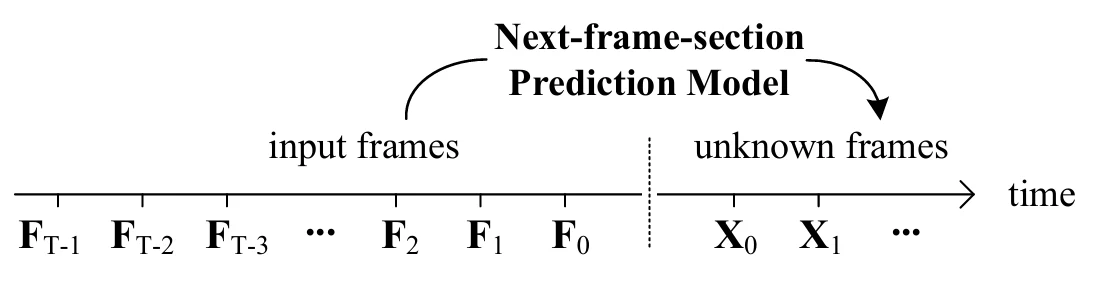
Source: FramePack official project page
Typical video generation
- The longer it gets, the more compute and memory it needs
- Assumes a high-VRAM GPU
- You can't see results until generation finishes
FramePack
- Constant compute regardless of length
- Runs on 6GB VRAM
- Preview frame by frame as it goes
How to use
-
Get it
On Windows use the one-click installer; otherwise clone from the official GitHub. The only legitimate distribution source is the official GitHub, and the developer warns against fake sites.
-
Prepare the environment
Prepare Python 3.10+ and CUDA-enabled PyTorch (for manual setup).
-
The model downloads automatically
On first launch, the required models (about 30GB) are fetched automatically from Hugging Face.
-
Launch the GUI
Run
demo_gradio.pyto open the Gradio-based GUI. -
Enter an image and prompt to generate
Input a source image and text to start generation. You can check results frame by frame as it proceeds.
Features
01Generate
Extend a video from an image.
- Image-to-Video — generate video starting from an image
- Long via next-frame prediction — constant load independent of length
- Sequential preview — check progress mid-generation
02Environments it runs on
Runs on your own PC.
- From 6GB VRAM — supports the RTX 30/40/50 series
- Windows one-click — installer bundled
- HunyuanVideo-family LoRA — apply additional styles
03Improved lines & derivatives
Evolving in the community.
- FramePack-F1 / P1 — official improved lines with better quality and consistency
- FramePack Studio — a community derivative adding QoL features like queue processing
- ComfyUI wrappers — use it from ComfyUI via community nodes
Pricing
FramePack is free open source under the Apache-2.0 license. There's no usage fee, but running it requires a PC with an NVIDIA GPU (6GB+ VRAM). Unlike cloud generation services, you run it in your own environment, so there's no per-image or monthly charge.
The developer states that "the only legitimate distribution source is this GitHub repository" and warns against fake distribution sites and paid hosting. Always obtain it from the official repository.
Difference from other video-generation AIs
Video-generation AIs differ greatly by "where you run them." FramePack is open source that you run locally on your own GPU, so its premise differs from cloud-based generation services.
| Aspect | FramePack | Cloud-based (Runway / Kling etc.) |
|---|---|---|
| Where it runs | Your own PC (NVIDIA GPU required) | Browser / cloud |
| Pricing | Free (you supply the GPU) | Monthly / credit billing |
| Long videos | Strong on length with constant memory | Depends on plan limits |
| Ease | Requires environment setup | Ready to use immediately |
For ready-to-use cloud options, Runway ML, Kling, Luma AI, or audio-included Veo are candidates. If you have a GPU and want to try long videos at no cost or keep everything local, FramePack is a strong choice.
The information on this page is based on content published on the official GitHub, project page, and paper as of August 2026. As open-source software, derivatives and specifications may be updated.
