
ComfyUI
: How to use it, features, and the business problems it solves
Add bookmark
What is ComfyUI?
Open-source (GPL-3.0) node-based generative AI tool developed by Comfy Org in the US. Build workflows by connecting nodes for image, video, audio and 3D models and processing steps, and run Stable Diffusion, FLUX, Wan and more on your own PC. Japanese UI available. The desktop app Comfy Desktop is free; the cloud version Comfy Cloud starts at $20/month for Standard ($16/month equivalent when billed yearly).
Business problems it solves



About "ComfyUI"
What is ComfyUI?
ComfyUI is a node-based generative AI tool in which you build workflows by connecting boxes called "nodes" with wires — AI models for images, video, audio and 3D, plus the processing steps before and after them. Loading a prompt, choosing a model, generating, upscaling and saving are laid out visibly one step at a time, so you can reproduce the same procedure as often as you like and fine-tune every setting yourself.
It started in January 2023, when a single developer in Quebec City, Canada, built it in about two weeks and released it as open source (according to the company page on the official site). Today it is developed and operated by Comfy Org (Comfy Organization, Inc.) in San Francisco, USA, and its GitHub repository has about 137,000 stars (as of October 10, 2026). It is the go-to tool for running open-weight models such as Stable Diffusion, FLUX and Wan on your own PC.
The core is open source and free. Besides Comfy Desktop, a desktop app that runs on your own PC, there is Comfy Cloud, a browser-based cloud version that needs no GPU of your own (paid, with a free trial), the Developer Platform (Comfy API) for publishing workflows as APIs, and Comfy Enterprise for organizations.
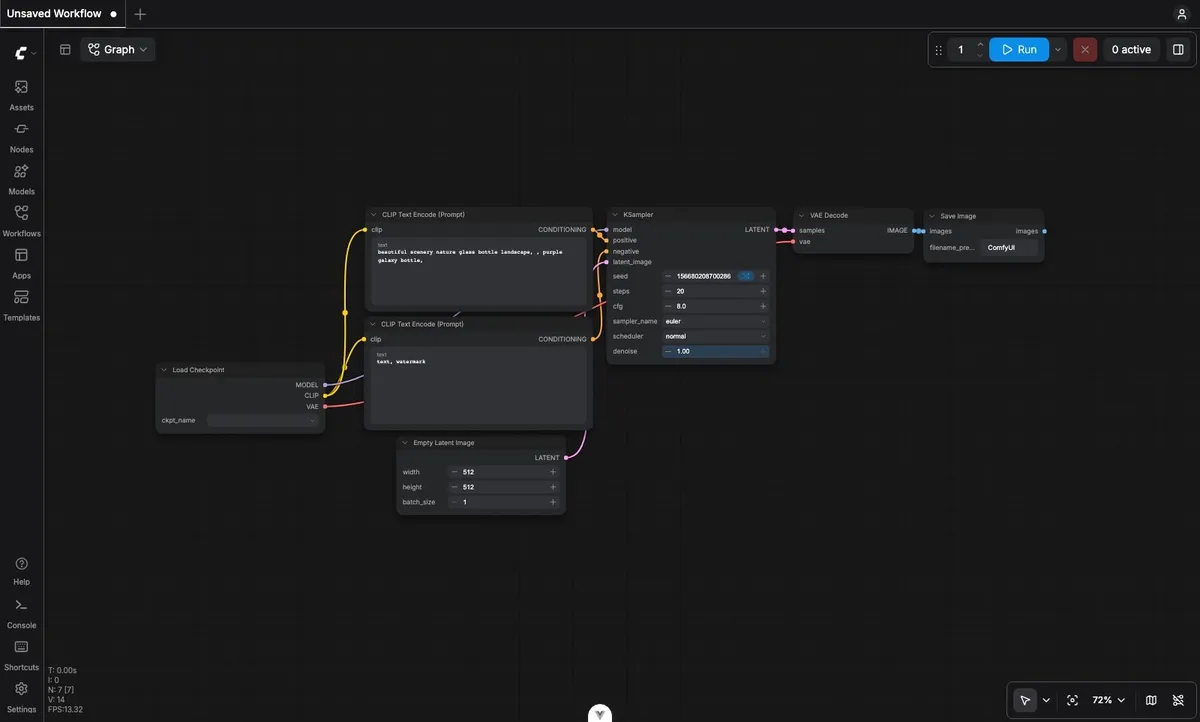
Source: ComfyUI official documentation
How to use
- Choose how to run it If you have a capable GPU, install the free Comfy Desktop and run it locally. If you have no GPU or just want to try it first, start with Comfy Cloud in your browser (5 free runs on real GPUs, no credit card required).
- Install Comfy Desktop Download the installer from the official site and run it. The app sets up the Python environment and dependencies automatically, so you do not need to install ComfyUI separately. One app can manage and switch between multiple ComfyUI installs with different versions and custom nodes.
- Switch the UI to Japanese (optional)
In Settings (gear icon or
Ctrl + ,), go to "Comfy" → "Locale" → "Language" and choose Japanese. By default, the language follows your browser. - Open a workflow from a template Open a ready-made template for image or video generation from "Templates" in the left sidebar. Templates embed download links for the models they need and prompt you to download any that are missing. When everything is ready, press "Run" to start generating.
- Add nodes and rework it for yourself Add and connect nodes for upscaling, background removal, ControlNet, animation and more to build a workflow that matches your own process. Saved workflows can be reused any number of times (on Comfy Cloud they can also be shared via a link).
Key features
01Building workflows
- Node editor — Models, prompts, samplers and post-processing are represented as nodes and wired together to form the processing flow, so you can see at a glance what happens at each step
- Templates — Ready-made templates for image, video, audio, 3D and other uses
- Subgraphs and partial execution — Bundle several nodes into one, or run only part of a workflow
- Comfy Agent — An agent that helps you understand, build, edit and run workflows from natural-language instructions. Generally available on Comfy Cloud; local support in Comfy Desktop is described as coming soon
02Range of models and nodes
- Open models — Run open-weight models such as Stable Diffusion, FLUX and Wan on your own PC
- Custom nodes — More than 60,000 community-made extension nodes (per the official site). Search for and install them inside the app with ComfyUI-Manager
- Partner Nodes — Bring closed models such as Nano Banana (Google), Kling, OpenAI and Luma into a workflow via API. Requires signing in to a Comfy account and credits
03Cloud and developers
- Comfy Cloud — Runs ComfyUI on Blackwell-generation RTX 6000 Pro GPUs (96 GB VRAM). More than 900 models are pre-installed, and you can queue up to 100 workflows
- Developer Platform (Comfy API) — Deploy your workflows as APIs and call them from your own services. GPU time is billed per second
- MCP and CLI — Control ComfyUI from AI agents and scripts via the Model Context Protocol (MCP) or the command line
Pricing
ComfyUI itself and Comfy Desktop (local use) are free. The official documentation states that "ComfyUI will always be fully open source and free for local users." Generation speed, however, depends on your own GPU.
The paid option that needs no GPU of your own is Comfy Cloud. Prices are in US dollars and are based on the official pricing page as of October 10, 2026.
| Plan | Monthly billing | Yearly billing (per month) | Credits per year | Main features |
|---|---|---|---|---|
| Free trial | $0 | — | — | Up to 5 free runs on real GPUs. No credit card required |
| Standard | $20 | $16 ($192/year) | 50,400 | Max 30-minute workflow runtime. Add more credits anytime |
| Creator | $35 | $28 ($336/year) | 88,800 | Everything in Standard + import your own models and LoRAs from CivitAI and Hugging Face |
| Pro | $100 | $80 ($960/year) | 253,200 | Everything in Creator + runtime of up to 1 hour |
| Team | $700 | $630 ($7,560/year) | 1,772,400 | Shared credit pool for up to 50 members, concurrent runs, role-based permissions |
| Enterprise | Contact sales | — | — | Custom members and features |
How credits are used: Credits pay both for GPU time while a workflow is running and for Partner Nodes (calls to external models such as Nano Banana Pro). Idle time spent building workflows is not charged. According to the official estimate, Standard's yearly credits generate about 4,560 five-second videos (Wan 2.2 Image-to-Video template with default settings). Monthly credits included in a subscription expire at the end of the billing period, and top-up credits expire one year after purchase.
When you use Partner Nodes in local ComfyUI, you buy and spend the same credits (shared between Comfy Cloud and local). The credits needed depend on the model and settings; the price badge on each node gives an estimate before you run it.
The Comfy API (Developer Platform) for developers is a separate product from Comfy Cloud plans. GPU time is billed per second — for example, RTX PRO 6000 (96 GB) is $4.54 per hour, H100 $6.23 and B200 $11.23. Storage for models is $0.20 per GB per month.
Japanese language support
- UI — Japanese can be chosen under "Language" in Settings (alongside English, Chinese, Korean and others). By default, it follows your browser's language.
- Documentation — The official documentation (docs.comfy.org) has a Japanese edition, so installation steps and node explanations can be read in Japanese.
- Node names and custom nodes — Many node and custom node names and descriptions are in English; translation depends on each node.
- Pricing and support — Prices are in US dollars with no yen display. Support is via support.comfy.org and Discord; Japanese-language support is not stated.
System requirements
| Method | Supported OS | Main requirements |
|---|---|---|
| Comfy Desktop | Windows 10 or later (x64 / ARM64), macOS 13 or later (Apple Silicon), Linux (.deb / AppImage) | At least 4.85 GB per install, 8 GB RAM (16 GB recommended). On Windows, an NVIDIA / AMD GPU is recommended (not required) |
| Portable version | Windows | NVIDIA GPU or CPU-only environment. Tracks the latest commit |
| Manual install | Windows / macOS / Linux | Supports NVIDIA, AMD, Intel, Apple Silicon and more. Python 3.13 recommended |
| Comfy Cloud | Browser | Chrome 143 or later recommended. No GPU needed |
Pros and cons
Pros
- Free for local use, and you can freely assemble models, settings and even the order of processing
- Workflows can be saved and reused, making results easy to reproduce
- Combine open models and commercial models (via Partner Nodes) on a single canvas
- Comfy Cloud offers the same experience without a GPU and supports team sharing
Cons
- It takes time to get used to the node concept. The company itself says "the learning curve is high but the payoff is worth it"
- Running it comfortably on your own machine needs a powerful GPU, and you manage model downloads and custom nodes yourself
- Custom node names and explanations are mostly in English
- Comfy Cloud and Partner Nodes use USD-denominated credits, and purchased credits are not refunded
Reputation and reviews
With about 137,000 GitHub stars (as of October 10, 2026), ComfyUI has one of the largest user bases among open-source image and video generation tools. The official site quotes Behance founder Scott Belsky saying that Comfy "has innovated a new and powerful ecosystem for creativity." On the other hand, as the company itself admits, the learning curve is high, and the flexibility makes the first steps harder. Locally, you also have to solve problems with installing and updating custom nodes yourself, so starting with templates or Comfy Cloud is the realistic approach.
Frequently asked questions (FAQ)
Q. Is ComfyUI free? A. Yes. ComfyUI itself and Comfy Desktop are free, and running them on your own PC costs nothing. What you pay for is the cloud version, Comfy Cloud, and credits for calling Partner Nodes (external commercial models).
Q. Can I use it in Japanese? A. Yes. Choose Japanese under "Language" in Settings and the menus are shown in Japanese. The official documentation also has a Japanese edition.
Q. Can I use it on a PC without a GPU? A. Locally it can run on CPU alone, but generation is very slow. Without a GPU, the easiest option is to try Comfy Cloud in your browser (up to 5 free runs on real GPUs).
Q. How is it different from Stable Diffusion? A. Stable Diffusion is a "model" that generates images, while ComfyUI is a "tool" that runs such models and lets you build the processing flow. In ComfyUI you can handle multiple models — Stable Diffusion, FLUX, Wan and more — on the same canvas.
Q. How do cancellation and refunds work for Comfy Cloud? A. You can cancel anytime from "Plan & Credits" in Comfy Cloud and keep using it until the end of the billing period. Purchased credits are not refunded except for billing errors and similar issues.
How it differs from other image and video generation AI
| Tool | Type | Best for |
|---|---|---|
| ComfyUI | Workflow tool built from nodes (free locally / paid in the cloud) | Fine control over models and steps; mass-producing or automating the same process |
| Stable Diffusion | Open-weight image generation model | The model "inside" tools such as ComfyUI |
| Midjourney | Closed web-based image generation service | High-quality images from short prompts without worrying about settings |
| Krea | Web service for image/video generation and upscaling | Quickly switching between and trying multiple models |
If ease of use comes first, web services like Midjourney or Krea fit; if you want to build the generation process yourself or run it locally, ComfyUI is the better choice. For video, running open models such as Wan and FramePack from ComfyUI is increasingly common.
The information on this page is based on ComfyUI's official website (pricing page, Terms of Service and company page), official documentation (docs.comfy.org) and GitHub repository as of October 10, 2026. Pricing and features may change, so please check the official website for the latest information.