
Influence
: How to use it, features, and the business problems it solves
Add bookmark
What is Influence?
Influence is an AI-assisted social media workspace that helps with everything from planning to drafting. Its AI, Influence IQ, uses your saved Brand Guidelines to suggest campaign posts and dates, then lets you tailor copy and media for each channel and schedule the posts. It supports 30+ destinations including Instagram, X, TikTok, YouTube, LinkedIn, Threads and Bluesky, and can be operated from ChatGPT or Claude via MCP. Available in 10 languages including Japanese; plans start at ¥2,357/month for Starter (excl. tax) with a 7-day free trial.
Business problems it solves


About "Influence"
What is Influence?
Influence is an AI-assisted social media workspace that helps you go from planning to drafts, provided by Centoria Gate Holdings Limited in Hong Kong. Save your brand information as guidelines, and the AI assistant "Influence IQ" uses them to plan campaigns and draft posts, adapts the copy and media for each destination, and lets you schedule everything on a calendar—all from one screen.
The official site describes it as "social media for people who wear many hats," and its main audience is small businesses, creators and startups without a dedicated marketing team. The interface is available in 10 languages including Japanese, and Japanese-yen pricing is offered for Japan.
Social, community, blogs and newsletters
All plans (per business)
ChatGPT, Claude, Cursor and more
Card required
How to use
-
Create a workspace and add Brand Guidelines
You don't need a website. Create a workspace and save your brand's character, voice and values as Brand Guidelines. Influence IQ refers to these guidelines in every suggestion it makes.
-
Connect your social accounts
Connect accounts such as Instagram, Facebook, X, TikTok, YouTube, LinkedIn and Threads. Every paid plan allows unlimited connected accounts for one business.
-
Describe what you want to say and build a campaign
Ask something like "I'm starting a new math class. Plan a campaign," and Influence IQ proposes several posts with a schedule. If you pick photos, it reads the context from them and uses it in the copy.
-
Tailor copy and media for each destination
From a single campaign, edit the copy, images and videos for each destination. Images and videos saved in the media library can be reused in other campaigns without uploading them again.
-
Check the content, accounts and timing, then schedule
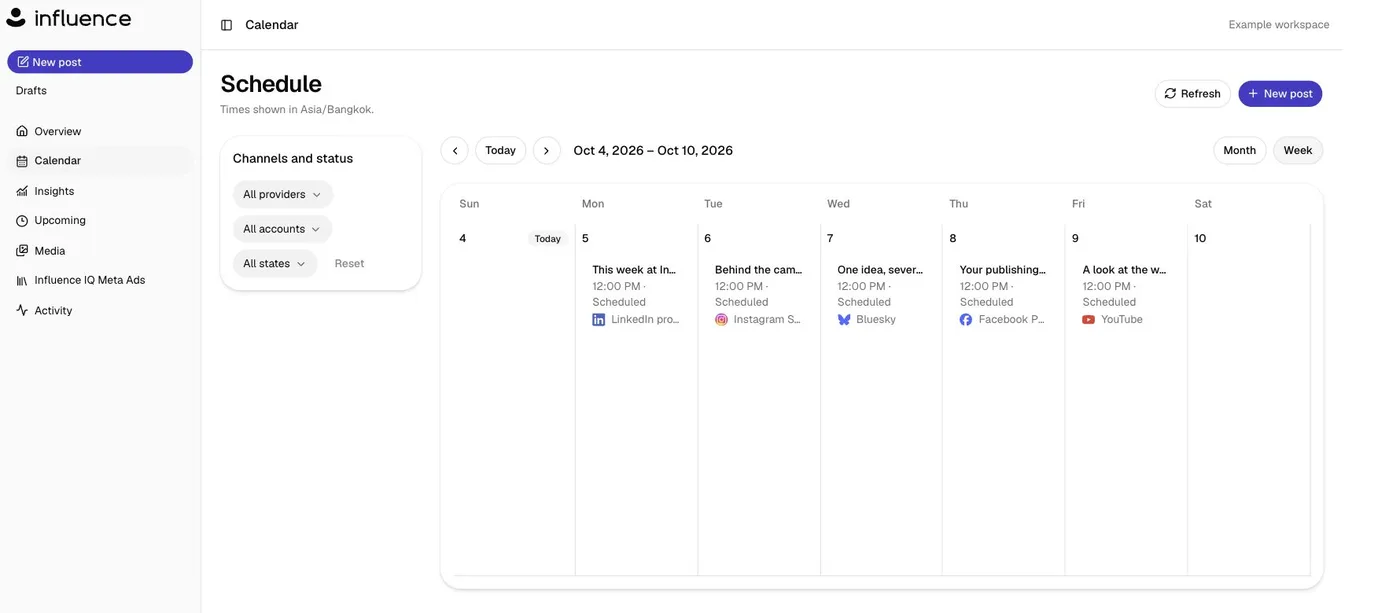
Review every version in the preview before scheduling. Until publishing starts, you can reschedule or cancel from "Upcoming," and after publishing you can check per-account results in "Activity."
An AI that knows your brand plans posts campaign by campaign
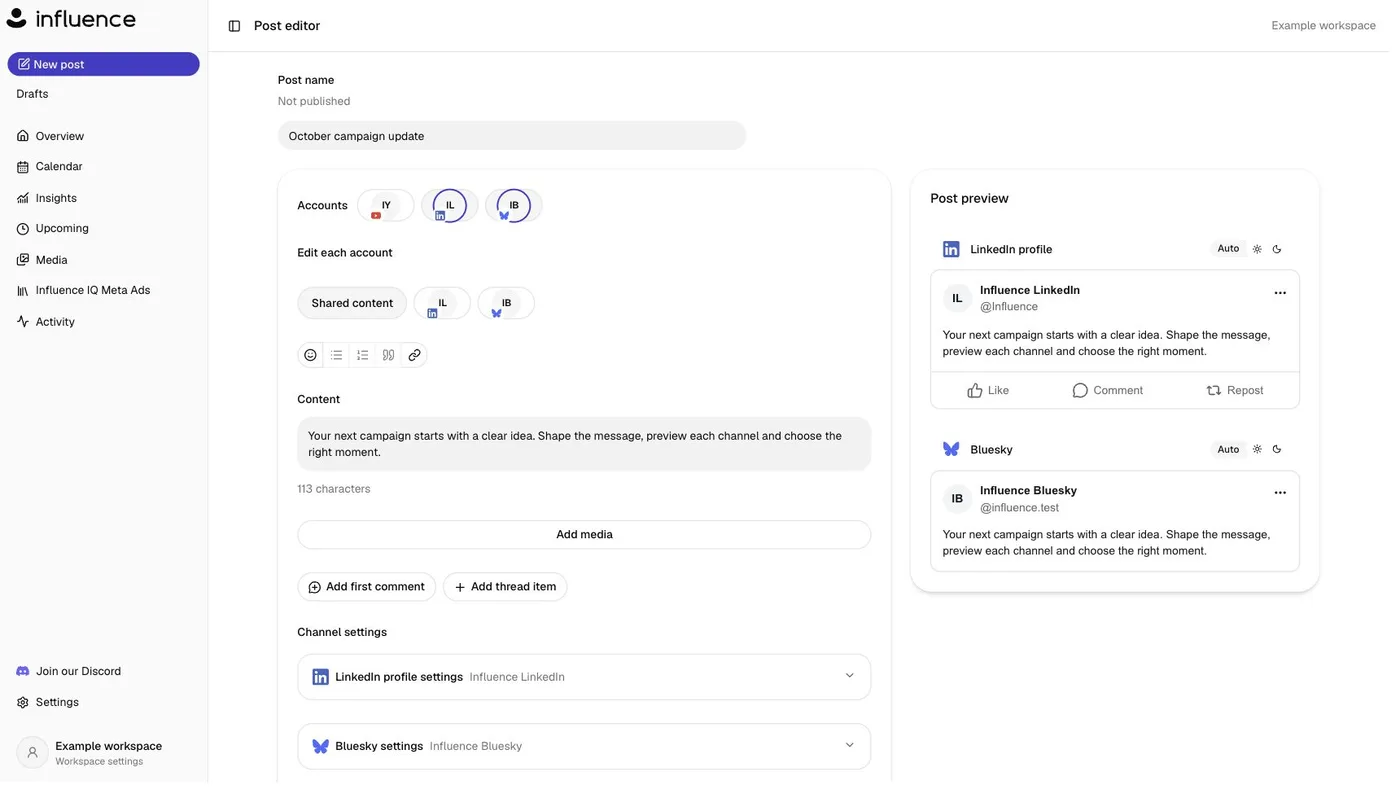
Source: Influence official site (same for the screenshots below; images provided by Influence)
At the heart of Influence is the idea of building your output in units of "campaigns" rather than writing posts one at a time. Tell it once what you want to communicate, and Influence IQ turns it into a scheduled plan running from the first announcement to the follow-up posts.
The AI bases its suggestions on your saved Brand Guidelines, the request at hand, and the images or videos you select. According to the official FAQ, even in workspaces where image generation is available, creating an image is a separate, credit-using action that you review before running, and a person checks the copy, media and schedule before publishing. The AI never posts on its own.
Run your social media from the AI assistant you already use
Influence supports MCP (Model Context Protocol) and can be connected from 14 AI assistants, including ChatGPT, Claude, Claude Cowork, Claude Code, Gemini CLI, Codex, Cursor, Manus and Kimi (per the official list as of October 2026). Once connected, you can simply say "Prepare next week's posts for review," and the assistant checks your Brand Guidelines and content calendar and prepares drafts suited to each destination. Changes like "Move Friday's post to the morning" can also be requested in a normal conversation.
The public MCP server and a customer skill are published on GitHub (influence-so/influence-mcp). Connecting from Manus requires an account that can add custom MCP servers.
Features
01Planning and drafting
Create first drafts that stay true to your brand.
- Influence IQ — suggests and revises campaign posts and dates based on your Brand Guidelines and request
- Brand Guidelines — save your brand's character and voice to keep a consistent tone
- Context from photos — reads the content of selected images and videos and uses it in the copy
- Image generation — in workspaces where it is available, create images using credits
02Editing and scheduling
Adapt one idea for each destination and schedule it.
- Per-channel tailoring — edit a campaign's copy and media for each destination
- Preview — compare how posts look on each destination side by side
- Content calendar — manage scheduled posts in week or month view and filter by provider, account and status
- Media library — store images and videos in one place and reuse them in other campaigns
03Checking and reviewing
Confirm delivery status and results.
- Upcoming — reschedule or cancel campaigns before they go out
- Activity — per-account delivery results, shown as "Published" or "Needs review"
- Insights — check performance using the metrics available on each channel
04Connecting
Operate it from tools you already know.
- MCP integration — plan, draft, review and schedule from 14 AI assistants such as ChatGPT, Claude and Cursor
- UI in 10 languages — Japanese, English, German, Spanish, French, Indonesian, Malay, Dutch, Thai and Tagalog
Supported destinations
The destinations listed on the official site are as follows (as of October 8, 2026). Supported formats differ by destination.
| Type | Destinations |
|---|---|
| Major social networks | Instagram, Facebook, X (Twitter), TikTok, YouTube, LinkedIn, Threads, Pinterest, Twitch, Rednote (Xiaohongshu) |
| Decentralized social networks | Bluesky, Mastodon, Misskey, Pixelfed, Plurk, Farcaster, Nostr, PeerTube |
| Chat and communities | Discord, Slack, Telegram, Signal, WhatsApp, Microsoft Teams, Mattermost, Matrix, Discourse |
| Blogs and newsletters | WordPress, Ghost, Tumblr, DEV, Hashnode, Listmonk |
Beyond X, Instagram, TikTok, YouTube and Threads—widely used in Japan—it stands out for handling decentralized networks like Bluesky and Misskey, communities like Discord and Slack, and WordPress blogs from a single scheduling screen.
Pricing
| Plan | Monthly (excl. tax) | Annual (excl. tax, per month) | Publishes per month | Influence IQ credits |
|---|---|---|---|---|
| Starter | ¥2,357 | ¥1,964 | 50 | 1,500/month |
| Growth | ¥4,583 (¥2,292 for the first 3 paid months during the promotion) | See the official pricing table | 150 | 3,750/month |
| Pro | ¥9,271 | ¥7,726 | Unlimited | 7,500/month |
(Japanese-yen prices shown on the official site as of October 8, 2026. The 50% Growth discount applies to the first 3 paid months on monthly billing or the first year on annual billing, until October 31.)
According to the provider, the standard monthly prices in US dollars are $19, $39 and $69. The Japan-facing pages show the yen prices above, and payments are processed by Stripe. Fees are generally non-refundable except where required by law or in cases such as duplicate charges or serious service failures.
How Influence differs from other social media tools
| Aspect | Influence | quso.ai | STOCKIMG.AI | Canva |
|---|---|---|---|---|
| Main role | Planning, drafting and scheduling posts with an AI that knows your brand | From turning long videos into shorts to scheduling and analytics | Generating images, logos and social posts, plus scheduling | Mainly design creation, with social scheduling available |
| Where AI is used | Suggesting campaign posts and schedules | Clipping, editing and captioning videos | Generating images and designs | Design and text generation |
| Starting material | What you want to say (a brief) and photos | Long-form video | Text prompts | Templates |
| Destinations | 30+ (including decentralized networks, chat and blogs) | Major social networks | Major social networks | Major social networks |
If you want to mass-produce shorts from video footage, quso.ai is a natural comparison; if your focus is visual production, compare STOCKIMG.AI or Canva. Influence is a tool that combines copy-led post planning with scheduling to many destinations, and it can be operated directly from AI assistants such as ChatGPT and Claude via MCP.
FAQ
Q. Can I use Influence in Japanese?
A. Yes. The interface supports 10 languages including Japanese, and yen pricing is shown for Japan.
Q. Is it free?
A. There is no free plan, but there is a 7-day free trial. It starts when you choose a plan and add a card, and moves to the paid plan unless you cancel during the trial.
Q. Is there a limit on connected accounts?
A. On every plan, connected accounts are unlimited for one business. Plans differ in monthly publishes and Influence IQ credits.
Q. Will the AI post on its own?
A. No. Influence IQ suggests posts and dates, but you schedule publishing only after checking the copy, media and timing. Even after scheduling, you can change or cancel before publishing starts.
Q. Can I use it from ChatGPT or Claude?
A. Yes. It supports MCP, so you can connect from 14 AI assistants including ChatGPT, Claude, Claude Code and Cursor and prepare posts, check the schedule and approve changes in conversation. Setup guides for each assistant are on the official site.
Q. Do I need a website?
A. No. Just create a workspace, add Brand Guidelines and connect your social accounts.
The information on this page is based on what was published on the official site as of October 2026. Please check the official site for the latest specifications and pricing.