

quso.ai
: How to use it, features, and the business problems it solves
Add bookmark
What is quso.ai?
An all-in-one AI social-media tool (formerly vidyo.ai) covering long-to-short clipping, video editing, captions, post scheduling, and analytics. It also does video generation, content repurposing, and pre-post engagement prediction (Virality Score). Free plan available.
Business problems it solves





About "quso.ai"
What is quso.ai
quso.ai is an all-in-one AI social-media tool that covers everything from turning long videos into shorts to video editing, captions, scheduling social posts, and analytics. Its tagline is "1 long video, 10 viral clips. Done in one click." It positions itself as a "one-stop social media manager for creators" and, per official figures, is used by 4M+ people.
quso.ai was formerly "vidyo.ai." Plans and pricing carried over after the rename. Where it once centered on long-to-short clipping, it has now grown into an all-in-one tool spanning video generation, content repurposing, an AI writer, post scheduling, and analytics.
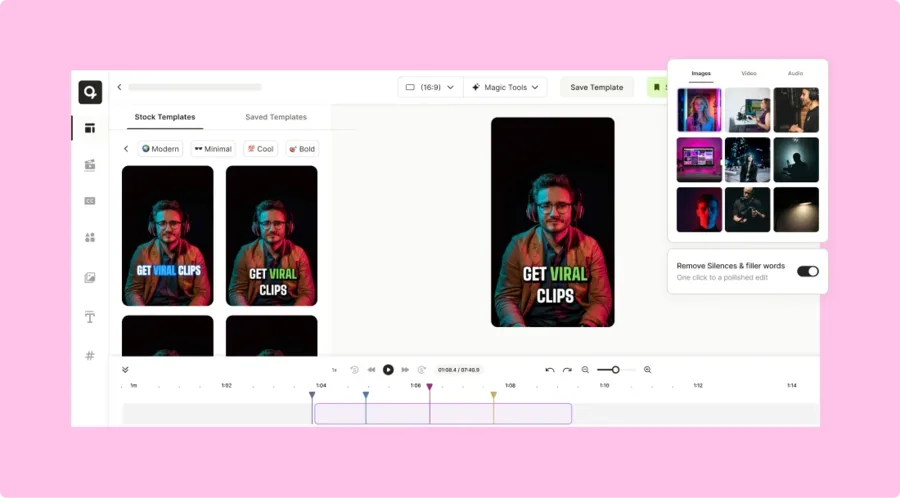
quso.ai's core is having AI extract the potentially viral parts of a long video and auto-convert them into vertical shorts. It bundles auto-captions, silence/filler removal, auto-reframe, and scene detection (CutMagic), letting you finish a video as if editing text. Finished clips can be scheduled straight to social media.
How to use
Import a video or enter a theme, generate and edit, then publish directly.
Import a video
Import from YouTube, Zoom, Drive, etc., or upload locally.
Generate clips
AI extracts viral moments and auto-converts them to vertical shorts.
Captions & editing
Finish with auto-captions, silence removal, and reframe (text-based editing).
Schedule & analyze
Schedule posts to 6 social platforms and review results with analytics.
The free plan gives 75 credits/month (1 credit ≈ 1 minute of video), enough to try clip generation and TikTok publishing.
Key features
01Clipping & video editing
Generate clips from long videos, extract highlights (Intelliclips), and make custom clips by timestamp. It includes a text-based AI video editor, automatic scene detection (CutMagic), silence/filler removal, auto-reframe, and auto-captions in 120+ languages.
02Generation, repurposing, writing
Generate video from text, trends, or scripts; repurpose one long video into 15+ posts; and use an AI writer that turns video into blogs, threads, and captions. It also generates social captions with hashtags.
03Scheduling, analytics, brand
Schedule posts to 6 social platforms with a visual content planner and scheduler, predict engagement before posting with Virality Score, review analytics afterward, and keep logos/colors/fonts consistent with a Brand Kit. Higher plans add the AI assistant "Viddy."
Pricing
There's a free plan, and paid comes in three tiers by use. Credits run at "1 credit ≈ 1 minute of video"; annual billing makes the monthly rate ~33% cheaper and grants 2× credits.
| Plan | Monthly (annual) | Credits/mo (monthly→annual) | Highlights |
|---|---|---|---|
| Free | $0 | 75 | 720p, shorts/chapters, TikTok publishing |
| Lite | $29 ($19) | 100→200 | Unlimited 1080p, publish/schedule to 6, advanced editor |
| Essential | $39 ($26) | 300→600 | + silence/filler removal, content planner |
| Growth (popular) | $49 ($33) | 600→1200 | + Brand Kit, Viddy, analytics, priority support |
Plan names are now Free / Lite / Essential / Growth (not the older "Starter/Pro"). Users migrated from vidyo.ai keep their plan and pricing. The underlying AI models are not disclosed; features are offered as proprietary tech like CutMagic, Intelliclips, Virality Score, and Viddy. Prices change, so check the official pricing page for the latest (as of August 2026).
How it differs from other clipping / social AI
quso.ai stands out because it bundles not just clipping but generation, captions, scheduling, and analytics — covering social media management end to end. That's a broader scope than clip-only tools.
| Aspect | quso.ai | Opus Clip | Klap |
|---|---|---|---|
| Focus | All-in-one social | Long→short clipping | Long→short clipping |
| Scope | Gen, captions, schedule, analytics | Clipping + captions | Clipping + captions |
| Publishing | Schedule to 6 + analytics | Some integrations | Some integrations |
Alternatives to compare include Opus Clip, well-regarded for long-to-short clipping, the similar Klap, and Captions, strong at subtitles and presentation. If you want to run everything from clipping to publishing and analytics in one place, quso.ai is a strong choice.
Information on this page is based on the official website as of August 2026. Please check the official site for the latest specs and pricing.
Frequently compared services





Articles featuring quso.ai
[2026 Edition] 14 AI Tools to Supercharge Social Media Management | Post Creation, Short Videos, Avatars, and Voice Conversion All in One
A detailed guide to 14 AI tools that tackle social media challenges: bulk post creation, automated short-form video generation, virtual human appearances, and voice conversion. Learn how to integrate them into your workflow to boost engagement and operational efficiency at the same time.
![[2026 Edition] 14 AI Tools to Supercharge Social Media Management | Post Creation, Short Videos, Avatars, and Voice Conversion All in One](/_next/image?url=%2Fimages%2Farticles%2Fai-tools-for-sns-managers.png&w=3840&q=75 "[2026 Edition] 14 AI Tools to Supercharge Social Media Management | Post Creation, Short Videos, Avatars, and Voice Conversion All in One")
[2026 Edition] 17 AI Tools for Video Creators | Full Coverage from Auto-Editing and Subtitles to Narration, BGM, and Social Media Videos
Supercharge your video production with AI. A curated selection of the latest tools supporting every stage — editing, subtitles, narration, BGM, and virtual appearances. [2026 Edition]
![[2026 Edition] 17 AI Tools for Video Creators | Full Coverage from Auto-Editing and Subtitles to Narration, BGM, and Social Media Videos](/_next/image?url=%2Fimages%2Farticles%2Fai-tools-for-video-creators.png&w=3840&q=75 "[2026 Edition] 17 AI Tools for Video Creators | Full Coverage from Auto-Editing and Subtitles to Narration, BGM, and Social Media Videos")
[2026 Edition] 13 AI Tools to Solve Marketers' Challenges | Organized by Use Case and Workflow
A curated, category-by-category selection of the latest AI tools that tackle marketers' everyday challenges — content creation, social media management, report generation, and more. [Latest 2026]
![[2026 Edition] 13 AI Tools to Solve Marketers' Challenges | Organized by Use Case and Workflow](/_next/image?url=%2Fimages%2Farticles%2Fai-tools-for-marketers.png&w=3840&q=75 "[2026 Edition] 13 AI Tools to Solve Marketers' Challenges | Organized by Use Case and Workflow")