

LilysAI
: How to use it, features, and the business problems it solves
Add bookmark
What is LilysAI?
A knowledge-management assistant (by Korea's LilysAI) that summarizes diverse sources — YouTube, PDFs, audio, web pages, recordings — with AI and organizes them into cited notes. Also does mind maps/quizzes and an AI chat 'Lily'. Free tier / paid from ¥900/mo, 20% off annual.
Business problems it solves



About "LilysAI"
What is LilysAI
LilysAI is a content-organizing assistant that summarizes diverse sources — YouTube, PDFs, audio, web pages — with AI and organizes them into cited notes. Under the line "Just save and subscribe. Never miss an insight," it has grown from a summarizer into a "second brain" (knowledge hub) that also saves, subscribes, recommends, and chats. Run by LilysAI, Inc. (Korea), it's used by 1.2M+ people.
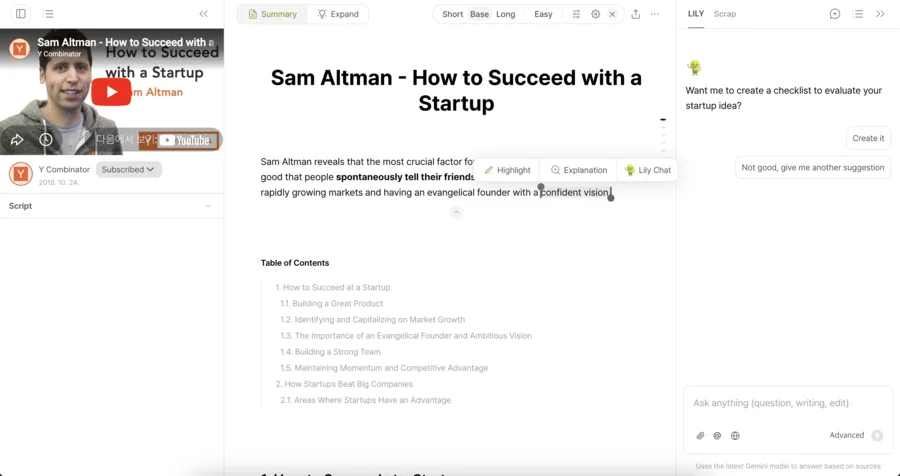
LilysAI's core is that just dropping in a source organizes it into a cited, structured note. Summaries can be short/standard/detailed and adjusted for difficulty; videos jump to the relevant segment, and PDFs keep their layout while linking elements to sources. Ask the AI chat "Lily" and it answers with sentence-level citations to the source.
LilysAI has grown from a "summarizer" into a knowledge-management assistant that also saves, subscribes, recommends (Now), and remembers via the AI chat (Lily). Inputs include YouTube, video/audio files, PDFs, documents, and web links, plus live recording and RSS. The chat is stated on-screen to use the latest Gemini model; the summarization base model is not disclosed.
How to use
Drop in a source, summarize it, organize it into notes, and put it to use.
Add a source
Import a YouTube link, PDF, audio, web page, and more.
Summarize
Choose length and difficulty; get a cited, structured note.
Dig deeper
Ask the AI chat "Lily," and turn it into mind maps or quizzes.
Organize & export
Organize notes and export to PDF/DOCX/Markdown/Notion.
Even the free plan (no credit card) gives unlimited AI notes and chat, plus 10 monthly "speed boosts" for faster processing.
Key features
01Summaries & notes
Summarize YouTube, PDFs, audio, and web pages into cited, structured notes. Videos jump to the relevant segment, and PDFs keep their layout while linking elements to sources. Length/difficulty is customizable, with highlights and memos.
02Visualization & learning
Convert into mind maps, infographics, quizzes, and flashcards to aid understanding and study. It's multilingual too, translating scripts and PDFs while preserving layout.
03AI chat "Lily" & subscriptions
The AI chat "Lily" answers questions with sentence-level citations to the source. Organize saves with an inbox and collections, and keep gathering info via Now (recommendations), RSS, and a Chrome extension.
Pricing
You can start free; paid comes in four individual tiers, plus team options. Prices are in JPY, with 20% off on annual billing.
| Plan | Monthly | Highlights |
|---|---|---|
| Free | ¥0 | Unlimited AI notes/chat, 10 speed boosts/mo |
| Starter | ¥900 | + unlimited advanced models, export, 50 boosts/mo |
| Basic (popular) | ¥2,300 | + advanced features, 1,000 boosts/mo, credit top-ups |
| Pro | ¥7,300 | + large uploads, unlimited speed boosts |
Team options include "Business" (¥3,400/user/mo) and "Enterprise" (contact us). The main differentiator across tiers is the number of "speed boosts" (faster processing) — higher tiers process more, faster. Prices are in JPY and change, so check the official site for the latest (as of August 2026).
How it differs from other AI summary/note tools
LilysAI stands out for organizing diverse sources into cited notes and leaning into "accumulate and use knowledge" — with saving, subscribing, and AI chat. That's a different center of gravity from source-limited research tools or transcription-focused tools.
| Aspect | LilysAI | NotebookLM | Glarity |
|---|---|---|---|
| Focus | Summary + notes + knowledge mgmt | Q&A on your sources | In-browser summaries |
| Input | Video/PDF/audio/web/recording | Uploaded sources | YouTube/web-centric |
| Output | Notes/mind maps, etc. | Notes/audio overview | Summaries |
Alternatives to compare include NotebookLM, strong at Q&A on your own sources, Glarity for in-browser summaries, and Notta for meeting transcription. If you want to organize diverse sources with citations and keep using the knowledge you build up, LilysAI is a strong choice.
Information on this page is based on the official website as of August 2026. Please check the official site for the latest specs and pricing.




![[2026 Edition] 8 AI Tools to Make Personal Learning More Efficient | Summarization, Audio Conversion, and Language Practice for Every Spare Moment](/_next/image?url=%2Fimages%2Farticles%2Fai-tools-for-daily-life.png&w=3840&q=75 "[2026 Edition] 8 AI Tools to Make Personal Learning More Efficient | Summarization, Audio Conversion, and Language Practice for Every Spare Moment")