

Deckbase
: How to use it, features, and the business problems it solves
Add bookmark
What is Deckbase?
Deckbase is an AI flashcard app from Yosuke Sakurai, an independent developer in Japan (Code Your Reality). It drafts cards from PDFs, Word files, images, Excel/CSV files, web pages or a chat with AI, adds AI images and text-to-speech audio, and schedules reviews with FSRS spaced repetition. It imports and exports Anki decks (.apkg) and offers a Chrome extension and an MCP server for ChatGPT, Claude and other AI tools. Available on iOS, Android and the web; the official site is available in Japanese. The free plan has unlimited cards (AI limited to an initial 100 credits); Basic is $5.99 a month ($59 a year) and Pro $11.99 a month ($119 a year).
Business problems it solves

About "Deckbase"
What is Deckbase
Deckbase is an AI flashcard app that drafts study cards from your materials or a chat with AI, then runs the reviews for you with spaced repetition. Load a PDF, Word file, image, Excel/CSV file or web page, or ask the AI to "make flashcards about X", and it drafts question-and-answer cards in seconds. You can add AI-generated images and text-to-speech audio to each card, and the cards are scheduled with FSRS (Free Spaced Repetition Scheduler) so they come back just as you are about to forget them.
In the official site's words, most tools make you choose between speed and control; Deckbase is built so you can draft with AI → edit it yourself → review with FSRS in a single app. It also imports and exports Anki decks (.apkg), so you can move over without abandoning your existing cards, and move back if you need to.
Deckbase is developed and run by Yosuke Sakurai, an independent developer in Japan (trading as Code Your Reality). The iOS app was published on the App Store on 21 March 2026 as "Deckbase: AI暗記カード・単語帳", and the service is available on iPhone, Android, the web (in a browser) and as a Chrome extension.
Let an AI draft take the work out of making cards
The part of flashcard study that people give up on is not reviewing but making the cards. The official site says so too: because creating cards by hand takes effort, people rarely keep it up. Deckbase hands that part to AI.
There are two ways in: chatting with the AI assistant and importing files. Type "make flashcards about the Krebs cycle", for example, and it produces question-and-answer pairs such as "Where does the Krebs cycle take place? → The mitochondrial matrix". Drop in a PDF, notes, an image or a DOCX file and it pulls out the key concepts, definitions and facts as cards.
You can also photograph textbook pages with your phone's camera (camera scan). What the AI produces is a draft: before saving, you preview each card, reword it and leave out the ones you don't want.
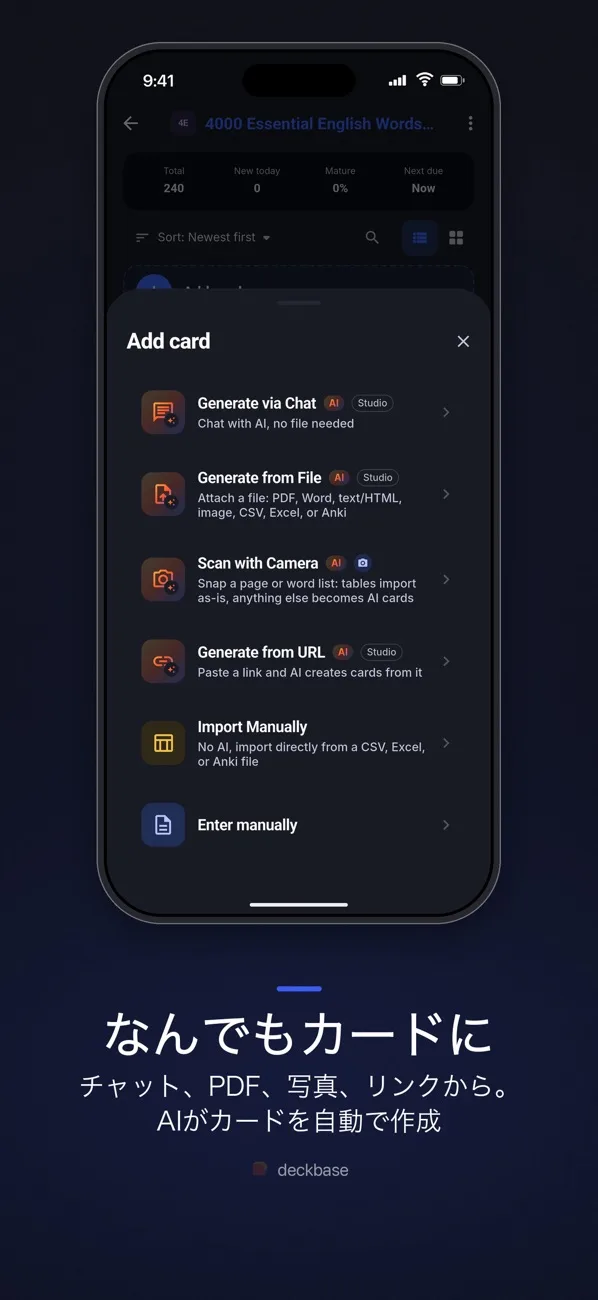
Source: Deckbase official site and App Store listing (the same applies to the screenshots below)
The card format is set by templates. Ready-made templates include Basic Q&A, Vocabulary Premium, Medicine Diagnosis and Japanese Vocabulary, and the AI follows the template so every card comes out in the same format.
Add images and audio, and learn with your eyes and ears
You can attach AI-generated images and text-to-speech audio to cards — pronunciation on a vocabulary card, or an illustration for a historical event — giving you more cues than text alone. According to the documentation, the audio uses ElevenLabs and the images use image-generation models.
Paid plans also include deck audio tracks, which let you listen to a whole deck and review while you are on the move.
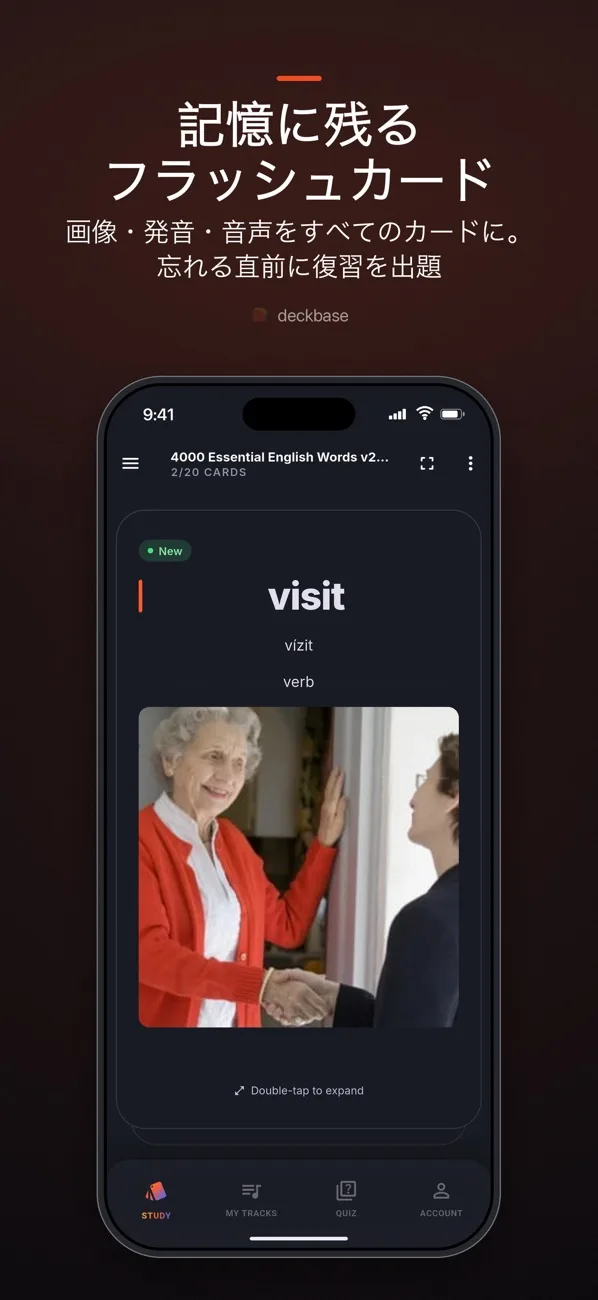
Cards come back just as you are about to forget them (FSRS)
The cards you make are scheduled by FSRS (Free Spaced Repetition Scheduler), a spaced-repetition algorithm. The better you know a card, the longer the gap before it comes back, and cards you are likely to forget are prioritised, so each day's reviews are limited to what you actually need. According to the official FAQ, most users review for about 10–15 minutes a day.
FSRS is an open-source spaced-repetition algorithm (the official FAQ points to the fsrs4anki repository), and Deckbase's documentation explains how it differs from SM-2 and the Leitner system and why Deckbase uses FSRS by default.
The app is offline-first: cards and study progress are stored on your device, so you can study, create and edit on a train or a plane. AI features and syncing need a connection, and once you are back online your progress is synced across the web, iOS and Android.
You can organise cards into decks and folders by subject, and use tags and smart filters for focused sessions such as "only cards that are due" or "only the cards I struggle with".
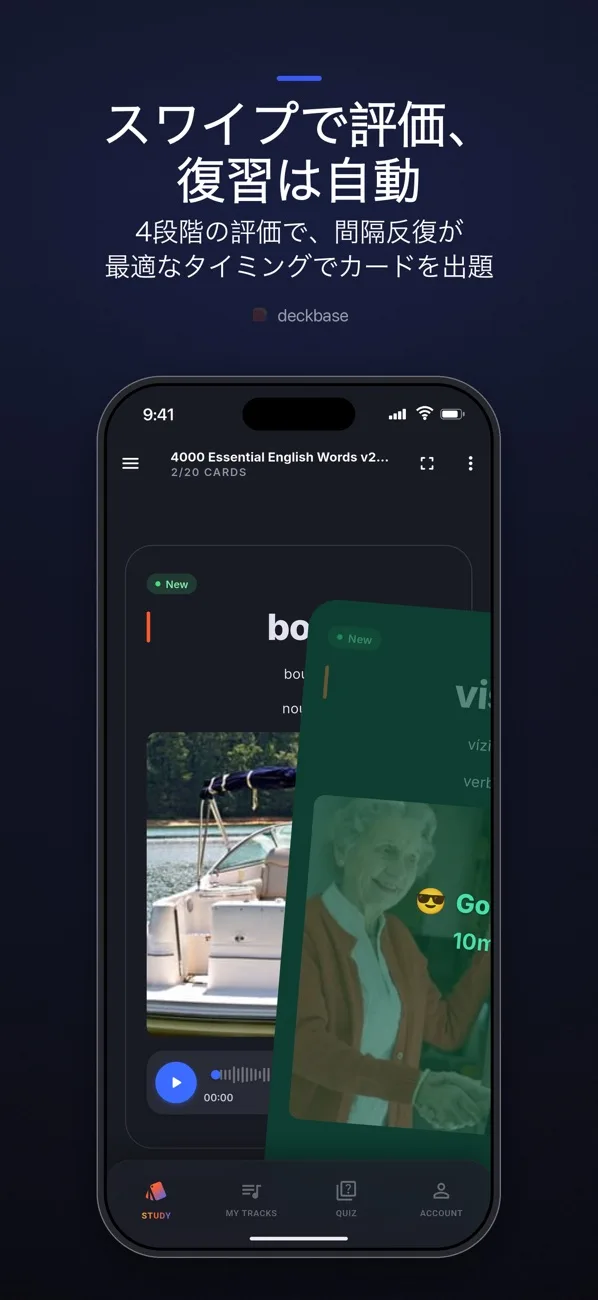
Switch from Anki, and switch back if you want
The worry when moving from another flashcard app is the cards you have built up. Deckbase imports and exports Anki .apkg files, so you can bring your Anki decks across as they are and return them to Anki if needed. CSV import and export is available on the free plan; Excel and .apkg require a paid plan.
Make cards from the page you are reading, or from the AI you already use
01Chrome extension (Web Clipper)
A Chrome extension released in September 2026, available on the Basic and Pro plans.
- Ask about the page — the assistant reads the page you have open; just say what cards you want and it turns them into a deck
- Select and capture — drag to select a diagram, table or word list and create cards from just that part
- Preview before saving — check the deck before saving. Chats sync with the web app and the mobile apps
02MCP server
A Model Context Protocol server released in March 2026 that lets other AI tools work with your Deckbase decks. Tool calls require a paid plan such as Basic or Pro (you can connect on Free, but requests will fail).
- Supported AI tools — ChatGPT (custom connector), Claude.ai, Claude Code, Gemini, Cursor, VS Code, Windsurf, Codex and more
- What it can do — 32 tools, including reading documents, listing decks and creating decks and cards. You can turn a conversation with AI straight into study cards
- Authentication — sign in with your Deckbase account (OAuth). No API key needed
For developers there is also a REST API for creating and updating decks and cards in bulk, generating AI audio and images, exporting decks and receiving webhooks.
How to use
- Install the app or sign up on the web — start from the App Store or Google Play on iPhone and Android, or at deckbase.co on a computer. It is free to start and no credit card is required
- Add material or start a chat — upload a PDF, paste notes, photograph a textbook or type a topic you want to learn; any of these is a starting point
- Choose a deck and template — decide where the cards go and what format they use. The AI keeps cards consistent with the template
- Edit the AI draft — preview the generated cards, fix the wording and choose which cards go into the deck
- Do your daily reviews — FSRS decides when each card is due, so open the app and review the cards that are due. If you have Anki decks, importing the .apkg first lets you pick up where you left off
Pricing
| Plan | Monthly | Annual | AI credits | Main contents |
|---|---|---|---|---|
| Free | $0 | $0 | 100 (one-time) | Unlimited decks and cards, spaced repetition, image and audio media, CSV import/export, 50 MB storage for card media |
| Basic | $5.99 | $59 ($4.92 a month) | 1,200 a month | About 400 AI cards or 600 AI quizzes a month, about 30K characters of premium voice a month, PDF/DOCX/image import, Excel and Anki import/export, MCP integration, cloud backup and sync, 2 GB |
| Pro | $11.99 | $119 ($9.92 a month) | 2,500 a month | About 833 AI cards or 1,250 AI quizzes a month, about 62K characters of premium voice a month, everything in Basic plus 4 GB storage |
Source: Deckbase pricing page and Commercial Disclosure (as of November 2026). Prices are in US dollars and include tax where required by law. When you buy through a mobile app store, the price shown by the store at the time of purchase applies
- Since September 2026, AI features (card generation, images, text-to-speech, quizzes and the AI assistant) draw from a single monthly credit balance. Figures such as "about 400 cards" are estimates for spending all your credits on that one feature
- On the free plan you can still create unlimited cards by hand and review them with spaced repetition. AI card generation requires a paid plan once the initial 100 credits are used up
- Plan credits are valid only for the calendar month (UTC) in which they are granted and do not roll over. If you run short, paid subscribers can buy add-on packs (500 credits $4.99, 1,200 credits $9.99, 3,000 credits $19.99; these do not expire)
- You can cancel at any time and keep paid features until the end of the period you have paid for. Fees already paid are not refunded except where required by law or by the app store's policies
How it differs from other AI study tools
| Product | Main use | Flashcards | Review system | Entry price |
|---|---|---|---|---|
| Deckbase | Turn materials and chats into flashcards and memorise them | AI drafts, you edit. Anki-compatible | FSRS spaced repetition | Free (unlimited cards), Basic $5.99 a month |
| NotebookLM(現Gemini Notebook) | Summarise and ask questions about your own materials | — (generates study guides, FAQs, Audio Overviews, etc.) | — | Free; limits rise with paid Google AI plans |
| LilysAI | Summarise videos, PDFs and more into organised notes | Converts content into quizzes and flashcards | — | Free tier; paid from ¥900 a month |
| Speechify | Listen to PDFs and web pages | — | — | Free plan; Premium $29 a month |
| Photomath | Photograph maths problems and see how to solve them | — | — | Explanations free; Plus $9.99 a month |
Information on other products is as stated on each product page at the time it was checked
- If you know what you need to memorise and want to review a little every day (languages, certifications, medicine, law and so on), Deckbase, which puts card creation and review in one place, is a good fit
- If you first need to understand or summarise the material, start with NotebookLM or LilysAI. You can also combine them, using Deckbase for the memorising stage once you understand the content
- If you would rather learn by listening than reading, Speechify is another option
Pros and cons
Pros
- Drafts cards in seconds from PDFs, images, web pages and chats
- AI images and text-to-speech audio make cards more than just text
- FSRS spaced repetition limits your reviews to what you need
- Imports and exports Anki .apkg files, so switching is low-risk
- Unlimited cards even on the free plan; manual use costs nothing
- Through MCP you can create cards from the AI tools you already use, such as ChatGPT and Claude
Cons
- The free plan's AI is limited to the initial 100 credits; to keep creating cards with AI you need a paid plan
- Prices are in US dollars, so the cost in yen depends on exchange rates
- The App Store lists English as the only language (as of November 2026). The official site and the web app display in Japanese
- Released in March 2026, it has not yet collected ratings on the Japanese App Store
FAQ
Q. Can I use Deckbase for free? A. Yes. The free plan offers unlimited decks and cards, and you can review hand-made cards with spaced repetition. You can try AI card generation with the initial 100 credits; after that you need Basic ($5.99 a month) or Pro ($11.99 a month).
Q. Can I use it in Japanese? A. The official site and the web app display in Japanese, and there is a Japanese Vocabulary template. The App Store lists English as the only language (as of November 2026).
Q. Can I use my Anki decks? A. Yes. You can import Anki .apkg files and continue studying, and export decks made in Deckbase as .apkg (Excel and .apkg import/export require a paid plan; CSV is available on the free plan).
Q. Does it work offline? A. Yes. Cards and study progress are stored on your device, so you can study, create and edit offline. AI features and syncing need an internet connection.
Q. Can I share decks with others? A. Yes. You can publish decks and templates to the community, where other users can browse, rate and import them. Importing creates your own copy.
Provider
Deckbase is developed and run by Yosuke Sakurai, an independent developer in Japan, under the trade name Code Your Reality. Sakurai is named as founder on the official "About Deckbase" page, and the App Store lists Yosuke Sakurai as the seller. The Commercial Disclosure under Japan's Act on Specified Commercial Transactions names Code Your Reality as the business and Yosuke Sakurai as representative and director of operations, with the address available on request. The terms of use are governed by Japanese law, with the courts of Tokyo having jurisdiction.
The information on this page is based on content published on the Deckbase official site (home, pricing, features, documentation, MCP guide, updates, About, Commercial Disclosure and terms of use) and the App Store as of November 2026. Please check the official site for the latest features and pricing.