
Mapify
: How to use it, features, and the business problems it solves
Add bookmark
What is Mapify?
An AI tool that summarizes PDF, Word, PowerPoint, YouTube videos, web pages, audio, images, and long text into mind maps. Developed by the team behind the mind-mapping software Xmind, with the web version operated by SUPERMIND PTE. LIMITED in Singapore. You can ask AI about the content while viewing the map, expand branches to add ideas, present maps as slides, and export to PDF, Markdown, or SVG. Available on the web, as a browser extension, and as iOS/Android/macOS apps, with maps generated in 31 languages including Japanese. Free plan: 30 credits (one-time); paid plans start at Basic ¥1,599/month as displayed in Japan (¥959/month billed yearly).
Business problems it solves


About "Mapify"
What is Mapify?
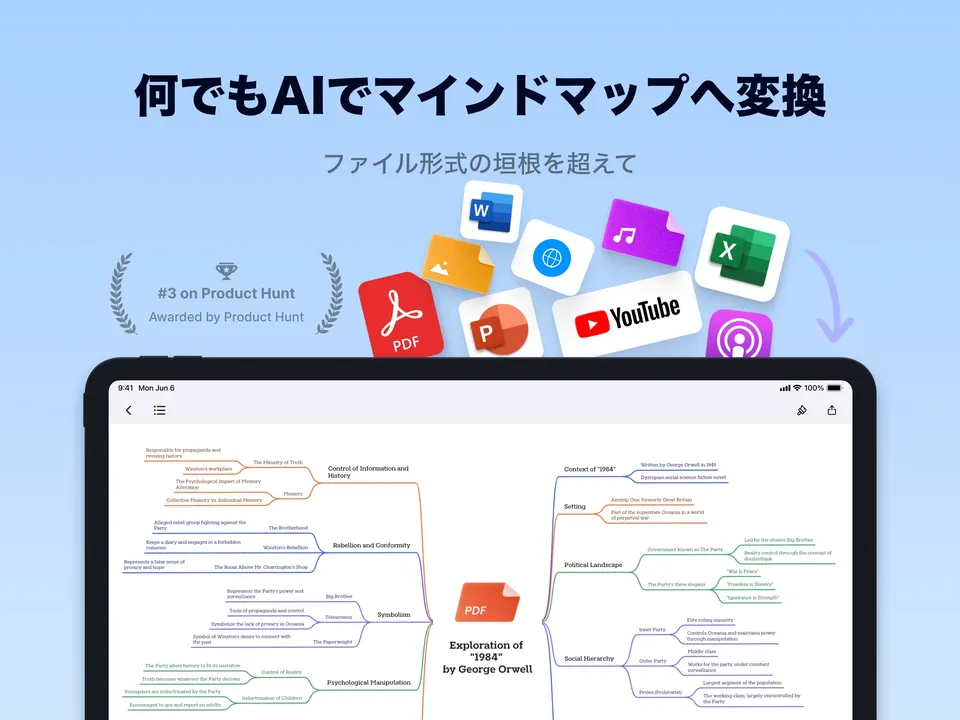
Mapify is an AI tool that summarizes any material into a mind map. Give it PDF, Word, or PowerPoint files, YouTube videos, web pages, podcast or meeting recordings, images, or pasted long-form text, and it quickly builds a mind map that organizes the key points into a hierarchy. You can edit the map directly, ask AI questions about the content, and expand branches to add ideas.
The official FAQ says Mapify was developed by Xmind, the maker of mind-mapping software. The App Store description also says it was "developed by the Xmind team" and "built on the legacy of Chatmind," and the seller of the iOS app is Xmind Ltd. The operator named in the web version's terms of use and privacy policy is SUPERMIND PTE. LIMITED in Singapore. The official site says it is used by more than 5 million people.
As shown on the official site
616 ratings (Oct 2026)
Including Japanese (official FAQ)
Free plan has 30 credits
How to Use
- Create an account Sign up from "Start for free" on the official site. No credit card is needed, and you receive 30 credits (one-time) when you register. You can also start from the Chrome extension or the iOS and Android apps.
- Provide what you want to summarize Upload a file, paste a YouTube or web page URL, or enter text. Before generating, you can choose the language of the map (such as Japanese) from the menu below the input box.
- Read and dig into the map Use the generated mind map to grasp the big picture, then click to expand branches or ask AI about anything you want to explore. In maps made from YouTube or audio, timestamps let you jump to the original scene (Pro and above).
- Polish and share Adjust the structure, layout, and colors with shortcuts or clicks, then share via link or export to PDF, Markdown, SVG, or image. Switch to slide view to present the map in a meeting as is.
Features
01Turn anything into a mind map
- Files — summarize PDF, Word, PowerPoint, Excel, and Markdown into maps. Pro and above support files of up to 10 million characters
- YouTube — turn a video's key points into a timestamped map; the transcript (captions) is also available
- Web pages and long text — turn articles, news, research papers, or pasted text into maps
- Audio and images — read recordings, podcasts, photos, charts, and handwritten notes into maps (Pro and above)
- Prompts — create a map from scratch from a one-line theme such as "make a plan for…"
02Develop ideas from the map
- Chat with AI — ask questions about the uploaded material and add the answers to the map (Pro and above)
- Branch expansion — expand any branch with one click to generate related points and ideas
- AI online search and Deep Research — enrich maps with information from the web. Deep Research is Pro and above
- Translation — summarize foreign-language material as a map in the language you choose
03Present and keep
- Editing and templates — adjust structure, layout, and colors. AI templates for brainstorming, analysis, and planning are available
- Slide view — present the map as slides
- Image generation — create images that match a node's content and add them to the map (Pro and above)
- Sharing and export — share via link, or export to PDF, Markdown, SVG, or image
Map long material first to grasp the whole
Mapify is most useful when you want to understand the overall structure before reading everything. Even a PDF of dozens of pages or a two-hour video is shown as a map that branches into chapters and key points, so you can see where everything is first and then read only the parts you need.
It also accepts almost any format. Besides Office documents and PDFs, you can hand over YouTube videos, web pages, audio, and images from the same screen. With the browser extension installed, you can turn the web page or YouTube video you are viewing, PDFs on the web, or social media posts into a map with one click. The official extension page says it supports YouTube videos of up to 7 hours and text of up to 2 million words.
Give it a YouTube video and you get a map that follows the flow of the talk. On Pro and above, each item in the map has a timestamp, and clicking it jumps to that scene in the video. When reviewing lectures or seminar videos, you can find and replay only the parts you need.
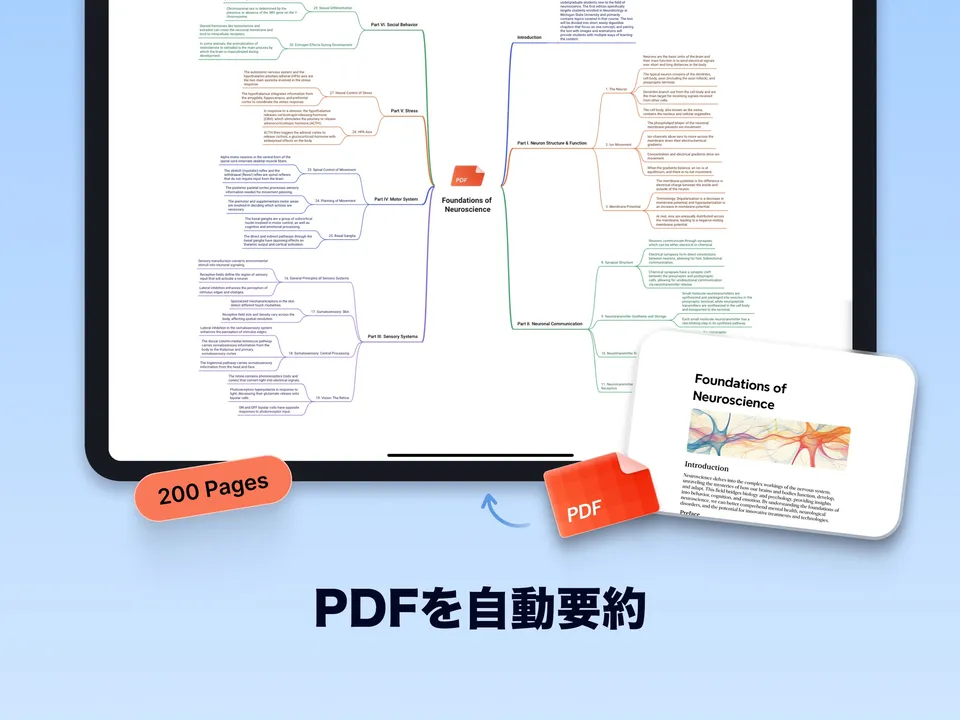
PDFs work the same way, with key points mapped chapter by chapter. While looking at the map, ask AI something like "What supports this conclusion?" and add the answer to the map to deepen your understanding.

Source: Mapify (App Store)
Pricing
Plans differ by the number of "credits" consumed each time you use AI. When accessed from Japan, the pricing page shows prices in yen, and yearly billing is 40% cheaper.
| Plan | Monthly | Yearly (per month) | Credits | What's included |
|---|---|---|---|---|
| Free | ¥0 | — | 30 (one-time) | 5 PDFs/documents, 5 YouTube videos, maps from prompts/Markdown, access to YouTube transcripts. Map editing, the powerful model, and audio summaries are not included |
| Basic | ¥1,599 | ¥959 | 1,000/month | Fast instant model, summaries of PDFs/documents/YouTube, map editing, export to PDF/Markdown/SVG, slide view |
| Pro | ¥3,199 | ¥1,919 | 2,000/month | Everything in Basic plus the powerful model, audio and image summaries, Deep Research, files up to 10M characters, timestamps for audio/video, image generation, AI chat with your content |
| Unlimited | ¥4,799 | ¥2,879 | Unlimited | Everything in Pro plus priority access to new features, members-only community, priority support |
Prices are based on the official pricing page (with the monthly/yearly toggle), checked from Japan on October 23, 2026, and the FAQ linked from it. The pricing page does not say how taxes are handled, and the terms of use state that payments are in US dollars, so check the amount on the purchase screen. Credit consumption varies with the model, file size, and output; as examples, the FAQ lists about 15 credits for a detailed summary of a 1 MB PDF with the powerful model and about 2 credits for one AI question. Basic and Pro credits reset every 30 days from the subscription date. Unlimited is subject to a fair use policy, and the powerful model is limited to 6,000 credits per billing cycle. Pro and Unlimited yearly plans have a 3-day free trial. If you run out of credits, you can buy add-on credits in units of 400. Subscriptions and add-on credits are non-refundable, and downgrading to a lower plan is not supported. In-app purchases on the Japanese App Store were listed as Basic (monthly) ¥1,600, Pro (monthly) ¥3,200, Unlimited (monthly) ¥4,800, Basic (yearly) ¥11,600, Pro (yearly) ¥23,400, and Unlimited (yearly) ¥34,800. The pricing page also mentions a 30% education discount for students and educators and a sales contact for teams (hi@mapify.so).
Data Handling
The official FAQ says Mapify uses third-party LLMs such as OpenAI and Anthropic only to provide the requested features, and does not use your data to train models. The pricing page states that the website is ISO/IEC 27001:2022 certified.
Even after your subscription ends, you can still view and export the maps you created (you may need to resubscribe to keep editing them). An account can be linked to up to 3 devices, and sharing it with others is prohibited.
Pros and Cons
Pros
- Turns PDFs, Office documents, YouTube, web pages, audio, and images into mind maps with the same steps
- Goes beyond summaries: ask questions, expand branches, edit, and present as slides on the map itself
- Developed by the team behind the mind-mapping software Xmind, with full map editing and export features
- One subscription covers the web, the extension, mobile, and Mac
Cons
- The free plan is a one-time 30 credits, and map editing requires a paid plan
- Credits per summary vary by document length and model, making it hard to estimate how many summaries you can do each month
- Audio and image summaries, AI chat with your content, and Deep Research require Pro or above
- No refunds, and no downgrade to a lower plan
Reputation
The official site highlights a #3 ranking on Product Hunt and a 4.8 rating on the App Store. On the Japanese App Store, the app had a 4.6 rating (616 ratings) as of October 23, 2026.
The official site features user comments from X, such as "even YouTube videos can be turned into a mind map in an instant" (ブレイクスルー佐々木) and "one of the indispensable tools in three scenes: organizing and understanding information, generating ideas, and creating materials" (リモートワーク研究所【リモ研】). On the other hand, one review on the Japanese App Store says that a certification-exam textbook could not be loaded on the cheapest plan because of the character limit and that the summary was shallow, so if you work with long documents, plan on Pro or above (files up to 10 million characters).
How It Differs from Other AI Summary and Diagram Tools
| Mapify | LilysAI | Napkin | NotebookLM | |
|---|---|---|---|---|
| Main output | Mind maps (editable, slide view) | Structured notes with citations, mind maps, quizzes | Diagrams, flowcharts, infographics | Cited answers, audio overviews, slides |
| Main inputs | PDF, Office documents, YouTube, web, audio, images, text | YouTube, PDF, audio, web pages, recordings | Pasted text | PDF, web, YouTube, audio, Google Docs |
| Pricing | 30 free credits / from ¥1,599/month (from ¥959/month yearly) | Free available / from ¥900/month | Free $0 / Plus $9 / Pro $22 | Free (limits increase with Google AI plans) |
Columns other than Mapify reflect the content of each product page as of when it was checked.
For summarizing documents and videos into notes, LilysAI is the closest product. Mapify puts the "map" at the center, including editing and presenting, while LilysAI centers on notes with citations. If you want to turn text into diagrams for materials, Napkin is a better fit, and if you want cited answers based only on your own documents, try NotebookLM. If you just want summaries while reading in your browser, extensions such as Glarity and Sider are also options.
FAQ
Q. Is Mapify free?
A. Yes. When you sign up, you get 30 credits (one-time) with no credit card, enough to map up to 5 PDFs/documents and 5 YouTube videos. However, map editing, the powerful model, and audio summaries are not available on the free plan. To keep using it, subscribe to a paid plan.
Q. Can I use it in Japanese?
A. Yes. The official site and apps are available in Japanese, and you can choose Japanese as the language of the map (the official FAQ lists 31 languages). You can also summarize foreign-language material as a Japanese map.
Q. What is the relationship between Xmind and Mapify?
A. The official FAQ describes Mapify as "developed by Xmind," and the App Store also says it was "developed by the Xmind team." The seller of the iOS app is Xmind Ltd., and the web version is operated by SUPERMIND PTE. LIMITED in Singapore.
Q. Are uploaded documents used to train AI?
A. The official FAQ says your data is not used to train models. Third-party LLMs (such as OpenAI and Anthropic) are used only to provide the requested features.
Q. What happens to my maps if I cancel?
A. After your subscription ends, you can still view and export your maps. You may need to resubscribe to continue editing them. You can cancel anytime from settings and keep using your current plan until the end of the billing cycle.
The information on this page is based on the official website (pricing page, FAQ, browser extension page, terms of use, and privacy policy) and the Japanese App Store listing as of October 2026. Prices, credits, and supported formats may change, so please check the official website for the latest information.