

NotebookLM(現Gemini Notebook)
: How to use it, features, and the business problems it solves
Add bookmark
What is NotebookLM(現Gemini Notebook)?
NotebookLM (now renamed to "Gemini Notebook") is a Google-built AI research and thinking partner that answers with citations based only on the materials you upload. You can use PDFs, websites, YouTube videos, audio, Google Docs, and more as sources, and the latest Gemini models handle summarizing, question answering, and material creation. Because it limits the basis for its answers to your sources, it curbs plausible-sounding errors and lets you grasp materials quickly, and it can also generate an Audio Overview (podcast-style conversational audio) and slide decks you can download as PDF or PowerPoint. It is free to use, with limits and available models increasing as it is included in Google AI Plus/Pro/Ultra (available in limited regions).
Business problems it solves





About "NotebookLM(現Gemini Notebook)"
What is NotebookLM
NotebookLM is a Google-built AI research and thinking partner that answers based only on the materials you upload. It is now renamed to "Gemini Notebook" and is built on the latest Gemini models (provided by Google; the official domain has moved to notebook.google, with the old notebook.google redirecting there). When you load sources such as PDFs, websites, YouTube videos, audio, and Google Docs, it summarizes, answers questions about, and creates materials from their contents. Unlike a typical chat AI, it limits its answers to the sources you load and shows citations.
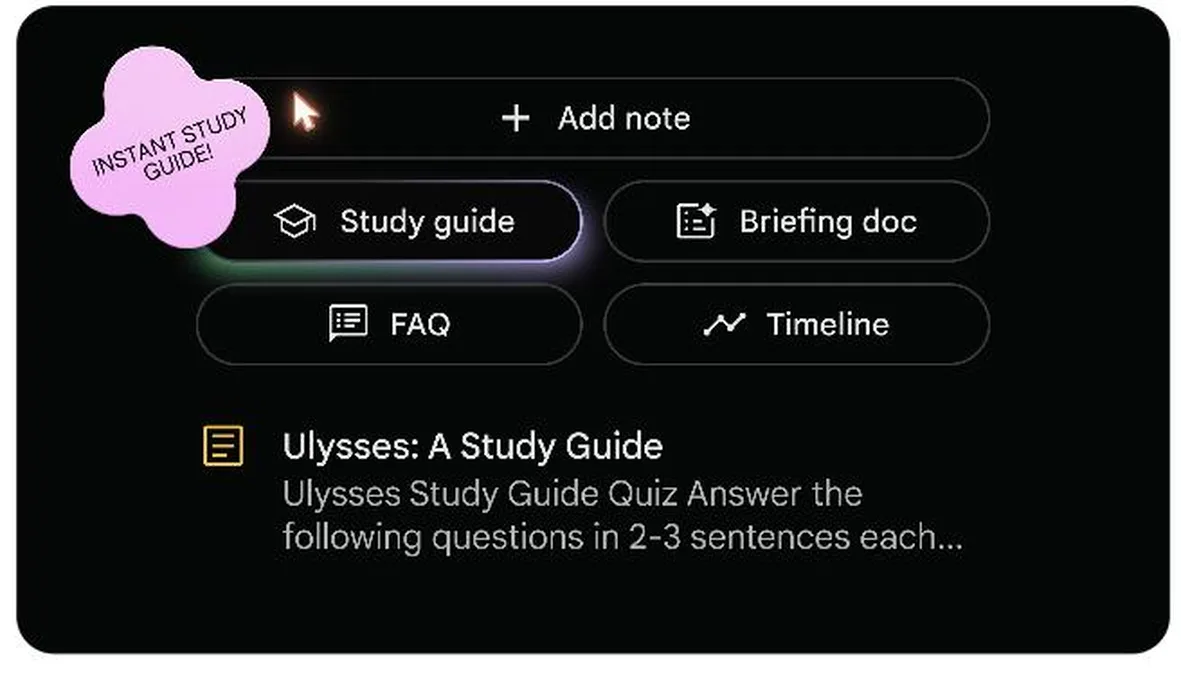
Source: Gemini Notebook (NotebookLM) official site
Answering with citations, based only on "your own materials"
The heart of NotebookLM is source grounding (basing answers on the materials you load). Answers are generated within the scope of the trusted sources you provide, with citations showing which passages they are based on. This lets you quickly grasp the contents of your materials while curbing the "plausible-sounding errors" that tend to occur with general generative AI. Organizational and school data is never used for training, and even for personal use it is not used for learning unless you share feedback.
The flow from upload to understanding
Add your sources
- PDFs, sites, YouTube, audio
- Google Docs / Slides
Gemini analyzes
- Understands content multimodally
- Extracts connections between topics
Answers with citations
Answers within the scope of your sources and shows citations for the supporting passages, curbing plausible-sounding errors
Turn it into deliverables
- Audio Overview, study guide, FAQ
- Timeline, mind map
The materials you load turn into a personalized AI expert.
How to use
-
Create a notebook
Go to notebook.google and create a new notebook with your Google account.
-
Upload sources
Add the materials you want to research (PDFs, websites, YouTube videos, audio, Google Docs, and more).
-
Ask questions and have a dialogue
Ask about the contents of your sources, and answers come back with citations. Use it to grasp key points and do preliminary research.
-
Generate deliverables
Generate an Audio Overview (a podcast-style conversational audio), slide deck, infographic, study guide, briefing doc, FAQ, timeline, mind map, and more.
-
Share and put it to use
Share the generated content and notebooks, and put them to work for your team or your studies.
Features
01Dialogue with sources
Understand based on trusted materials.
- Multi-source ingestion — PDFs, sites, YouTube, audio, Google Docs, and more
- Cited answers — Shows supporting passages and answers within the scope of your sources
- Multimodal analysis — Understands content across the board with the latest Gemini
02Deliverables you can generate
Turn reading into something usable.
- Audio Overview — Summarizes sources into conversational audio
- Study guide, briefing doc, FAQ — Automatically generate documents for each purpose
- Timeline, mind map — Visualize structure and chronology
- Slide Deck, infographic — Generate image-based presentations and visual summaries from your sources (PDF, PPTX, PNG)
03Plans and data
Choose limits and quality to fit your needs.
- Higher limits — Higher tiers increase the number of sources per notebook
- Better models — Higher tiers use more capable Gemini models
- Data protection — Organizational data is not used for training, and personal data is not used by default
Creating slide decks from your sources
With Slide Deck in Studio, you can turn the sources you have loaded into a presentation with headings, diagrams and illustrations in a few minutes (launched in November 2025; available to users aged 18 and over). The slides are drawn by the image-generation model Nano Banana Pro, so the design is polished, but the text is part of the picture.
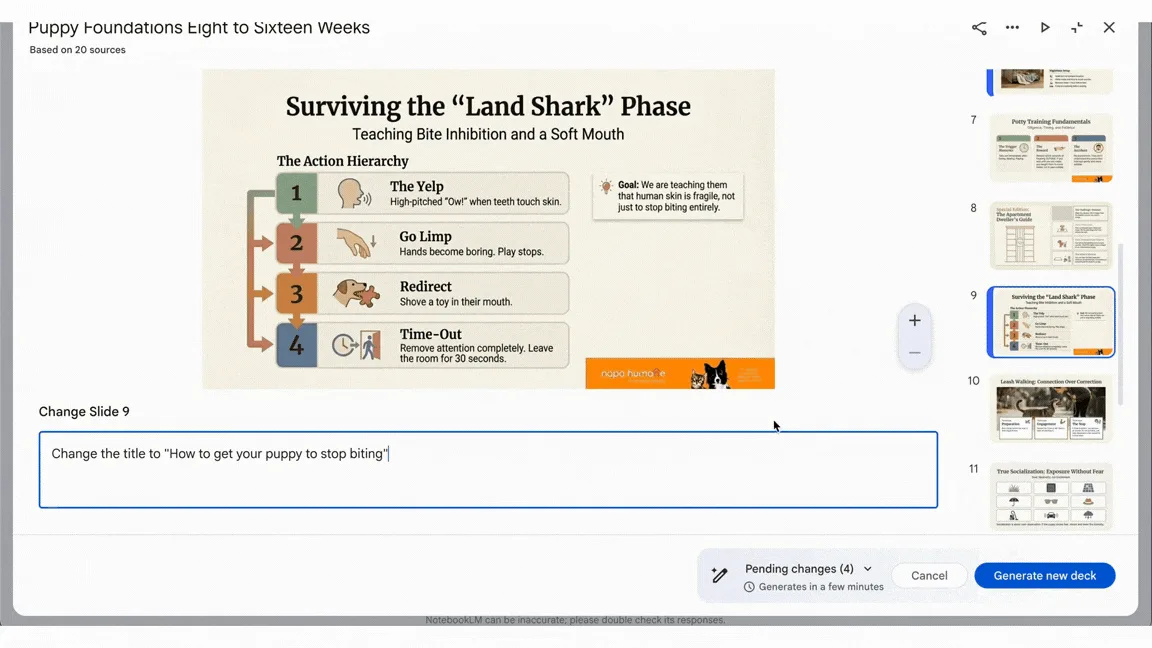
Source: official demo from Google Workspace Updates (20 March 2026) (English UI, before the rename)
Infographics, also created in Studio, are images too and download as PNG. For ways to fix just part of the text on a slide (tips for revising, overlaying text in PowerPoint, converter tools that turn slides back into editable PPTX, and rebuilding the deck), see our article "How to edit NotebookLM slides".
Pricing
You can use it for free, and limits and available models increase as it is included in Google AI subscriptions (Plus / Pro / Ultra). Higher tiers are available in limited regions (as of August 2026).
| Plan | Positioning | Source limit per notebook |
|---|---|---|
| Gemini Notebook (free) | For individuals, standard Gemini model, standard access | Up to 50 |
| Plus | Included in Google AI Plus, early access to new features | Up to 100 |
| Pro | Included in Google AI Pro, high-performance Gemini model, priority access | Up to 300 |
| Ultra | Included in Google AI Ultra, highest-performance Gemini model, priority access | Up to 600 |
Usage limits also vary by the type of deliverable. Since 2 September 2026 the limits have been compute-based: your allowance refreshes every 5 hours, with a weekly cap (Plus gets 2x the free allowance, Pro 4x, and Ultra 5x or 20x Pro). Please check the official plan page for the latest supported regions and limits.
How it differs from other AI research tools
NotebookLM stands out for being specialized in "answering with citations, based only on the trusted sources you choose". Its aim differs from general-purpose generative AI and AI search that answer from the whole web, making it well suited to preliminary research, reading comprehension of materials, and studying. Its Audio Overview (a feature that turns sources into podcast-style conversational audio) is also unique.
| NotebookLM (Gemini Notebook) | Perplexity | ChatGPT | |
|---|---|---|---|
| Basis for answers | Limited to sources you add, with citations | Web search + citations | Model knowledge + optional web |
| Strengths | Reading comprehension, summarizing, studying, Audio Overview | Research on the latest information | General-purpose generation and dialogue |
| Best for | People who want to deeply understand the materials at hand | People who want to research with sources | People who want to handle a wide range of tasks |
If you want to research the whole web with sources, Perplexity is a good comparison; for AI search in Japanese, Felo; and Genspark, which handles everything end to end from material generation to slides, is also worth comparing.
The information on this page is based on content published on the official site and help center as of September 2026. Please check the official site for the latest specifications and pricing.
Frequently compared services










Articles featuring NotebookLM(現Gemini Notebook)
How to Edit NotebookLM Slides [September 2026]: Why You Can't Fix the Text Even in PPTX, and Five Methods by What You Need to Change
NotebookLM (renamed Gemini Notebook in July 2026) produces slide decks that are "a single picture with text in it", drawn by the image generation model Nano Banana Pro. Whether you export to PDF or PowerPoint (PPTX), each slide goes in as an image, and export to Google Slides is still not available as of September. This article confirms from Google's official help that the official Revise feature rebuilds the entire slide deck every time and does not consult your sources during revisions, then sets out five methods you can choose by what you want to fix: giving instructions with Revise; laying corrections over the top in PowerPoint; conversion tools that use OCR to turn slides back into a PPTX with editable text (comparing pricing and data handling for NoteSlide, Kirigami, DeckEdit, CopySlides and Swift-Slide); redrawing the slide as an image with Nano Banana; and rebuilding it as an editable deck with tools such as GAMMA or Irusiru. It also covers caveats such as Canva's Grab Text not working on Japanese slides, the compute-based limits in place since 2 September, and how watermarks are handled.
![How to Edit NotebookLM Slides [September 2026]: Why You Can't Fix the Text Even in PPTX, and Five Methods by What You Need to Change](/_next/image?url=%2Fimages%2Farticles%2Fnotebooklm-slide-edit.png&w=3840&q=75 "How to Edit NotebookLM Slides [September 2026]: Why You Can't Fix the Text Even in PPTX, and Five Methods by What You Need to Change")
[2026 Edition] 8 AI Tools to Make Personal Learning More Efficient | Summarization, Audio Conversion, and Language Practice for Every Spare Moment
A thorough guide to 8 AI tools organized by goal — document summarization, podcast creation, English conversation practice, and more. Practical strategies for keeping learning going even on a busy schedule.
![[2026 Edition] 8 AI Tools to Make Personal Learning More Efficient | Summarization, Audio Conversion, and Language Practice for Every Spare Moment](/_next/image?url=%2Fimages%2Farticles%2Fai-tools-for-daily-life.png&w=3840&q=75 "[2026 Edition] 8 AI Tools to Make Personal Learning More Efficient | Summarization, Audio Conversion, and Language Practice for Every Spare Moment")
[2026 Edition] 10 AI Tools to Accelerate Executive Decision-Making | Mid-Term Plans, Investment Analysis, Learning, and Presentation Decks
[Latest 2026] Speed up mid-term business plan drafting, investment decision reports, executive learning, and presentation creation. A deep dive into 9 AI tools that support leadership decision-making — covering features, benefits, selection criteria, and real-world adoption examples.
![[2026 Edition] 10 AI Tools to Accelerate Executive Decision-Making | Mid-Term Plans, Investment Analysis, Learning, and Presentation Decks](/_next/image?url=%2Fimages%2Farticles%2Fai-tools-for-executive-decision-making.png&w=3840&q=75 "[2026 Edition] 10 AI Tools to Accelerate Executive Decision-Making | Mid-Term Plans, Investment Analysis, Learning, and Presentation Decks")
[2026 Edition] 7 Essential AI Tools for Writers | Full Coverage from Auto-Writing and Image Generation to Reference Management
A guide to 7 cutting-edge AI tools that streamline the full writing pipeline — auto-drafting articles, generating images, and organizing reference lists. The 2026 edition for writers who want both speed and quality, featuring tools like Writesonic and Canva.
![[2026 Edition] 7 Essential AI Tools for Writers | Full Coverage from Auto-Writing and Image Generation to Reference Management](/_next/image?url=%2Fimages%2Farticles%2Fai-writing-tools-for-writers.png&w=3840&q=75 "[2026 Edition] 7 Essential AI Tools for Writers | Full Coverage from Auto-Writing and Image Generation to Reference Management")