Monica
: How to use it, features, and the business problems it solves
Add bookmark
What is Monica?
Monica, from Butterfly Effect (maker of Manus), is an all-in-one AI assistant that lets you switch among multiple cutting-edge AI models on one subscription. It crosses the GPT-5, Claude 4, and Gemini 3 families plus image/video and coding models, covering chat, search, summarize, translate, and image/video generation, with an AI agent, Deep Research, a browser extension, desktop, and mobile. Pricing: Free / Pro / Max (formerly Unlimited) / Ultra (USD; accounts are for individual use).
Business problems it solves

About "Monica"
What is Monica
Monica is an all-in-one AI assistant that lets you switch among multiple cutting-edge AI models on a single subscription. Provided by Butterfly Effect (the maker of the autonomous agent "Manus"), it bills itself as "your AI companion & expert." It brings chat, search, summarization, translation, writing, image/video generation, and coding together, usable from a browser extension, web app, desktop, and mobile. Lately it has expanded into agentic features that carry out tasks autonomously.
At Monica's core is a multi-model assistant where you switch models by purpose. From the left menu you can choose chat, search, read, write, image (Artist), translate, and memo, and combine them with file uploads and web search. As a browser extension, it can summarize or translate the web page you're viewing on the spot.
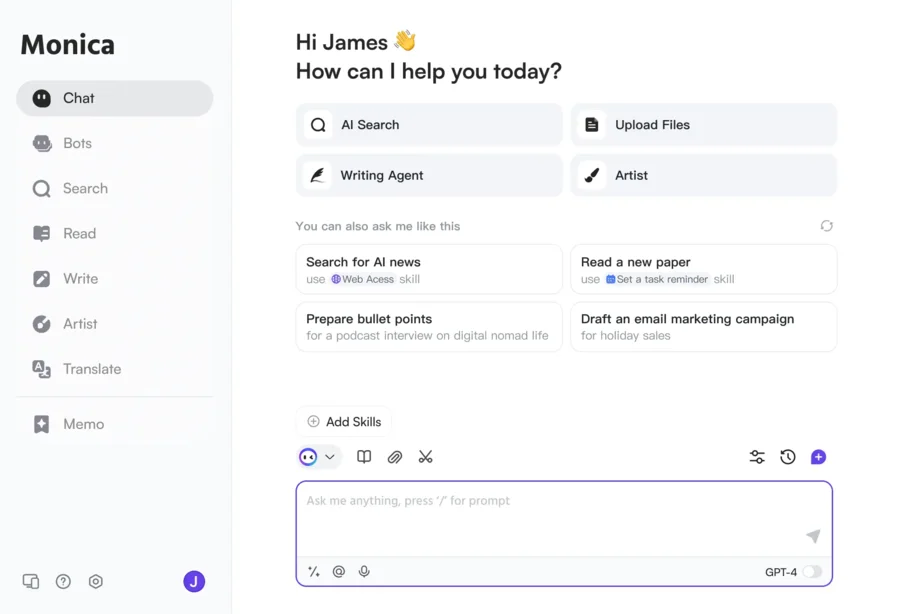
Source: Monica official site (the screenshots below are from the same source)
Switch the latest models, and use tools together
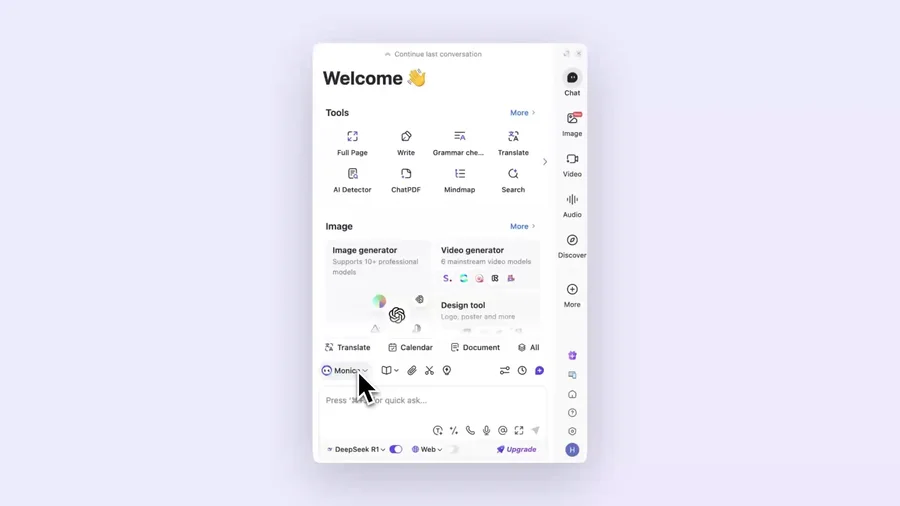
What sets Monica apart from a single-model chat AI is that you can use multiple models and many tools from one entry point. You can switch among the GPT-5 family, the Claude 4 family, and the Gemini 3 family, as well as image/video models like Nano Banana, Sora, and Veo, and coding models, by purpose. Tools like summarize, translate, ChatPDF, mind maps, and image/video generation are laid out in a list so you can call up what you need right away.
The tool set gathers full-page processing, writing, grammar check, translation, AI detection, ChatPDF, mind maps, search, and more. On top of that, an AI agent, Deep Research, slide creation, Image Studio, and coding (Monica Code) are all available from one account.
How to Use
-
Register and log in
Sign up for free with email or a social account on the official site.
-
Choose your environment
Pick from a browser extension (Chrome/Edge), web app, desktop, or mobile.
-
Choose a model and tool
Switch models by purpose and choose tools like chat, search, translation, and image generation.
-
Use advanced features
Deep Research, slide creation, and image/video generation consume "advanced credits."
Features
01Research & read
- Multi-model chat & search — switch models to ask and compare
- Webpage summarize & translate — summarize/translate the page you're on
- ChatPDF & YouTube summary — summarize/translate PDFs and videos
02Create
- Writing assistant — draft, rewrite, grammar check
- Image/video generation (Image Studio) — generate images and video from text
- Slide creation & Monica Code — generate materials; code in VSCode/JetBrains
03Work autonomously
- AI agent & Deep Research — carry out research and tasks automatically
- Browser Operator — operate the browser on your behalf
Pricing
It is free to start, and paid plans are four tiers—Free / Pro / Max / Ultra ("Unlimited" was renamed to Max). Amounts are in USD, and annual billing is cheaper. Advanced features consume "advanced credits."
| Plan | Monthly (annual / monthly) | What's included |
|---|---|---|
| Free | $0 | 40 basic-model queries/day; image/video and agent as trials |
| Pro | $8.3 / $8.6 | 5,000 basic + 200 advanced queries/mo; 1,500 advanced credits |
| Max (formerly Unlimited) | $16.6 / $18.2 | unlimited basic & advanced; 4,500 advanced credits |
| Ultra | $82.9 / $86.3 | unlimited; 20,000 advanced credits; up to 10 devices |
Advanced credits are consumed by Deep Research, slide creation, Image Studio, image/video generation, ChatPDF, and more, and reset monthly. Accounts are for individual use; sharing or multi-user use is not intended (it is sometimes described as "commercial use OK," but there is no explicit commercial-use grant). Pricing may change, so check the [official pricing page](https://monica.im/pricing) for the latest (as of August 2026).
How it differs from other AI assistants
Monica's strength is that it bundles multiple models and tools into one subscription, usable from a browser extension and every device. Its scope and breadth of entry points differ from single-model chat AIs.
| Aspect | Monica | ChatGPT | Poe |
|---|---|---|---|
| Models | Switch among several | Mainly first-party | Switch among several |
| Entry points | Extension, web, app, IDE | Web, app | Web, app |
| Agent | AI agent, research | Yes | Bot-focused |
The first-party-focused ChatGPT, the multi-model Poe, and the all-in-one Genspark AI are comparison points. If you want multiple models and tools in one place and quick use in the browser, Monica is a strong choice.
The information on this page is based on what was publicly available on the official site as of August 2026. Please check the official site for the latest specifications and pricing.